CM12 for Moto E 2015 available for download

Latest version of Cyanogen Mod a k a CM12 is now available for download courtesy of XDA. Of course to flash the cyanogenmod for Moto E 2015, you will need its custom recovery. We recommend TWRP for Moto E 2015 which is more user friendly.

cyanogenmod 12 moto e 2015 download

Here is what is working out of box:

* GPU accelerated graphics
* Camera preview (but not picture taking)
* WiFi
* RIL
* QSEECOM keystore
* GPS
* Accelerometer (and auto-rotation)
* Adaptive brightness
* Audio
* Media codecs
* Camera

The only thing that can give you some problems is wifi which is a bit slow in detecting networks and then connecting to them. You can download it from here. To flash it onto your Moto E 2015, simply put it onto the micro SD card slot or internal storage. Boot into TWRP and flash it from there.

Download Moto E Android 5.1.1 update

A new firmware has emerged on xda developers that allows Motorola Moto R users to download Lollipop android 5.1.1 update on their devices. This ROM is known as Flex OS and it boats amazingly utilities like flex control, animation control and myriad other tweaking apps to help you get the most of your device. Make sure you have Moto E custom recovery pre installed as only then you can install a custom firmware.

Download Moto E Android 5.1.1 update

Here is its feature list:

* FlexControl – All the tweaks and features at one place
* Animation Control – Toast animations, Listview animations and system transitions.
* HeadsUp Customizations just like Cm11
* Slim DSLV
* Navigation Bar Tweaks – On/Off Toggle, Dimensions
* Navigation Buttons Tint
* Slim Advanced IME Features
* Statusbar Network Speed Meter
* Screen Sound Enable/Disable Toggle
* Camera Switch Sound Enable/Disable Toggle
* OmniSwitch – Use omniswitch alongside stock android recent apps or use it as primary.
* Recents FAB Button – Positions (Top left, Top right, Top center, Bottom left, Bottom right, Bottom center)
* LCD Density Adjuster
* Volume Steps
* Hide superuser icon in statusbar
* Double tap to sleep on navigation bar and status bar
* Instant reboot from power menu
* App Circle Sidebar
* Captive Portal – If disabled, a connection to google servers is not required in order to detect data connection.
* CyanogenMod Theme Engine
* Statusbar Clock Customization
* Volume Steps
* Inbuilt File Manager from OmniROM
* Quick pulldown
* More Material
* Battery icon customization

To flash it, first download the ROM and place it in your internal / external SD card. Then boot into recovery and wipe system, cache, data. Make sure you make a backup to avoid hassle. Then flash Flex OS ROM Package and then gapps.

Huawei MediaPad M2 specifications, Powerful and stylish

Huawei MediaPad M2 is the latest masterpiece from Chinese manufacturer and its launch was quite unexpected. It is successor to the MediaPad M1 and will be made available in the month of June of this year at a suggested retail price fixed at 279 euros. Before we reveal Huawei MediaPad M2 specifications, I would like to add that Huawei will also be offering a tablet with built in 4G LTE and this model will cost you 349 euro.

Huawei MediaPad M2 review

Huawei MediaPad M2 specifications detailed

Huawei MediaPad M2 has 8 inch LTPS display with WYXGA resolution (1920 x 1200 pixels). On the communication front, you get LTE cat 4 radio providing download speeds of up to 150 Mbps, dual band wireless LAN, Bluetooth 4.0 and NFC module. Its battery has capacity of 4800 mAh.

Huawei MediaPad M2 reviews

On the rear of Huawei MediaPad M2, you will find an 8 megapixel camera with LED flash and 2MP front camera for taking selfies and doing video calls. It has thickness of about 7.8 millimeters and weighs 310 grams. Chassis is made of aluminum.

Huawei MediaPad M2 review list

It runs Android 5 lollipop with EMUI 3.0 layer on top.

Teclast X70 3G specifications, packs Atom X3-C3130

Teclast X70 3G is one of the first tablets running Android on an Intel Atom X3-C3130 processor. Teclast X70 3G specifications include 7 inch display, 512MB RAM, 4GB storage and dual SIM card slot. Storage is expandable via micro SD card slot. You also get on board 3G for high speed data connectivity and of course 802.11n Wireless LAN.

Teclast X70 3G specifications

Atom X3 C3130

This processor has single core and runs at 1GHz clock speed. It is backed by dual core Mali 400 MP2 graphics. Its other specifications include 2 megapixel main camera and 0.3 MP front camera for doing video calls.

Not so much better than Teclast P70 3G

Last year the Teclast P70 3G was launched and it is surprising to see the company offering the X70 with lower screen resolution than Teclast P70. The tablet will go on sale for just about $ 50 which is about $ 35 less than P70.

Best Smartphones that offer Long Battery Life

One of the biggest concerns today for any smartphone user is the battery life of their phones. Often times, users find that they are running out of battery on their phone, especially in urgent situations. There are a few models in the market that are known for their excellent battery life. Some of the best phone with long lasting battery life are mentioned below:

Gionee Marathon M3

The Marathon M3 is one of the best smartphones that is known for its long battery life. The phone is powered by Android KitKat and features a 5” IPS HD Display Screen. On the hardware front, the phone comes loaded with 1.3 GHz quad-core processor, 1 GB RAM, and 8 GB ROM. The powerful 5000 mAh battery keeps you phone running for 32.8 days on standby mode and it provides up to 32. 46 hours of talk time for 3G users and if you are a 2G user, you can enjoy uninterrupted talk time up to 51 hours. True to its name, the Gionee M3 mobile is built to run a marathon race. If you compare the mobile price list of different phones in the market, the phone price at Rs. 12,000/- is totally worth its price.

Intex Aqua Power HD

Intex phones may not be immensely popular as other brands but if you ask any Intex phone users about the battery life of this model, you would hear only praises and appreciation. The phone boasts of having a 4000 mAh battery that helps you stay connected all day long even with continuous usage. Other specifications that make this model a worthy buy is its 2 GB RAM, Media Tek octa-core chipset processor and 12 GB internal memory. For additional memory there is a slot for microSD card that can be expanded up to 32 GB. With all these awesome specifications and a price of Rs. 9,500/- the Intex Aqua Power HD is totally worth it’s every penny.

Lenovo A5000

This is one of the latest entrants in the smartphone market. The model is the successor of Lenovo A4000 and it comes with an improved hardware specification and better battery life than its predecessor. The phone runs on Android KitKat and sports a 5” HD display screen. The phone is powered by 4000 mAh battery that keeps your phone running for full day and stay connected at all times; on a standby mode, the phone lasts for 792 hours. Under the hood of this amazing smartphone is MediaTek MT6582 1.3 GHz quad-core chip, 8 MP camera with LED flash light and 1 GB RAM. With such incredible battery life and a price of Rs. 10,500/-, the phone surely offers great value for its money.
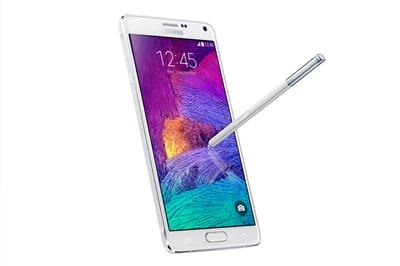
Samsung Galaxy Note 4

Samsung Galaxy Note 4

A smartphone list would seem incomplete without any of the Samsung phones featuring in it. When it comes to phones that offers great battery back, the Samsung Galaxy note series phones are rated among the best. The powerful 3220 mAh battery help you keep your phone running for more than 2 days with normal usage. Other specifications that would surely leave you in awe of this model is its 2.7 GHz quad-core processor, 3 GB RAM, 3.7 MP front camera, 16 MP rear camera and Gorilla Glass 4 that lends added security to your screen. Although the price of this phone is on a higher side, it would cost you Rs. 50,400/- it’s awesome features are sure to provide an amazing user experience.

Note 4 ROM for Note 3 Neo

Note 3 Neo users are very lucky as xda users have developed a ROM that brings almost all features of Galaxy Note 4 to the Note 3 Neo. 

Aroma installer 
Two Boot animations
Two Themes (Note 4 White and S5 Stock)

note 4 neo rom

Download the ROM from here and for better stability flash this kernel too. Features of this ROM are given below.

Fully Deodex + Rooted + busybox
S5 Touchwiz
Air command toggle
Air message
Wallpaper Alpha & Note4 in homescreen and lockscreen
S5 Statusbar
S5 Setting
S5 Lockscreen + 8 Effect
S5 Mini Music
S5 Mini Video
S5 Gallery
S5 Mail
Widget Meteo Galaxy Alpha
S5 Mini Clock
S5 Mini SStudio
S5 message
Playstore v5.0.31
S5 Group Play
S5 Polaris Office
Framework with new animation

Poor battery life in Macbook 12 2015 laptop

So you just bought yourself the mew shiny Apple Macbook 2015 laptop only to find out it has poor battery life. Apple claims that Macbook 12 has all day battery life but we have been receiving reports that it has less than stellar battery runtimes. So how would you improve Macbook 12 battery life the easy way? Here are few things you can do to make a huge difference.

Poor battery life in Macbook 12 2015 laptop

Improving Macbook 2015 battery life

* Use Safari as it is highly optimized to consume as little CPU resources within OS X as possible
* Make sure you install Adblock Plus extension in Safari to remove CPU tasking ads (especially animation and video based ads)
* Another nifty addon to improve Macbook 2015 battery life is to install ClickToFlash extension in Safari to prevent loading of resource hogging Flash animations. It is intelligent enough by not blocking HTML5 video instead.
* You should turn off Transparency. Do this by going into the Settings –> Accessibility –> Displays. I feel it is a needless eye candy.
– turn off the Bluetooth radio if it is not in use. Do this in Settings –> Bluetooth
– Make sure you have a decent WiFi connection. Do option-clicking on the Airport icon and confirm something stronger than -75 RSSI (e.g. -50 to -70).  A weaker wireless LAN network consumes more power.
– If you have a lot of apps installed, install iStat Menus to keep an eye on on which and what apps are eating the CPU resources.
– Once a month, run a maintenance app like Cocktail to optimize your operating system.

So there you go. The Macbook 2015 not only runs Parallels poorly but also has poor battery life. But you can try things