Asus G751JL specifications, comes with GTX 965M

Asus G751JL is the newest 17 inch gaming laptop that features powerful Intel Core i5 4200H or i7 4720HQ processors, up to 32GB of RAM and dedicated Nvidia GeForce GTX 965m with 2 GB of GDDR5 RAM onboard.

asus g751 review

The new model will join rest of the ROG models that include Asus G751JY, G715JT and G751JM. The G751JL has same appearance like those models – wedge shape, taut lines and nerve and brushed metal inserts that give it a futuristic look.

Asus G751M price

It is already on sale in Europe for about 1800 euro. The Asus G751JL measures 416 x 318 x 20/43 mm and weighs 4.3 kg. As expected Asus G751JL specifications are top notch. You get Intel Core i5-4200H or i7-4720HQ 22 nm Haswell processors backed by up to 32 GB of RAM and a dedicated video card which is the mighty Nvidia GeForce GTX 965m with 2 GB of GDDR5 RAM.

For storage you get whopping 1TB 5400 RPM with 8 GB of cache, 1.5 TB 5400 RPM + 128GB SSD or even a 1TB 7200 RPM traditional hard drive combined with a 256 GB solid state drive.

Asus G751M price

Other specifications include DVD super multi optical drive, four USB 3.0 ports, a Thunderbolt, HDMI and VGA video outputs, audio jacks for headphones and microphone, RJ-45 for Ethernet LAN, 2-in-1 card reader,  Gigabit Ethernet LAN, 802.11ac Wi-Fi and Bluetooth 4.0 modules. Battery capacity is 8 cell 6000 mAh.

Ello working on Windows Phone, iPhone and Android app

Ello is an ad-free social networking service that was launched back in March 2014. According to an email sent to windows central, the company is planning to release applications for Windows Phone, iPhone and Android phones. Here is the email they sent,

We are working on Ello mobile apps for iPhones, Androids, AND Window’s Phones! :) We’ll send out a newsletter when each is released so that you know when they are available to use. Once the app is out, Ello should run more smoothly on mobile devices. We believe a social network can be a tool for empowerment. Not a tool to deceive, coerce and manipulate — but a place to connect, create and celebrate life. You are not a product.

Ello working on Windows Phone, iPhone and Android app

Right now Ello is an invitation only service and the company never revealed the number of current users on the site. However the company has generated a whopping 5.5 million dollars in venture capital investment. It has also generated a significant revenue through T-shirt sales.

Note 4 Bloatware free Odex and Xposed ROM (for N910C)

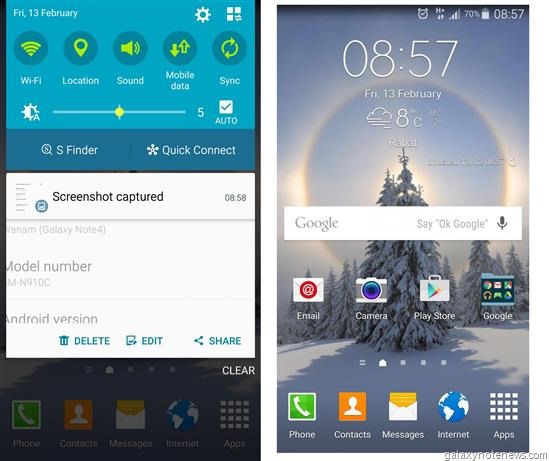
If you use the Samsung Galaxy Note 4 SM-N910C model and are sick of pre installed bloatware, XDA developers has got you covered. There is a new ROM called Wanam Lite that is clean, lean, Odexed and comes with Xposed pre installed. Based on the latest official Lollipop firmware, it makes it use of stock kernel and has large APN list. It also support Samsung Kies desktop syncing software.

Screenshot_2015-02-13-08-59-16

To install, copy the ROM file to Internal SD card; flash it through CWM recovery; reboot and enjoy. You can download the ROM from here.

The developer of this ROM adds that if the S-Health force quits, then clear the Health service data.

Intel Core i7 5650U benchmark

The Core i7 5650U is a very powerful ultra low voltage processor by Intel that was introduced by the chip giant in January 2015. It is slated to be used in the upcoming broadwell Macbook Air and ultrathin ultrabooks as it consumes little power; has high performance output and dissipates little heat which is critical in ultrathin laptops. Interestingly the Core i7 5650U has lower CPU base clock speed than the outgoing Core i7 5600U but faster GPU.

Intel Core i7 5650U benchmark

The Intel Core i7 5650U benchmark indicate that thanks to improved architecture, it is about 10 percent faster than the lower clocked Core i7 4650U which. This means it is powerful enough for working on CPU-hungry applications.

Core i7 4650U benchmark results:
Cinebench R15 (CPU Single 64 bit): 124
Geekbench 3 (32 bit multi core): 5875
3DMark 2013 (fire strike standard physics full HD): 3864
Passmark: 4176

Core i7 5650U also brings improved HD graphics 6000 that offer 48 EUs at 300 MHz – 1000 MHz. It has faster memory speeds up to 1866 LPDDR3, so this makes it more powerful than the Intel HD Graphics 5000 that has 40 EUs. Demanding games should run just fine at medium detail settings.

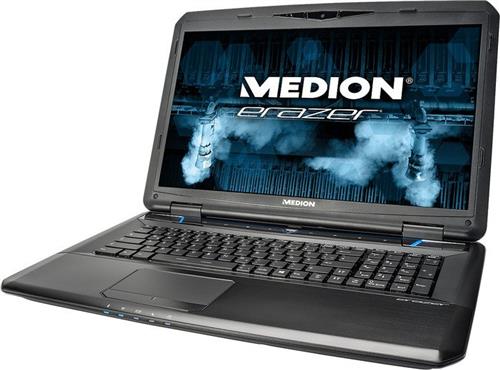
Medion Erazer X7833 gaming laptop specs and review

While most of the laptop manufacture are busily engrossed making ultrathin ultrabooks, Medion, a popular tablet manufacture has released a 6 cm thick Erazer X7833 laptop that weighs under kilograms. The Medion Erazer X7833 is all about strong CPU and GPU performance. The laptop packs Intel Core i7 4710MQ processor , NVIDIA GeForce GTX 970M and 16 GB RAM that enable the gamers to enjoy all PC games released till date at almost highest settings.

Medion Erazer X7833
Continue reading “Medion Erazer X7833 gaming laptop specs and review”

Broadwell powered Macbook Air release date

A Czech website is now reporting that Apple is all set to release the Broadwell powered Macbook Air in February. According to the information released so far, the Apple Macbook Air will soon feature the Intel Core i7 5650U processor with base clock speed of 2.2 GHz or with Core i5 5250U CPU with 1.8G GHz base clock speed.

The fifth generation Intel Core i-series processor are manufactured using 14 nanometer process and thus are more energy efficient and incorporate more powerful integrated graphics unit. This means that Macbook Air will have better battery life and run less hot than before. However do not expect Apple to equip the Macbook Air 2015 to feature a higher resolution display.

Broadwell Macbook Air 2015

Also Apple will be releasing this new model without doing any show or fanfare, so expect a small announcement on their blog about it before the end of February.

Galaxy S5 ROM ported to Samsung Galaxy Mega 6.3

If you want to give your aging Samsung Galaxy Mega 6.3 a fresh make over you might want to install this new Galaxy S5 ROM on it. This will bring all the Samsung Galaxy S5 features on your Mega and the best part is that it works for both GT-i9200 and GT-i9205 which are 3G and LTE variants respectively.

Galaxy S5 ROM ported to Samsung Galaxy Mega 6.3

Samsung Galaxy S5 features ported to Galaxy Mega 6.4 include S5 Launcher work, System UI, Music Player, Calendar & Widget, Video Player, S-Voice, Calculator, File Manager, Album 2014, App Messaging, Voice Recorder, Memo, Task Manager, Samusung Apps, Group Play, Bluetooth, Phone & Contacts, Keyboard, Emergency mode, Radio, Lockscreen w/ all effects, Popping colors, Light, Blind, Stone skipping, Watercolor, Oil, Paint & Ripple Effects, Gallery, Multiwindow, S Finder, Studio, Pop-Up caller, Kids Mode Installer, Vip Mode, Shutdown Menu and Car Mode. Here are the installation instructions:

1: Download ROM (link)
2: Reboot to PhilzTouch Recovery
3: Wipe Factory Reset Phone -> clean to install a New ROM
4: Install Zip -> install from sdcard/sdcard1 -> S5ROMforMEGAi9200_17Jan2014.zip and flash.
5: Reboot to recovery again.
6: Re-root system using Philz touch miscellaneous settings.
7: setup wizard comes up and proceed till you get to the home screen.
8: You will find the navigation bar. Do not disable it in build.prop instead follow step 9.
9: Install Xposd Framework apk (search it and download it from google), open the app, install framework. reboot.
10: Install GravityBox KK apk from the download section of xposd app. Install it. Enable it in modules. Restart
11: go to gravitybox app reduce the size of the navbar to like 0 or 1 .. prefered is 0 using the slider.
12 That will get rid of the navigation bar (this is important for the dialer) and wil stil have the overflow menu enabled everywhere.
13: download AppSettings from xposed app under download section and install it. enable it in the modules section. reboot.
14: open App settings app and look for contacts.
15: change the dpi from 0 to 320 and save (this is important for the phone dialer to become full screen)
16: thats pretty much you have to do. everythin else is present already in the ROM.
17: to explore the various features.. long press the notification toggle icons.. it ll open a new menu which is not present in the settings.
18: using xposd app you can download even floating windows to make windows float like note 4.