LG G Flex TWRP Recovery Download

We have a great news for the LG G Flex owners. TWRP recovery is now available for it – F340K model to be exact. Everything works on it. To flash it, first get the img file from here.

LG G Flex TWRP Recovery Download

Then, download Flashify and boot into recovery. For that, power off the device and use Volume up + power button simultaneously. You will get a scrolling effect and then you will enter recovery. Everything should work like a charm.

For those who do not know about TWRP, it is basically a touch optimized version of CWM (clock work mod).

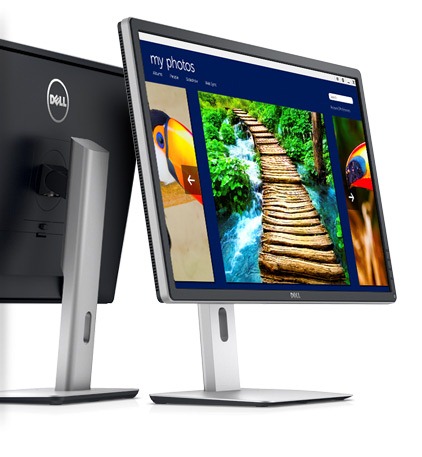
Dell P2815Q Cheapest 4K Monitor Specs Price

Dell has introduced a 28 inch 4K monitor for just USD 699. Called the P2815Q, it is the cheapest 4K monitor till date.

Dell P2815Q Cheapest 4K Monitor Specs Price

So, why is the price of Dell P2815Q so low? The reason is it uses TN display which does not gives you viewing angles as, let us say, an IPS screen. Another thing to note – the screen refresh rate is 30 Hz at its native resolution. To get 60 Hz, you must use 1920×1080.

4K means it has 3840 x 2160 pixels, which will give you an amazing workspace to work on. The screen of P2815Q can be twisted 90 degrees, so that one can use it both landscape or portrait mode. Dell offers some other Ultra HD monitors that includes 32 and 28 inch models (that retail for USD 3500 and 1300 respectively).

The Dell P2815Q will available for purchase on January 23 2014.

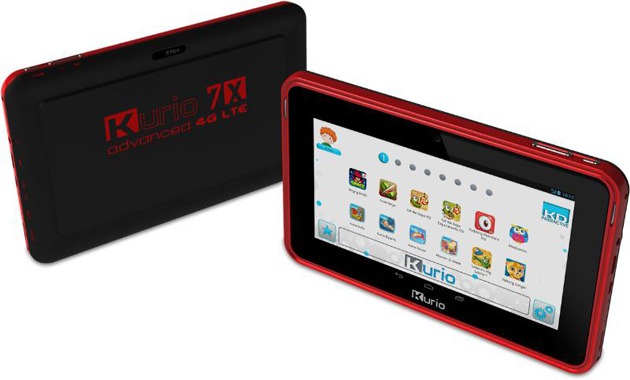
Kurio 7x 4G LTE tablet Specs Price

Kurio has launched 4G tablet called 7x and a smartphone for kids. The phone is pretty basic, and is designed for both kids and parents who want to monitor and control activities of their kids.

Kurio 7x 4G LTE tablet Specs Price

Kurio 7x 4G LTE tablet Specs include Android 4.2 operating system, 8 user profiles, 8 inch display, WVGA resolution, 1 GB of RAM, 4 GB of flash storage and support for the LTE – only Verizon network is supported though.

The tablet comes with a protective bumper case as well. Kurio has installed a software that lets parents manage contact list and ability to manage calls  and messages. Parents can also view message and call logs.

Pricing information is not available but we will know that when the company will launch it this summer.

Download AOKP KitKat Nexus 5 ROM

Nexus 5 is an amazing phone, and you get regular updates on it, but you can have so much more fun with it. For instance, you can download and install the latest AOKP KitKat ROM on it. Installation is straight forward and simple.

Download AOKP KitKat Nexus 5 ROM

1. If coming from another ROM or another major AOKP version, wipe data in recovery
2. Make sure you’re using the latest CWM or TWRP (recommended).
3. Download the ROM from here and flash ROM by placing it in root folder and then going into recovery.
4. Flash Google Apps (GAPPS). Download it from here and flash it in recovery. 
5. Reboot

That is it. You can successfully downloaded and install AOKP on your Nexus 5 Android phone.

Download TWRP For Nexus 5

TWRP touch recovery is available for download for the Nexus 5 phone. TWRP provides same functionality as CWM, but lets user interact with the phone using touchscreen (no more volume rocker or power buttons to press).

Download TWRP For Nexus 5

To download TWRP to your Nexus 5, follow these steps.

1) Install GooManager from the Play Store
2) Open GooManager and provide root permissions
3) Hit Menu (or the button with the 3 dots on your screen) and then Install OpenRecovery

AORUS X7 with GTX 765M SLI GPU

Meet AORUS X7, gaming laptop that is mere 22.9 mm thick and packs Nvidia GTX 765M SLI GPU. It is launched at the CES 2014 tech event.
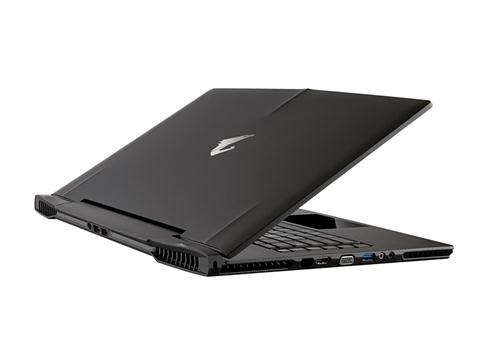
AORUS X7 specs

It is very ultrabook-ish, but quite heavy to be called an ultrabook. However, at 2.9 kilograms, it is certainly the lightest gaming notebook out there.

AORUS X7 manages heat by making use of its full aluminum housing and its strong internal fans.

AORUS X7 price

The laptop scored a 3Dmark 11 score of 7393. It can be equipped with up to 1 TB hard disk or up to 2 TB of mSATA SSD. There are four RAM slots and the machine supports up to 32 GB of DDR3L SDRAM.

Since AORUS X7 is a gaming laptop, you get backlight keyboard, programmable macro keys and even windows key disable function. It also has 2x built in subwoofers.

AORUS X7 specs include 500GB ~ ​​1TB HDD, GeForce GTX 765M × 2, Intel Core i7-4700HQ (2.4GHz) processor, 8GB memory, Intel HM87 Express chipset, Windows 7 Home Premium / Professional or Windows 8.1/8.1 Pro operating system.

AORUS X7 review

Coming to the interface, you get 2x HDMI output, USB 3.0 × 3, USB 2.0 ×, mini D-Sub 15 pin, Gigabit Ethernet, IEEE 802.11a/b/g/n/ac enabled wireless LAN, Bluetooth 4.0, 1.3 megapixel Web camera, Mini Display Port, SD card reader, audio input and output. Battery capacity is 73.26 Wh. It measures 392 × 263 × 22.9mm (height width × depth).


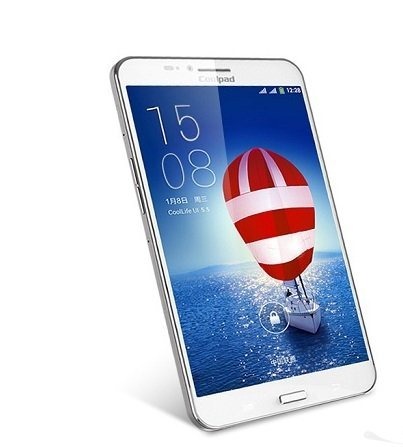
Coolpad 9976A Specs Price

Coolpad did a press conference today and launched a new tablet called 9976A. Its specs include Mediatek octa core processor, dual SIM slots and 13 megapixel camera. Price is estimated a 1888 Yuan, which is around USD 312.

Coolpad-9976A1

The Coolpad 9976A runs Android 4.2 jelly bean operating system and has a custom UI which the company calls CoolLife 5.0. The display is full 7 inches and packs full HD resolution (1920×1080). Its octa core Mediatek MT6592 processor runs at 1.7 GHz clock speed, which is backed by quad core Mali 450 MP4 GPU (clocked at 700 MHz) and 2 gigabytes of RAM.

For storage, you get 8 GB flash storage, but you can expand Coolpad 9976A’s storage by its micro SD card slot.

Other Coolpad 9976A specs include 13 megapixel rear camera, 802.11n Wi-Fi, 5 MP webcam (front), GSM + WCDMA radio, NFC technology, USB port and even HDMI port.

Despite packing all that, Coolpad 9976A manages to stay pretty slim as it is mere 7.6 mm thick. Battery life should last you a day easily, thanks to its 4000 mAh capacity.