Which is best antivirus software for Samsung phones?

Google Android is an open source operating system. Being overly open, it is at risk of getting infected from malware and harmful applications. That is you need decent antivirus software on your Samsung phone. There are many free and paid antivirus applications available for them. While the idea of installing antivirus software might seem like an overkill, it is extremely important to protect yourself from dangerous malware. We put many antivirus applications to paces and found AVG antivirus best in terms of performance and features.
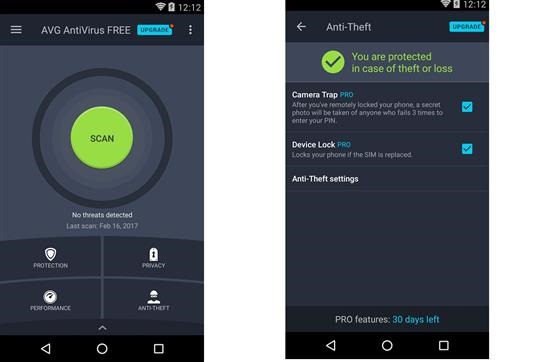
avg antivirus

Compatible with both Samsung and other android phones, the AVG antivirus is the number 1 free antivirus for android mobile. It scans applications and games in real time without having any effect on the overall performance. This means that your phone would not bog down with the AVG antivirus application running in the background. It even kills the tasks that it feel would slow down your phone. So, the device keeps running fast at all times.

Samsung Galaxy Note phones are notorious for slowing down after sometime. AVG keeps the entire system and memory optimized to prevent any such slowdowns.

The AVG anti virus app for android makes sure that there are no unsecure settings on your Samsung Galaxy Note. If it founds any, it alerts you and guides you on how to fix them. At the same time, it protects your phone getting infected from malicious applications, malware and spyware.
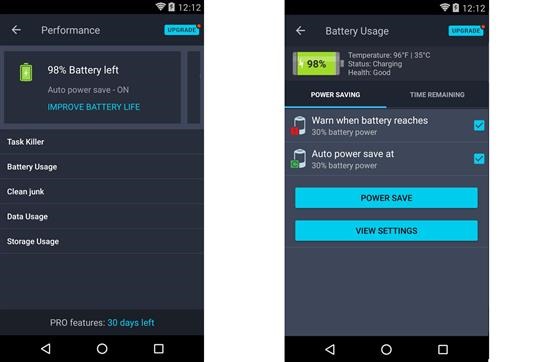
avg antivirus android phone

Some other nifty features include encrypted Vault and Wi-Fi feature. In Vault, you can store your most private photos in a way that they are not seen by the smartphone’s Gallery or Photos applications. This way, a stranger or friend cannot gain access to the private photos. The vault is protected by password which is only known by you.
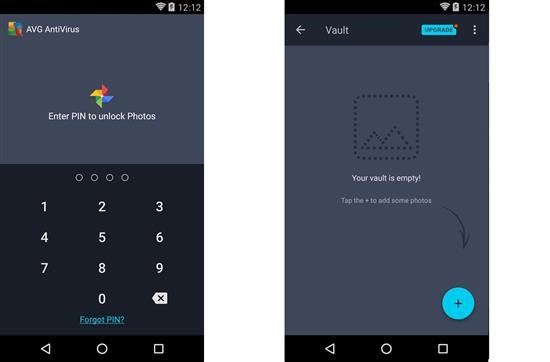
avg antivirus android 

Wi-Fi feature lets you scan the 802.11g/b/n wireless networks around you and gives alerts if there are encryption issues. This way, you only connect to the most secure network. It also sends out alerts to its users when it feels that weak passwords are being used.

Verdict – AVG Antivirus for android phones and tablets is a must have application. Android platform is brimming with malware and such application tightens the security and guards it against malicious apps, viruses, malware and spyware.

AICP ROM for the N7100 Galaxy Note 2

If you heart vanilla software, then you will love the AICP ROM for the Samsung Galaxy Note 2 N7100. It is based on lollipop firmware which was actually never released for this Samsung Galaxy Note. Samsung halted all development after releasing official android 4.4.2 for N7100. The developer ported it from another device and made it work with the Note 2 drivers. To flash this AICP ROM, you will need Note 2 TWRP custom recovery and it is also strongly recommended that you fully wipe your device before doing a flash and avoid restoring system applications and data with something like Titanium backup for android phones as that can work against stability for your phone.

AICP ROM for the N7100 Galaxy Note 2

Here are the flashing instructions for AICP ROM for the N7100. First download the ROM from here and put it in microSD. Then boot into N7100’s custom recovery and flash the firmware from there. Gapps are absent and must be installed before boot. So flash them after installing ROM.

For flashing the ROM, both TWRP and CWM work. Developer says that until android lollipop, he used to make ROMs that were AOKP but were later changed since folks at AOKP halted all development. He says that if the developers behind make a comeback, he will get back to AOKP but for now, the base has been changed to cyanogenmod.

Download Android 7 AOSP ROM for Galaxy Note 2 N7100

We have been informed about the Android 7 Nougat ROM for the Samsung Galaxy Note 2 N7100 android phone. This ROM is based on AOSP which means there is no Samsung TouchWiz user interface. This is great for those who are looking for vanilla experience on their android phone. Substratum is fully compatible.

Download Android 7 AOSP ROM for Galaxy Note 2 N7100

Keep in mind that the first boot will take some time and it might even loop for few times. Just make sure not to use any custom kernel with this Android 7 Nougat ROM.

Keep in mind that there is no default music player onboard so use something like blackplayer, folder player or musixmatch.

Instructions for flashing:
– Download ROM and GApps.
– Copy ROM and GApps to internal storage.
– Wipe /data, /system and /cache.
– Flash ROM and GApps (And any mods you use)
– Enjoy :P

Instructions for update:
Download ROM and GApps.
– Copy ROM and GApps to internal storage.
– Flash ROM and GApps

Everything is working out of box and there are no known bugs. This makes this Android 7 Nougat ROM excellent for everyday use. This is the best Nougat ROM.

Feature list.

Based On AOSP 7.1.1_r25:
Blur customizations
LED customizations
Substratum theme engine (OMS7)
Latest OMS Rootless Support with Float UI/Theme Interfacer

Navigation bar:
Dynamic navbar color
Smartbar customizations
Fling & Pulse

Hardware keys:
Volume keys control media volume
Volume button wake
Music control
Volume button swap
Volume key cursor control
Power + volume up behavoir
Volume down for do not disturb
Volume up in do not disturb
Do not disturb switch
Navigation key customizations
Disable navigation buttons

Lockscreen:
Center screen Shortcuts
Longpress shortcuts
Lockscreen swipe shortcuts
Lockscreen weather
Double-tap to sleep
Lockscreen torch
Lockscreen charging info
Lockscreen Music Visualiser

Notification drawer:
Quick pulldown
Smart pulldown
Force expanded notifications
Disable brightness slider
Disable quick settings when locked
QS tile titles
Small QS Tiles Scrolling
Advanced QS Easy Toggle
QS tile row/column count
Custom header image

Status bar:
Battery styles
Custom carrier label
Clock settings
Ticker
Network traffic
Status bar icons
Double-tap to sleep
Slide brightness control
Notification count
Bluetooth battery status

Recents:
Hidden apps
Memory bar
Immersive Recents
Clear all button
Omniswitch

It is nice to see the old N7100 still being supported by XDA community.

Download Wileyfox Swift 2 Debloater to clean up android phone

Folks at Wileyfox have started rolling out android 7 to their Swift 2 users and there is a lot of bloatware onboard. This is why some people are looking for some easy way to get rid of bloatware on their phone. Some of the annoying ones including ads in launcher and forcing users to use Truedialer to dial numbers which also has ads inside. There is a nice AOSP dialer there so why use truedialer?

Download Wileyfox Swift 2 Debloater

Before proceeding, keep in mind that by install the debloater for Wileyfox Swift 2, you will not able to get new OTA so no more new software builds for your android phone. Second, you will have to disable DM-VERITY otherwise you won’t be able to boot. For that just install magisk. Make sure you are running latest android Wileyfox swift 2 image which is android 7 nougat.

Then unlock the bootloader and install Wileyfox swift 2 TWRP custom recovery. Download debloater’s zip file from here and put it somewhere on your phone. Choose Install and locate and flash the ZIP. Reboot and enjoy.

If you are missing missed call notifications, go into Settings > Apps, then hit the gear in the top right corner and make sure you’ve a config similar to one shown in image below.

Download Wileyfox Swift 2 Debloater

Removed application list includes , AndroidPay , BasicDreams , BookmarkProvider , Google Books , Chrome , CMFileManager , Drive , Duo , Gmail , GooglePrintRecommendationService , GoogleTTS , Hangouts , Keep , Maps , Google Music , News and Weather , PhotoTable , talkback , Google Videos WFChromeCustomization , Youtube , Contacts , FoxHole , Mms , SnapdragonGallery , TrueCaller , All bundled-apps from /system/vendor/bundled-app.

App additions include Google Contacts, in replacement of the half-dummy, prebundled Contacts app (which was missing link with the Dialer). , Google Dialer, in replacement of TrueCaller. , Google Messages, in replacement of Wileyfox Mms app. , AOSP’s Launcher3, in replacement of FoxHole (Wileyfox’s Launcher).

Download lineage OS for Wileyfox Swift 2

Developer behind lineage OS has released a testing ROM for the Wileyfox Swift 2. And since it is in heavy development state, make sure to backup entire device. The ROM brings numerous enhancements and improvements over the stock Wileyfox Swift 2 android phone https://apothetech.com/download-wileyfox-swift-2-recovery-image-and-fastboot-image/ .

Download lineage OS for Wileyfox Swift 2

Lineage OS for Wileyfox Swift 2 is based on AOSP project so you get vanilla android experience and you phone feels very fast. It does not even come with google services installed but you can install them yourself of course. I will be doing that too since I am too much into google services network.

Here is what is working.

Sound (Speakers and headphones), Camera, Mobile Network, Wi-Fi, Bluetooth, 2 SIM cards, Memory card, Dialer, Sensors, Indicator (50/50)

Here is what is not working.

Fingerprint scanner (50/50), GPS, NFC

Installation instructions:

* Download the zip – find it in the development link given at the bottom of this article
* Install a compatible Recovery (TWRP recovery recommended)
* Perform a nandroid backup of your current ROM (Optional)
* Wipe data/factory reset and Flash LineageOS
* Optional: Install the Google Apps addon http://opengapps.org/
* Reboot

Bloatware Free Stock ROM for Galaxy J5 2016

There is an amazing light stock ROM that is bloatware free for the Samsung Galaxy J5 2016. To flash this stock ROM, you will need to be stock Android marshmallow firmware. So if you are not, you will to be on official firmware and you can do so by downloading and flashing it using Odin.

Bloatware Free Stock ROM for Galaxy J5 2016

You will also need to download J5 2016 TWRP and flash it as that is how you can flash third party, custom ROMs. Here are the features of the Bloatware Free Stock ROM for Galaxy J5 2016.

PreRooted, Deodexed , Zipaligned, Debloated (Some bloatware removed), DeKnoxed, Added init.d support, S7 nougat Browser, S7 Music Player, S7 File manager, S7 Quick connect , 3G tweaks, Wireless tweaks, Netspeed tweaks, Google DNS tweaks, Note 7 System sounds, Note 7 ringtones and notifications, Su.d support, Insecure boot, Battery tweaks, Performance tweaks and VoLTE

Installation instructions for Bloatware Free Stock ROM for Galaxy J5 2016

1) Download the ROM from here. Boot into J5 2016’s TWRP recovery using Volume UP button + Home button + Power button simultaneously for upto 10 seconds.
2) Wipe your Data, Cache and Dalvik cache first before proceeding.. It may cause a bootloop if you don’t.
3) Click on install from main menu and locate the downloaded ROM.
4) Select the ROM, flash and reboot.
5) First boot time may vary from 5-20 minutes to load. So please be patient.
6) If the keyboard doesn’t show any word suggestions then please use another keyboard like the latest Sony Xperia keyboard from here. Its good looking as well as better than Samsung’s keyboard

The ROM is tested to work with SM-J510FN : J510FNXXU2APK6 variant of J5 2016 so flash it only on this model.

Fix Galaxy J5 2016 WiFi Battery Drain with this method

Are you a user of J510N, J510FN or J510GN Samsung Galaxy J5 2016 model and have noticed the battery drain by Wi-Fi? There is a way on how to fix this. All you have to do is by flashing this stock kernel that has Wi-Fi fix.

Fix Galaxy J5 2016 WiFi Battery Drain

This fix is said to be working with these ROMs – RetRom Spring Final, Light TM Final, Hybrid Note 7 Rom , Light Stock J5 2016 ROM V3 and Pixel & Cyanogen Skins.

To flash this kernel, you will have to have Galaxy J5 2016 TWRP custom recovery installed. Then, fire up ODIN and connect your J5 2016 in download mode. Put the kernel in AP in ODIN and flash it. It will only take few moments to flash it.

The phone will now reboot with the Wi-Fi fix installed. J510HXXU2AQA3, J510FNXXU2AQA7and J510FNXXU2APL4 are supported kernels.

Of keep in mind that while by installing this custom kernel, your wifi drain problem with the Samsung galaxy j5 2016 android phone will be solved, you will loose warranty. So think twice about it. A lot of people already have their phone out of warranty so it makes sense to install things like TWRP and this kernel to get Wi-Fi fix working.

Download Wileyfox Swift 2 Recovery Image and Fastboot Image

Recover images of Wileyfox Swift 2 android phone are now available for download. This will help you get your phone to factory state if something goes wrong with it. We have also got hold of the fastboot image that requires open bootloader.

Wileyfox Swift 2 Recovery Image

The recovery Wileyfox Swift 2 recovery image works nicely in Wileyfox Swift 2’s TWRP custom recovery and does not requires open bootloader like in case of fastboot image.

These are the images of the latest TOS118C firmware which is the latest one at the time of this post. This is also useful for those Wileyfox Swift 2 users who have not received the update and want the latest firmware on their phone.

Download Wileyfox Swift 2 Recovery Image

In case you are on old ROM and just want the incremental update, there is an option for that as well. It will upgrade you from TOS089A to TOS118C which means from decf3a575d to aa4d5d86bc.

This upgrade is also useful for those users who have rooted Wileyfox Swift 2 and want to upgrade to the latest version without removing root or relocking the bootloader. So you will not have to wipe your android phone.

Here are the download links:

Set it to WILEYFOX   rsotaua 1.0   Chrome    Replace    WF and only then the download link will work.

Acer Revo Cube RN76 powered by Intel kabylake processors launched for 599 dollars

Acer Revo Cube RN76 review

Acer Revo Cube RN76 is the latest mini PC to hit the market. This is the third generation of Acer Revo mini PCs which is doing quite well in US and other markets. At first glance, the Acer Revo Cube looks remarkably similar to the Intel NUC mini PC which is not a bad thing at all.

Acer Revo Cube RN76 specifications include Intel Core i3 / i5 / i7 (Kaby Lake) processor, Intel HD Graphics 510 or 520 graphics depending on the chip, up to 32GB of DDR4-2133 RAM and up to 256GB SSD M.2 storage and with up to 2TB hard drive (or SSD. Also onboard is a WiFi 802.11ac radio, three USB 3.0 ports, one USB Type-C, a RJ45 Gigabit Ethernet, HDMI and typical audio jacks. Tis mini PC runs on Windows 10 operating system.

This Acer Revo Cube was released at a global conference in New York. It is also said to have some form of Qi wireless charging so there is battery inside and it can operate for sometime without AC power. It would also be able to power your smartphone and other devices since it boats power USB ports.

We love everything about it. It is quite similar to the Acer Aspire GX-281 but lacks a dedicated graphics card. This would made it ideal for basic gaming and CAD related tasks. That being said, Acer Revo Cube is good enough for your daily computing tasks and drive a mini projector or desktop monitor with ease, which is done by, like 95 percent of the users.

Acer Revo Cube (RN76) will be available on the market in August at a starting price of $ 599 and we will have more information on this model later this month during Computex 2017.