HP Elite X3 Release Date

HP Elite X3 Release Date

Microsoft recently announced its withdrawal from the consumer business known you want to focus exclusively on business customers. That does not mean that you completely withdraws from the smart phone business, but its range of Windows Mobile devices 10 is thus certainly not more. Fans now have to look elsewhere. And here, the HP Elite X3 is the very great hope, the HP smartphone actually has everything wants the Windows Phone users, especially an ultra-stylish design and plenty of power. This was unveiled officially at the Mobile World Congress in 2016 , but to buy it is still not.

This is partly because the device at the time of the MWC is not simply finished or is. But it is, as we saw evidence at Computex. Because there was the precious smartphone appear on the Microsoft booth, HP was in the Elite X3 but continued to work, it is compared with the device originally shown in Barcelona a refined and functionally advanced model.

Fingerprint Sensor – Thus, HP has now incorporated the fingerprint sensor or integrated on the back. Whether and how well this works, we can not say, however, as we were unfortunately unable to put itself to the device our prying fingers. Another difference is also found on the rear side, namely the now somewhat more matt surface. In the first-mentioned Microsoft decision with respect to the smart phone business we wrote that, they need to look elsewhere and this is fortunately also for private clients. Because initially wanted to HP with the HP Elite X3 only on the business market, now it is said that it will offer the device for home users.
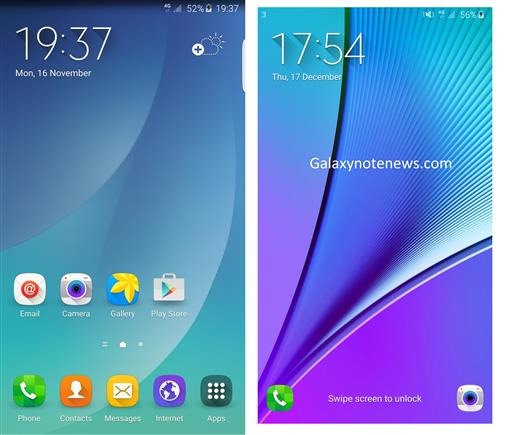
Note 5 ROM for Samsung Galaxy Note 4

Samsung Galaxy Note 5 is an amazing android phone but most of the Note 4 users might stick onto their devices for couple of more years before they upgrade. But at the same time, you would not want to miss features that Note 5 folks are enjoying on their devices and to counter that problem, xda developers has ported Note 5 ROM for Samsung Galaxy Note 4. This is made for the N910F model of Note 4 snapdragon variant but you can use it on N910G, N910W8, N910T and N910T3 if you flash their bootloader and modem. . There are two version of the ported Note 5 ROM for Note 4: light and heavy. Light one is debloated. Here are the installation instructions:

download Note 5 ROM for Samsung Galaxy Note 4

* Make sure your bootloader and modem match the ROM base (N910F). So we suggest updating the bootloader and modem. For other snapdragon variant download them from here.

* You must also have a Note 4 custom recovery (TWRP is advised).
* Download the ROM (Light or Heavy)
* Download any bloat-ware you require
* Make a back-up (nandroid)
* Perform a factory reset
* Flash the ROM.zip then the bloatware.zip
* Reboot, this can take a while after a clean install.

Download Android 6 un official ROM for Galaxy Note 4

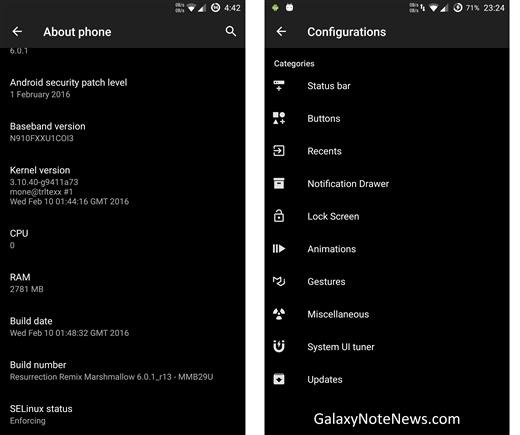
Folks at XDA have released android 6 un official ROM for the Samsung Galaxy Note 4 snapdragon aka US variant and it is called the resurrection remix offering amazing combination of performance, customization, power and new features. The features of this android 6 firmware for Note 4 include:

Download Android 6 galaxy note 4

* Navigation Bar
* Enable/Disable Navbar
* Navbar Ring Switch
* Navbar Ring Targets
* Navbar Button Customization
* Navbar Dimensions(Portrait & Landscape)

* Status bar
* Brightness Slider
* Enable/Disable Show Notification Count
* Super User Indicator Switch
* Carrier Label   
* Carrier Label Switch
* Carrier label Color
* Quick Pull-down Switch
* Smart Pull down Switch
* Clock Customizations
* Time & date
* Clock Color
* Day & date Toggle
* Center Clock/Right Clock Choice
* Battery
* Battery Bar customization
* Battery Icon Customization(circle/landscape/Portrait and more)
* Battery % Text
* Network Traffic Indicator

* Theme Chooser
* RR exclusive PITCH BLACK THEME
* Animations
* Toast Animations
* List View Animations
* System Animations

* Gestures
* Gestures Anywhere Feature

* App Circle Bar
* Choose apps in App circle
* Trigger Width
* Trigger Height
* Trigger Position

* Recent Panel
* Clear All button Switch
* Clear All Tasks Switch
* Clear All Button Location(Top right,Top Left,Top Center,Bottom Left,Bottom Right,Bottom Center)

* Clock Widget
* Clock And Alarm Customizations
* Weather Panel Customizations
* Calendar Events

* Lock Screen
* Lock screen Shortcuts
* Choose up to 5 Shortcuts
* 100+ Icons for Shortcuts

* Quick Slider Shortcuts

* Notification Drawer
* Weather Display Switch
* Quick Settings
* Choice to Add 20+ Tiles
* Enable 2/3/4 Tiles per Row
* Enable Disable Brightness Slider in Notification Panel
* Advanced Location Settings Switch(Choose Battery saving/Device Only/High Accuracy Directly in Notification Panel)
* Long Press Toggles to Enter Settings

* Buttons
* Backlight Timer
* Backlight Strength
* Navigation Bar left/Right handed mode Switch
* Power Menu
* Power Menu End Calls Switch

* Home Button(For devices with HW keys Only)
* Home Button Wake Up
* Home Button answer call
* Long Press Actions
* Double Tap Actions

* Back Button(For devices with HW keys Only)
* Wake Up device Switch

* Menu Button(For devices with HW keys Only)
* Wake Up Device Switch
* Short Press Actions
* Long Press Actions

* Search Button(For devices with HW keys Only)
* Wake Up Device
* Short Press Action
* Long Press Action

* Volume Buttons
* Wake Up Device
* Playback Control
* Keyboard Cursor Control
* Swap Buttons on Landscape mode

* Performance Profiles
* LCD Density
* Expanded Desktop Mode
* All New CM Audio FX App
* Heads Up Customizations
* Overall Smoothness Improvements
* Quick Unlock
* Optimizations to Improve Battery
* All cm12 Features

And here is how you can install it on Snapdragon Galaxy Note 4:

* Download the latest build from here
* Download Gapps from hre
* Take a nandroid backup
* Recommended – Full wipe and factory reset
* Flash ROM using latest Note 5 twrp recovery
* Flash Gapps
* Reboot
* Enjoy.

Root LG G5 Tmobile H830 with tot file

We finally have a method of rooting the T-Mobile variant of LG G5 with TOT file. By rooting the LG G5 Tmobile, you will be able to install apps that require super user permission. This will also open doors to all sorts of hacks and messing around with file system and so on. Here are the instructions on how to Root LG G5 Tmobile H830 with tot file.

Root LG G5 Tmobile H830

1. Install LGUP + DLL H830. Enable USB debugging + check OEM unlock> adb reboot bootloader > fastboot oem unlock.
2. Put phone download mode ( turn off phone > hold volume up button and connect cable)
3. Open LGUP > Choose UPGRADE > choose file tot extract h830 > Start
4. Fire up LG G5 in twrp recovery mode > flash super su + dm-verify> reboot > Done

– File TOT full add twrp H830: Download
– File TOT stock full h830: https://docs.google.com/uc?id=0Bw8q3…xport=download

If you get into bootloop after flashing in twrp, use these commands in ADB to fix everything.

adb shell
su
dd if=/dev/zero of=/dev/block/platform/624000.ufshc/by-name/misc
dd if=/dev/zero of=/dev/block/platform/624000.ufshc/by-name/fota
reboot

ASRock Desk Mini review: Compact PC for expansion according to personal needs

ASRock Desk Mini reviewed by mytechpartner team. At Computex, we have taken the opportunity to bring even the “Desk Mini 110” from ASRock for you before the camera. It is a very compact machine in which her ​​most important components have yet to buy according to your own needs and have to install. The motherboard is for easily extract from the casing in the ground state and offers space for a variety of components. It is equipped with a H110 chipset from Intel, which you can populate with a Skylake Intel processor of your choice. The chip, however, should have a maximum of 65 Watt TDP.

ASRock Desk Mini review

Of course, the chipset supports DDR4 format for the main memory. The available slots for enough to put up to 32 gigabytes of RAM in the small case. Furthermore, can be found on the board two SATA3 ports and two M.2 slots that can be equipped with the respective storage media.

When using SSDs limits are hardly set and use of high-end models, it brings the system entirely on data throughputs gigabytes per-second range.

ASRock-DeskMini-1024x512

By nature, the system also brings a number of terminals. So the user can choose when connecting a display, for example, between HDMI, Display Port and VGA. Here one must, however, be limited to the integrated graphics units of CPUs, there simply is no space for an additional graphics card is present.

Furthermore, USB ports of versions 2.0, 3.0 and 3.1 are available as well as jacks for audio signals. ASRock provides to the system already has a default cooler, which should be enough for these CPUs. The housing itself is in any case already designed deliberately for the strongest possible ventilation.

If necessary, the entire system can also be ordered with alternative chipsets. In the standard version of the product will cost around 135 euros, the cost of the processor and memory did we mention it.   

How to install Windows 10 Mobile on Nokia Lumia 530

The Nokia Lumia 530 did not get the official windows 10 mobile and even barred from getting the technical preview version of the windows 10 mobile. Fortunately, there is a way to hack it and it comes from the folks at XDA. Previously, the Nokia Lumia 530 users were able to use the vcRed and Extra&Info hack to get windows 10 mobile on their smartphones but once that stopped working, the Nokia Lumia 530 users were left alone in the dark. Nevertheless, xda developers have found this trick to install Windows 10 Mobile on Nokia Lumia 530.

install Windows 10 Mobile on Nokia Lumia 530

1. Free up some space – The “100-year trick”
* You will need a large Micro SD card – at least 4GB.
* The updates downloaded alone require around 900MB of space. After it’s finished, Windows 10 Mobile build 10586.164 takes 2.46GB on my Lumia 530. We’re going to need more space.
* Hard reset your phone
* When it comes back up, disable time synchronization, and set the date to 100 years in the future (e.g. 01/01/2155).
* Open the Settings App, and try to open all the various tabs. Many of them will tell you there’s a problem, and allow you to uninstall it.
* Uninstall any other apps from the All apps screen.
* You should have around 1.4GB free space now.

2. Developer Unlock your Lumia 530
* Install the Windows Phone 8.1 SDK https://go.microsoft.com/fwlink/p/?LinkId=534599
* If you haven’t already, you’ll need to register as a developer. https://developer.microsoft.com/en-us/windows
* Search for Windows Phone Developer Registration Tool 8.1 on your computer, and follow the steps to Developer unlock your Lumia 530 (your screen must be unlocked during this procedure. 
* Go to the app store, and install the Windows Insider and Preview for Developers app.
* Open up Storage Sense, and move Preview for Developers to the SD card.
* Make sure Windows Insider remains on your Phone storage; and the default App location is your Phone.

3. Interop Unlock your Lumia 530
* Grab and deploy CustomWPSystem_0500.xap and WPSystem_Folder_Unlocker_Release_ARM.xap to your phone (using the Windows Phone Application Deployment 8.1 program from the SDK -> C:\Program Files (x86)\ Microsoft SDKs\ Windows Phone\ v8.1\ Tools\ AppDeploy\ AppDeploy.exe)
* Copy CustomPFD_0003.xap to the SD Card
* Open up WPSystem_Folder_Unlocker on your phone, and tap “Unlock WPSystem Folder (sdcard)”. It should say “Success!”
* Open up CustomWPSystem on your phone.
* Tap the red bar “SD Card permissions”, then browse to your SD Card and tap Apply (the tick).
* Scroll to the bottom, and tap “Select the XAP”.
* Pick the CustomPFD_0003.xap file you copied to the SD card.
* Tap Apply Xap. Browse to Preview for Developers in the All Apps list. The icon should have changed.

4. Change your Device Identifiers

* Here’s the real reason this works: We’re going to pretend our humble Lumia 530 is actually a Lumia 535.
* Open the Preview for Developers app
* Browse to HKLM/SYSTEM/Platform/DeviceTargetingInfo and change the following keys:
PhoneManufacturer: MicrosoftMDG
PhoneManufacturerModelName: RM-1089_1048
PhoneModelName: Lumia 535
PhoneMobileOperatorName: 000-IT
5. Force updates to download to the SD Card – the “1GB File trick”

Windows update have always preferred to download updates to the local phone storage as it is faster than the SD card but since there is inadequate space on the Nokia Lumia 530, it will download the update files to the SD card. For that, on your PC, open up a Command Prompt as Administrator. Create a 1GB file (copy and paste following line in Command Prompt):
fsutil file createnew C:\1gb.tmp 1000000000

Copy the file to your Phone storage. Join the Insiders Program if you haven’t already, and select Slow Ring or Release Preview. Check for phone updates. Soon after the updates begin downloading (say 5% to be sure), you must delete the 1GB temp file. While this file forced Windows Update to download to the SD card, we still need all that space we cleared earlier for the updates to actually install. Now allow your phone to reboot when prompted.

Astrobotic MoonMail review: US start-up wants to bring private packages to the moon

New Extraterrestrial business idea: A US-based company wants to lure customers by offering to deliver small packages to the moon. The end of 2017 to the first delivery of private programs held for the Earth’s satellite and make the remembrance contained thus “immortal”.

Currently experiencing the private space in the US a real wedding. Besides the well known industry representatives SpaceX, which it has been possible to land a rocket on land and on a drone ship in the ocean, but still want to earn other companies in this boom. US start-up Astrobotic hopes to cash with the idea of moon post, in order to finance the actual mission.

The bigger the package the higher the price

Under the heading Moon mail and with the motto “do your souvenir on the moon immortal “the company advertises currently on its homepage to private customers who are interested in a package delivery to the lunar surface. As usual with the space, the potential size of the Moon delivery, however, remains relatively limited. “Astrobotic now accepts small souvenirs, which are received at our first mission to the moon,” the company said. “This memory will be stored for centuries there.”

In the first step, interested customers have to choose one of three basic capsules, so to speak, serve as packet size for souvenirs. The service fee for the smallest container with dimensions of 1.3 cm to 0.3 cm is 460 dollars. Those who book the widest possible moon package with dimensions of 2.5 cm to 5 cm, have to pay $ 25,800. After the capsule was then sent to Astrobotic, this promise in the next step with a “high-resolution photo” to document exactly when in the is used according to lunar vehicle, with the total private space programs are to be placed on the lunar surface.

Astrobotic MoonMail review

Astrobotic wants the Moon mail finance part of its actual main mission, which is the first private company to carry out a commercial moon landing. So he can do the moon for “scientists, researchers and other pioneers” accessible again.

Zotac GTX 1080 will turn your PC into the king of the party

Zotac GTX 1080 review

Zotac has been one of the first builders to show their model “no reference” the next NVIDIA GeForce 1080 GTX already falling. Made with a custom PCB, graphics incorporates multi – color LED lighting not only at the top but also throughout the backplate to create an atmosphere color around inside the PC case so we can highlight the most in the LAN Parties without resorting to cold cathodes or LED illumination in the box itself.

Continue reading “Zotac GTX 1080 will turn your PC into the king of the party”

SilverStone Redline RL05 review

The famous manufacturer of computer boxes SilverStone pulls out a new model in its line boxes semi tower redline format with the SilverStone Redline RL05 , a box that takes over from the previous models in the series in terms of capacity to store the best components hardware but with a complete redesign of the interior, leaving him completely transparent.

SilverStone Redline RL05 review

The new box RL05 of the Redline series has been created with the goal of exceeding the user experience and their expectations of what the chassis affordable computer, offering a striking visual style and technical features that usually are reserved for models more expensive brands. The RL05 includes two LED 140mm fans to provide the best possible input to achieve a high flow of air through the front filter according to the configuration and characteristic of computer boxes SilverStone of positive air pressure, which not only provides a large cooling but also a low dust accumulation inside the box, since the air escaping from the same prevents it from inside.

The bottom areas of the case where the power supply and the bay device is housed, have covers to clearly separate the individual components of the interior and thus have areas of separate cooling, while allowing users to hide the wires not necessary for building your team, providing a flawless appearance inside.

SilverStone Redline RL05 review (1)

The cooling system of the new SilverStone Redline RL05 is supplemented by the inclusion of a hole in the back for installing a 120mm fan (or radiator of a liquid cooling that employs a fan that size) and two holes on top of the box for installing two fans, consisting of either 120 or 140 mm.

SilverStone Redline RL05 review (2)

The box allows the installation of high-end graphics cards like Nvidia Radeon 490 and 490x with a maximum length of 373 mm and a maximum height of 162.5 mm. In turn, it also allows the installation of heatsinks for processor up to 165 mm in height and power supplies up to 220 mm in length.

Finally, there is a USB 3.0 Type-C located on the front panel I / S to provide a convenient connection for this reversible technology. For enthusiasts who want to mount a PC with features and style first within a budget, the RL05 is an outstanding choice.

Cube i16 specs: A 10.6-inch tablet hybrid with Wacom pen

Cube i16 is an interesting tablet packing 10.6 inch display and support for wacom pen. Its spec sheet include the new Intel M3-6Y30 skylake processor that handles any job without sweating. Priced at 460 euros, this tablet packs 4GB RAM, 64GB eMMC storage and runs windows 10 operating system with built in Wacom pen support. Asus VivoTab Note 8 also support wacom input.

Cube i16 specs

Continue reading “Cube i16 specs: A 10.6-inch tablet hybrid with Wacom pen”