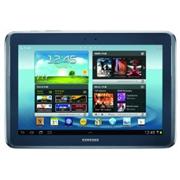
Samsung released the Note 10.1 tablet with Android 4.0.4 ICS. While it has promised that Jelly Bean Android 4.1 will be released in Q4 2012, you can taste Jelly bean, at least some of its elements by flashing the JellyICS ROM.

Samsung released the Note 10.1 tablet with Android 4.0.4 ICS. While it has promised that Jelly Bean Android 4.1 will be released in Q4 2012, you can taste Jelly bean, at least some of its elements by flashing the JellyICS ROM.

Rumors are brewing on the web that Samsung will be releasing the Galaxy Note 2 (GT-N7100) in two colors. First is the obvious Ceremic White which is identical to the Galaxy Note 1’s color. Second color is metallic blue, which is similar to the one being offered for Galaxy S3.
Samsung has officially launched Galaxy Note 10.1 in Singapore and will be released to the public on August 25, 2012.
As expected, there will be two versions of it – one with built in 3G+Wi-Fi and another with Wi-Fi only radio. The 3G version with 16GB internal flash storage will retail for 998 Singapore dollars, which makes it considerably more expensive than than the Apple iPad 3.
Both black and white colors have been made available. Price for the Wi-Fi only version is not yet known. Hardware of the Galaxy Note 10.1 is very identical to the Samsung Galaxy S3 but comes with 2GB RAM.
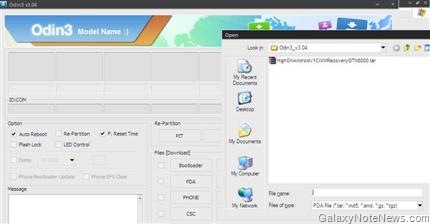
Both Galaxy Note N8000 and N8013 share same Clockworkmod recoveries which means same custom CWMs (clockwork mod) recoveries can be flashed on either without any modification. Same can be said about rooting them.
So, install CWM in Galaxy Note 10.1 and download super SU file. You can download that file from here. Put the CWM-SuperSU-v0.94.zip in the root of your SD card. Now, we will put it in recovery mode. To do that, press volume up and power button. It will reset. Let go of power but keep the volume up button pressed. You will boot in recovery mode. Select “install zip from sdcard” and browse for the CWM-SuperSU-v0.94.zip using volume up and down buttons. Select power to flash the file. Your Galaxy Note 10.1 will boot up rooted.
Galaxy Note N8000 vs N8013 – The only difference between these two tablets is the presence of 3G radio in N8000, which is absent in N8013.
Galaxy note 2 root
The USB drivers for Galaxy Note 10.1 are automatically installed if you have installed Kies on your Windows computer. However, sometimes, while flashing custom or official ROMs, you might face difficulty in getting your Note 10.1 recognized by the computer.
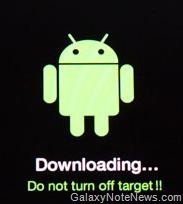
Download mode is the mode which allows you to install custom ROMs, perform hard reset, clear caches and so on. Of course, to install custom ROMs, you will need to install clockworkmod recovery on Galaxy Note 10.1, otherwise, you will not be able to flash custom firmwares.
As all custom ROM flashers know, flashing a new firmware requires you to install custom recovery. Same is the case for Galaxy note 10.1. In few days, custom firmwares for the Note 10.1 will crop up and you will be required to install CWM (clock work mod recovery).

Continue reading “Galaxy Note 10.1 N8000 Clockwork mod recovery”
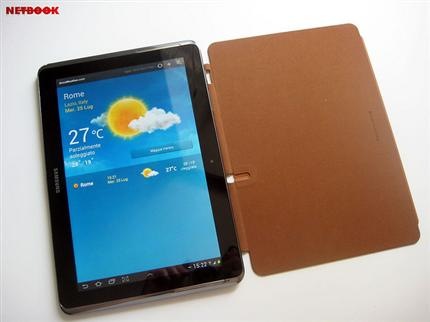
Just like Samsung released flip case for the Galaxy Note and Galaxy S3 phone, the company is making a similar but bigger case available for the Note 10.1 as well. Folks at netbooknews.it has posted several pictures of the case.
Continue reading “Galaxy Note 10.1 Official Flip case review”
Galaxy Note 10.1 comes with a built in stylus called D-pen which makes it very unique when compared to other Android tablets. Using the D-pen, you will be able to write on the PDF pages. I tried the Kno app but it kept crashing – something that I did not wanted.
Continue reading “Galaxy Note 10.1: Writing on PDF Documents”
First Galaxy Note 10.1 reviews are in and most of them are pretty, well, except for the Gizmodo, as expected. Gizmodo did not like the Galaxy Note phone (N7000) and we expected this.
Engadget says,
It’s been a long time — six months, to be exact — since Samsung first gave birth to the Galaxy Note 10.1. Our initial reaction was one of intrigue; a risky bet we were eager to see play out in final form, especially given stiff competition from various quad-core competitors. So, does the Note 10.1 manage to overcome its well-matched rivals and carve out its own spot in the crowded tablet space? Ultimately, no matter how deftly executed and streamlined the S-Pen experience may be, this tab still feels like a niche device, especially since the suite of compatible applications is still pretty small. This is the sort of purchase early adopters and creative professionals are likely to make based on their familiarity with Android and the additional flexibility afforded by that stylus.