Download Android 7 Nougat ROM for Moto E 2015

Moto E 2015 may no longer be getting updates to latest android but there are several ROM developers that are churning out Android 7 Nougat updates for the android phone. This particular ROM is called AOSP Extended and it gives you stock user interface with some customizations with the custom developer’s theme engine. This gives you smooth and lag free experience out of box.

Download Android 7 Nougat ROM for Moto E 2015

Here are features of the Android 7 Nougat ROM for Moto E:

*  DUI(Fling/Pulse/Smartbar)
*  Substratum Theme Engine
*  Inbuilt SuperSU
*  Privacy Guard
*  Expanded Desktop
*  Dashboard suggestions/summaries (Enable/Disable)
*  Statusbar Clock/Date customizations
*  Statusbar Traffic Indicators
*  Notification count
*  Dt2s on Statusbar
*  QS quick pulldown
*  QS Brightness Slider(Enable/Disable)
*  QS Tiles Animations
*  Force expand notifications(Enable/Disable)
*  Immersive Mode messages(Enable/Disable)
*  Flashlight Notifications
*  Immersive Recents
*  Toast icon
*  MediaScanner behaviour on boot
*  Heads up Notifications(Enable/Disable)
*  Power Menu Customizations
*  Additional Battery Saver steps
*  Volume Rocker tweaks(Wake/Music seek/Keyboard cursor control/Swap in landscape mode)
*  Spanish Translations
*  PT BR Translations
*  Update Fling Logo
*  Add gestures back to settings app
*  QS haptic feedback
*  One tap data & Wifi tile
*  Auto brightness icon toggle
*  Breathing Notifications
*  Clickable clock and date in statusbar header
*  Long press gear icon in statusbar header launches Extensions
*  Show 4G instead LTE switch
*  Night Mode is back
*  Night Mode QS Tile
*  Long press caffeine tile action
*  Customize QS Rows/Columns
*  Customize small QS Tiles
*  StatusBar brightness control
*  Lockscreen Shortcut
*  Double tap on lockscreen to sleep
*  Quick Unlock for PIN/Password
*  Battery Styles and percentage
*  Change default file manager to MK Explorer
*  Add FMRadio
*  Add support for Jio4G Voice App
*  Navbar QS Tile
*  Flip Button Animation
*  Unlink Notification volume
*  Status bar clock Seconds
*  Partial ScreenShot Type
*  Screenshot Delay
*  Slimperience browser
*  Pixel’s bootanimation(Experimantal)
*  Pixel’s UI(Navbar/Accent/Pixel launcher)
*  OMS7
*  Camera sound toggle
*  Advance Ambient Display
*  Longpress power button on lockscreen for torch
*  Disable FC
*  Wakelock Blocker
*  Toggle Lockscreen Media Art
*  Toggle Lockscreen music Visualizer
*  Ticker
*  Bluetooth QS tile easy toggle(one touch)
*  CM’s Eleven Music Player
*  Disable QS on Lockscreen
*  Invert Ambient display’s Color
*  Toggle Dynamic notification card’s color
*  Low Battery Notification Toggle
*  Hide Clock/Date/Alarm text from lockscreen
*  Lockscreen Clock’s Font customizations
*  Weather on lockscreen

Here are installation instructions:

*  Download the ROM and GApps of your choice
*  Backup each and every partition from Moto E TWRP Recovery
*  Make a full wipe system, data, cache, dalvik
*  Install the ROM
*  Install GAPPS package
*  Wipe cache.
*  And at last Reboot.
[First boot will take few minutes. Keep patience.
Clean Flash is always recommended.

Galaxy S5 Mini Android Marshmallow 6 Pre rooted, deodexed, de-knoxed ROM Download with Touchwiz

We have got hold of official touchwiz android 6 Marshmallow ROM for the Samsung Galaxy S5 Mini that is deodexed, rooted and de-knoxed. This ROM is exactly the same as the one that was pushed by Samsung but the only difference is that it has been rooted so there is no need of rooting it again. The only requirement to flash it is that you need to have Galaxy S5 Mini TWRP installed and second, it works only on the G800F variant of the android phone.

Download Galaxy S5 Mini Android Marshmallow 6 Pre rooted, deodexed, de-knoxed ROM

Here are the installation instructions for installing the Samsung Galaxy S5 Mini Android Marshmallow 6 Pre rooted, deodexed, de-knoxed ROM.

1 Download original Firmware and mod.

2 Boot to recovery and wipe everything – internal storage isn’t necessary, but it is always recommended to start a 100% clean installation

3 Boot to Download mode and flash original firmware using ODIN

4 Let it boot, configure your things, etc and then go back to download mode

5 Flash latest TWRP recovery – don’t let the phone boot. Press volume up + home + power until “recovery is not seandroid enforcing” message pops up as soon as ODIN finishes the flashing process

6 Press install and select this mod.

Shuttle XC60J is An industrial fanless mini PC with Celeron J3355

Shuttle XC60J is cheap industrial mini PC that that is aimed for those who want a low powered, efficient fanless computer. It has TDP of mere 10 watts which has allowed its manufacture to make it fanless since there is so less heat dissipation. Shuttle XC60J specifications include Intel Celeron J3355 processor, two SoDIMM RAM slots, three storage slots, Intel i211 gigabit Ethernet base and three RS232 ports.

Shuttle XC60J review

Continue reading “Shuttle XC60J is An industrial fanless mini PC with Celeron J3355”

Should you get antivirus for android phone?

If you are an android user, you might be having several questions about whether you should have antivirus on your phone or not. Many Apple users see android phone as virus-prone phones and do not like buying them for this very reason. However, this virus problem becomes a non-issue if you install a nice antivirus application on your phone. This way, you will be able to enjoy all the benefits of an android ecosystem and remain virus-free too.

android antivirus (2)

There are plenty of antivirus applications out there but the one we recommend is AVG antivirus. This is a free antivirus for android and protects your phone from viruses and more. The Google Play Store is the main target for such viruses and malware. Google does not have a strong comprehensive policy and hackers make use of it put adware, Trojans, viruses and spy tools in their applications. Their applications send private user information back to the hacker which can be used for all sorts of bad things.

Fortunately, by installing AVG antivirus, you make your phone immune. The first thing you should do after installing of AVG app is full scan of the system. It supports scanning of both internal and external storage. This is important as sometimes there are applications that might have installed malware or virus in your system which could already be harming you or your phone’s performance. AVG will help you get rid of those and more.

android antivirus (3)

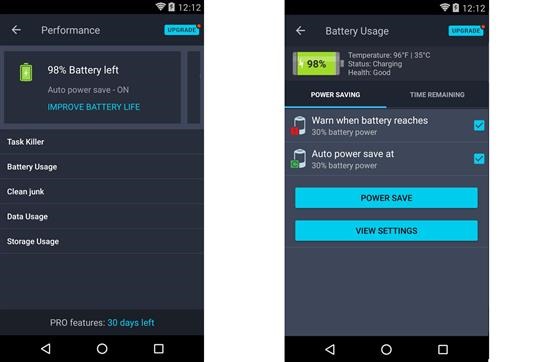
AVG antivirus is more than antivirus. It has wifi scanning feature that alerts you if you are connecting to a network with poor security level. It also protects your phone from ARP poisoning where the hacker can redirect you to different URL and infect your phone. It runs in the background and scans the webpages and if it finds something harmful, it stops its activity and alerts you. Main web browser and Google Chrome are supported. It monitors the battery consumption in the background and can turn on power saving feature if the power levels go under specified level. For instance, you can make power saving turn on as soon as your phone hits 20 percent battery level.

android antivirus (1)

Verdict – We love the fact it works on both android phones and tablets. It is optimized for both small and big screen devices. AVG antivirus is must have phone for all android users.

Samsung Galaxy J CyanogenMod 14 CM14 ROM with Android 7 Nougat

Vanilla Android 7 Nougat ROM for the Samsung Galaxy J7 SC-02F and SGH-N075T variants is available for download. This is designed to make your android phone fast and increase performance over the stock android ROM that is brimming with useless features. This is a cyanogenmod 14 ROM which means it is totally vanilla.

Galaxy J CyanogenMod 14 CM14 ROM with Android 7 nougat

For this, you will have to install TWRP custom recovery for the Galaxy J and then install the ROM. Without custom recovery, installation of this cyanogen mod14 ROM is not possible.

ROM feature:
Based off latest CyanogenMod 14.0 sources
Custom camera HAL featuring:
– 4k video record

Kernel feature:
Adreno idler
CAF update tag to LA.BF.1.1.3-01610-8×74.0
F2FS
No placebo patches, features, or compiler “optimizations”
Many other misc. improvements not listed here

What’s working :
Boots
RIL (Calls, SMS, Data)
Wifi
Bluetooth
Camera ( Videos And Photos )
Video Playback
Audio ( Record and Playback )
Sensors
Flash
Pretty much everything

What’s not working :
NFC (Osaifu/kentai)
TV Tuner

Instructions:
Download the ROM from here and GAPPS Android 7 ARM; Flash the latest TWRP; Reboot to recovery; Flash latest build; Flash GAPPS; Reboot

That is it, you have successfully install android 7 nougat vanilla variant on your Samsung Galaxy J. Make sure to do fresh install of everything.

Download Samsung galaxy J1 ACE TWRP custom recovery

If you are looking to install custom firmwares on your Samsung Galaxy J1 Ace, you will have to install a custom recovery – something like TWRP or CWM. This particular one is for the SM-J110H variant of Samsung Galaxy J1 Ace and after its installation, you will have to install all J1 Ace specific hacks and even root it with ease.

Samsung galaxy J1 ACE TWRP

Here are the instructions on how to install TWRP custom recovery on the Samsung Galaxy J1 Ace SM-J110H variant.

1. Download and install Odin on your PC.
2. Once you have Odin installed, download the proper .tar file for your device from the download link above.
3. Power off your device. Turn on your device using the proper key combo to get into download mode and attach the device to your computer via a USB cable
4. Use the PDA tab or button to browse to and select the tar file that you downloaded and flash the device.

Keep in mind that modern Samsung devices come with a key combo in order to prevent users from entering into recovery. For that, you will have to type in fastboot reboot into ADB and then hold the key combo and boot to TWRP. Once TWRP is booted, TWRP will patch the stock ROM to prevent the stock ROM from replacing TWRP. If you don’t follow this step, you will have to repeat the install.

Which is best antivirus software for Samsung phones?

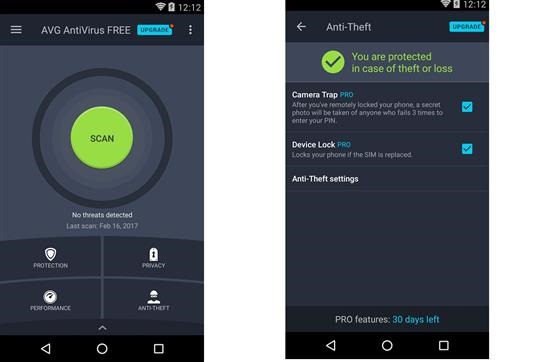
Google Android is an open source operating system. Being overly open, it is at risk of getting infected from malware and harmful applications. That is you need decent antivirus software on your Samsung phone. There are many free and paid antivirus applications available for them. While the idea of installing antivirus software might seem like an overkill, it is extremely important to protect yourself from dangerous malware. We put many antivirus applications to paces and found AVG antivirus best in terms of performance and features.

avg antivirus

Compatible with both Samsung and other android phones, the AVG antivirus is the number 1 free antivirus for android mobile. It scans applications and games in real time without having any effect on the overall performance. This means that your phone would not bog down with the AVG antivirus application running in the background. It even kills the tasks that it feel would slow down your phone. So, the device keeps running fast at all times.

Samsung Galaxy Note phones are notorious for slowing down after sometime. AVG keeps the entire system and memory optimized to prevent any such slowdowns.

The AVG anti virus app for android makes sure that there are no unsecure settings on your Samsung Galaxy Note. If it founds any, it alerts you and guides you on how to fix them. At the same time, it protects your phone getting infected from malicious applications, malware and spyware.

avg antivirus android phone

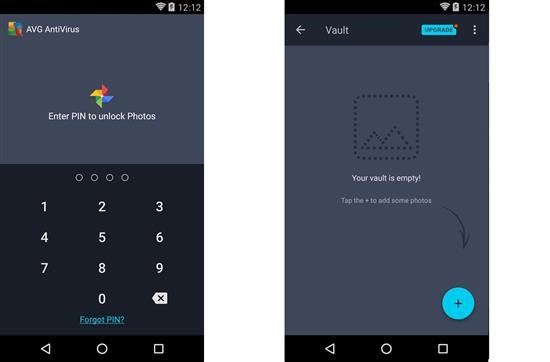
Some other nifty features include encrypted Vault and Wi-Fi feature. In Vault, you can store your most private photos in a way that they are not seen by the smartphone’s Gallery or Photos applications. This way, a stranger or friend cannot gain access to the private photos. The vault is protected by password which is only known by you.

avg antivirus android 

Wi-Fi feature lets you scan the 802.11g/b/n wireless networks around you and gives alerts if there are encryption issues. This way, you only connect to the most secure network. It also sends out alerts to its users when it feels that weak passwords are being used.

Verdict – AVG Antivirus for android phones and tablets is a must have application. Android platform is brimming with malware and such application tightens the security and guards it against malicious apps, viruses, malware and spyware.

AICP ROM for the N7100 Galaxy Note 2

If you heart vanilla software, then you will love the AICP ROM for the Samsung Galaxy Note 2 N7100. It is based on lollipop firmware which was actually never released for this Samsung Galaxy Note. Samsung halted all development after releasing official android 4.4.2 for N7100. The developer ported it from another device and made it work with the Note 2 drivers. To flash this AICP ROM, you will need Note 2 TWRP custom recovery and it is also strongly recommended that you fully wipe your device before doing a flash and avoid restoring system applications and data with something like Titanium backup for android phones as that can work against stability for your phone.

AICP ROM for the N7100 Galaxy Note 2

Here are the flashing instructions for AICP ROM for the N7100. First download the ROM from here and put it in microSD. Then boot into N7100’s custom recovery and flash the firmware from there. Gapps are absent and must be installed before boot. So flash them after installing ROM.

For flashing the ROM, both TWRP and CWM work. Developer says that until android lollipop, he used to make ROMs that were AOKP but were later changed since folks at AOKP halted all development. He says that if the developers behind make a comeback, he will get back to AOKP but for now, the base has been changed to cyanogenmod.

Download Android 7 AOSP ROM for Galaxy Note 2 N7100

We have been informed about the Android 7 Nougat ROM for the Samsung Galaxy Note 2 N7100 android phone. This ROM is based on AOSP which means there is no Samsung TouchWiz user interface. This is great for those who are looking for vanilla experience on their android phone. Substratum is fully compatible.

Download Android 7 AOSP ROM for Galaxy Note 2 N7100

Keep in mind that the first boot will take some time and it might even loop for few times. Just make sure not to use any custom kernel with this Android 7 Nougat ROM.

Keep in mind that there is no default music player onboard so use something like blackplayer, folder player or musixmatch.

Instructions for flashing:
– Download ROM and GApps.
– Copy ROM and GApps to internal storage.
– Wipe /data, /system and /cache.
– Flash ROM and GApps (And any mods you use)
– Enjoy :P

Instructions for update:
Download ROM and GApps.
– Copy ROM and GApps to internal storage.
– Flash ROM and GApps

Everything is working out of box and there are no known bugs. This makes this Android 7 Nougat ROM excellent for everyday use. This is the best Nougat ROM.

Feature list.

Based On AOSP 7.1.1_r25:
Blur customizations
LED customizations
Substratum theme engine (OMS7)
Latest OMS Rootless Support with Float UI/Theme Interfacer

Navigation bar:
Dynamic navbar color
Smartbar customizations
Fling & Pulse

Hardware keys:
Volume keys control media volume
Volume button wake
Music control
Volume button swap
Volume key cursor control
Power + volume up behavoir
Volume down for do not disturb
Volume up in do not disturb
Do not disturb switch
Navigation key customizations
Disable navigation buttons

Lockscreen:
Center screen Shortcuts
Longpress shortcuts
Lockscreen swipe shortcuts
Lockscreen weather
Double-tap to sleep
Lockscreen torch
Lockscreen charging info
Lockscreen Music Visualiser

Notification drawer:
Quick pulldown
Smart pulldown
Force expanded notifications
Disable brightness slider
Disable quick settings when locked
QS tile titles
Small QS Tiles Scrolling
Advanced QS Easy Toggle
QS tile row/column count
Custom header image

Status bar:
Battery styles
Custom carrier label
Clock settings
Ticker
Network traffic
Status bar icons
Double-tap to sleep
Slide brightness control
Notification count
Bluetooth battery status

Recents:
Hidden apps
Memory bar
Immersive Recents
Clear all button
Omniswitch

It is nice to see the old N7100 still being supported by XDA community.

Download Wileyfox Swift 2 Debloater to clean up android phone

Folks at Wileyfox have started rolling out android 7 to their Swift 2 users and there is a lot of bloatware onboard. This is why some people are looking for some easy way to get rid of bloatware on their phone. Some of the annoying ones including ads in launcher and forcing users to use Truedialer to dial numbers which also has ads inside. There is a nice AOSP dialer there so why use truedialer?

Download Wileyfox Swift 2 Debloater

Before proceeding, keep in mind that by install the debloater for Wileyfox Swift 2, you will not able to get new OTA so no more new software builds for your android phone. Second, you will have to disable DM-VERITY otherwise you won’t be able to boot. For that just install magisk. Make sure you are running latest android Wileyfox swift 2 image which is android 7 nougat.

Then unlock the bootloader and install Wileyfox swift 2 TWRP custom recovery. Download debloater’s zip file from here and put it somewhere on your phone. Choose Install and locate and flash the ZIP. Reboot and enjoy.

If you are missing missed call notifications, go into Settings > Apps, then hit the gear in the top right corner and make sure you’ve a config similar to one shown in image below.

Download Wileyfox Swift 2 Debloater

Removed application list includes , AndroidPay , BasicDreams , BookmarkProvider , Google Books , Chrome , CMFileManager , Drive , Duo , Gmail , GooglePrintRecommendationService , GoogleTTS , Hangouts , Keep , Maps , Google Music , News and Weather , PhotoTable , talkback , Google Videos WFChromeCustomization , Youtube , Contacts , FoxHole , Mms , SnapdragonGallery , TrueCaller , All bundled-apps from /system/vendor/bundled-app.

App additions include Google Contacts, in replacement of the half-dummy, prebundled Contacts app (which was missing link with the Dialer). , Google Dialer, in replacement of TrueCaller. , Google Messages, in replacement of Wileyfox Mms app. , AOSP’s Launcher3, in replacement of FoxHole (Wileyfox’s Launcher).