Galaxy Note 3 N900 Lollipop Android 5 ROM, has ultra power saving mode

You can now download the un official Android 5 lollipop firmware from XDA for the Samsung Galaxy Note 3 N900 model. Based on N900XXUEBOC4_N900ODDEBOB2_N900DDUEBOB1_HOME firmware, this new ROM features ultra power saving mode, emergency mode and customizable torch light settings. This custom firmware comes with pekaka advance tweak that adds following features:
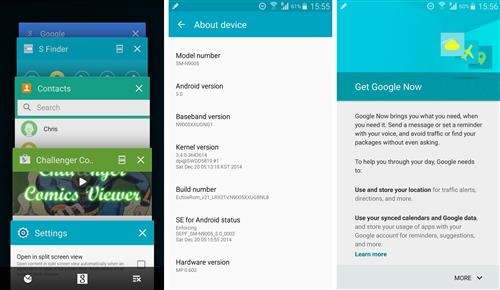
Galaxy Note 3 N900 Lollipop

* stutas date_show mod|small/big/disable
* stutas ampm show mod|small/big/disable
* stutas clock position mod|left/middle/right/disable
* Netspeed color
* Statusbar clock color
* Status expander clock color
* Statusbar Signal icon color
* Statusbar wifi icon color
* Memkiller color
* status bar color
* StatusBarHeader color
* quick setting container background color
* quick setting tile background color
* toggle slider color
* sfinder qconnect background color
* Locksrceen Carrier text and color
* Quick setting button number
* Enabled UI stock color(unchecked for stock,checked disable stock color to enable customer color mod)
* Used battery color
* Rest battery color
* Num color in battery
* Pullup app settings

It is suggested by its ROM developer to do a full wipe before installing the firmware. You can download from following links:

Flashing instructions:

1. before flashing this ROM, your phone firmware should have been updated to lollipop 5.0 already
2. need custom Note 3 recovery to flash.
3. download ROM copy to your phone’s SD card
4. just go to recovery to flash the ROM but before select full wipe.
5. When the flashing process finishes, the phone will auto reboot into new ROM.

Dell Venue 10 7000 specifications, costs 400 dollars

Dell Venue 10 7000 is a 10 inch android tablet that has same design and specifications like the Dell Venue 8 7000 – all at a starting price of 400 dollars. The Dell Venue 10 7000 is a business tablet featuring Intel RealSense 3D depth sensing camera.

Dell Venue 10 7000 specifications

Dell Venue 10 7000 specifications

The tablet is powered by Intel Atom Z3580 processor backed by 2 gigabytes of memory and 10 inch display packing 2560 x 1600 OLED pixel resolution. It packs 7000 mAh battery that offers up to 15 hours of runtime.

Dell Venue 10 7000’s unique cylinder on one end includes stereo speakers and battery. This allowed the manufacture to make the tablet extremely thin, measuring just 0.24 inches.

Dell offers an optional 130 dollar keyboard dock that allows the user to use the Dell Venue 10 7000 like a mini laptop bringing total cost of tablet and keyboard dock to 629 dollars.

It runs Android and support Android for Work platform that allows users create work profiles on single device – much like multi user functionality on windows.

Increase Moto E 2015 battery life by flashing this custom kernel

Moto E 2015 battery life is pretty good but it is not enough for power users. Phone experts say that one of the best ways to increase Moto E 2015 battery life is by flashing a custom kernel. The one that we recommend flashing is Squid Kernel and it is  based on original stock kernel. Features of Moto E 2015 custom kernel:

[ ] Moderately under volted
[ ] Permissive SE Linux
[ ] Updated to Kernel 3.10.73
[ ] Synced with latest Code Aurora changes
[ ] Simplified build process
[ ] Compiled with Linaro GCC 4.9.3 and optimized for Cortex A53

increase moto e 2015 battery life

To install it, download it from here and flash it using Moto E 2015 TWRP custom recovery for which we posted about earlier.

And in case you would like to revert back to stock kernel, all you have to do is download and flash stock kernel from here. This file is a TWRP flash able zip of the stock kernel for the Moto E LTE. You should have bootloader unlocked on Moto E 2015 before you flash any kernel, including stock kernel.

Keep in mind that this kernel is only meant to be flashed on Moto E 2015 LTE version that is on sale only in selected countries. Another known issue is that this custom kernel would not work with CDMA networks. A test kernel has been released which makes it work with Boost Mobile though. Also this kernel sometimes hangs or reboots during the boot process.

This is probably due to a race condition. Be patient, and give it up to 2 minutes to boot before giving up. If it fails to boot the first time, it should work after the first or second reboot.

Moto E 2015 rooting tool and instructions

A beautiful XDA software now allows you to easily root Moto E 2015 phone. But before you root you must unlock Moto E 2015 and flash a custom recovery. Fortunately this tool also lets you do both. So if you did not unlock Moto E 2015 before, you can do it with this all in one software.

moto e 2015 rooting tool download

Here is Moto E 2015 rooting tool feature list:

* Beautiful Metro UI Theme
* Full Boot loader Unlock
* Automatic Motorola Unlock String Retrieval
* Gain Permanent Root
* Flash Custom Recovery
* Flash Custom Kernel
* Flash Custom ROMs
* Side load Zips
* Push Files
* Install Apps
* Relock Boot loader

Download the Moto E 2015 rooting tool from below:

Download Moto E 2015 Boot unlocker, custom recovery

Folks at XDA have released Moto E 2015 book unlocker and relocker tool that easily allows you to unlock Moto E 2015 by pressing few buttons. The very same tool allows you to install custom recovery into the Moto E 2015, allowing you to install various custom firmwares and hacks.

moto e 2015 boot unlocker download

To install, you must have NET 4.0 installed in your system. If you do not have it, you can install it from here.

download moto e 2015 custom recovery

How to use boot unlocker Moto 2015 tool

Turn ON USB Debugging Mode under Setting>>Developer options
Select Allow OEM Unlock
Open Moto E Toolkit
Click Download Drivers button and then install it.
Click on Check Devices button, your device will be listed

Unlocking Bootloader

Warning: Unlocking Bootloader Will wipe User data take Backup of your contacts, msgs, apps etc
Click on Generate String Button,
Device will reboot into Fastboot mode and website will be open.
Login into site,
Copy String from application and paste it into website text field and clicking “Can my device be unlocked?”
If your device is unlockable, a "REQUEST UNLOCK KEY" button will appear at the bottom of this page
Select I agree, and click on REQUEST UNLOCK KEY,
Copy Unlock Key you got in your mail and paste it into Application text field "Enter Unlock Code" and click on Unlock
Done

How to block all ads on Nokia and Microsoft Lumia phones

Thanks to XDA we have a really nice way of blocking ads on Lumia phones. This tool works on all Lumia handsets with micro SD card slot. This method also prevents ads in applications and games.

adblock windows phone

1) You must have an interop-unlocked handset with full file system access. To have full system access, download and install this on your windows phone.
1) Download the latest "blocking" hosts file, for example, from here
2) Rename your download from hosts.txt to HOSTS
3) Connect your handset to PC, navigate to \Windows\system32\drivers\etc folder
4) Paste downloaded HOSTS file, choose "replace" in the copying dialog.
5) That is it, no need to reboot like Android phones.

To revert back, simply delete \Windows\system32\drivers\etc\HOSTS file.

Medion Akoya E6416 now for 399 euro on Aldi stores

Aldi Nord is now selling the Medion Akoya E6416 laptop for discounted price of 399 euro. Features include the new Intel Core i3 5010U broadwell processor, fast wireless A/C LAN and Intel HD Graphics 5500 GPU. The i3 5010u has passmark score of 2916 as mentioned by CPU passmark website.

Medion Akoya E6416 specifications

Other Medion Akoya E6416 specifications include a 15.6 inch display packing 1366 x 768 pixel resolution, Core i3 5010U 2.1 GHz processor that is backed by 4GB of RAM, a 500GB hard drive and integrated Intel HD Graphics 5500. It has plenty of ports that includes Wireless LAN, Gigabit LAN port and four USB ports out of which two support USB 3.0 standard.

You also get HDMI, VGA, SD card reader and DVD burner. The operating system is pre installed windows 8.1 operating system. It weighs just under 2.3 kilograms. Medion and Aldi offer a manufacturer’s warranty of 3 years.

Lenovo Y40 and G50-80 updated with Radeon R5 and R9 M300 GPU

Lenovo Y40 and the entry level Lenovo G50-80 will soon be updated with a Radeon R9 M375 and Radeon R5 M330 respectively. The launch of the new AMD graphics cards is closer than expected.

Lenovo Y40 and G50-80

There is massive excitement in the world of graphic cards as Nvidia and AMD both have introduced new models. Nvidia launched GTX 960M GPU last month and AMD launched the new Radeon M300 series. Some companies like Lenovo have already planned upgrading of some notebook models especially for gamers.

2015 Lenovo Y40 and G50-80 specifications

Lenovo has updated the data sheet of Lenovo Y40 and G50-80. Both laptops will now use Radeon R9-M375 and M330-R5 respectively. At the moment, no other details on the two notebooks is available.

Information about the new Radeon R5 GPU: It comes equipped with a memory bus to 64 bits and 1 or 2 GB of DDR3 RAM. The Radeon R7 will have the same amount of onboard memory but with the option to choose between DDR3 and GDDR5 versions and with bus 64 or 128 bits.

Stay tuned for official announcement from Lenovo regarding the new 2015 Lenovo Y40 and G50-80 laptops.

RaspPi Kiiboard has Raspberry Pi 2 inside

RaspPi Kiiboard is a keyboard that can do the function of a mini PC. It packs Raspberry Pi 2 inside which is one of the smallest PCs ever built. While the Raspberry Pi 2 has remained a niche product as it requires high degree technical knowledge.

RaspPi Kiiboard review

RaspPi Kiiboard review

RaspPi Kiiboard on the other hand has all required ports that one would need on a modern computer. You get a full fledge HDMI video output port and two USB ports. The user can decide whether to use the RasPi Killboard as normal keyboard or an all in one computer.

RaspPi Kiiboard reviews

To do this, the designer had to remove the doors from the original PCB of Raspberry because the motherboard does not have available ports on one side and thus he had to rewire all contacts to get them to get up to the bracket which also eliminated the Ethernet LAN because RaspPi Kiiboard only uses Wi-Fi. He was also kind enough to upload a video explaining this grueling process.

The key on the keyboard have a retro look which makes it look very unique. It clearly takes us back to the golden era of the Commodore VIC20, C64 or Amiga.