Asus G751JL specifications, comes with GTX 965M

Asus G751JL is the newest 17 inch gaming laptop that features powerful Intel Core i5 4200H or i7 4720HQ processors, up to 32GB of RAM and dedicated Nvidia GeForce GTX 965m with 2 GB of GDDR5 RAM onboard.

asus g751 review

The new model will join rest of the ROG models that include Asus G751JY, G715JT and G751JM. The G751JL has same appearance like those models – wedge shape, taut lines and nerve and brushed metal inserts that give it a futuristic look.

Asus G751M price

It is already on sale in Europe for about 1800 euro. The Asus G751JL measures 416 x 318 x 20/43 mm and weighs 4.3 kg. As expected Asus G751JL specifications are top notch. You get Intel Core i5-4200H or i7-4720HQ 22 nm Haswell processors backed by up to 32 GB of RAM and a dedicated video card which is the mighty Nvidia GeForce GTX 965m with 2 GB of GDDR5 RAM.

For storage you get whopping 1TB 5400 RPM with 8 GB of cache, 1.5 TB 5400 RPM + 128GB SSD or even a 1TB 7200 RPM traditional hard drive combined with a 256 GB solid state drive.

Asus G751M price

Other specifications include DVD super multi optical drive, four USB 3.0 ports, a Thunderbolt, HDMI and VGA video outputs, audio jacks for headphones and microphone, RJ-45 for Ethernet LAN, 2-in-1 card reader,  Gigabit Ethernet LAN, 802.11ac Wi-Fi and Bluetooth 4.0 modules. Battery capacity is 8 cell 6000 mAh.

Note 4 Bloatware free Odex and Xposed ROM (for N910C)

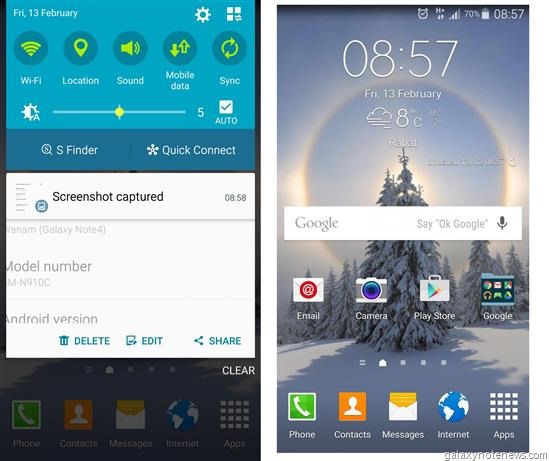
If you use the Samsung Galaxy Note 4 SM-N910C model and are sick of pre installed bloatware, XDA developers has got you covered. There is a new ROM called Wanam Lite that is clean, lean, Odexed and comes with Xposed pre installed. Based on the latest official Lollipop firmware, it makes it use of stock kernel and has large APN list. It also support Samsung Kies desktop syncing software.

Screenshot_2015-02-13-08-59-16

To install, copy the ROM file to Internal SD card; flash it through CWM recovery; reboot and enjoy. You can download the ROM from here.

The developer of this ROM adds that if the S-Health force quits, then clear the Health service data.

Intel Core i7 5650U benchmark

The Core i7 5650U is a very powerful ultra low voltage processor by Intel that was introduced by the chip giant in January 2015. It is slated to be used in the upcoming broadwell Macbook Air and ultrathin ultrabooks as it consumes little power; has high performance output and dissipates little heat which is critical in ultrathin laptops. Interestingly the Core i7 5650U has lower CPU base clock speed than the outgoing Core i7 5600U but faster GPU.

Intel Core i7 5650U benchmark

The Intel Core i7 5650U benchmark indicate that thanks to improved architecture, it is about 10 percent faster than the lower clocked Core i7 4650U which. This means it is powerful enough for working on CPU-hungry applications.

Core i7 4650U benchmark results:
Cinebench R15 (CPU Single 64 bit): 124
Geekbench 3 (32 bit multi core): 5875
3DMark 2013 (fire strike standard physics full HD): 3864
Passmark: 4176

Core i7 5650U also brings improved HD graphics 6000 that offer 48 EUs at 300 MHz – 1000 MHz. It has faster memory speeds up to 1866 LPDDR3, so this makes it more powerful than the Intel HD Graphics 5000 that has 40 EUs. Demanding games should run just fine at medium detail settings.

Medion Erazer X7833 gaming laptop specs and review

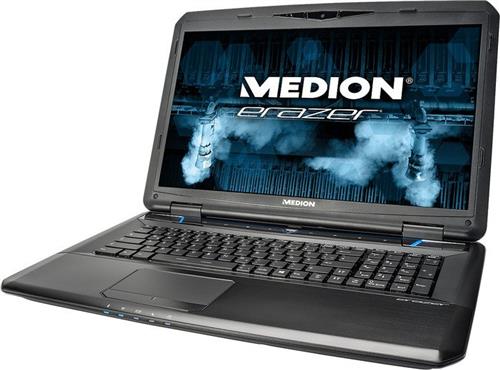
While most of the laptop manufacture are busily engrossed making ultrathin ultrabooks, Medion, a popular tablet manufacture has released a 6 cm thick Erazer X7833 laptop that weighs under kilograms. The Medion Erazer X7833 is all about strong CPU and GPU performance. The laptop packs Intel Core i7 4710MQ processor , NVIDIA GeForce GTX 970M and 16 GB RAM that enable the gamers to enjoy all PC games released till date at almost highest settings.

Medion Erazer X7833
Continue reading “Medion Erazer X7833 gaming laptop specs and review”

Onda B220 is perfect Apple iMac clone

Onda is a Chinese manufacture that has launched a clone of widely popular all in one computer Apple iMac. Even the press photos are similar to the original iMac. Price and availability details are unknown though but judging by rest of Onda’s lineup, the B220 is going to be darn cheap. 

Onda B220

Onda B220 specifications include 21.5 inch display packing full HD 1920 x 1080 pixel resolution, 0.7 cm total chassis thickness that houses motherboard and all computer components. Included in bundle are wireless keyboard and mouse just like iMac. Other specs include Intel 2.42 GHz processor, built in HD graphics, 128GB mSATA SSD, 1920 x 1080 pixel resolution and ALC662 speakers with 5.1 output. You also get USB 3.0 ports, Wireless LAN and Bluetooth.

Back in 2008, Asus also churned out a cheap all in one computer but it looked much different. The Onda B220 is also much more powerful than Asus computer as it features Intel J1900 processor which is a lot more powerful than the Atom CPU that was used in Asus.

Galaxy S5 ROM ported to Samsung Galaxy Mega 6.3

If you want to give your aging Samsung Galaxy Mega 6.3 a fresh make over you might want to install this new Galaxy S5 ROM on it. This will bring all the Samsung Galaxy S5 features on your Mega and the best part is that it works for both GT-i9200 and GT-i9205 which are 3G and LTE variants respectively.

Galaxy S5 ROM ported to Samsung Galaxy Mega 6.3

Samsung Galaxy S5 features ported to Galaxy Mega 6.4 include S5 Launcher work, System UI, Music Player, Calendar & Widget, Video Player, S-Voice, Calculator, File Manager, Album 2014, App Messaging, Voice Recorder, Memo, Task Manager, Samusung Apps, Group Play, Bluetooth, Phone & Contacts, Keyboard, Emergency mode, Radio, Lockscreen w/ all effects, Popping colors, Light, Blind, Stone skipping, Watercolor, Oil, Paint & Ripple Effects, Gallery, Multiwindow, S Finder, Studio, Pop-Up caller, Kids Mode Installer, Vip Mode, Shutdown Menu and Car Mode. Here are the installation instructions:

1: Download ROM (link)
2: Reboot to PhilzTouch Recovery
3: Wipe Factory Reset Phone -> clean to install a New ROM
4: Install Zip -> install from sdcard/sdcard1 -> S5ROMforMEGAi9200_17Jan2014.zip and flash.
5: Reboot to recovery again.
6: Re-root system using Philz touch miscellaneous settings.
7: setup wizard comes up and proceed till you get to the home screen.
8: You will find the navigation bar. Do not disable it in build.prop instead follow step 9.
9: Install Xposd Framework apk (search it and download it from google), open the app, install framework. reboot.
10: Install GravityBox KK apk from the download section of xposd app. Install it. Enable it in modules. Restart
11: go to gravitybox app reduce the size of the navbar to like 0 or 1 .. prefered is 0 using the slider.
12 That will get rid of the navigation bar (this is important for the dialer) and wil stil have the overflow menu enabled everywhere.
13: download AppSettings from xposed app under download section and install it. enable it in the modules section. reboot.
14: open App settings app and look for contacts.
15: change the dpi from 0 to 320 and save (this is important for the phone dialer to become full screen)
16: thats pretty much you have to do. everythin else is present already in the ROM.
17: to explore the various features.. long press the notification toggle icons.. it ll open a new menu which is not present in the settings.
18: using xposd app you can download even floating windows to make windows float like note 4.

Recover bricked Galaxy Mega 6.3 LTE i9205 easily

In this guide we will teach you how to recover a bricked Galaxy Mega 6.3 LTE i9205 easily. Use this guide only if your phone only detected QHSUSB_DLOAD.

1 Download Win32DiskImager
2 Download debrik.img – only  for i9205
3 Unzip both items and run win32diskimager
4 Select Image File debrick.img
5 Select Device ( put your sdcard in 16gb or 32bg )
6 Click write ( note this will format your sdcard plz backup your data )
7 After finish put your sdcard to your phone. you will se a magical your phone will boot.

After it boot turn off the phone and go to download mod. Open odin and flash the stock firmware (I flashed I9205XXUCML1). After boot go to setting, more storage and format your SD card.

Recover bricked Galaxy Mega 6.3 LTE i9205 easily

So from now on, you can say that your Samsung Galaxy Mega 6.3 LTE i9205 is un brickable.

HTC ChaCha: How to improve battery life and make it run faster

HTC ChaCha is one of the few android phones with built in hardware keyboard but its battery life is not its strongest point. It is also not a very fast phone. Fortunately there are ways to improve HTC ChaCha battery life and make it run faster. These tweaks are meant for people on stock firmware or Cyanogen Mod.

HTC ChaCha How to improve battery life and make it run faster

If you are stock ROM, we suggest you to totally dump it and instlal the Hexgore’s stock ROM. It is built on stock firmware but will all HTC’s bloatware removed. So it runs much faster and yields better battery life since less HTC crap is running in background. Here are the features of this custom HTC ChaCha ROM:

* It’s been rooted, of course (ChainsDD’s version of Superuser)
* I’ve added Busybox and Bash
* Removed: Peep, Flash Lite, Flickr, FriendStream, Facebook, Facebook Chat, HTC Feedback, HTC Recommends, HTC Hub and all associated widgets
* Tinfoil for Facebook replaces the official and HTC Facebook apps, this is a more lightweight and privacy aware version of Facebook which doesn’t run in the background all the time or download all your contacts
* ASTRO file browser is now also included
* Ad blocking host files are built right in, no need for AdFree or AdAway
* Zipaligning for optimisation, this means apps should use less RAM
* Beats Audio has been added for heavy bass awesomeness
* Sense 4 wallpaper
* ICS font
* ICS clock widget
* Play Store has replaced the outdated Market apk
* Disabled boot sounds

To install it, boot into recovery, wipe your data, cache, and Dalvik cache, then flash the ROM (download link) and reboot the phone.

Galaxy Alpha S view flip case review

Samsung Galaxy Alpha S View flip case is an expensive case that brings front screen protection to the tablet. It also promises to add a lot of classiness to the already classy design of Galaxy Alpha. The Galaxy Alpha S view flip case is ideal for checking the time or answering or rejecting phone calls without opening the case. We have reviewed the black Galaxy Alpha S view flip case that goes well with our black Galaxy Alpha.

Galaxy Alpha S view flip case review

The Galaxy Alpha S view flip case fits the phone so well and it becomes a part of the phone by replacing the back cover. This keeps the overall profile of Galaxy Alpha super thin and the window indeed gives a whole new aspect.

Replaces the back cover of the Samsung Galaxy Alpha. Provides full screen protection without additional bulk

You can change the background color of your S-View screen too. For doing that, open the flip cover and go to Settings > Lock screen and change the color of S-View window.

View and action incoming calls and messages. Intelligent colour system customises your S-View screen

Another benefit is that you will be able to take pictures without opening the flip. You will also be able to change music tracks as well. You can find both of these options by swiping to the right.

Durable construction offers premium protection for your screen. Official Samsung accessory made for the Galaxy Alpha

The only thing that we did not like about S View flip case is wireless charging. For that you must use the Samsung Galaxy Alpha wireless charging back cover. If wireless charging does not matter to you, simply stop dithering and just get it. It is indeed worth every penny.