Blu Studio Mini LTE, 5.0 HD LTE, Studio 6.0 LTE launched, specifications inside

Blu has launched three new android phones to its smartphone lineup. All the three phones are members of the Blu Studio family and all of them boast 4G LTE radio for providing high speed broadband connectivity in the USA.

Blu Studio Mini LTE review

Blu Studio Mini LTE is the cheapest of the newly models. It is priced at 120 dollars and has these specifications. Currently it runs Android 4.2 jelly bean operating system but the company has confirmed it will be pushing kitkat update very soon. The Blu Studio Mini LTE supports AT&T, T-Mobile, Straight Talk, Cricket, and Metro PCS networks.

Blu Studio Mini LTE specifications

* 4.5 inch with 854 x 480 pixel display
* 1.2 GHz Qualcomm Snapdragon 400 quad-core processor
* 1GB of RAM
* 4GB of storage expandable via microSD card slot
* A 5MP rear camera and front facing 0.3 megapixel webcam
* Connectivity options include onboard WiFi, Bluetooth, all of which is powered by 1850mAh battery.

Blu Studio 5.0 HD LTE review

Next is the Blu Studio 5.0 HD LTE which sells for 199 dollars. It comes unlocked to be used on any cellular network.

Blu Studio 5.0 HD LTE specifications

5 inch, 1280 x 720 pixel display, has a 13MP rear camera and 5MP front camera, sports a 2200mAh battery, and has 8GB of storage. Unlike the aforementioned model, the Blu Studio 5.0 HD LTE ships with Android 4.4 kitkat operating system onboard. Rest of its specifications are similar to the Blu Studio Mini LTE.

Blu Studio 6.0 LTE review

Last one is the Blu Studio 6.0 LTE which costs 279 dollars and like Studio 5.0 HD LTE, it also comes unlocked and runs latest Android 4.4 kitkat operating system software. However it does not supports AT&T’s 4G LTE network.

On the brighter side the Blu Studio 6.0 LTE does have full support for T-Mobile’s LTE network for faster internet browsing.

Blu Studio 6.0 LTE specifications

* 5 inch display with 1920 x 1080 pixel resolution
* 2 gigabytes of memory
* 16 gigabytes of flash storage expandable via micro SD card slot
* 13Mp and 5MP cameras
* Android 4.4 software
* 1.6 GHz Snapdragon 400 chip, and a bigger 3200mAh battery.

Asus Zenfone 2 specifications leaked thanks to Bluetooth SIG

Asus will be unveiling the Zenfone 2 at the Consumer Electronics Show to be held in Las Vegas in 2015 but its filing at Bluetooth SIG has already spilled out its specifications.

A phone by model name ZC451CG has surfaced on Bluetooth SIG’s website which tells us that the Asus Zenfone 2 will feature 4.5 inch display with a resolution of 480 x 854 pixels. It will be powered by Intel dual core processor backed by 1 gigabyte of memory. There is a 5 mega pixel camera and a VGA front facing shooter as well.

Power all this is a 2100 mAh battery which should be enough for a day of good usage.

Asus Zenfone 2 specifications

We loved Asus Zenfone 5 which was one of the best budget android phones of 2014. We will learn about the Zenfone 2 in about two weeks time when it will be unveiled at the Las Vegas.

Grovemade Maple iPhone 6 case review, too expensive to recommend

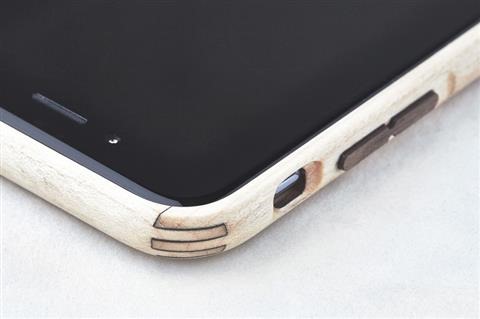
Grovemade is well known brand when it comes to all wood cases but does it really makes any sense to spend hundred dollars on a cell phone case made of wood? Nevertheless here is the review of Grovemade Maple iPhone 6 which retails for 99 dollars.

For $99 you get precise cuttings for volume and power buttons. There is an opening at the bottom for the lightning cable.

So how does the Grovemade Maple case feels in hand? Well it actually feels very good – like wood but we will be lying if we say the fake wood case don’t feel good in hand. In fact they look better too.

This iPhone 6 case consists of two parts – backplate and bumper. The backplate has no cutting for the logo so for those who bought the phone for flaunting that Apple logo will be disappointed.

Grovemade Maple iPhone 6 case review

Here are some features of the case:

Made from Eastern Hardrock Maple
All wood construction using the strength of grain direction
CNC milled
Signature, precision-crafted corner joints
Lasercut actuated walnut power and volume buttons
Hand sanded and hand stained
Phone easily snaps in and out of frame
One piece .070” thick adhesive back plate- leaves no residue (not meant to be repeatedly removed)
Manufacturing process creates minimal waste
Conceptualized, fabricated and constructed by Grovemade in Portland, Oregon.

No matter how good the case is, we just cannot recommend anyone a $99 case that is made of wood.

Galaxy Note 4, 3, S5, S4 MHL 2.0 HDTV adapter review, connect using HDMI cable

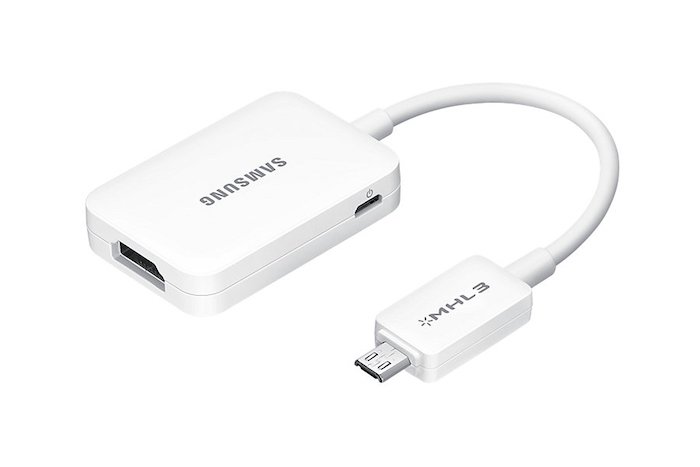
Samsung MHL 2.0 adapter is meant to be used in latest Galaxy Note and S series and it allows users to run full HD 1080p videos at up to 60 FPS. The best part is that you do not require your phone to connect to power source to use it. Also this HDTV adapter is fully backwards compatible with Galaxy S3 and Note 2 that have only MHL 1.0 support.

samsung note 4 mhl adapter
Continue reading “Galaxy Note 4, 3, S5, S4 MHL 2.0 HDTV adapter review, connect using HDMI cable”

Micro SATA 1.8 inch SSD HDD to 2.5 SATA converter review

The Micro SATA 1.8 inch SSD-HDD to 2.5 inch converter is for using 1.8 inch SSD drives in laptops with 2.5 inch HDD bay. In simple words, it lets you use a small SSD or hard disk into your conventional laptop.

I bought one for just $5 from Amazon to try it out and it works like a charm. I had a 128GB 1.8 inch SSD from Toshiba lying around and I thought of using it on my Lenovo ThinkPad X120E laptop that is slow snail when it comes to performance. I came to the conclusion that only an SSD can rescue it but I did not want to buy one since I already had one at home.

Micro SATA 1.8 inch SSD HDD to 2.5 SATA converter review

This Micro SATA 1.8 inch SSD HDD to 2.5 SATA converter worked like a charm. It adds around 1 inch to the length of the SSD. Here is how it looks like with the 1.8” SSD attached.

micro sata converter

After attaching simply slide it into the 2.5 inch connectors of your laptop. You may need to add some padding on the bottom so that it does not rattle. I added thermocol for padding. It works perfect and has solid construction.

laptop 1.8 inch converter to 2.5

It shall be noted that this converter does not works with mSATA drives.

Conclusion: It is cheap and it is functional. It lets you use your 1.8 inch SATA SSD drives in your big laptops. Buy it from amazon for just $5.

Rooted ROM for T-Mobile Note Edge with Knox disabled

Few days back we mentioned steps on how to disable knox on international Samsung Galaxy Note Edge. Today we are going to teach you how to do it on T-Mobile variant.

Step 1:
1.1 Download the factory NK3 ROM (link below) and Odin the package. This is the full factory NK3, which means it contains the factory recovery, modem, system, etc. It will essentially reset your device to factory (without wiping the /data partition, so all your installed app and data will still be there). You will lose root. When you complete this step, your modem will also be on NK3.
This is a zipped file. You need to unzip to get the tar file for Odin. The extension will be .tar.md5.
Download Link
1.2 Follow these instructions here to regain root. Pre requirements for getting root: Chainfire’s CF-AutoRoot & RECOVERY TWRP.Also, UPDATE SuperSU-v2.16. and just in case, Samsung USB Drivers. Finally Download Ext SD Card Write Fix.

Root T-Mobile Note Edge

Store these files inside your phone’s internal storage.

1. Make sure file UPDATE-SuperSU-v2.16.zip is in your Internal SD Card (Phone’s Internal Memory. Do not unzip this file – simply copy and paste it).
2. Make sure file tmo_n915t_extsd_fix_tekhd.zip is in your Internal SD Card (Phone’s Internal Memory).

STEP 0 -> Make sure you have already the Samsung USB Drivers installed; if not… Download them from the link above and install them.

STEP 1 -> Unzip the CF-ROOT File (CF-Auto-Root-tbltetmo-tbltetmo-smn915t.zip)

STEP 2 -> You will now have a program called Odin3 v3.07.exe… Run the program as Administrator (Right click, run as administrator) Once you open Odin3 v3.07.exe you will have a screen with only 1 checkmarks on it:

T-Mobile Note Edge

Follow these steps on the phone. Then Turn OFF Your Phone and Turn it back ON by pressing POWER + VOLUME DOWN + HOME button together at the same time. A Warning Screen will come up; press Volume Up button to enter DOWNLOAD MODE. Now connect the phone to PC via USB.

STEP 3 -> Make sure your program looks like the picture above… Now click on PDA and browse for the file CF-Auto-Root-tbltetmo-tbltetmo-smn915t.tar.md5.

>>> Now, If you are a 100% sure that your program looks like the picture above… Click START

-> The program will flash the Chainfire’s CF-AutoRoot for a few seconds then IT WILL FAIL. No need to worry.

Download and install TWRP custom recovery on T-Mobile Samsung Galaxy Note Edge

STEP 4 Now, to DOWNLOAD MODE AGAIN (by pressing POWER + VOLUME DOWN + HOME button together at the same time. A Warning Screen will come up; press Volume Up button to enter DOWNLOAD MODE).
STEP 5 -> Now open ODIN v.3.07, then click on PDA and browse for the file openrecovery-twrp-2.8.1.1-trltetmo.img.tar.
>>> Now, If you are a 100% sure that your program looks like the picture above. Click START > > PHONE WILL REBOOT AFTER FLASHING RECOVERY.
-> Now you have TWRP Custom Recovery.

twrp samsung galaxy note edge

STEP 6 -> Now turn OFF Phone Again. This time you are going to the recovery. (Not Download Mode) So basically after the phone is off, you just turn it on by pressing POWER + VOLUME UP + HOME button together at the same time. You will see this on the display.

STEP 7 Now hit SETTINGS ->SCREEN -> and UNCHECK "Enable Screen Timeout" & Set Brightness to 10% (See Pic Below) -> This will prevent display issues when using TWRP on your Note Edge.

STEP 8 -> No hit INSTALL (upper left) > then browse for the file UPDATE-SuperSU-v2.16.zip and swipe to install. Root Flashing completed, but don’t exit recovery yet. Now browse for the file tmo_n915t_extsd_fix_tekhd.zip and swipe to install. External SD Card Write Fix Flashing is complete. Exit Recovery and reboot (System Option in TWRP).

Now the final steps. 2.1 Download and flash the deodexed NK3/Knox disabled zip, be sure to verify the MD5
Download Link
MD5 Link
2.2 Clear dalvik and cache.

Adidas Fit Smart Wrist Based Heart-Rate Coach now supports Windows Phone

Adidas has announced an update to its miCoach Train and Run app for windows phone 8.1 which will allow WP8.1 users to use the company’s Fit Smart wrist based heart rate coach with their devices.

Following the update, you will be able to pair, configure and transfer your completed and planned workouts. You would also be able to use Fit Smart for sending heart rate, speed, distance and stride information in real time to the Train and Run app.

Both miCoach Train and Run apps are very popular among windows phone users, thanks to their comprehensive cardio, strength and flexibility training programs developed in partnership with the elite coaches at Exos.

The Adidas Fit Smart Wrist can store up to 10 hours of training data at one time and it makes use of optical sensor to measure your heart rate and accelerometer to track speed, distance and stride rate from your wrist.

Adidas Fit Smart Wrist Based Heart-Rate Coach now supports Windows Phone

Breaking: Lumia 435 specifications leaked, might replace Nokia X

The Lumia sales of 730 and 830 models is great and to improve them even more, Microsoft is working on Lumia 435 windows phone which will retail at an even cheaper price tag than 530.

This could be the device Microsoft needed from start in order to grab a decent chunk of marketshare, but better late than never, right? The Lumia 435 emerged earlier in various leaks by these model numbers – RM-1068, RM-1070, RM-1071, RM-1032, RM-1034  and RM-1069 which represent single and dual SIM models.

Lumia 435 specifications

Both have already been spotted on Indonesian certification and FCC websites. The Lumia spotted has 4 inch display packing WVGA 800 x 480 pixel resolution and hardware navigation buttons.

Lumia 435

Other specifications include 118.1 x 64.7 mm, Qualcomm Snapdragon 200 processor, 5 megapixel camera and removable battery.

Allwinner A83T vs RK3288, Atom Z3745, Snapdragon S4 Pro by Qualcomm

Allwinner A83T is an eight core processor that is designed for cheap tablets. We had a chance to use the InFocus C2107 7 inch Android tablet for some time and the first thing we did were few benchmark programs to see how it fares with likes of RK3288, Atom Z3745 and Snapdragon S4 Pro by Qualcomm.

The Allwinner A83T specifications includes 2 GHz octa core that is based on ARM Cortex A7 architecture with PowerVT SGX 544MP graphics.

AnTuTu benchmark test comparison

Allwinner A83T – 27942 Detailed Allwinner A83T benchmark.
Rockchip RK3288 – 37153
Intel Atom Z3745 – 33703
Qualcomm Snapdragon S4 Pro – 20383

To give you an idea of its performance, it is faster than the Snapdragon S4 Pro that is being used in the Nexus 7 2013 tablet.

CF Bench test

Allwinner A83T – 26138
Rockchip RK3288 – 21070
Intel Atom Z3745 – 29018
Qualcomm Snapdragon S4 Pro – 15230

Allwinner A83T – 27942
Rockchip RK3288 – 37153
Intel Atom Z3745 – 33703
Qualcomm Snapdragon S4 Pro – 20383

I will be honest with you – while these benchmark tests the raw power, all chips are speedy enough for your daily work.

Allwinner A83T vs RK3288, Atom Z3745, Snapdragon S4 Pro

After spending some time with our InFocus C2107, we have come to conclusion that the processor is powerful enough to handle most games, videos and web browsing which is surprising since I tis meant to be used in such cheap tablets.

The Allwinner A83T will be used in tablets that cost between 150 to 200 dollars.

Lumia buy-back offer coming to India

Microsoft Mobile is said to be launching its Lumia buy back offer in India that will encourage the Lumia users to upgrade to higher models and to increase the sales of Lumia devices.

Under this offer you will be able to get up 65 percent of existing device values. Of course there is a catch – the offer is only valid if you upgrade in the three months from the last purchase.

Discounts will range from 10% to 50% if such exchanges happen in six months and will also hinge on the condition of the older Lumia phone being swapped.

Lumia buy-back offer coming to India

This offer is not valid for devices with purchase date beyond six months. However if your device is not in working condition and is still under 6 months range, you will still get 10 percent discount. This includes if your device has broken display and is brutally scratched.