Moto G 2014: Root guide on Android 5 Lolipop

Moto G 2014 has proved that you do not need to spend a lot to get flagship features. The phone has very good quality and runs vanilla like Android that yields excellent performance. Now you will be able to root your Moto G 2014 thanks to the modified version of the stock kernel with root enabled. An XDA developer member made modifications in the ramdisk that allow the flashing the of SuperSU.

Step 1: Download this: http://downloads.codefi.re/savoca/root/titan
Step 2: fastboot flash boot xt1064_lollipop_boot.img
Step 3: Flash SuperSU

Of course to flash it you need unlocked bootloader.

Moto G 2014 root android 5 lolipop

Root is considered as the main step for doing any sort of development as it grants the developer and user rights to do modification on the phone as per their needs. So if you are a user of Moto G 2014, you will definitely appreciate the progress made so far.

Moto E: Unlock bootloader guide

Before you proceed we shall make it clear that unlocking the bootloader of Moto E voids its warranty.

Also unlocking the bootloader of Moto E will wipe all data from it which means all personal data will be deleted including your applications, photos, messages and settings.

Make sure to take a backup of your entire device data.
Download the Android SDK OR Download the Minimal ADB and Fastboot
Install the latest Motorola USB Drivers on your desktop. Download here.
Put your device in fastboot mode (power off, then press the power and volume down buttons simultaneously).
Open Command Prompt on androidsdk/platform-tools/ (Hold Shift and right click and press open command window here)
Connect your Phone to PC
Type this in the CMD prompt window – fastboot oem get_unlock_data
You will get a return string. Copy it. [Right Click-Mark- Mark the text by pressing the shift key-Now press Ctrl+C]
Paste all the lines together in a notepad. Remove the empty spaces.
Now go to the Motorola Site. Sign in using your Google account or Motorola ID. Scroll down the page and paste the copied string in the field at step #6. Then click on ‘Can my device be unlocked?’, after which a "REQUEST UNLOCK KEY" button will appear at the bottom of page.
To get your unlock key, select the ‘I Agree’ option. Note: You will receive an email with your Unlock Key at the email address you used to log in there.
Important – Copy the 20-character key that Motorola sent you via email. Make sure your device is connected.
Then in CMD type: fastboot devices (To check your device is connected)
Then type: fastboot oem unlock UNIQUE_KEY

Make sure to replace the word UNIQUE_KEY with the unlock code that you get via email. Then hit enter and unlocking process will start. To relock the bootloader, type in this command – fastbook oem lock

Moto E Unlock bootloader guide

How to remove the unlocked bootloader message

Download the logo.zip.
Extract all the files
Reboot to fastboot mode (power + vol down)
Now open cmd and use cd command to go to the directory where you placed the file.
Now Type the command: fastboot flash logo logo.bin
Reboot from the recovery (use vol up to select and vol down to navigate)
Now your bootlogo should be restored back to the normal version

How to get OTA updates after rooting the device

So you have a rooted Moto E and want to get OTA updates even after rooting your device? Here is how.

1. Use the full unroot option from the Super Su.
2. Flash the stock recovery Use Code : mfastboot flash recovery recovery.img
3. Now you’ll be able to get OTA updates as before

GoClever Insignia 700 Pro and Quantum 700N video review

GoClever is an Italian computer maker and today it has launched Insignia 700 Pro and Quantum 700N laptops. These two feature 7 inch display and run Android 4.4 kitkat operating system.

goclever_quantum_700n

The most compact of the three is the GoClever Insignia 700 Pro that measures 190 x 108 x 9.1 mm and weighs 258 grams. 700 Pro specifications include 7 inch display with a resolution of 1024 x 600pixels that is powered by Intel Atom Z2520 clover trailer processor. Other features include 2 gigabytes of memory, 8GB of flash storage, audio jack, a 2 megapixel rear camera, a front-facing 0.3 megapixel, GPS modules, 3G, Bluetooth and Wi-Fi. All this is powered by a battery with a size of 3000 mAh.

goclever_insigna_700_pro

Next up is the GoClever’s Quantum 700N that measures 191 x 116 x 12 mm and weighs 320 grams. The display is identical to the 700 Pro but it is instead powered by MediaTek MTK8127 quad core processor with four ARM Cortex A7 cores and ARM Mali 450 GPU. It is supported by 512 MB ​​of RAM and 8 GB of RAM. Its battery has slightly less 2800 mAh capacity but it should still give up four-five hours of real world use. Price of it is 89.90 euro.

Insignia 1010 specifications

Another model GoClever Insignia 1010 has Intel Atom Bay Trail-T processor and a detachable keyboard. Unlike its other two new models, the Ingignia runs windows 8 and runs on Bay Trail-T.

goclover Insignia 1010

The Insignia 1010 specifications include 10.1 inch display with 1280 x 800 pixel resolution and Intel Atom Z3740D processor. The RAM is 2 gigabytes and for storage you get 32GB of flash storage. The 3G module is absent.

The Insignia 1010 which measures 258 x 172.6 x 10.5 mm and weighs 924 grams has a slightly higher battery capacity and yields around 6 hours of battery runtime. Its battery capacity is 8000 mAh.

The keyboard dock is included in the package which will be appreciated by the professional. The tablet is already available in several online shops at an average price of around 300 Euros.

Review of Zero Chroma Vario Edge bumper iPhone 6 case

We are normally huge fans of bumper cases and this one is different because it combines bumper with a stand. The Zero Chroma Vario Edge bumper is a case for the Apple iPhone 6. It costs 40 dollars and features a flux stand that allows you to do web surfing and watch videos with ease.

The Vario Edge fits the Apple iPhone 6 curved sides just fine and has appropriate openings for the ports and buttons. It fits perfectly with the company’s arm band and car mount which also makes the Zero Chroma Vario Edge bumper case the most versatile case out there.

Review Zero Chroma Vario Edge bumper iPhone 6 case

There is a lip on the front and stand on the back that keeps the fit of the Vario Edge slightly tighter than other bumper cases for the iPhone 6.

If an Apple iPhone 6 kick stand and bumper case is important to you, look no further than the Zero Chroma Vario Edge bumper.

Backup Your Android Phone with Vibosoft Android Mobile Manager

Nowadays the mobile phone plays a more and more important role in people’s lives. Almost all users prefer to use cell phones everyday. It is inevitable that they store batch of data in their phones. And among the data, some of them are very critical information, for example, office documents, some personal account, technical information. On one hand, with the increase of data we need to free up the phone space. On the other hand, we have to prepare for the data loss. In a word, we must backup our mobile phone data.

Phone data backup differs from the computer backup process. We need to finish an effective backup of contacts, text messages and even call log record. And sometimes we also need to keep a backup of applications. Then how can we backup the phone data safe and effectively? According to personal experience, it is better to back up to our computers compared to other backup methods. To backup all the data inside phones on our personal computer, it is better to rely on some third-party softwares, those programs can achieve transference between data like photos, text messages, contacts, applications, or even call records and computer. Thanks to them, we don’t need worry about the exhausted memory and don’t need encounter a permanent loss of data. From the great extent, they play the role of escort for our personal data in our phones.

Although there are so many choices for us, we should learn to distinguish the differences and choose the best one for you. Here I will share my preference named Vibosoft Android Mobile Manager. Vibosoft studio specializes in data recovery software, PDF tool and e-Books tool for both Mac and Windows users. It is well-known for his hi-tech and professional phone data recovery softwares. Vibosoft Android Mobile Manager is well-designed for Android mobile users. It provides safe and effective data backup and management service on your PC or Mac. This software is able to transfer phone data such as contacts, text messages, call history, pictures, apps and other content to the computer. What’s more, it can help you manage your phone data as an Android assistant. That is to say, you can edit your contact, send bulk SMS and organize your apps on computer. It has powerful functions and simple operation. All the functions mentioned above can be achieved with simple clicks.

Guide on How to Backup Contacts from Android Mobile Phone to Computer

Step One. Download the program, install it on your computer and then launch it. Users can download Windows version or Mac version based on personal need.

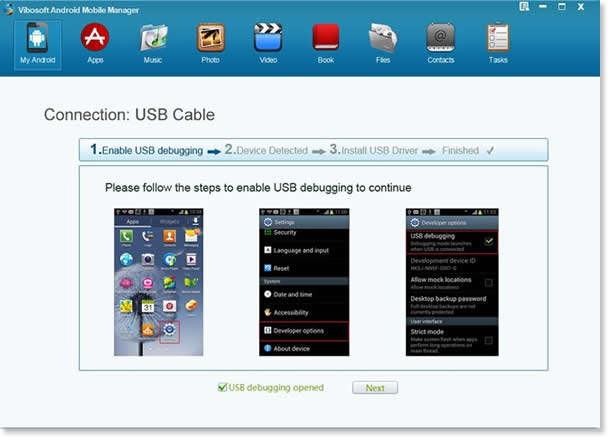
Step Two. Plug your Android device to PC via a USB cable and follow the instruction to open USB debugging. When it is over, your phone will be detected and it will install the USB driver automatically.

clip_image001

Step Three. Fully scan your Android device. You need wait a few seconds or more if your phone contains a large database. After that, all your phone information will be displayed with details. Tab the “Contact” folder to enter the management interface. You can export all the contacts or parts of them as you like.

clip_image001[7]

Vibosoft Android Mobile Manager is fully applicable to all Android braches. It doesn’t cause any damage to the original files. You can be relieved to manage your Android phones with it. You can reach the steps to transfer Android messages to computer here.

Best way to convert MP4 videos to MOV

The MOV format was coined and developed by folks at Apple. It is currently the universal codec used in all Mac computers and Apple devices such as iPhone, iPad and iPod Touch. However it is not the most popular format out there chiefly due to the fact that it can not be natively played on Windows platform and myriad of other devices. The most popular format out there is MP4 as it is playable out of box on most windows computers and non-Apple mobile devices like Android and Windows Phone.

Apple devices are also very popular and this leads to compatibility issues. Fortunately there exist a way to convert MP4 to MOV easily by using Movavi video converter. Movavi is an excellent company that makes video processing applications and it trusted by millions of satisfied people across the globe.

convert MP4 videos to MOV

The Movavi video converter lets you convert MP4 files to MOV format and much more. It supports plethora of mobile devices and is available for both Macintosh and Microsoft windows operating system. If you have a non-MP4 file such as WMV, MPEG-2 etc, you can still convert that video file to MOV using this application.

Using the Movavi video convertor application is fairly easy. First you must download it from their website. After opening the installer, you will be presented with an easy to use installation wizard. Simply follow the onscreen instructions and you will have it installed in no time. After installation, click on the shortcut on the desktop.

After that add you source files and set the destination. If you do not choose a destination folder, the converted files will be saved in the default folder. Now select the output format, which in this case is MOV. If you want to convert to some other format, choose it from here. The converter supports more than 180 formats. It supports two way encoding as well.

Now that you have specified and keyed-in all the settings, it is time to press the Convert button to start the conversion process. We have been told that Movavi video converter makes use of hardware encoding to speed up the process. It has full support for Intel Core i-series processors and Nvidia Cuda graphics which makes it must faster than the competition.

The developers and team behind it guarantee total user satisfaction as they themselves know they have a winner in their hands and no other video conversion software can touch in terms of simplicity, performance and ease of use.

Toshiba Z20T Portege specifications, 12.5 inch tablet spotted with keyboard

Toshiba Portege Z20T was recently spotted on FCC website and we were able to find out its specifications. It comes with a 12.5 inch full HD display and a detachable compact keyboard.

There are a lot of chances the Toshiba Portege Z20T could be fanless and equipped with a Intel Core M broadwell processor or the less powerful Core i5 / i7 ultra low voltage haswell CPUs. SSD drives of different capacities will be used in different models. RAM goes up to 8 gigabytes depending on the model you buy.

Built in digitizer will also be offered in certain models so that users able to doddle or write notes just like a pen. Of course you will Windows 8 operating system on board.

Toshiba Portege Z20T

Concrete release dates are not yet know but expect it to be released during or just before the holiday season. Picture shows a tablet with square corners with Toshiba logo on the bottom left. Camera and microphone looks slightly off centered.

The Toshiba Z20T looks like a slightly bigger version of the Portege Z10T released last year. Other than improved processing speed, the Z20T offers maximum angle of inclination of the tablet attached to the dock of 120 degrees which is about 15 degrees more than what one used to get with Z10t.

The Long Wait is Over – GOSF is just Round the Corner

If you are a vivid online shopping enthusiast, you will be aware of GOSF or (Google Online Shopping Festival). This online festival has been creating waves in the online market by offering some of the best deals. It all began on the landmark date 12-12-12 (12th December 2012) and was touted to be one of the best days for online shoppers. The same legacy continued on 11-12-13 (11th December), when the second GOSF was hosted. So, what is GOSF? Is the hype around it really worth it? Which brands participate in GOSF? Are the goods really affordable? What are the terms and conditions? These are some of the questions that are generally asked by people who are not aware of GOSF.

In this year, GOSF is going to be held between 11th December and 13th December. If you have some very big plans for your Christmas and New Year shopping, then hold on to your guns and wallets. There would be many exciting offers from all participating brands and companies. This concept is very similar to the China Shopping Festival and the Cyber Monday, which are held every year. More so, further discounts can be availed by using the GOSF Coupons that make shopping more fun.

During GOSF, customers are offered myriad deals and discounts on furniture, apparels, mobiles, tablets, laptops, and many other categories. In the year 2012, GOSF was only for a day, but it created a roar in the online market. Seeing the success of 2012, the organizers decided to extend the duration from one day to three days. Seeing this demand, the festival was extended for one more day. Yet, there were many customers who were very disappointed and were left in the lurch by the organizers.

Like 2013, this year too Google has decided to host the event for three days—experts say that this is really a smart move by the search engine giant. However, the experts also believe that this year the festival will be extended by two to three days. There are many other speculations that are being floated in the online world. You can choose to believe them or you can choose to ignore them—customers is the king—remember that.

If you want further discounts on the goods that are being sold during this year’s GOSF festival, then you will have to look out for some very good GOSF coupons. There are some very good Indian coupon websites that are really offering substantial discounts on many items.

This is how Android 5.0 looks on LG G3

It is obvious that LG would release Android 5.0 lollipop for the LG G3 phone. Now first screenshots of it have been released that show how the new operating system will look in conjunction with the proprietary LG user interface on the G3.

Android 5.0 looks on LG G3

These images were released by a Polish site. The notification center show LG’s own adjustments along with certain tweaks to the homescreen as well. Overall the LG’s UI looks quite attractive but the new Android 5.0 does adds some more confusion as well.

The release of Android 5.0 for LG G3 will commence in few weeks from now but we do not have a concrete release date. We have been told that the LG G2 will be getting the update sometime later.

Pipo W5 tablet specifications, comes with stylus

Pipo W5 is a windows 8 tablet that costs 199 euro and features a small 8 inch display with 1280 x 800 resolution. The highlight of Pipo W5 is its support for stylus input.

Pipo W5 tablet specifications include Intel Atom Z3735G quad core 1.83 GHz processor, 2GB RAM, 32GB eMMC flash memory, two cameras (5 / 2 megapixel cameras) and a battery with capacity of 4500 mAh.

The Pipo W5 costs about 899 Yuan in China which is about 120 euros in Europe. However we are pretty sure it will retail at much higher cost in European shops if it ever makes a debut here.

Pipo W5 tablet specifications

The new Windows 8.1 with Bing has definitely allowed the Microsoft to gain some market share in the tablet arena and with devices like Pipo W5, there is little its rivals will be able to do. Windows allows users to do so much more on the move. There are no compatibility issues and you can even connect your scanners and printers with them easily since you can use the existing x86 / x64 drivers with them.