Getting Rid Of Computer Viruses

It’s often normal for a virus to affect your computer files and the overall performance of your system. Many people store a massive amount of data and files in their systems and the majority of people use the internet in a way which makes it easy for an operating system to become infected with a virus. A virus can be defined as a computer program capable of copying itself to a computer and infecting it. This term is also synonymous with referring to malware like adware and spyware programs which are incapable of reproduction.

Computer Viruses

Provided there is enough evidence to believe a computer is infected with a virus, running an antivirus scan will help to detect and remove the threat. Those users who are unable to boot into windows can boot the computer to safe mode to run the antivirus scan.

As soon as the malware threat is discovered by the antivirus program, a prompt is usually given and informs the user if they would like to remove the infection. The user should either quarantine or remove the threat. Many users don’t have malware security software on their computers and in this case, if they are suspicious of a file infected with a virus, running an online scan may be the right way to proceed. There are many websites out there on the Internet which are capable of scanning a computer’s hard drive for infections. Installation of a high quality free antivirus or paid version is recommended.

There are two different categories of the antivirus programs. One of them is a real time program that consistently seeks and identifies malware.

A different option exists in the form of on-demand scanners that look out for malware infections. Detection occurs when opening the program manually and running a system scan. It is better to have a single antivirus program installed with real-time protection but some on demand virus scanners could be handy.

Using antivirus or malware removal software is crucial and there is really no point in manually deleting files on the computer which are suspected to be infected as it won’t fix the problem. In the process, the user could end up deleting some important files which aren’t affected by viruses. It may unfortunately lead to errors and issues with the computer’s operating system.
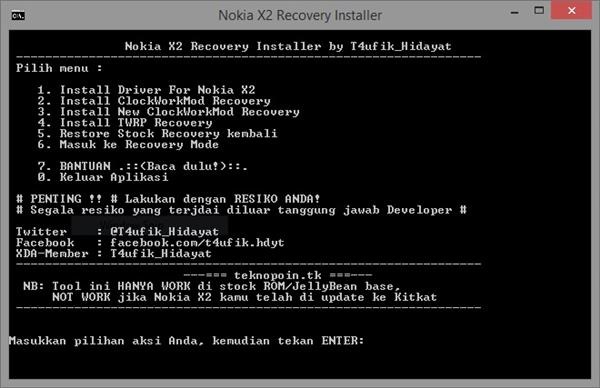
Download Nokia X2 Clock Work Mod recovery, custom recovery Philz Touch and original recovery

You can download CWM a k a clock work mod recovery for the Nokia X2. In fact there four options for you. First is the Philiz Touch which is used by most of the Nokia X2 custom ROMs. Second is CWM and third is TWRP. Last one is the original Nokia X2 stock recovery which is useful for bringing the Nokia X2 to original configuration.

nokia x2 custom recovery

Continue reading “Download Nokia X2 Clock Work Mod recovery, custom recovery Philz Touch and original recovery”

Monk Magnet Wallet Case Review for iPhone 6 and 6 Plus

Monk Magnet Wallet Case is perfect for those iPhone users that are tired of carrying too many things with them. If you are looking for case that can store your cash and credit cards and something that is made of leather, then you might want to check out the Monk Magnet Wallet Case that is available for both iPhone 6 and iPhone 6 Plus. 

Monk Magnet Wallet Case Review for iPhone 6 Plus

Monk Magnet Wallet Case iPhone 6 Review: Video Overview

This iPhone 6 case comes with QuickMag technology that allows you to quickly detach your phone from case when you simply do not want to use the case. This is great for me because I talk a lot on the phone and would not want to put a heavy leather case against my ears.

Monk Magnet Wallet Case iPhone 6 Plus Review

Monk Magnet Wallet Case Review for iPhone 6 and 6 Plus: Features

Protect your 6 in style; Detachable magnet inner case; Edge-to-edge access to touch screen; Includes pockets for cards, and cash;
Includes window pocket for ID; Unique vintage book design; Camera hole allows for easy access to iSight camera; Snap-in design ensures your phone will stay in place; Thin profile; Shock protection; Screen protection and Abrasion protection

Monk Magnet Wallet Case Reviews for iPhone 6 Plus

Manufacture part number SW-30493-6. Costs $34.95 for either iPhone models.

Intel Xeon E7-8895 v3 specifications, The most powerful processor for servers

Intel Xeon E7-8895 v3 was quietly launched today by the company and it currently the most powerful x86 processor for servers. Intel Xeon E7-8895 v3 has total of 18 cores which with hyper threading gives you 36 logical cores that can be configured on the fly depending on the load.

Intel Xeon E7-8895 v3 specifications

Intel Xeon E7-8895 v3 specifications: 22 nm Haswell-EX processor with base frequency of 2.6 GHz and 3.5 GHz in turbo more, a 45 MB cache, DDR3 / DDR4 memory that supports up to 1536 GB of memory and 32 PCI-Express 3.0 lines with a TDP of 175 watts.

As mentioned earlier, you can change the number of cores in action and the operating frequency at any time remotely without having to make any changes physically. However, these functions are currently only supported by the Oracle Server X5-4 that was announced recently.

For now, the  Xeon E7-8895 v3 is only available to Oracle customers, and nobody knows when it will be sold to other customers. Price tag is also unknown but it will be close to 7200 dollars.

Download Samsung Android 5 keyboard for Note 3 Neo

Samsung introduced new improved keyboard in Android 5 lollipop but has not made it available for the Galaxy Note 3 Neo. Fortunately XDA has made it available by porting it to Note 3 Neo. 

Download Samsung Android 5 keyboard for Note 3 Neo

To use it, you must download and flash the Note 4 Mini V6 ROM on your Note 3 Neo and then flash it. Download Samsung Android 5 keyboard from here and flash it using Note 3 Neo custom recovery but if you had earlier installed the Note 4 Mini v6 ROM, you must be having the custom recovery already installed. The ROM is very efficient and will improve your battery life as well.

You will find multitude of enhancements on this Samsung keyboard compared to the one you already have on your Note 3 Neo. It feels much polished and better to type on. 

Download Flipboard briefing for Galaxy Note 3 Neo

Flipboard Briefing is originally now bundled with the Samsung Galaxy Note 3 Neo but you can get it by installing the APK from link given at the bottom of this post. This flipboard briefing APK has been extracted from a Galaxy S6 ROM.

Download Flipboard briefing for Galaxy Note 3 Neo

The best part is that the Flipboard briefing APK can be installed as a normal APK file. For those who do not know about Flipboard briefing, it gives you the daily top news, according to your interests, all in one place – all powered by your Flipboard account.

After installing the APK file, from the home screen, swipe left to the Flipboard Briefing panel and select Get Started that is located at the bottom. Review the terms and conditions and tap on I Agree to continue. Then tap on the Menu Icon and follow the on screen prompts.