Macbook Pro: How to clone hard disk to SSD including operating system

So you just bought an SSD a k a solid state drive for your Macbook Pro and now you are looking to clone that old and slow hard disk and move all that data including the operating system to the new drive. Believe us, the Macbook Pro are still the best of Apple laptop line up and they become unbeatable after adding in an SSD.

How to clone hard disk to SSD

The one I personally recommend getting for your Macbook Pro is Samsung 850 Evo SSD. I have been using its predecessor, the Samsung 840 Evo for over an year now and it has been superb and trouble free so far. The Samsung 850 Evo solid state drives come with good enough warranty and it really hits a sweet spot when it comes to price.

Clone Macbook Pro HDD to SSD

Anyway let us get back to topic, that is how to clone the Macbook Pro hard disk to SSD. For the cloning I personally like the SuperDuper utility. This simple-to-use tool is a simple, powerful piece of software and its free version is good enough for the most users.

clone macbook pro hdd

You can use the SuperDuper to clone the HDD’s contents to your new SSD. Make sure you have partitioned it through Disk Utility using any generic USB to SATA adapter. This way, you can make sure the drive is ready to go before you start opening up your computer and moving things.

usb to sata adapter

Click on Copy Now button to start cloning.

How to charge Macbook 2015 and use USB simultaneously

The new Apple Macbook 2015 comes with a single USB C port so how would you charge a Macbook 2015 and use the USB at the same time? The solution is to use the USB-C Digital AV Multiport Adapter that Apple sells for 79 dollars. This is how it looks like. It adds three connections: USB-C, HDMI and USB 3.1 Gen 1 ports. The USB-C can be used for charging and another USB can be used for connecting peripherals.

Macbook 2015 charge usb port

We saw every one complaining about not being able to charge the Macbook 2015 and use another peripheral such as Mouse as the same time. The answer is yes, you can do it but you will have to cough 79 dollars to add that functionality. We really hoped Apple included the $ 79 accessory in the box but alas, it does not.

charge Macbook 2015 and use USB

The Apple’s idea is that this is supposed to be a universal port and if you would be connecting many peripherals, then we suggest getting another USB to 4 port USB hub. We found one that retails for mere $ 6 so there is no point in not getting one.

Macbook 2015 and TSA Transportation Security Administration

Apple Macbook 2015 is a pretty amazing laptop but will it have to be removed from bag or can you keep it inside the bag given the fact that Macbook 2015 is fanless and pretty small just like a tablet? We feel that most of the public will consider it as upgraded Macbook Air which shows the poor marketing done on the Apple’s part.

Macbook 2015 and tsa

So unless Apple phases out the Macbook Air which we are guessing they will, this issue will not be solved. Transportation Security Administration a k a TSA will provide some guidance on the point but that means nothing.

macbook air Transportation Security Administration

Transportation Security Administration at myriad airports will continue to do whatever they want. It shall be noted that Macbook Air 11 inch model is allowed to stay inside the bag most of the time except when you have agents at the airport that do not understand the policy.

Huawei MediaPad X2 price and release date along with specifications

Huawei MediaPad X2 is a 7 inch android tablet packing a very powerful eight core 64 bit Huawei Kirin 930 processor based on ARM Cortex A53 architecture clocked at 2 GHz.

Huawei MediaPad X2 price tag and release date: Huawei MediaPad X2 will be released on March 17 with a price tag of 1999 Yuan which is about $ 319.

Huawei MediaPad X2

Huawei MediaPad X2 specifications include 7 inch display packing 1920 x 1200 pixel resolution, 16 gigabytes of storage, Mali T628 GPU, 3 gigabytes of memory, micro SD card reader, LTE and massive 5000 mAh battery which according to the manufacture will provide full day of use. 32GB storage will cost 2499 Yuan which is about $ 398.

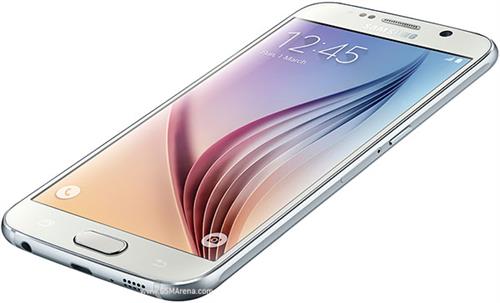
Samsung Galaxy S6 and S6 Edge display problems

Samsung Galaxy S6 and S6 Edge were launched at the mobile world congress 2015 event. Many reviewers have noted that there are some display problems on these new android smartphones with some finger inputs are not detected properly. These Galaxy S6 and S6 Edge display problems were double confirmed with the TSP Grid mode test that proved that there there are dead spots on the edge of the touch screen. 

Samsung Galaxy S6
Continue reading “Samsung Galaxy S6 and S6 Edge display problems”