Guleek i8 hands on review, excellent windows desktop with battery

The Guleek i8 is a mini desktop computer with a built in battery. This makes it one of the most unique desktops around. It is as small as Zotac mini PCs but has a 3000 mAh battery inside too which allows you to move it from one place to another without shutting it down.

The Guleek i8 is a compact computer with windows 8.1 operating system and is powered by Intel bay trail processor.

Guleek i8 video review

As you can see, this is basically a mini laptop without a display. It features 1.8 GHz Intel Atom Z3735F quad-core processor, 2GB of RAM, 16GB of storage, a microSD card slot, and a fanless design.

On the ports front you get 2x USB 2.0 ports, a micro USB port (for charging), a micro HDMI port, a headset jack, 802.11b/g/n WiFi and Bluetooth 4.0. It measures 5.9″ x 3.2″ x 0.4″ and weighs about 8.5 ounces.

Here is what we did not like about it:
– Doesn’t have a network port;
– The power socket is right next to the USB sockets, should be on the back;
– You can find tablets for the same price with bigger batteries, a screen, and more storage.

Guleek i8 review While the support for controlling the device with a Android device gives it some interesting niche uses as low cost media center, simple auto uploader/downloader, basic streamer, converting a monitor or TV into a simple net computer, basic server, kiosk system

This would be interesting paired with one of the old Motorola Lapdocks from the Atrix/Bionic era. The lapdock itself is powered and would provide nearly everything else that’s missing: Display, keyboard, trackpad, audio (possibly), and maybe some extra USB ports. Roll your own networking? Just Velcro the thing to the back of the lid and route the cables into the dock ports like with any other stick PC.

Guleek i8 Not sure why everyone is comparing it to a tablet. It's very similar to an Asus X205TA netbook, except that has a bit more storage memory. Personally I think having the dual screen option is worth the extra money

Verdict – It’s really pointless when consumers can spend less and have a fully portable system with dual functionality. This mini PC would only work if it was on par with prices to the ARM devices. If you need a dual display option you can buy a Asus Vivo that runs Intel 4th Gen. It supports THREE displays connected at once, runs Linux and Windows and is almost the same price as this mini PC. And has USB 3, Ethernet “yada yada”. I just don’t see the market appeal if its priced the same as a tablet.

Blu Studio Mini LTE, 5.0 HD LTE, Studio 6.0 LTE launched, specifications inside

Blu has launched three new android phones to its smartphone lineup. All the three phones are members of the Blu Studio family and all of them boast 4G LTE radio for providing high speed broadband connectivity in the USA.

Blu Studio Mini LTE review

Blu Studio Mini LTE is the cheapest of the newly models. It is priced at 120 dollars and has these specifications. Currently it runs Android 4.2 jelly bean operating system but the company has confirmed it will be pushing kitkat update very soon. The Blu Studio Mini LTE supports AT&T, T-Mobile, Straight Talk, Cricket, and Metro PCS networks.

Blu Studio Mini LTE specifications

* 4.5 inch with 854 x 480 pixel display
* 1.2 GHz Qualcomm Snapdragon 400 quad-core processor
* 1GB of RAM
* 4GB of storage expandable via microSD card slot
* A 5MP rear camera and front facing 0.3 megapixel webcam
* Connectivity options include onboard WiFi, Bluetooth, all of which is powered by 1850mAh battery.

Blu Studio 5.0 HD LTE review

Next is the Blu Studio 5.0 HD LTE which sells for 199 dollars. It comes unlocked to be used on any cellular network.

Blu Studio 5.0 HD LTE specifications

5 inch, 1280 x 720 pixel display, has a 13MP rear camera and 5MP front camera, sports a 2200mAh battery, and has 8GB of storage. Unlike the aforementioned model, the Blu Studio 5.0 HD LTE ships with Android 4.4 kitkat operating system onboard. Rest of its specifications are similar to the Blu Studio Mini LTE.

Blu Studio 6.0 LTE review

Last one is the Blu Studio 6.0 LTE which costs 279 dollars and like Studio 5.0 HD LTE, it also comes unlocked and runs latest Android 4.4 kitkat operating system software. However it does not supports AT&T’s 4G LTE network.

On the brighter side the Blu Studio 6.0 LTE does have full support for T-Mobile’s LTE network for faster internet browsing.

Blu Studio 6.0 LTE specifications

* 5 inch display with 1920 x 1080 pixel resolution
* 2 gigabytes of memory
* 16 gigabytes of flash storage expandable via micro SD card slot
* 13Mp and 5MP cameras
* Android 4.4 software
* 1.6 GHz Snapdragon 400 chip, and a bigger 3200mAh battery.

Asus Zenfone 2 specifications leaked thanks to Bluetooth SIG

Asus will be unveiling the Zenfone 2 at the Consumer Electronics Show to be held in Las Vegas in 2015 but its filing at Bluetooth SIG has already spilled out its specifications.

A phone by model name ZC451CG has surfaced on Bluetooth SIG’s website which tells us that the Asus Zenfone 2 will feature 4.5 inch display with a resolution of 480 x 854 pixels. It will be powered by Intel dual core processor backed by 1 gigabyte of memory. There is a 5 mega pixel camera and a VGA front facing shooter as well.

Power all this is a 2100 mAh battery which should be enough for a day of good usage.

Asus Zenfone 2 specifications

We loved Asus Zenfone 5 which was one of the best budget android phones of 2014. We will learn about the Zenfone 2 in about two weeks time when it will be unveiled at the Las Vegas.

Grovemade Maple iPhone 6 case review, too expensive to recommend

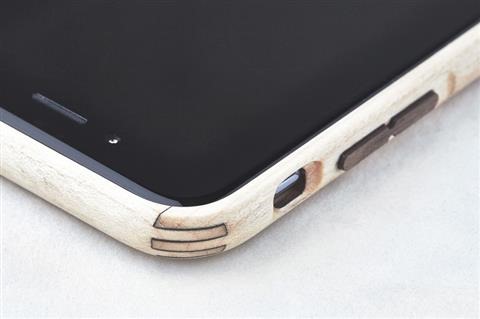
Grovemade is well known brand when it comes to all wood cases but does it really makes any sense to spend hundred dollars on a cell phone case made of wood? Nevertheless here is the review of Grovemade Maple iPhone 6 which retails for 99 dollars.

For $99 you get precise cuttings for volume and power buttons. There is an opening at the bottom for the lightning cable.

So how does the Grovemade Maple case feels in hand? Well it actually feels very good – like wood but we will be lying if we say the fake wood case don’t feel good in hand. In fact they look better too.

This iPhone 6 case consists of two parts – backplate and bumper. The backplate has no cutting for the logo so for those who bought the phone for flaunting that Apple logo will be disappointed.

Grovemade Maple iPhone 6 case review

Here are some features of the case:

Made from Eastern Hardrock Maple
All wood construction using the strength of grain direction
CNC milled
Signature, precision-crafted corner joints
Lasercut actuated walnut power and volume buttons
Hand sanded and hand stained
Phone easily snaps in and out of frame
One piece .070” thick adhesive back plate- leaves no residue (not meant to be repeatedly removed)
Manufacturing process creates minimal waste
Conceptualized, fabricated and constructed by Grovemade in Portland, Oregon.

No matter how good the case is, we just cannot recommend anyone a $99 case that is made of wood.

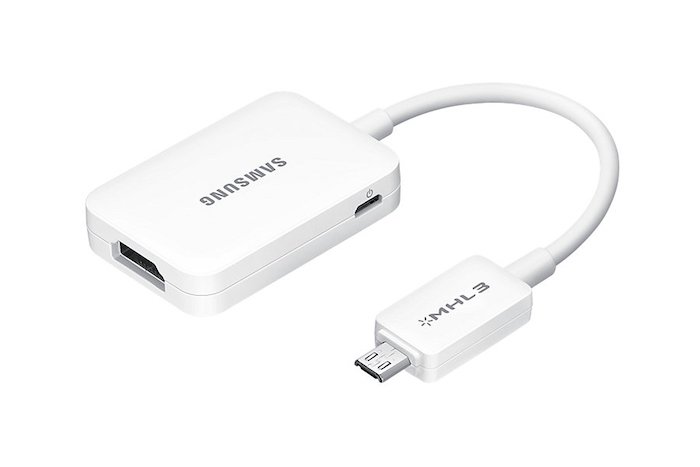
Galaxy Note 4, 3, S5, S4 MHL 2.0 HDTV adapter review, connect using HDMI cable

Samsung MHL 2.0 adapter is meant to be used in latest Galaxy Note and S series and it allows users to run full HD 1080p videos at up to 60 FPS. The best part is that you do not require your phone to connect to power source to use it. Also this HDTV adapter is fully backwards compatible with Galaxy S3 and Note 2 that have only MHL 1.0 support.

samsung note 4 mhl adapter
Continue reading “Galaxy Note 4, 3, S5, S4 MHL 2.0 HDTV adapter review, connect using HDMI cable”

Micro SATA 1.8 inch SSD HDD to 2.5 SATA converter review

The Micro SATA 1.8 inch SSD-HDD to 2.5 inch converter is for using 1.8 inch SSD drives in laptops with 2.5 inch HDD bay. In simple words, it lets you use a small SSD or hard disk into your conventional laptop.

I bought one for just $5 from Amazon to try it out and it works like a charm. I had a 128GB 1.8 inch SSD from Toshiba lying around and I thought of using it on my Lenovo ThinkPad X120E laptop that is slow snail when it comes to performance. I came to the conclusion that only an SSD can rescue it but I did not want to buy one since I already had one at home.

Micro SATA 1.8 inch SSD HDD to 2.5 SATA converter review

This Micro SATA 1.8 inch SSD HDD to 2.5 SATA converter worked like a charm. It adds around 1 inch to the length of the SSD. Here is how it looks like with the 1.8” SSD attached.

micro sata converter

After attaching simply slide it into the 2.5 inch connectors of your laptop. You may need to add some padding on the bottom so that it does not rattle. I added thermocol for padding. It works perfect and has solid construction.

laptop 1.8 inch converter to 2.5

It shall be noted that this converter does not works with mSATA drives.

Conclusion: It is cheap and it is functional. It lets you use your 1.8 inch SATA SSD drives in your big laptops. Buy it from amazon for just $5.