Galaxy Note 2 Root

samsung Galaxy Note 2 RootFollowing instructions will guide you on how to root your Samsung Galaxy Note 2. After rooting, you will be able to play with all sorts of advanced apps that involve Super user permission; messing with file system and so on.

-Make sure you have installed adb driver or Samsung Kies on PC
-Download Odin
-Download Galaxy note 2 CWM recovery and reboot device to Note 2 download mode which allows you download firmwares from PC.
-Open odin on your PC and select downloaded file for PDA tab
-Connect device to PC, and wait till device successfully added to com port and flash.

After rooting, we suggest you to visit Play market and update SuperSu and install Busybox which are required for all root apps.


Galaxy Note 2 Released in Indonesia (Price, Contract)

Erafone, a popular phone retailer has started taking pre-orders for the Galaxy Note 2 in Indonesia. Samsung is offering massive cut in official price there – Rp7,499,000 ($780) to Rp5,299,000 ($550). The discount can only be availed by those who are willing to pay via credit card installments for 12 months (at 0 percent interest rate). Also, you need to have credit of one of these companies – BCA, BNI, Mandiri, or Citibank.

galaxy note 2 indonesia

Continue reading “Galaxy Note 2 Released in Indonesia (Price, Contract)”

Galaxy Note 2: South Africa Price, Contract, Plans

South African network provider, MTN has already started taking orders for the Samsung Galaxy Note 2. You can purchase it on Anytime 200 contract starting today for RM 429 per month that spans over 24 months. Galaxy Note 2 South Africa Price, Contract, Plans The plan includes 250MB of data usage as well. You can fill an online form over MTN’s website to register one for yourself.
Vodacom will be making it available starting from Oct 3, 2012 under following plans:

Continue reading “Galaxy Note 2: South Africa Price, Contract, Plans”

Galaxy Note 2 Download Mode

Putting the Galaxy Note 2 in download mode is similar to Note 1. download mode galaxy note 2 Just press the vol down + power button + home button simultaneously. A warning screen will come up. Just press the Volume Up key to continue booting your Note 2 in download mode.

The mode is used to flash custom firmwares, clock work mod recoveries, radios and so on. Make sure you know what you are doing as you can easily screw things up in download mode by flashing a wrong ROM. 

Galaxy Note 10.1 Canada Price, 3G Version Release Date

Canadian users, rejoice as Samsung has finally made the much awaited Note 10.1 tablet available in canada galaxy note 10 1Canada. It is on sale at Best Buy, Future Shop and many others and price starts at 500 dollars for the 32GB model. Folks that want the 3G version will have to wait tiny bit more as the carrier branded model will be made available later this year (2012).

For 500 dollars, you get quad core processor, 2GB RAM, 5 mega pixel camera and Android 4.0. It will be given Jelly Bean treatment (Android 4.1) very soon too.  Full specs:

Continue reading “Galaxy Note 10.1 Canada Price, 3G Version Release Date”

Deodexed, Zipaligned Galaxy Note 10.1 Firmware

An xda user has released a firmware based on the official stock firmware (N8000DDALH1) that is both Deodexed and Zipaligned. This firmware also disables the increasing ring.  Here is the full list of features of this ROM.

FULL RTL ARABIC SUPPORT+SAMSUNG ARABIC KEYBOARD
Based off Stock Indian N8000DDALH1
Custom Boot animation support
Google Now
Deodexed / Zipaligned
Extended Power Menu
Disable the increasing ring
remove SMS from call log
Add Dsp manager and audio Hack
SMS, Recipient limit, Receiving time, Conversion=200
Joining Unlimited Contacts in Single one
Add CRT Off
Add xbmc , netflix and hulu

To install it, make sure you have custom recovery for N8000 installed on your Galaxy Note 10.1 tablet. Then, download the firmware from here and copy it to the root directory of your SD card.

After that, boot into recovery (vol up + power button) and install the firmware from there.

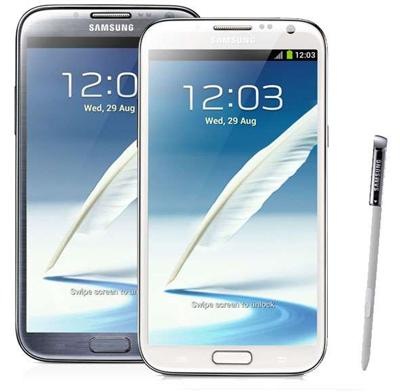
Galaxy Note 2: Grey or White

The Samsung Galaxy Note 2 is up for pre-order in various countries and many are unable to decide whether to go for white color or the new Titanium Grey (nope, no black color this time). So, here are my thoughts on it (they might help you decide).

grey-white-samsung-galaxy-note 2 

1) If you have owned a white phone (I own a white Galaxy Note and S3) before, I really suggest you to go for the new grey as it stands out from the crowd.
2) If you want to look professional at work place, grey is the color to go.
3) My white Galaxy Note with flip got dirty quick and believe me, I am not a messy person. The dirt stands out big time.
4) White is the one to go if you are into show off. You will catch a lot of attention by girls with your white Note 2 in ear while drinking Red Bull.
5) My friend, who owns a blue Galaxy S3 often associates white phones with women.
6) My other friend, on the contrary, finds the white more elegant as it does not shows fingerprints easily.