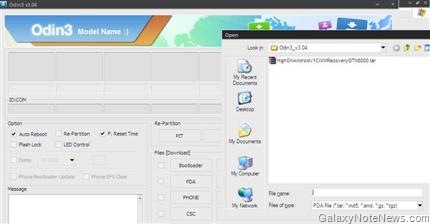
Galaxy Note i717 is an amazing phone, but you can do much more after rooting it. For example, you can install apps to underclock or overclock it. You must root in order to install custom CWM which is required if you are going to install a custom ROM on your Note. To enable tethering on i717, you will need to root first so that you can install Titanium backup on it. Here are the steps on how to root your Galaxy Note i717 phone.
Galaxy Note i717r Roger Firmware
Flashed a custom ROM on your Roger Samsung Galaxy Note (i717r) and now want to go back to the original firmware. For this, you will have take back phone, pda and CSC version to the following version numbers:
PHONE: I717RUXLA2
PHONE:I717RUXLA2
CSC: I717RRWCLA2
Build info Jan 6 2012
You must use the firmware with ODIN only.
1, RWC_signed_Q1_USA_1221.pit (3.89 KB) PIT FILE
http://www.multiupload.nl/GUEL1DIAMF
2. ABOOT_SGH-I717R_I717RUXLA2_user_CL875155_REV00.tar.md5 (1.54 MB) BOOTLOADER FILE http://www.multiupload.nl/XSP4X7SU5O
3. PLATFORM_KERNEL_AMSS_SGH i717R_I717RUXLA2_user_CL875155_REV00.tar.zip (536 MB) PDA FILE UNZIP IT FIRST http://www.multiupload.nl/03Q71WYKAU
4. I717RUXLA2_phone_secure_Q1_ROGERS_REV_00_CL870799. tar.md5 (26.09 MB) PHONE FILE
http://www.multiupload.nl/0KV4DII0X1
5. SGH-I717R-CSC-RWCLA2.tar.md5 (9.19 MB) CSC FILE http://www.multiupload.nl/3EZMLXNY08
Samsung BT S Pen MH5100 Review
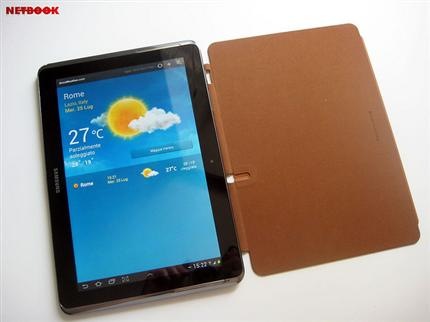
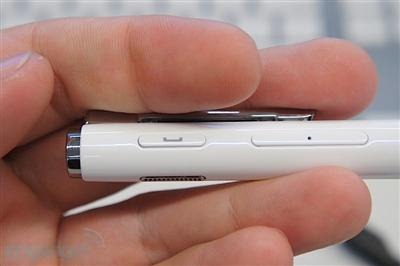
Galaxy Note 10.1 tablet comes with a stylus built in but if you find it unconformable in your hands, you can opt for the more pen-like MH5100. This Samsung accessory is much more thicker and feels great in hand.

It provides much more functionality than the D-pen as it lets you use it as a headset. Just connect your N8000 or N8010 via Bluetooth and then you will be able to make calls from your tablet, just like a normal phone.
Download Android 4.0.4 N7000DDLR6 for Galaxy Note
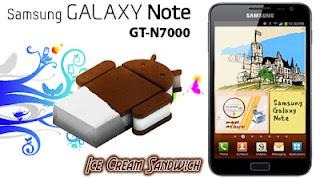
The Android 4.0.4 is the latest ROM for the Galaxy Note N7000 phone. This firmware brings improved keyboard; improved web browser and bug fixes to the Samsung N7000 users. I installed this and my Galaxy Note is much more smoother now.

Here are the download links:
Continue reading “Download Android 4.0.4 N7000DDLR6 for Galaxy Note”
Core i5-3320M specs
Core i5-3320M specs
Core i5-3360M specs
Core i5-3360M specs
Core i5-3427U Specs
Core i5-3427U Specs
Core i7-2630QM specs
Series Intel Core i7
Codename Sandy Bridge
Clock Rate 2000 – 2900 MHz
Level 1 Cache 256 KB
Level 2 Cache 1024 KB
Level 3 Cache 6144 KB
Number of Cores / Threads 4 / 8
Max. Power Consumption (TDP = Thermal Design Power) 45 Watt
Transistor Count 995 Million
Manufacturing Technology 32 nm
Die Size 216 mm2
Max. Temperature 100 °C
Socket FCPGA988
Features HD Graphics 3000 (650-1100MHz), DDR-1333 Memory Controller, Hyper Threading, AVX, Quick Sync, Virtualization (VT-x)
64 Bit 64 Bit support
Hardware Virtualization VT-x
Announcement Date 01/03/2011
Core i7-2635QM specs
Series Intel Core i7
Codename Sandy Bridge
Clock Rate 2000 – 2900 MHz
Level 1 Cache 256 KB
Level 2 Cache 1024 KB
Level 3 Cache 6144 KB
Number of Cores / Threads 4 / 8
Max. Power Consumption (TDP = Thermal Design Power) 45 Watt
Transistor Count 995 Million
Manufacturing Technology 32 nm
Die Size 216 mm2
Max. Temperature 100 °C
Socket FCBGA1224
Features HD Graphics 3000 (650-1200MHz), DDR-1333 Memory Controller, HyperThreading, AVX, Quick Sync, Virtualization
64 Bit 64 Bit support
Hardware Virtualization VT-x
Announcement Date 01/06/2011
Core i5-3317U Specs
Core i5-3317U Specs
Series Intel Core i5
Codename Ivy Bridge
Clock Rate 1700 – 2600 MHz
Level 1 Cache 128 KB
Level 2 Cache 512 KB
Level 3 Cache 3072 KB
Number of Cores / Threads 2 / 4
Max. Power Consumption (TDP = Thermal Design Power) 17 Watt
Manufacturing Technology 22 nm
Features Turbo Boost 2.0, Hyper-Threading, Virtualization VT-x, AES, Intel 64, Anti-Theft, My Wi-Fi, Idle States, Enhanced Speed Step, Thermal Monitoring, Execute Disable Bit
64 Bit 64 Bit support
Hardware Virtualization VT-x, VT-d