Acer Aspire One 103 now available for preorder [Netbook]

Although the Acer Aspire One 103 was announced just a few days back, but it is already available for preorder at PCcorner. It also confirms that it would be using the new Intel Atom N280 running at a clock speed of 1.66GHz. We though that it would be sporting the 160GB HDD, but it is offering 320GB HDD. It is also coming with 6-cell battery as standard, which should provide 6 hours+ battery life.

It would be nice to know the improvements the Intel Atom N280 brings other than the little 60Hz difference. Another exciting inclusion is the use of Intel GN40 chipset, which supports many hardware acceleration features for video playback.

Also, it seems to have two RAM slots (notice the two 512MB RAM chips). It is available for PhP26,500, which is $550. At $550, it is still a great buy!

Here are the FINAL specs: Continue reading “Acer Aspire One 103 now available for preorder [Netbook]”

AMD CEO agrees that Notebook/Netbook line will continue to blur [Netbook]

A couple of days back, we said something about the future of netbooks.  AMD CEO Dirk Meyer says that “The distinction between what is a Netbook and what is a notebook is going to go away. There will be a continuum of price points and form factors.”

He says that the people who buy cheap netbooks are not able to enjoy full PC experience. I don’t understand this statement. If someone is buying a $299 netbook, he must be well aware of it’s capabilities. At such a low price, you won’t be getting a top-of-the-line netbook with all the features. If you shell out $450 for the ASUS EEE 1000H or S101, you would be able to get a great PC experience unless you want to play Crysis.

AMD CEO agrees that Notebook/Netbook line will continue to blur

Although, we must consider the fact that these words are coming from a company that does not have a netbook processor and think that they do not need one too. [fudzilla]

How To: Install Windows 7 on HTC Shift [UMPC]

HTC Shift comes with Windows Vista only. There is no official support for Windows XP. But, Vista drivers seems to work fine on the Windows 7 (of course in compatibility mode). The snapvue also seems to work fine in Windows 7. To install Windows 7 on the HTC Shift, you will need an external DVD drive.

Here is a step-by-step guide to install Windows 7 on Shift. (thanks to deadnex at xda-devs)

• Download the beta image from Microsoft

• Burn the image to a DVD

• Enable wifi and Bluetooth in Vista.

• If you want to dualboot Windows 7 and Vista you need to partition your harddrive before starting the installation. Use a suitable partition manager such as Paragon Partition Manager and shrink c:/ to approximately 15-17 GB. Create a new partition in the free space.

• Connect the USB DVD drive to your shift

• Press fn+0 (F10) after turning on your shift – select the DVD drive

• Follow the steps for installing Windows. Remember to select partition 2 as target partition if you want to dualboot with Vista. If not you can safely format the existing partition. This will not affect the recovery partition. If you prefer to upgrade from Vista to keep your files and programs you can start the installation from Vista instead of booting the DVD. However, since Windows 7 is still a beta OS this might cause some unknown problems. I recommend installing a fresh copy and dualboot with Vista.

• Download the shift drivers from HTC Continue reading “How To: Install Windows 7 on HTC Shift [UMPC]”

After Blue Angel, Windows Mobile 6.5 ported to HTC DIAMOND and HTC TOUCH HD [Windows Mobile]

Well, it did not take them long to do it. First, we heard about Windows Mobile 6.5 ported to old Blue Angel. Well, it has now been ported to the latest and the greatest devices by HTC: HTC TOUCH DIAMOND and HTC TOUCH HD. They have able to get most of the things working correctly, but not everything is working. We are pretty sure, it won’t take the folks at xda-devs much time to get all the components working correctly.

After Blue Angel, Windows Mobile 6.5 ported to HTC DIAMOND and HTC TOUCH HD

Read ApoTheTech’s HTC TOUCH DIAMOND review

Read our ApoTheTech’s HTC TOUCH HD review

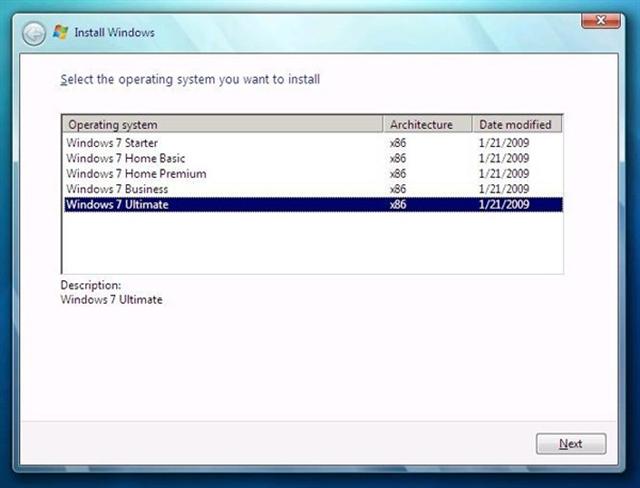
Multiple Windows 7 versions = Ok. But will there be a netbook version? [Netbook]

Here is a screenshot from the Windows 7 beta, build 7025. As we can see, upon it’s install, it asks user which version would he like to install. But, it makes the netbook community wonder one thing. What about the netbook version which is supposed to be lighter than the bulkier full verison of Windows 7?

People who would be using Windows 7 on their netbooks, UMPCs and MIDs generally won’t be needing all the featues that they use on their desktops and laptops. Although, there are many rumors from various sources that say that Microsoft would be making a special version for the netbooks and UMPCs, which would be lighther and cheaper. But, may be not in this version.

[pcbeta] [via engadget]

Acer working on a Mobile Internet Device [MID]

Soon after releasing the 10-inch Acer Aspire One, Acer may be now working hard on a MID with a pretty sizable touchscreen. The unit also seems to have a dock connector at the bottom to connect to other peripherals. The little hole looks like to be a 3.5mm headphone jack.

Acer working on a Mobile Internet Device

There is no other information like the type of processor it will be using and the amount of storage space. But, if we follow the market trend, all the latest MIDs are coming with Atom processors, which also opens the possibility to use Desktop-class operating systems like Windows XP or Windows 7. So, it will likely have an Atom processor. [electronicpulp]

Samsung SGH-i780 ROM update [Windows Mobile]

This new ROM update for the Samsung i780 will upgrade the software version from Windows Mobile 6.0 to Windows Mobile 6.1. It seems like folks at Samsung took a really long time to come up with this update especially when the Windows Mobile 6.5 is around the corner.

Note that since this will a ROM update, it will erase all the contents of your device. So, you should do a backup of all of your data before performing the update.

[related ROM update webpage]

thanks to John for the tip

Sony VAIO P Review

SONY VAIO P was the most popular product at the CES 2009. It drew a lot of media attention with it’s super sleek design. When we heard that it would be using the slower 1.33GHz Atom processor, we were really not pleased with this netbook ultra-portable (ok, Sony?) especially considering the fact that it would be running Vista. Folks at notebookreview were able to get their hands on the SONY VAIO P and they have given it a go:

Is it worth $900 when you can get a similar laptop for less money? That depends on what matters to you. The VAIO P has a revolutionary design, an extremely high-resolution display, and a few features you won’t find in a $500 netbook. That said, it still uses a relatively weak processor and isn’t designed to be a primary computer. If you plan to use the VAIO P as your primary family PC and multimedia center then you will probably be disappointed. If you plan to purchase the VAIO P as a lightweight travel laptop it might just be the perfect laptop on the market.

Sony VAIO P Review


Pros:

  • Smallest and lightest in class
  • Excellent build quality
  • Fantastic keyboard despite the small size
  • Responsive, business-grade touchpoint
  • Available with built-in 3G WWAN
  • No noisy cooling fan

Cons:

  • Expensive for an Atom-based laptop
  • Gets a little hot
  • Glossy plastic lid is a magnet for fingerprints
  • Weak speakers, even for something this small
  • Not user-upgradeable

[notebookreview]

Here are the specifications of SONY VAIO P:

  • 1.33GHz Z520 Intel Atom Processor
  • 2GB DDR2 800MHz (1 DIMM)
  • Windows Vista Basic SP1 (32-bit)
  • 8-inch 1600 x 768 glossy LED backlit display
  • 64GB Solid State Drive
  • Intel GMA 500 Integrated Graphics
  • 802.11b/g/n Wi-Fi
  • 3G WWAN Verizon card
  • SD/SDHC Media card reader
  • Memeory Stick card reader
  • Sony “Motion Eye” webcam
  • 4-Cell Li-ion battery (6-cell extended life battery also available)
  • Size: 9.65″ x 4.72″ x 0.78″
  • Weight: 1lb 4.8oz (with 4-cell battery), 1lb 12oz (with 4-cell battery and AC adapter), 1lb 8.8oz (with 6-cell battery)

Hide line separators on Today Screen [Windows Mobile]

Do you hate those (ugly) line separators, which border the today plugins? XDA-devs have come up with a interesting tweak which can hide those lines. For this, you will need a registry editor like Resco Registry (comes with Resco Explorer) or PHP regedit.

In HKEY_LOCAL_MACHINESoftwareMicrosoftToday. add a new DWord key with name “HidePluginSeparators” and value 1

After doing the registry add, soft reset. No more ugly today screen lines!

[via wmpoweruser]