Jim Goldman at CNBC claims that Microsoft may be planning a Zune-phone. Yes, we have heard that before too. Sometimes we heard that it will be a windows mobile device with zune software and sometimes we even thought it would be made by Nokia! This time, it is about a device codenamed “Pink”, which will be a cross of zune and technology borrowed from Sidekick (which is now owned by Microsoft).
Rumor has it that it may get unveiled at the upcoming CES going to held in January, 2009 or 3GSM conference.
The much liked Skyfire browser is now available more widely and especially to the ones living in US, Canada and UK getting special attention. But, it works fine for other countries too. Just go to get.skyfire.com and download it. Do note that for the Skyfire site to recognize your device, you must make your device recognize as Pocket PC (which is the default setting of IE mobile)
The best part: youtube works flawlessly
Well, this was the first thing I did as-soon-as I loaded up Skyfire: load Youtube.com since it promises to let you see youtube in the webpage itself. I must say that they are successful. The quality is great.
Comparison with Opera Mobile
These days, many OEMs and Carriers are bundling Opera Mobile with their devices to provide the users decent mobile experience. So I thought that the comparison was much required.
Here is the screenshot of ApoTheTech.com opened in Skyfire. Note that the text is not readble in the page-overview. So, one can hardly make out the text written.
Now the same webpage rendered in Opera Mobile. The screenshot speaks the truth itself. Also, you cannot zoom-in with the scroll wheel of HTC Diamond in Skyfire, the way one can do in Opera Mobile.
Double tapping any area in Opera Mobile zoom in and wraps the text around the screen (in VGA devices). This is not done in Skyfire. Here is the screenshot of area zoomed-in. See how the texts nicely wraps around the screen for easy-reading.
Unfortunately, this is not the story in case of Skyfire. Also notice that the images are also not clear like Opera.
However, skyfire does provide an option to wrap the text around the screen and it does infact wraps the text around the screen, but it keeps it that way even in zoom-out mode! This feature is not done correctly at all. The whole feature is pointless so far.
However, I did like the great speed at which the page was loaded. It simply blows away the Opera Mobile in terms of speed. I should say that the winner is:
Skyfire if you want speed
Opera Mobile if you want quality browsing
It also comes with a nifty Today plugin which lets you do web search from the today screen itself. It uses google for searching.
However, it won’t run on the newly released WVGA Windows Mobile devices. This includes HTC TOUCH HD and SE Xperia X1. Owners of WVGA devices will have to wait a bit more to enjoy the amazing skyfire browsing experience.
We should not complain much considering the fact that it is still in Beta and I hope that it gets better in the upcoming/final versions.
As I said before, it is still in Open Beta stage and one can grab it for free for the time being. Get it from get.skyfire.com and visit the following link for more details.
The Samsung NC10 was originally launched in only white color and now it would be available in two more colors: blue and black.
The NC10 Black is available on several UK retailer websites, but, it is more expensive than the white NC10. Th black NC10’s supply is also short in the US. On the other hand, NC10 Blue has good supply in US, but not so good in UK.
The newly released Samsung NC10 comes with same specification as the white NC10 – 10.2 inch screen, 1GB of RAM and an Intel Atom processor.
The SPB Keyboard is not a new application. Its first version was released in the year 2002. Things have changed multifolds since then. iPhone was released last year and almost all cell phone manufactures as-well-as software houses started focusing on making the user-interface more and more finger-friendly.
The SPB Keyboard promises to change the way one inputs text on their devices. Here is what is hot in this software:
full screen keyboard
skin support
gesture support
ability to edit and expand user dictionary (which contains words previously entered by user)
Installation
The installation can be done by either the EXE (meant to be run on the desktop) or via a CAB file (meant to run on the device itself). The installation went fine with no problems
Product highlights
Let us first take a look at the default keyboard provided in the windows mobile for text entry. It certainly does not look nice for entering text by your thumbs or fingers. Is it? It is more made for stylus data entry.
SPB has understood the current market demand of thumb/finger input without taking the stylus out and this is what makes the SPB Keyboard 4 shines. As you can see in the following screenshot, the keys now looks much more finger-friendly.
HTC Touch Pro has been very popular amongst the carriers. Verizon has finally made it official. If you are interested in this QWERTY-keyboard totting device then you can go to their website and grab one for $350 ($420 after a $70 mail-in rebate). This makes it Verizon’s HTC Touch Pro the most expensive windows mobile in The US.
SCARTEL AND HTC LAUNCH WORLD’S FIRST INTEGRATED GSM/WIMAX HANDSET
Designed and Optimized for the Russian market, HTC MAXTM 4G Will Be Available in Russia on November 26th
Moscow, Russia – Scartel (brand Yota), Russian provider of Mobile WiMAX, and HTC Corporation, a global leader in mobile phone innovation and design, has announced the HTC MAX 4G, the world’s first integrated GSM/WiMAX handset. Supported by a broad range of services based on Yota’s Mobile WiMAX network, the HTC MAX 4G delivers a rich multimedia and high quality telephony experience in a sleek and powerful touch screen handset.
“Yota was established to provide a unique set of mobile communication services to millions of people in Russia and today we have launched the first device and services to realise its full potential,” said Denis Sverdlov, General Director of Yota’s parent company, Scartel LLC (brand Yota). “We really believe that these innovative services, high-speed Internet and stylish HTC MAX 4G will completely change the communications industry, just as the introduction of cellular communications did many years ago.”
HTC MAX 4G: A New World of Entertainment
The Yota Mobile WiMAX network offers high-speed wireless Internet access that opens a new realm of entertainment and communication possibilities. Continue reading “Press Release: HTC Max 4G”
According to Scott Lin, Acer Taiwan President, Acer will be launching 10-inch versions of the popular Aspire One netbooks in february or March next year. He also pointed out that notebook/netbook average selling prices will continue to decrease through the end of this year. A 14.1-incher is also in the pipelines and should hit this year with a price of NT$40,000 (~$1,200).
“The company will also launch a 14.1-inch LED-based notebook priced below NT$40,000 during the upcoming IT Month-a local promotional sales event-and is preparing to launch 12.1-inch, 13.3-inch and 15.6-inch LED-based notebooks in 2009.”
The competition in the netbooks is getting fiercer and fiercer everyday. Everyday or so, we hear new computer manufactures jumping into the Netbook battle ground. ASUS, being the most experienced company has remained the leader so far in the netbook business. It’s new netbook, the EEE 904HA promises to give user excellent features at quite affordable price. Has it been able to impress us? Read the review to find out!
Unboxing
The ASUS has comes in a small box. The contents of the ASUS EEE 904HA are 100% same as 1000H, which includes the following:
EEE 904HA (what else, Beyonce?)
AC adapter/charger
Restore XP CD
6600mAh battery
Silicon Case
Soft cleaning cloth
Few documents
I received the ASUS EEE 904HA with 160GB HDD and not 80GB HDD like some EEEs. The extra space is always welcomed.
Bootup
The bootup times is quite fast thanks to the boot-booster which does not displays the splash screen upon hard boot. The XP Home which comes with the EEE 904HA loads up pretty quickly. It also seems that ASUS has tweaked the XP quite a bit to the EEE’s hardware. Also, it comes with hard disk and not SSD which also boosts up the boot times. Generally, the SSD that comes with the EEE is quite slow, which results in longer boot timings. the EEE 904HA has fast Seagate HDD of which we will learn about later in this review
Exterior, Size
The ASUS EEE 904HA adopts the shell/casing of the EEE 1000 series, though there are few differences too, which you will learn later in this review.
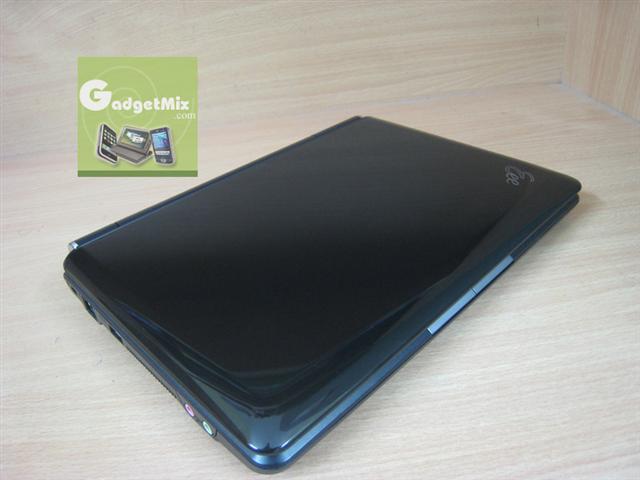
The EEE 904HA has shiny exterior, which looks very sleek. Currently, almost every netbook in the market comes with shiny exterior and 904HA is no exception. But, shiny exterior means that it also catches fingerprints easily. This may be another reason, why ASUS included cleaning cloth in the package.
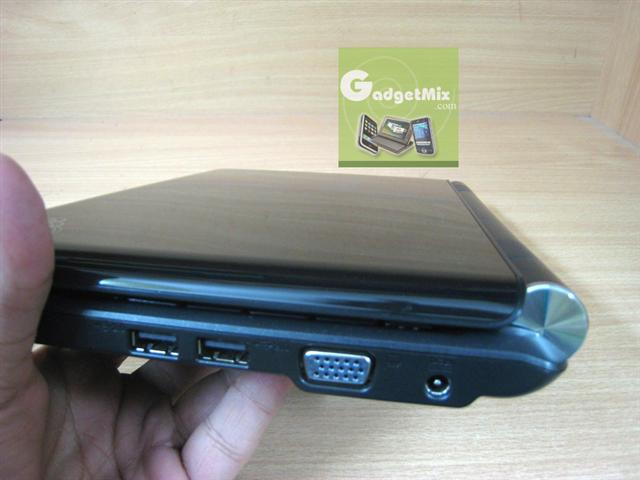
On the left side of the unit, you will find the familiar ETHERNET port, a USB port, microphone and earphone jack. Note that it does not have Dolby Digital support.
On the other(right) side, you will find the VGA output port, AC adapter port and 2 USB 2.0 ports. You will also find the MMC/SD card reader, which is integrated into the unit. It is SDHC compatible meaning that it can read/write all those high-capacity SD cards in the market. The capacity of these cards go upto 32GB.
MMC/SD slot
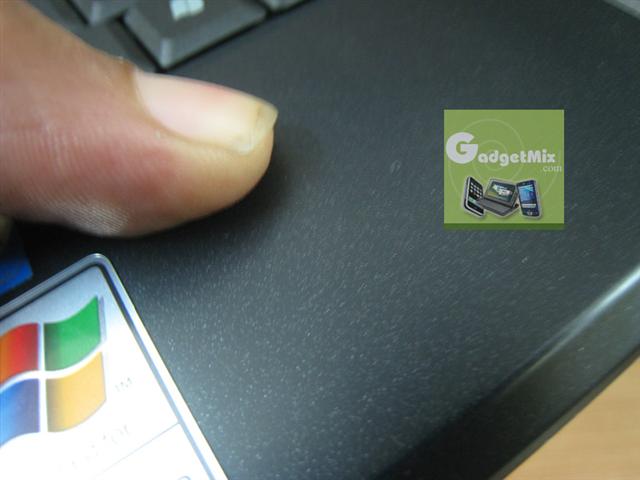
Unlike ASUS EEE 1000H, it has matte, grainy interior. I like matte interior over the shiny black interior of EEE 1000 series. This makes it not to catch the fingerprints. It also prevents you palm slipping away from the keyboard while you type. Nice touch ASUS!
Keyboard
This is the best part of the EEE 904HA. It is just fabulous. You can type on it just the way you type on any normal laptop keyboard. ASUS claims it to be 95% of the usual laptop keyboard. This makes typing on it a no-learner job. Anyone can just start typing on it without making any adjustments. This is a great news for those people who work or blog on the go. Since the size of the EEE 904HA is smaller than the conventional laptop, it makes it an ideal companion for everyone who do a lot of input and are always on the move.
The keyboard is big and it is spacious!
Screen, Resolution
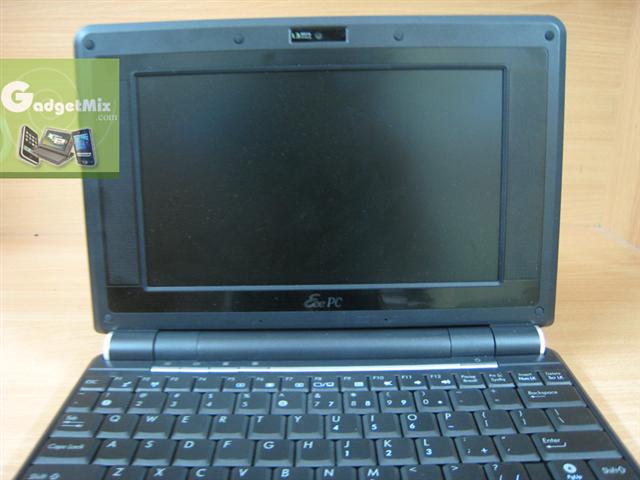
The ASUS EEE 904HA comes with a 1024 x 600 resolution, which is definitely better than the shabby resolution of the EEE 700 series (800 x 480). The screen of the ASUS 904HA is nice and bright. The text is easy to read on it. The images looks crisp. You can work on this netbook for an hour and your eyes won’t feel tired at all. Webpages, office documents all look fine and you won’t find yourself scrolling like you had to do in EEE 700 series. The speakers surround the screen just like they did on EEE 700 series. I personally like the front facing speakers as the sound does not get muffled when you are using the netbook on your lap.
notice the 1.3MP camera on the bezel
Battery, Battery life
The EEE 904HA comes with a big 6 cell battery which promises really nice run times. It is 6600mAh and is exactly the same as the one used in 1000H. I tested its battery in 1000H and vice-versa and it worked fine in both cases. In auto-powersaving mode and normal brightness, I got nearly 5 hours with wifi on. In power saving mode, you may be able to squeeze out even more.
SHE (Super Hybrid Engine) – The actual player behind the great battery performance
All credits to its awesome battery life goes to the SHE. It gives you to underclock the EEE when you feel that you don’t need all the horsepower. The result: long runtimes. You would absolutely love this feature. You can toggle between: power-saving, auto power-saving, high performance, auto high performance and super performance modes with a touch of a button. By default, it is assigned to the 3rd button from the left in the top row.
Multitouch Touchpad
The touchpad of the EEE 904HA supports multi-touch. You can use various gestures like moving your fingers apart at the same times will trigger zoom in in a webpage or image and bringing your fingers together will zoom out. In a web browser, you can use two fingers to scroll up and down. Three finger tap to a right click and so on. The touchpad is also much more comfortable when compared to many of its rival netbooks like Lenovo Ideapad S10, S9 or its little brother ASUS EEE 700 series.
Basic tests of applications
I loaded up the following applications and they all ran fine.
Office 2007: runs flawless
Visual Studio 2005: runs great and EEE 904HA can be a huge asset for programmers
Firefox
Opera
klite codec
Microsoft Activesync: to sync with my windows mobile device
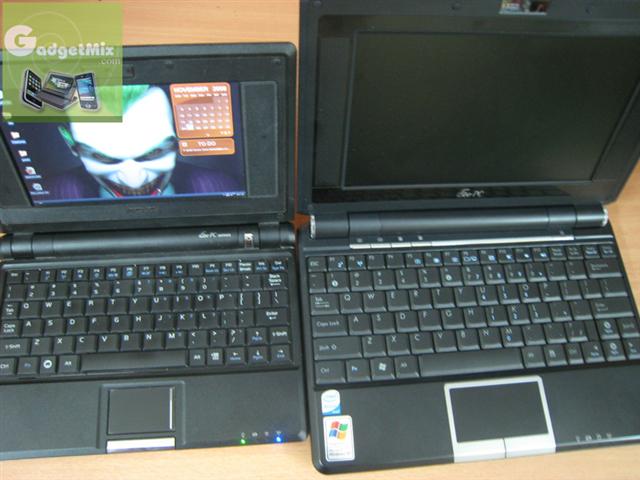
Size Comparisons
This is the part I like to most: comparing it to other gadgets.
EEE 1000H and EEE 904HAEEE 1000H, EEE 701 and EEE 904HA
Thickness comparison of the ASUS EEE 701 and EEE 904HA
Keyboard comparison: I would like to reiterate the fact the EEE 904HA is perfect for typing making it great for businessmen who work on the spreadsheets and office documents; perfect for the students and programmers who would appreciate it nice size.
like the wallpaper of my EEE 701? ;)
Ability to upgrade? = Yeah!
You can easily upgrade the RAM module and HDD of the EEE 904HA. You have to unscrew the backdoor panel of the EEE 904HA to gain access to the RAM module and HDD.
Take extra care of the ‘holders’ of the RAM chip and take the RAM module out.
The HDD is fast @ 5400rpm and has 160GB storage capacity. You need to unscrew the 6 screws to take the HDD out. Now since it is the normal 2.5″ HDD, you can also swap-in a 2.5″ SSD in the future.
Here is the RAM module that came with EEE 904HA. As you can see, it came with 1GB DDR2 RAM.
I took the 2G Transcend RAM @ 667Mhz bus speed out from my EEE 701 and swapped it in to the EEE 904HA. It worked fine. Note that if you don’t go into the BIOS, your device won’t recognize the newly added 2G RAM as the boot booster is enabled by-default. Infact, it will still think that only 1GB RAM module is there. To enter into the BIOS, repeatedly press F2 immediately after hitting the power button. Then, you must press F10 to save the changes. After that, your device should be able to use the full 2GB RAM.
Final Verdict
It is around 100gm lighter than the 1000H and has front facing speakers. It has the same resolution as the EEE 1000H. The difference of screen size is just 1.3″, which is just not noticeable to me as I was using both the devices at the same time. It is also around $50-80 cheaper depending upon from where you buy it. But to me, the front facing speakers and lighter weight wins the battle over 1000H.
Here are some bigger pictures of the ones used in the review. It also includes some which were not used in the review at all. Click on the thumbails too the bigger pictures:
CNET ASIA has been able to get some great pictures of the ASUS P565, the fastest PDA-phone in the world. It is no hidden truth that it is infact a speed daemon.
Hey! The model looks good. Er. I meant the P565, if you are thinking otherwise. See more pics here.
The Asus P565 is an exceptional phone with great specs. It has a nice 5 megapixel camera that takes amazing pictures and has a nice feel to it. While the user interface leaves a lot to be desired, its processing speed makes up for it.