MSI Triples the Notebook Sales in Taiwan IT Month

The MSI Wind Netbook U100 again took top honors during the annual Taipai computer show, taking half of the total sales volume of MSI. Furthermore, the multimedia notebook EX400, elegant and colorful VR220YA, and high-end gaming notebook GX600 were among the top sellers at the show.

The MSI Notebook booth at the Taipei computer show is packed with consumers, tripling the sales volume of MSI notebooks over the past year!

PocketGrandmaster upgraded to version 4

Great news for the (mobile) chess players! PocketGrandmaster 4.0 has been released. If you like to play chess on your windows mobile, then you must take a look at PocketGrandmaster. Pocketgrandmaster is not a new player in the game. It has been around for nearly 7 years now!

List of Improvements:

  • Full support for WVGA (HTC Touch HD) and square screen devices.
  • Play online on the Free Internet Chess Server (FICS) and the server of the Internet Chess Club (ICS).
  • Play against players from all over the world (works well even without registration on FICS).
  • Support for cut & paste in most windows, you could for example cut & paste a movelist to an email.

Pocketgrandmaster homepage

A Celeron powered EEE-box. What?

Alright, we all know that the EEE box was launched with an Atom Processor. But, now the ASUS has now introduced a model with celeron processor. This is the same processor that is being used in the ASUS EEE 700 series and EEE 900. Everything else is similar to the one with atom processor.

Celeron is already quite old now. I see the point that that they want to keep the Atom processors for the netbooks, but using the celeron processor is not a wise move especially when the competition is getting fiercer in the netbox market too.

Visit EEE BOX homepage

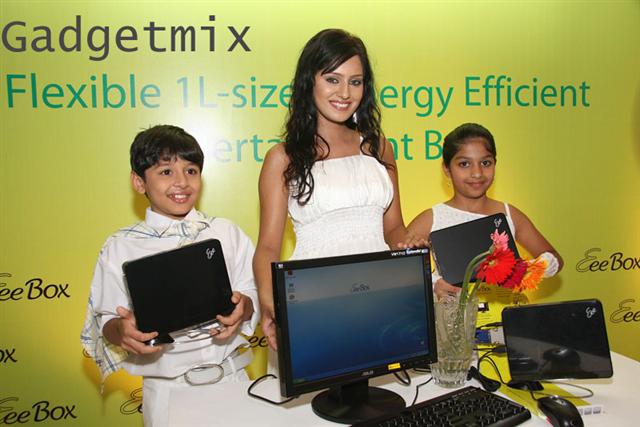
see the ASUS EEE BOX launch event pictures

Is the Google Chrome recommended for the netbooks like ASUS EEE 700 series with WVGA resolution?

Google Chrome came out of its beta stage a couple of days ago. It is working great on the notebooks and other latest netbooks with 1024 x 600 resolution. But, how does it work on the UMPCs and netbooks with WVGA (800 x 480) resolution.

Is the Google Chrome recommended for the netbooks like ASUS EEE 700 series with WVGA resolution

Installation

The installation was painless. I just pointed my browser to http://chrome.google.com and it took me to the download page. The installation was done over the air and didn’t involve any user interaction at all, which is a nice thing. However, this means that you cannot install it on the driver of your choice.

Web-Browsing

The EEE 701 and other UMPCs and netbooks that sport a 800 x 480 display often struggle to provide decent web-browsing experience out-of-box. This is mainly due to the fact they come with IE6 or IE7. The linux version of EEE 700 series comes with Firefox 2 and it is not simple to upgrade to the Firefox 3 if you are on Xandros (default OS that comes with the 701 series).

Stories aside, lets me give you some comparison pictures. Pictures say a thousand words by itself. Right? You can click on any screenshot to see the actual resolution screenshot.

ApoTheTech.com on Chrome

Continue reading “Is the Google Chrome recommended for the netbooks like ASUS EEE 700 series with WVGA resolution?”

Lenovo introduces S10 Special Edition "Gold"

Lenovo has launched Special Edition “Gold” S10 netbook in the Hong Kong. It looks so good. So far, I have no idea that it will be made available in other countries. The Lenovo S10 is a decent netbook with quite nice features. The 6-cell battery is also going to be made available worldwide making this netbook a great deal overall.

The discounts are also available on the S10 models. Sadly, the gold edition is not being entertained by this offer.

via (blogeee.net)

HP mini 1000 – TOO much form over function?

Lately, I’ve been reading a lot about the HP mini 1000. Sure, it is getting quite a good response from the technology bloggers. But, are they hiding the truth from the common man? I was able to play with recently released HP mini 1000 and here are some you-will-either-hate-me-or-love-me facts:

Trackpad: Even after receiving so many complaints from the HP mininote 2133 users regarding how difficult it is to use the trackpad, HP did nothing to enhance the trackpad. They could have atleast move those buttons to the bottom of trackpad.

TOO much form over function?

Poor battery life and you cannot do much about it

The HP mini 1000 comes with only 3-cell battery. So, why am I complaining so much? There are many netbooks there in the market that come with just 3-cell battery. Well, at least they can easily upgrade to 6-cell or more but the mini 1000 can not do it. This is because the battery is there beneath the casing. This makes it almost impossible for the HP or the 3rd party manufactures to release bigger batteries in the future. So, the users potential users of the mini 1000 must keep it in mind while buying this 3-cell netbook, which would only give them around 1.5-2 hours of battery life.

Wrist-rest space

You may think that the keyboard of the mini 1000 is big enough to type on nicely for hours. Your thinking is wrong then. You cannot type for more than 10mins on it even if it sports one of the best keyboards one can have in netbooks. One cannot type on it for a long due to small wrist-rest space. Continue reading “HP mini 1000 – TOO much form over function?”