VIA Artigo A600 specifications, compact fanless PC

After VIA ARTiGO A820, VIA has launched ARTiGO A600, an ultra-compact fanless computer that is perfect for IoT and M2M applications that require computing power along with features like low consumption and wide range of I / O capabilities.

VIA Artigo A600 specifications

VIA ARTiGO A600 integrates four COM ports that include Phoenix RS-485 3-pole 3.75KV isolation, a port for RS-232 COM port and a GOD for 8-bit GPIO connections. The I / O section also includes two USB 2.0 ports, a Mini HDMI port interfaces for HMI, a Gigabit Ethernet port, a miniPCIe port, which measures only 12.5 x 12.5 x 3 cm and can accommodate an optional Wi-Fi module.

VIA ARTiGO A600 includes a VIA 800MHz Cortex-A9 SoC, a Micro SD input and a 4GB eMMC flash memory and 1GB DDR3 SDRAM. Also available is a software development tool that is optimized for Linux. It supports all key features such as complete set of customized software services which allow quick and easy development.

VIA ARTiGO A600 will enable companies to transform developing a new generation of smart devices. The control systems for industrial automation will have a key role in the development of innovative products and services more personalized.
MSI GeForce GTX 980 Ti Golden Edition Overviews and specs

MSI has announced the launch of a new special edition of the GeForce GTX 980 Ti from NVIDIA, which is the current top model of the company. The MSI GeForce GTX 980 Ti Golden Edition is a special variant with a copper sink, offering maximum heat dissipation and of course, since it is dressed in gold, it lives up to its name.

MSI GeForce GTX 980 Ti Golden Edition review (4)

MSI GeForce GTX 980 Ti Golden Edition: The Review

The fully integrated heat sink made of copper has several advantages and some disadvantages. Typically, the copper heat pipes and these are being welded or somehow grip block of aluminum foils, which is a good transmitter of heat but not as good as copper. Using a sink made entirely of copper allows one to do soldering better and therefore, the heat dissipation is more uniform and efficient and greatly reducing the overall temperature of the device.

MSI GeForce GTX 980 Ti Golden Edition review (3)

The drawbacks are obvious: the copper is heavier than aluminum and therefore, the final product is heavy. For instance, this GPU weighs 1,338 grams and non-copper model weighs 1,068 grams. Also, the copper is far more expensive, so integrating a heat sink made entirely of copper significantly increases the costing and therefore, sale price of the graphics card in higher than the aluminum one.

MSI GeForce GTX 980 Ti Golden Edition review (2)

In addition to what has been said, this MSI GeForce GTX 980 Ti Golden Edition integrates a wide black back plate with the MSI Gaming dragon orange that covers the entire back of the PCB and also improves the aesthetics of the graphic card. On the opposite side, it incorporates two cooling fans responsible for cooling down the whole sink.

MSI GeForce GTX 980 Ti Golden Edition review (1)

Finally, we are told that MSI has always used the best Military Class components to provide this GPU better stability and performance. It is factory overclocked and MSI has raised the operating speed of the core to the 1291 Mhz compared to 1279 Mhz reference version and 7096 MHz memory (GDDR5 effective) compared to 7010 Mhz stock.

So far MSI has not announced pricing or availability of this new graphic card but it kind of Limited Edition, so expect it to be very, very expensive.

Download Android 5.1 Lollipop for Meizu MX4

Meizu MX4 android 5.1 lollipop ROM is now available for download, courtesy of XDA developers. To flash it, you to will need unlocked bootloader, custom recovery and this ROM which can be downloaded from here.

Download Android 5.1 Lollipop for Meizu MX4

Unlocking bootloader of Meizu MX4

Flash clean stock firmware, do this only on android version: 4.4.2 firmware on MX4 (4.2.8.2A) / 4.4.4 firmware on M1 Note (4.2.0.5A) (Android 5.0/5.1 firmwares uboot not patch)

Get ROOT by standard method (flyme account). SuperSu NO NEEDED
Unpack on your disc (on PC) archive with firmware which you used to flash on your MX4 (4.2.8.2A) / M1 Note (4.2.0.5A) VERY IMPORTANT!!!
Place in a folder with unpacked archive (p.3) file “Meizu_Patch.exe” from folder “patcher” of your downloaded archive and open this with administrator rights.
-Theoretically, antiviruses can alarm to packer which patcher was complicated (but Dr.Web is fine) / but antiviruses recommended to be closed.
-If you are afraid about viruses and Trojans, skip this step and all the following.
If all goes well – we see a flashing green “Successfully Patched” in the patcher round window – continue.
If no and you see inscription “Patching Failed!”, RED – STOP – something goes wrong and if you continue – BRICK!!!

Delete from this folder 2 files: “Meizu_Patch.exe” and “uboot.img.bak”.
Create a folder with name “UNLOCK” in phone root directory (SD card)(DCIM folders, Picture, Music, data etc.) and copy in already patched loader file “uboot.img” from firmware folder from PC (where we started our patching (unpacked firmware)).
Pack this firmware (on PC) back in archive (using 7-zip/winrar) with name “update.zip” (default flyme firmwares) – could be useful.

Copy a folder “gscript” together with the contents in phone root directory (SD card).
Install “gscript.apk” on your phone from “gscript” folder.
Add and launch script “unlock.sh”. (for menu with adding: flyme smartbar hide – off / use flymetools double tap on right statusbar zone function).
Program should show 2 window with root access for gscript, Agree! Wait for one-two minutes for script action (until the yellow lines in the gscript window).
Wait 1 more minute and reboot your phone. If it successfully boot – congratulations, all is fine!!

Android 5.1.1 Lollipop ROM for the Galaxy Alpha

Samsung Galaxy Alpha users are still waiting for the official android 5.1.1 lollipop but folks at XDA developers have churned out un official ROM that brings lollipop to our devices.

Download Android 5.1.1 Lollipop ROM for the Galaxy Alpha

This ROM is based on many projects like AOKP, CM, PA,OMNI and original Remix firmware for the Galaxy Alpha.

Android 5.1.1 Lollipop ROM for the Galaxy Alpha: Installation instructions

Required: Stock Firmware 5.0.2 preinstalled, ROM + Gapps (download links given below) saved in Internal Storage, TWRP Recovery v2.8.1.1, Root Access
Backup: go to custom recovery and create a backup of your current ROM
Wipe /system, /data, /cache, dalvik cache
Install ROM + GApps
Restart your phone.

Android 5.1.1 Lollipop ROM for the Galaxy Alpha: Main features

Material Design – clear user interface
New Lockscreen – Notifications are now displayed directly on your device’s lock screen.
Battery-Saver Mode – … promises to squeeze 90 extra minutes of juice out of the battery in your device.
Notification Control – classification into three categories (NONE, PRIORITY, ALL)
Smart Lock – automatic deactivation of device lock
User Management – Create new user accounts, or use guest mode with friends.
Keep Apps Pinned – Pin a specific app to the home screen.
Improved Quick Settings – You can quickly adjust the brightness, an rotation lock option and a built-in flashlight, among other features.
ART Runtime – improved performance and battery life
Heads Up Notifications – Pop-Ups for incoming calls, messages etc.

Download links:

Download Galaxy S6 Edge Plus Deodexed Debloated ROM

Deodexed ROM for the Samsung Galaxy Edge Plus 928F android phone is now available for download. This ROM is based on stock Samsung Galaxy S6 Edge Plus and works fine with Xposed.

Download Galaxy S6 Edge Plus Deodexed Debloated ROM

When you flash it, only the the APP/Framework/PRIV-APP folders are changed – nothing else.

The XDA developer person who made this ROM has created two variants of it. First is simply stock ROM that is deodexed. Second variant is not only deodexed but also debloated. 

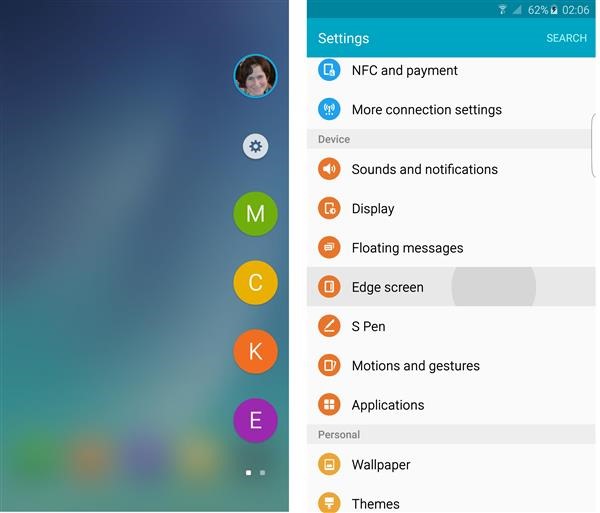
Galaxy Edge+ Contacts, Apps on Samsung Note 5

An XDA developers mod brings Samsung Galaxy Edge+ contacts and app feature to Galaxy Note 5 users. To use this Galaxy Edge+ Contacts, Apps mod, you need to be on an deodexed Note 5 ROM which was mentioned here on galaxy note news last month.

Download Galaxy Edge  Contacts, Apps on Samsung Note 5

To install this mod, download the mod from here; put it on the root directory and boot into custom recovery. For that, hold down the power and volume up button for few seconds. You will enter custom recovery. From there, browse for the edge mod.

Flash it from there and reboot to find the custom recovery.

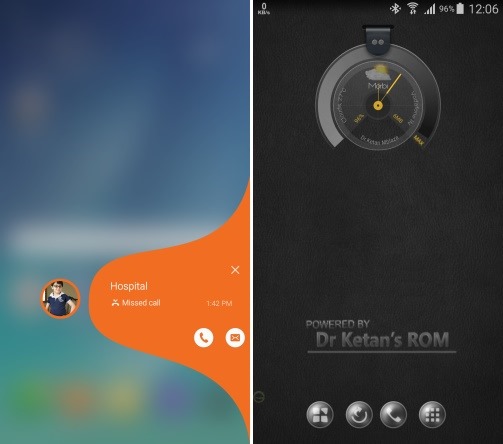
Download Dr Ketan Note 5 ROM for Galaxy S6 Edge features and to enable call recording

Dr Ketan is a renowned developer at XDA and he has just released a ROM under his name that packs some really amazing features such as Galaxy S6 Edge’s edge feature and ability to record calls. To install it, you will Galaxy Note 5 TWRP custom recovery installed as that is the only way to get install custom firmware on device.

Download Dr Ketan Note 5 ROM for Galaxy S6 Edge features and to enable call recording

* Reboot device to Recovery
* Select Wipe option – Factory reset
* Select N920I Dr.Ketan ROM zip – download link
* This will start calculating md5, wait till it finish and match MD5 with download page of ROM. Once it match – select ‘yes’ to flash ROM.
* Now this will start AROMA wizard and you have to select stuff you requires.
* Once ROM flashing finish – DO NOT REBOOT Device but again select to Install file
* Select Kernel file you have copied (If you are already on custom kernel, this step can be skipped)
* After this, do not reboot the device. Install call audio fix and then reboot device and keep patience for 5* 6 minute to boot device.

Feature list.

* Ad Free
* Auto Call Recording * Auto call record included On/Off from Dr.Ketan utility
* Manual Call Record * ROM Control * Native call record
* Power Menu -5 Way Reboot mod with sound mode
* 22 Quick Panel Toggles (Floating Msg won’t work)
* CSC features * Separate app for CSC features
* All App Multi Window (optional in ROM Control)
* Camera Hack * Use camera with Flash at low battery + Camera shutter sound toggle
* Call/SMS block
* No Increasing ring tone. (Extra Settings* Other mods)
* Memory Clean option on expanded notification with switch (Extra setting-Memory Clean view) Also Color can be set. (Extra setting-Other Mods-color-Memory color
* Mute/Vibrate/Sound option in power menu.
* NFC hack with screen off (ROM Control)
-.Appoops (permission manager) Settings-LockScreen and security * Application permission
* No call delay mode (preactivated)
* Center clock option (separate zip available in Add On later
* Advanced Messaging features
Split view toggle
Priority sender
Delay sending option
No SMS to MMS conversion
Backup/Restore option
Scheduled message

Android 5.1.1 for Note 10.1 2014 available for download

Android 5.1.1 a k a latest version of lollipop is available for download for the Samsung Galaxy Note 10.1 2014 model. This ROM is made specifically for the P605 model but the developer says it would work just fine on the P607T.

Download Android 5.1.1 for Note 10.1 2014

It is said not to work on the P600 and P601. You should have Note 10.1 2014 TWRP on board in order to flash it. Here are the flashing instructions:
Reboot into recovery (volume up + power button for few seconds). Go into wipe menu. Select "Advanced Wipe". Check Dalvik Cache, System
Cache, Data and wipe them. Don’t reboot just yet.
Go into install.
Flash aosp-2015XXXX-lt03lte.zip
Flash GAPPS.zip
Flash SuperSU.zip
Reboot
Copy SuperSu and Gapps zip to /sdcard/OpenDelta/FlashAfterUpdate so that they are automatically applied after OTA update.

If internal storage is not being shown, connect your Note 10.1 2014 to the computer and type these commands into the ADB terminal.

su
restorecon -FR /data/media/0