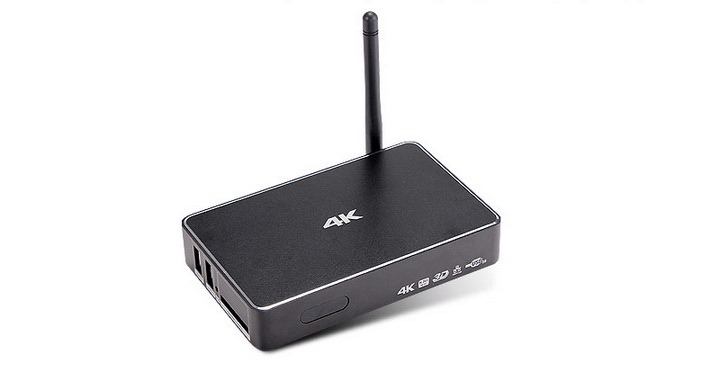
Download M 195 Android TV box Firmware

A new firmware for the M 195 android TV is now available and you can use this firmware to perform factory reset and get new features. This M-195 features Realtek 1195 dual core ARM Cortex-A7 processor that integrates a Mali-400 GPU with 1GB RAM, 8GB  of storage, WiFi b / g / n and Bluetooth 4.0 with external antenna. You can buy it for 55 euro from most Chinese e-commerce websites.

Download M 195 Android TV box Firmware

Continue reading “Download M 195 Android TV box Firmware”

Phison PS5007-E7 PCIe NVMe controller officially announced

Phison PS5007-E7 PCIe NVMe controller has been officially announced by the company. It promises transfer read speeds of 2.7 GB/s and write speeds of 1.3 GB/s. Phison PS5007-E7 PCIe NVMe specifications PCIe 3.0 x 8-channel NVMe 1.2 compliant controller, 2600 MB/s sequential read and over 1300 MB/s sequential write, with random 4K up to 350,000 IOPS read and 250,000 IOPS write performance.

Phison PS5007-E7 PCIe NVMe controller

Continue reading “Phison PS5007-E7 PCIe NVMe controller officially announced”

Philips BDM3490UC monitor with 34 inch screen

Philips has introduced its new monitor called BDM3490UC packing massive 34 inch curved IPS display packing 3440 x 1440 pixel resolution that is specifically designed to provide the user with a unique sense of immersion in both games and movies to your PC. Thanks to the curvature on these display panels, it creates a unique feeling of immersion in almost anything you are doing, whether playing or watching a movie.

Philips BDM3490UC review

Philips BDM3490UC specifications include three HDMI video inputs (one is HDMI 2.0, the other two are HDMI 1.4 and one of these is compatible with MHL ), a DisplayPort, audio port and 7 watt RMS stereo speakers with DTS technology.

Philips BDM3490UC monitor review

The only thing not to like about Philips BDM3490UC is its ergonomics, for being a fairly large and heavy panel base. Also, it does not allow any movement except the inclination, and that too very slightly. For now Philips has neither confirmed nor the date for the Philips BDM3490UC but most likely it will arrive in time for Christmas season for around 800 euros.

Toshiba XG3 PX04P BG1 specifications and speed

Toshiba Corporation has announced three new families of SSDs with PCIe interface using the protocol NVMe (Non-Volatile Memory Express). All are imed at various applications including high performance portable storage, tablets, computers 2 in 1 and server applications and mass storage. The top SSD models are able to deliver speeds of up to 3250 MB / s. Let us take a look at Toshiba XG3, PX04P, BG1 one by one.

Toshiba XG3 reviews

Toshiba XG3 for high performance laptops

It is available in M.2 2280 that supports up to four PCIe 3.1 lanes and bandwidth delivering six times higher than usual SATA 3 format (in this case reaches 2516 MB / s read and 1572 MB / s write speeds). This XG3 family is equipped with QSBC (Quadruple Swing-By Code) technology which is owned by Toshiba and it ensures maximum energy efficiency. You can see their specific technical features in the table shown below.

Toshiba XG3 review

Toshiba PX04P is for servers and mass storage

Toshiba PX04P reviews

This family of SSDs has several technologies specifically designed for servers where the device is one 24 x 7. Therefore Toshiba has layed particular emphasis on energy efficiency without neglecting performance since it assumes that these SSDs will be used in critical environments. That said, it does not disappoint on the performance front, offering up to 3250 MB / s read and 2464 MB / s writing.

Toshiba PX04P review

Toshiba BG1 is for ultrabooks and tablets

Toshiba BG1 review

The BG1 is the world’s smallest (16 x 20 mm) solid state drive. In the table below, you can find its technical specifications. As you can see, there are three models: M.2 Type 1620, 2230 and 2280.

Toshiba BG1 reviews

So far,Toshiba has not disclosed the prices but we have been told that they will be launched in October this year.

Delete Windows 10 Windows.old $Windows.~BT $Windows.~WS in Three Steps

So you have installed Windows 10 by installing the upgrade over Windows 7 or Windows 8 and now you are wondering how to delete Windows.Old, $Windows.~BT and $Windows.~WS in Windows 10. These three folders occupy nearly 20-22 GB of your storage and that is bug you a lot if you are on a SSD drive smaller storage capacities.

Delete Windows 10 Windows.old Windows.~BT Windows.~WS

First thing, it is safe to delete them IF you are not planning to roll back. Here are three commands to delete Windows.old in windows 10. Start up command prompt using administrative rights and copy-paste them in cmd prompt (Ctrl + C from here and Ctrl + V on command prompt).

Continue reading “Delete Windows 10 Windows.old $Windows.~BT $Windows.~WS in Three Steps”