
An XDA user has ported Samsung Galaxy S6 user interface to the Grand Prime. This is great as S6 is a premium phone and grand prime is a mid range phone with premium build quality.
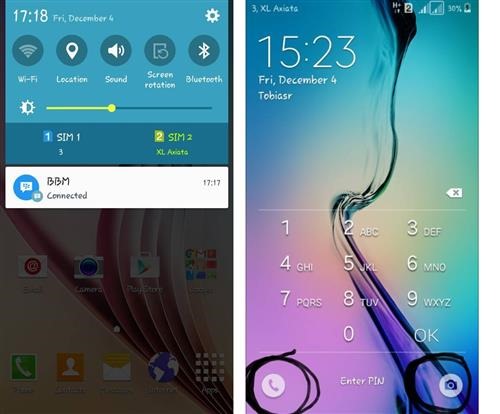
An XDA user has ported Samsung Galaxy S6 user interface to the Grand Prime. This is great as S6 is a premium phone and grand prime is a mid range phone with premium build quality.
This method will teach you how to root the Samsung Galaxy Grand Prime running android lollipop 5.1.1. I tested this root method on SM-G530T and it worked perfectly. A user has told me that it works on SM-G530P.

Continue reading “Root Grand Prime on Android Lollipop 5.1.1: Supported models SM-G530T, SM-G530P”
Clock work mod recovery and TWRP custom recovery for Samsung Galaxy Grand Prime is now available for download thanks to excellent folks at XDA. CWM does not touch screen input but gets the job done. But that is important to you on your Grand Prime, then consider flashing TWRP custom recovery.

Continue reading “Download Galaxy Grand Prime CWM TWRP custom recovery”
15 inch ultrabooks are best for business as well as for doing any kind of serious work. If your job requires you to sit in front of computer screen for long durations then going for a 15 inch ultrabook laptop will be an ideal choice. 2015 was clearly the year of ultrabooks thanks to the powerful and very power-sipping processors from Intel and AMD.

Every android device including Nexus 6P needs a custom recovery in order do any sort of hacking. That is why folks at xda developers have churned out a custom recovery that features touch driven user interface. It is called the TWRP and it is now available for download. Own a Nokia X? Download its TWRP custom recovery here.

TWRP for Nexus 6p will allow users to install custom firmwares and do all sorts of hacks on it. Installing TWRP custom recovery onto the Nexus 6P is rather easy. You can downloaded latest version from here.
To install TWRP on Nexus 6p, you will require ADB drivers which are part of platform tools. Windows users will also have to install USB drivers. You will also need to enable developer mode on your phone. Also enable USB debugging here. Type in these commands on your computer.
adb reboot bootloader
fastboot flash recovery twrp.img
fastboot reboot
Here replace the “twrp.img” with the file you downloaded.
Thanks to folks at xda developers, Moto E users are able to finally enjoy what it feels like to have Android Marshmallow on their smartphones. Interestingly, Cyanogen Mod 13 for Moto E first generation is quite stable for daily use. Even the dual SIM functionality works like a charm. Of course, display, wireless LAN, SD card, GPS, Bluetooth and Camera works as well. Download CM12 for Moto E 2015 from here.

* Wipe data and cache. Make sure Moto E bootloader is unlocked.
* Flash the CM13zip. Downloadable from here. Of course you need to have Moto E custom recovery to flash it.
* Reboot
* boot into recovery mode.
* Install gapps if you want
* Reboot
That is it, you now have Android 6 marshmallow on your smartphone. Moto E is showing its age but till we have xda developers, we do not have anything to worry about.
Until now we have been able to install various launchers, for instance Note 4 launcher on Galaxy S4 and so on. Today we will show you how to install Xperia launcher on Nokia X2. This has been done thanks to an XDA user who has been able to do it on his Nokia X2.

To install, you will have push the launcher as system app. Download the Xperia launcher for Nokia X2 from here and install it like a regular APK file. After installation, the next time you press the home button, choose the Xperia launcher and set it as default so that you do not get the notification about choosing default launcher again and again.
A lot of people do not like the native Nokia X2 launcher and installing Xperia launcher is a good choice since it is used on all Sony Android phones including the low end and high end devices.
Cyanogenmod 12 is now available for download for the Nokia X2 android devices. This means users of Nokia X2 will be able to enjoy Android 5.1.1 a k a lollipop on their phones. The progress is still in its infancy stage and not a lot of things are working at the moment. For instance, mobile data, messaging and camera are not yet working on Android 5.1.1 CM12 right now so consider installing it only if Nokia X2 is not your primary device.

* Download ROM from here.
* Wipe Factory reset
* Wipe cache
* Wipe dalvik cache
* And flash ROM and GApps
Find the development of this at xda-developers. Again, the status of the android 5.1.1 lollipop firmware for the Nokia X2 is in Alpha phase so there are several rough edges.
Teclast X16 Pro specifications includes Intel quad core Atom Z8500 X5 cherry trail processor, 4GB of RAM LPDDR3 and 64GB of internal eMMC storage that is expandable with a slot for micro SD cards up to 128GB. The X5 Z8500 processor which is made using 14nm manufacturing technology, is clocked at 1.44GHz. Teclast X1 Pro specifications can be found here.

Continue reading “Teclast X16 Pro Specifications Price, comes with Atom X5 Z8500”
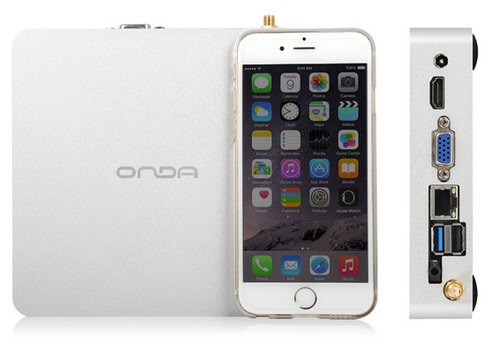
Onda 2 mini PC is a computer of very compact size, good specifications at an affordable rate. Powered by Intel Pentium J1900, it offers decent performance for under € 190. The housing of the Onda M2 is made of aluminum and it is 14 cm square by 3 cm.
Continue reading “Onda M2 Mini PC Specs: Intel J1900, 4 GB and 128 GB for € 188”