Qualcomm Snapdragon 430 and Snapdragon 617 have been announced. Designed for mid range phones, it is best for multimedia and connectivity features.

Continue reading “Qualcomm Snapdragon 430 617 Specifications, for mid range phones”
Qualcomm Snapdragon 430 and Snapdragon 617 have been announced. Designed for mid range phones, it is best for multimedia and connectivity features.
Continue reading “Qualcomm Snapdragon 430 617 Specifications, for mid range phones”
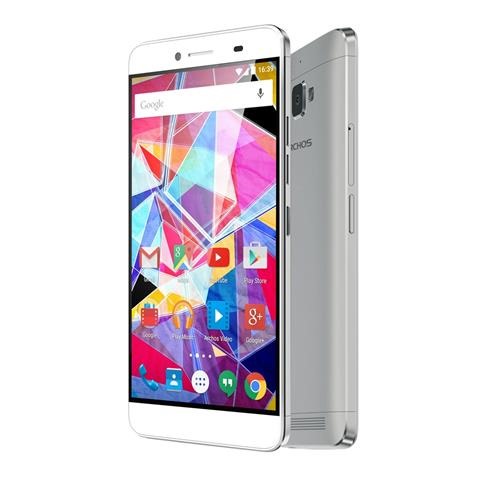
Archos Diamond Plus offers all the features of the prestigious Diamond line: an octa-core processor, connectivity 4G / LTE, good cameras, and more – all packed in a new silver chassis that is the home to the beautiful 5.5 inch full HD display. Archos Diamond Plus specifications include Mediatek MT6753 octa core processor, Mali-T720 GPU, 2GB of RAM and 16GB of storage that is easily expandable up to 32GB with a Micro SD card. Archos Diamond Plus release date is sometime in November 2015 with a price tag of 279 euro.
Sony Xperia Z3+ is an amazing phone but you can make it even better by flashing custom firmware. To do that you will require a custom recovery for Xperia Z3+ such as TWRP. After flashing TWRP on Xperia Z3+, you will be able to do all sorts of hacks onto it including the ability to flash custom ROMs. Here is how you download and install TWRP on Xperia Z3+.

This recovery image is for the E6553 single SIM Z3+. Do not use it on another model.
This recovery image requires an unlocked bootloader. You will lose some functionality on your phone if you unlock your bootloader
Do your research and make sure you’re using the latest version of the relevant tools if you do decide to unlock.
This recovery image CANNOT be flashed to your phone. Sony has not yet released the open devices bootloader for the Z3+
Until Sony releases an open bootloader you need to use this image via fastboot boot mode.
Unzip the recovery.zip file to extract the recovery.img file
C:\>adb reboot bootloader
C:\>fastboot boot recovery.img
A custom kernel has been released by XDA developers that features A53 Overclocking; Sweep2sleep; init.d support, USB Quick charge, Disable SELinux, RIC, Add SIO, FIOPS, Headphone quality improvement and other misc optimizations.

USB fast charge depends on your computer. In our test conditions, it increased the current for 500ma to 700ma. It shall be noted that the processor clock while overclocking does not stick.
So lets say, you set it to 1708 and it resets back to default, do not fret as it is completely normal. The overclocking is performed by the Qualcomm core and one does not need to set it manually.
Sony Xperia android handsets are well known for having small and high resolution icons. An XDA developer user has just released an icon set that is inspired from the new Sony Xperia Z5 android phone. It will not only give your phone material look but also native Sony user interface feel. This android hack also themes some core applications like calculator.

To install the Sony Xperia Z5 icon set, you will need Root access; Recovery ( Or you can install them manually ) and Super User mode ( Not important but recommended ).
If you are a Android lollipop user, flash the file using recovery and clear your cache. And if you are a kitkat user, extract the file using root explorer and install them manually. Also, don’t forget to set the permissions for ” RW-R–R– “.
MP4 is currently the most popular video format and is playable on almost every media device out there, except for the DVD player that can only handle AVI format. So, while you can easily the MP4 file on Android, iPhone, windows phone, windows computer or Mac, you will not be able to play it on the DVD player. In order to play on DVD player, one must convert the file to AVI format that is natively playable.

While there are tons of video conversion software out there, the best and easiest one is Movavi video converter that makes conversion from mp4 to avi a breeze. The software makes use of some of the most advanced algorithms that reduce the conversion time in a big way. Moreover, if your desktop or laptop has hardware encoding or Nvidia CUDA support, encoding will be done even faster.
To use it, download it from the Movavi’s official website and install it on the computer. Both Macs and PCs are supported. Installation is simple and takes only couple of minutes.
After you have installed it, start it up. Since we have to convert MP4 to AVI, we will click on “Add Video” button. You can add all of your MP4 files at once since the Movavi video converter support batch video conversion. After that, click on the drop down menu located beside the “Convert To” label. From there, select AVI present for conversion. In this case, we suggest selecting AVI HD 720p for maintaining optimum video quality and size.
In the next step, specify the destination where you want the converted files to be stored. If you don’t enter any, default location will be used which is same as the input folder. Now, it is time to press the “Convert” button that will start the conversion process.
Once the conversion is completed, the output folder will open that contains all the converted files. You can now burn them to your DVD drive.
The Movavi video converter also lets you convert between various video formats. For instance, if you want to convert from MP4 to MOV or vice-versa, you can do it by selecting MOV format in the “Convert To” option. In a similar way, audio and image file conversion is also possible. Just select “Add Audio” or “Add Image” instead of “Add Video” in the first step; select appropriate codec and click on Convert to start the conversion.
If you transfer DVD file on your Samsung Galaxy Note phone or any phone, you will not be able to it natively as the built in media player only supports MP4 and some other video formats. DVD files are combination of video, audio, menus and subtitles and often consume a lot of space. So, one must convert the DVD files to MP4 file format that is easily playable on a multimedia device. MP4 has now become a universal video format, supporting android, iPhone, iPad, windows phone and even desktop OS like windows and Macintosh.
Continue reading “Convert DVD to MP4 for Galaxy Note and Other Devices”
Viewsonic VX2573-sg and VX2573-shw are two new IPS monitors from electronic giant. It is specifically designed for users who spend many hours in front of the PC. They incorporate many features to improve the visual health of the user. Whether for professional or casual use, having a monitor to take care of your visual health is being increasingly demanded today which is why manufacturers like ViewSonic are bringing those computer monitors that incorporate technologies that take care of vision. This include Flicker free, Blue Light Filter or low EMI emissions as well.

Viewsonic VX2573-sg and VX2573-shw pack full HD resolution (1920 x 1080) resolution and measures 25 inch screens that feature IPS technology for SuperClear and wide viewing angles. Both incorporate many video inputs including VGA, DVI, HDMI and even MHL so it is up to user which method they wish to use to output display.
The VX2573-shw model incorporates a pair of stereo speakers to provide a complete solution for multimedia entertainment. For now the manufacturer has not disclosed the price of these two new monitors.
Acer has introduced two new desktop PCs with Windows 10. One is Acer U5-710 and second is Acer M1-601. First is an all in one computer and is only 37mm thick. Acer U5-710 specifications include Intel Core i7 and i5 processors based on new Intel Skylake platform, Nvidia GeForce graphics card, up to 16GB RAM, essential ports (HDMI I / O, DC Jack, Ethernet, USB 2.0 and 2 x USB 3.0, TV tuner) organized at the back. The screen of the Acer U5-710 measures 23.8 inches and pack full HD resolution.

Acer U5-710 screen supports multi touch input as well that offers great viewing angles and flicker less technology. Dolby Digital along with Acer True Harmony technologies ensure your room is filled with rich sound.

On the other hand, Acer M1-601 is a small PC that is based on the concept where the user can customize his PC without having to open it. This is done using the blocks concept where each blocks adds a certain functionality.

For instance, there is a block that adds 500GB hard disk, there is one for wireless charging and so on.

The Acer M1-601 specifications include Intel Pentium or Celeron processor with Intel HD integrated graphics, up to 8GB DDR4 RAM and a volume of 125 x 125 mm.
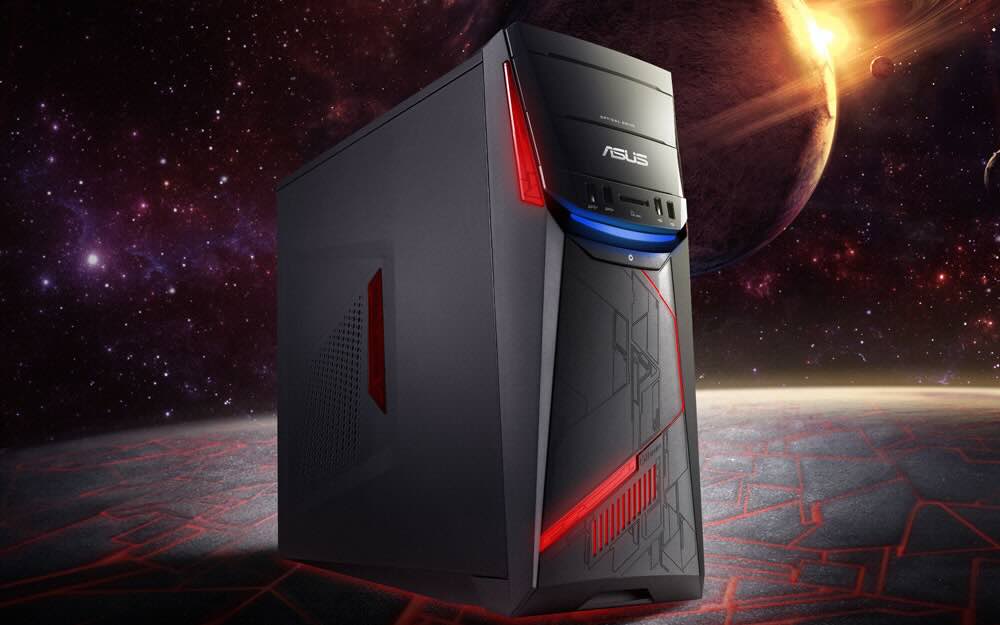
Asus has announced a revamped version of its famous full desktop system, ROG G11. It is now equipped with Intel Skylake six generation processor and latest Nvidia GeForce GTX 980 graphics, DDR4 RAM and PCI M.2 Express SSD. Asus ROG G11 Specifications are given below.