Download Galaxy S6 Keyboard for Note 4

Both Samsung Galaxy Note 4 and Galaxy S6 are popular phones but since the Note 4 was released before S6, it did not get improved Galaxy S6 keyboard. Fortunately it was made available for download by custom ROM developers.

Download Galaxy S6 Keyboard

Install Samsung Galaxy S6 Keyboard for Note 4

To install the Samsung Galaxy S6 Keyboard for Note 4, download this file and flash it in recovery. To put your Note 4 in recovery mode, hold down volume up + power button. Then browse for the file you downloaded earlier and press power button to flash it. It will only take few seconds for the flashing process to complete.

Then do a reboot. The Galaxy S6 Keyboard is working perfectly on my Galaxy Note 4. It is important to note that you must be on Lollipop to use it.

Download Galaxy Note 4 Bloatware removal script for Lollipop (N910C and N910F)

Bloatware removal script for Samsung Galaxy Note 4 (N910C and N910F models) is now available for download. There are two variants of this bloatware removal script. First is the light version that does not deletes Samsung Music, Accuweather, Samsung Account, Yahoo weather service and some widgets.

Download Galaxy Note 4 Bloatware removal script for Lollipop

The full version of the bloatware removable Note 4 script deletes a lot of stuff that includes:

* Air Wake Up * Ant Hal Service * Ant Plus Plugins * ANT Plus test * ANT Radio Service * Automation Test * Basic Dreams * BC Service * Beacon Manager * Beam Service * Choco EU Kor * Chrome * Chromcast Framework Service * Chrome Customizations * Cool EU Kore * DiagMonAgent * Drive * Drive Link * Drive Link Remote * Dropbox * DSML * Dual Clock Digital * Easymode Contacts Widget * ELM Agent * Evernote * Facebook * Facebook Messenger * Facebook Pages Manager * Factory Camera FB * FB App manager * FB Installer * Flipboard * Flipboard Briefing * Fota Client * Gmail * Google TTS * Google Plus * Hangouts * Hancom Office * Hw Module Test * Interactive Tutorial * Insatgram * KIES * KLMS Agent * Knox Agent * Knox Wizard Client * Maps * Mirrorlink * Mobile Printer * Moble Tracker * Noise Field * OmaCP * PhaseBean * Play Music * Play Banca * PageBuddy * PENUP * Play Games * Power Sharing * Preload Instalaer * Rose EU Kor * RNB * RNB Shell * Samsung Apps Widgets * Samsung Billing * Samsung Link Platform * Safety Assistance * SNS * Sec Factory Phone Test * S Printer Spooler * STK * Stret * Switch Knox * Switch Knox Plus * Talkback * Tap and Pay * TuiService * TrimApp * Videos * Velvet * Web Manual * WhatsApp * Wlan Test * YouTube

Flashing instructions for Galaxy Note 4 Bloatware removal script

You Must be rooted and have custom recovery like TWRP installed
Download file from here.
Reboot into Recovery
Install Script
Reboot. That is it.

EaseUS System GoBack: Easiest Way to Downgrade from Windows 10 to Windows 7/8/8.1

EaseUS System GoBack is a software that is aimed for those who want to prepare their computer before upgrading to Windows 10 upgrade. Stakes are pretty for the new Windows 10 OS from Microsoft as it is a free update to many but those have reserved theirs may get headache if they do not prepare for it now.

EaseUS System GoBack review

Continue reading “EaseUS System GoBack: Easiest Way to Downgrade from Windows 10 to Windows 7/8/8.1”

XIAOMI Redmi 2 Pro offers great value for money

XIAOMI Redmi 2 Pro is a smartphone from a Chinese manufacture. However this Chinese manufacture is different from rest of the hoard as it focuses in giving the best quality product with an affordable price tag. Packing 4.7 inch display, the XIAOMI Redmi 2 Pro features HD OGS screen that looks great from any angle. It feels so upmarket and not like a phone that retails for under 150 dollars.

1435791615109-P-2793406

Continue reading “XIAOMI Redmi 2 Pro offers great value for money”

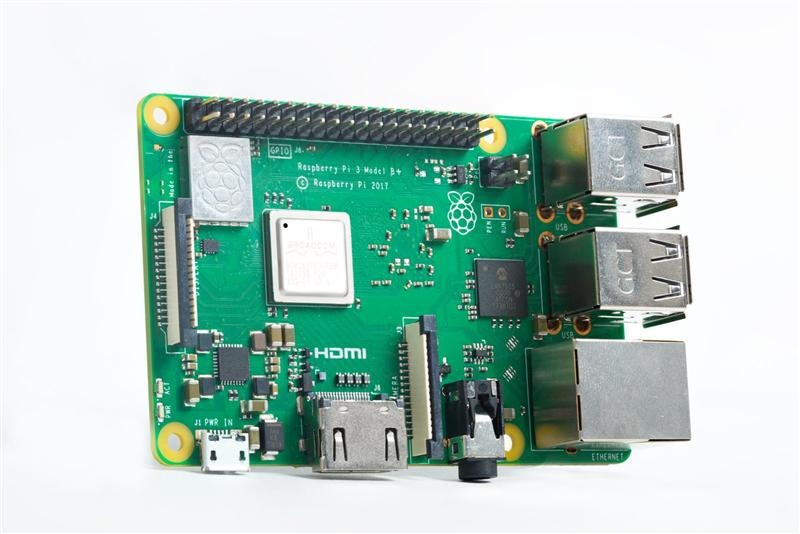
Odroid XU4 specifications, packs more power than Raspberry Pi

Odroid XU4 is like Raspberry Pi but on steroids. It is much bigger but still smaller than your conventional motherboards. Odroid XU4 specifications include Samsung Exynos 5422 processor with 8 cores and Big.little architecture incorporating 4 ARM Cortex A15 cores and four ARM Cortex A7 cores. All this is operating at a maximum speed of 2 GHz and integrates an ARM Mali-T628 GPU MP6 GPU that is compatible with OpenGL ES 3.0 / 2.0 / 1.1 and OpenCL 1.1.

Odroid XU4 specifications

However unlike Raspberry Pi, it is not fanless. You can see in the image that it features a big fan to keep it cool. Odroid XU4 features 2 GB of LPDDR3 RAM where PoP Stacked integrated in the PCB. It integrates a eMMC 5.0 8-bit connector for external modules eMMC memory which does not incorporate standard integrated storage. However, eMMC supports both modules as microSD cards so you can install the operating system on an external card with no problem.

Odroid XU4 specs

This device, as have guessed already seeing your specifications, it is an SUV but logically is limited by its hardware. However it is compatible with virtually any Linux distribution. You can install Android 4.4 on it. Odroid XU4 can be used as mini PC as it packs much greater power than the Raspberry Pi. So you can use it as an autonomous torrents server, a VPN server, media player (Android), file server, etc.

Download Lumia ROM Builder

Get Lumia Interop unlock by installing ROM builder for windows phone

Lumia Interop unlock is now finally possible thanks to excellent talented developers at XDA developers. Previously interop unlock was only limited to Samsung windows phone but finally interop unlock is possible for Lumia branded phones as well. Here are the steps on how to do it.

Download ROMRebuilder for windows phone

1. Download this file on your computer and extract it. You will find two files: ROMRebuilder.7z and customWPsystem. Extract ROMRebulder.7z and copy ROMRebuilder.xap file and Data to SD card.
2. Now copy and install CustomWPSystem v0.6 in phone memory.
3. Change year in phone to 2110 and run Extras + info. When you see an error message, tap uninstall button and set actual date.
4. Change installing applications to SD card.
5. Run CustomWPSystem , select Extra + info and tap Download from store.
6. If the application will be installed, go back to CustomWPSystem, tap SD Card permissions and select SD card. Now button should change to green color.
7. Tap Select the XAP , select ROMRebuilder.xap, and tap Apply XAP.
8. When everything will be done successfully, app Extras+info, will be converted to ROM Rebuilder (although the name remains Extras+info). When you have everything installed and ROM Rebuilder waiting for the commands, you need to do a few other important things.
9. Copy Data.bin to Data folder on SD card. To create Data.bin file, follow these steps:

1. Run ROM Rebuilder and tap Backup button. OEMSettings.reg file will be copied to Backup folder on SD card.
2. File OEMSettings.reg is compressed using gzip. You can open it using e.g 7-zip. Inside archive is located one file. Click on it with the right mouse button and select edit.
3. At the bottom add whole content from additional_entries.reg and save the changes.
4. Change name OEMSettings.reg to Data.bin and copy this file to Data folder on SD card.

Finally, you can press Rebuild button in ROM Builder. Whole process will take a little moment. After getting Success message, you need to do Hard Reset on windows phone.