Asus has updated its lineup of Zenbook Flip models by churning out UX461 and UX561. Both of these convertible laptops have premium design and touchscreen displays. One can make use of its 360 degree hinge and use it as slate tablet.
If you own a Asus FX553 VD or VE and find the laptop running incredibly hot, we have a solution for your problem. But first we need to understand why the Asus FX553 runs so hot. The main reason is the fact it comes with a standard voltage processor which has a tendency to run so hot. However, there is a limit to everything and if the temperature crosses a limit, the laptop will turn itself off.
Many users of Asus FX553 laptop say that the processor reaches as high as 88 degrees Celsius and GPU reaching as high as 80 degrees. Excessive heat is not good for either graphics card or the processor and can significantly reduce the lifespan of your Asus FX553 laptop.
Even if you take your Asus FX553 to service center, they would not do anything other than applying some simple thermal paste here and there.
There is a solution to overheating problem though – by buying the IC Diamond thermal paste, the laptop’s temperature will go down considerably. This means you will have open the laptop to get access to the motherboard where you will find both the processor and graphics card. Applying some IC Diamond solves this problem.
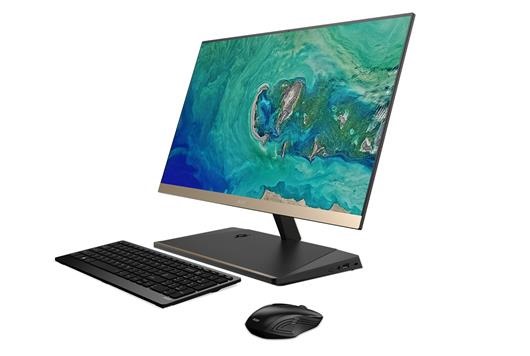
Acer S24 all in one desktop PC has been announced that features striking design elements including a 5.97mm ultra thin borderless display with gold accents that gives it a touch of luxury and elegance. Acer S24 specifications include 8th generation Intel Core i-series processor and optional Intel Optane memory that makes it significantly faster than non-Optane computers. The latest eight-generation Intel Core processors and optional Intel Optane memory allow the Aspire S24 to dive into the world of entertainment or day-to-day work with utmost simplicity, with a highly responsive device. Wireless connectivity is enabled by the Intel Dual Band Wireless-AC (802.11ac 2×2 MIMO) technology, which offers fast and reliable connections, and thanks to the subwoofer 2.1 and Dolby Audio Premium and Acer True Harmony, the Acer S24 desktop offers extremely deep audio, bringing in Surface also sounds the most difficult to perceive.
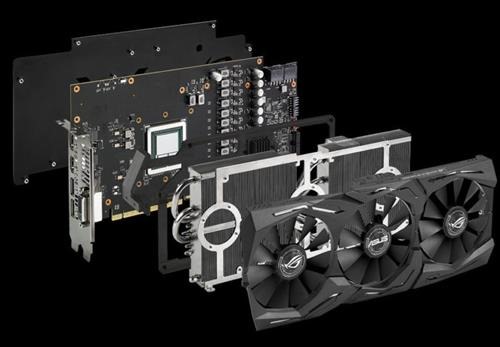
Asus has been the first graphics card assembler to announce its custom model of the new AMD Radeon RX Vega, both the 64 and the 56. Called the Asus ROG STRIX Radeon RX Vega 64/56 O8G, this graphics will hit the market with Usual Heatsink DirectCU III brand, and with some factory overclocking.
The mini Android TV and development boards like Raspberry Pi are getting popular among fans. Today we are going to talk about the Khadas VIM2 Max, a really small PC computer that brings top-of-the-range hardware and performance, leaving Raspberry Pi behind. Let’s start by talking about hardware. The Khadas VIM2 Max specifications include a SoC Amlogic S912 which is already well known, with eight cores at 1.5 Ghz which is able to smoothly play in 4K resolution content. It supports HDR and 10 bit decoding and comes with 3 GB of DDR4 RAM and 64 GB of high-speed eMMC storage (150 MB / s), but it also has WiFi 2 × 2 MIMI with RSDB (Real Simultaneous Dual Band) for the best wireless performance.
This is an Ethereum-modeled financial technology firm that offers a blockchain platform and payment wallets. In this post, we take a comprehensive review of Omisego to demonstrate everything you need to know about it. What exactly is Omisego? – Omisego is a financial company that designed the financial technology for application in digital wallets. The technology is crafted to help in real-time and peer-to-peer exchanges. The technology targets operating agnostically in various jurisdictions for both fiat money and decentralized currencies cryptocurrencies. The main goal of Omisego was enabling financial inclusion to disrupt the conventional financial institution’s operations. To put it differently, the target of Omisego is making it cheaper to send or receive payments. The company was founded in 2013 by Jun Hasegawa and Donnie Harinsut. It is registered in Singapore as a Pte LTD. The digital wallet and network framework are scheduled for launch in the fourth quarter of 2017. OMG tokens will precede the main launching later in the year.
How Omisego operates – Omisego operates using two core products in its blockchain and wallet ecosystem. The platform will enable decentralized exchanges on its blockchain at a very high volume while keeping the cost as low as possible. Omisego anticipates providing the next-generation value transfer services for operating across varying currencies.
As far as you are connected to the Ethereum network, you will be able to use Omisego for different financial transactions. Some of the key transactions that people can perform using Omisego include payroll deposits, B2B commerce, remittance, payment, loyalty program, supply-chain finance, and asset management. The Omisego platform will further help to make it easier for users to participate in Cryptocurrency globe. The platform will help users switch from utilizing conventional money to decentralized currencies such as Bitcoin and Ethereum among others. By removing barriers that stand between trading and transactions, Omisego ensures that only the best currency will be elevated to the top.
The main Omisego features
The wallet SDK – The SDK promises to greatly simplify implementation of Omisego system by providing post-integration support to hit the market faster and stay ahead. This feature is a white-label wallet that means companies can apply the wallet in various industries. This means that the wallet can be used in the conventional currencies as well as cryptocurrencies. The wallet further provides users access to Omisego payment gateway; virtual and credit cash card that top up over the counter as well as via direct debit. Applying the SDK wallet, different companies can apply individual styles and even embed custom apps. For example, you can apply the wallet to run loyalty programs for your company. Note that the Omisego wallet utilizes a special distributed open protocol that allows it to communicate with others to harness the entire potential of the mobile commerce.
Omisego Tokens – Omise will sell OMG tokens in the coming months. These tokens are designed to allow token holders the rights for earning fees when they validate transactions on PoS proof of state network. This is a network that features decentralized exchange built into the OMG blockchain. PoS will also come with consensus rules that allow inherent interoperability with other blockchains such as Ethereum.
Features of a good crypto currency:
Security: Centrally controlled assets such as FIAT currencies, bonds, securities and title deeds are all vulnerable to tampering. Either a central bank can change the money supply, a corrupt or incompetent government can change or lose records or records of ownership can be damaged by water and fire, even if they’re stored in digital form. Cryptos are, by their nature, decentralised. Records don’t exist in one location but in hundreds or thousands of servers around the world. In the case of Bitcoin, records can only be compromised if 51% of the computing power of the servers is directing a coordinated attack with the explicit intention of making an alteration. This becomes an economically impossible task given the already huge amount of computing power distributed around the world. The individuals taking part in the system have economic incentives not to tamper with the network Note that whilst it’s almost impossible to hack the network, the same cannot be said for individual security.
Transparency: Almost every crypto is open source, ie. Its source code is available for everyone to see. For those who understand the programming the inner workings are completely transparent. It is possible then to trust the system without needing to trust any one person as code only obeys logic. Furthermore, with the use of “explorers” it is possible for anyone to see every transaction that has ever been executed since the crypto’s creation. Some cryptos differentiate themselves by doing the opposite and making it impossible or so they claim for anybody to trace your transactions.
Immutability: Given the previous two points, it is not only nigh on impossible to change the transaction history, but fully verifiable, allowing for complete confidence that said transactions have taken place without the need to place faith in a third party. These records can never be changed bar a complete collapse of the ecosystem.
Global accessibility: Geography is irrelevant when it comes to sending and receiving cryptos. As long as you have access to the internet the cost and speed of transaction is the same for somebody with an optic fiber connection in London as it is for someone with a mobile connection in Ethiopia.
Speed and price Bank transfers typically take 3-5 business days and offer poor exchange rates between currencies. Cryptos solve this with transaction times ranging from instantaneous to 1 hour depending on the crypto being used. Furthermore there is no need to change currency so the amount sent will be the amount received minus a usually small or zero transaction fee.