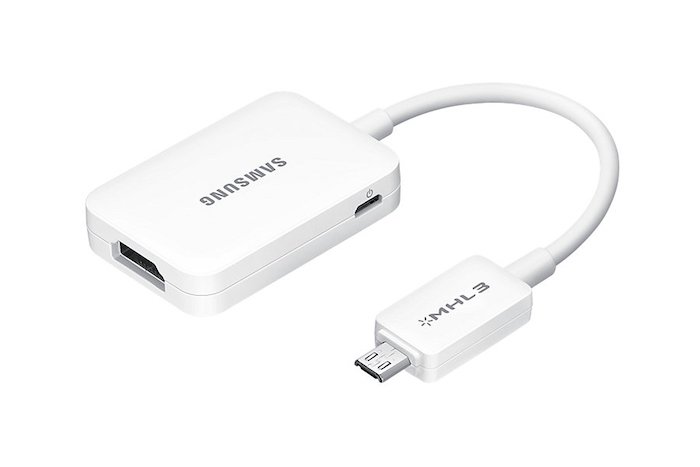
Galaxy Note 4, 3, S5, S4 MHL 2.0 HDTV adapter review, connect using HDMI cable

Samsung MHL 2.0 adapter is meant to be used in latest Galaxy Note and S series and it allows users to run full HD 1080p videos at up to 60 FPS. The best part is that you do not require your phone to connect to power source to use it. Also this HDTV adapter is fully backwards compatible with Galaxy S3 and Note 2 that have only MHL 1.0 support.

samsung note 4 mhl adapter
Continue reading “Galaxy Note 4, 3, S5, S4 MHL 2.0 HDTV adapter review, connect using HDMI cable”

Micro SATA 1.8 inch SSD HDD to 2.5 SATA converter review

The Micro SATA 1.8 inch SSD-HDD to 2.5 inch converter is for using 1.8 inch SSD drives in laptops with 2.5 inch HDD bay. In simple words, it lets you use a small SSD or hard disk into your conventional laptop.

I bought one for just $5 from Amazon to try it out and it works like a charm. I had a 128GB 1.8 inch SSD from Toshiba lying around and I thought of using it on my Lenovo ThinkPad X120E laptop that is slow snail when it comes to performance. I came to the conclusion that only an SSD can rescue it but I did not want to buy one since I already had one at home.

Micro SATA 1.8 inch SSD HDD to 2.5 SATA converter review

This Micro SATA 1.8 inch SSD HDD to 2.5 SATA converter worked like a charm. It adds around 1 inch to the length of the SSD. Here is how it looks like with the 1.8” SSD attached.

micro sata converter

After attaching simply slide it into the 2.5 inch connectors of your laptop. You may need to add some padding on the bottom so that it does not rattle. I added thermocol for padding. It works perfect and has solid construction.

laptop 1.8 inch converter to 2.5

It shall be noted that this converter does not works with mSATA drives.

Conclusion: It is cheap and it is functional. It lets you use your 1.8 inch SATA SSD drives in your big laptops. Buy it from amazon for just $5.

Rooted ROM for T-Mobile Note Edge with Knox disabled

Few days back we mentioned steps on how to disable knox on international Samsung Galaxy Note Edge. Today we are going to teach you how to do it on T-Mobile variant.

Step 1:
1.1 Download the factory NK3 ROM (link below) and Odin the package. This is the full factory NK3, which means it contains the factory recovery, modem, system, etc. It will essentially reset your device to factory (without wiping the /data partition, so all your installed app and data will still be there). You will lose root. When you complete this step, your modem will also be on NK3.
This is a zipped file. You need to unzip to get the tar file for Odin. The extension will be .tar.md5.
Download Link
1.2 Follow these instructions here to regain root. Pre requirements for getting root: Chainfire’s CF-AutoRoot & RECOVERY TWRP.Also, UPDATE SuperSU-v2.16. and just in case, Samsung USB Drivers. Finally Download Ext SD Card Write Fix.

Root T-Mobile Note Edge

Store these files inside your phone’s internal storage.

1. Make sure file UPDATE-SuperSU-v2.16.zip is in your Internal SD Card (Phone’s Internal Memory. Do not unzip this file – simply copy and paste it).
2. Make sure file tmo_n915t_extsd_fix_tekhd.zip is in your Internal SD Card (Phone’s Internal Memory).

STEP 0 -> Make sure you have already the Samsung USB Drivers installed; if not… Download them from the link above and install them.

STEP 1 -> Unzip the CF-ROOT File (CF-Auto-Root-tbltetmo-tbltetmo-smn915t.zip)

STEP 2 -> You will now have a program called Odin3 v3.07.exe… Run the program as Administrator (Right click, run as administrator) Once you open Odin3 v3.07.exe you will have a screen with only 1 checkmarks on it:

T-Mobile Note Edge

Follow these steps on the phone. Then Turn OFF Your Phone and Turn it back ON by pressing POWER + VOLUME DOWN + HOME button together at the same time. A Warning Screen will come up; press Volume Up button to enter DOWNLOAD MODE. Now connect the phone to PC via USB.

STEP 3 -> Make sure your program looks like the picture above… Now click on PDA and browse for the file CF-Auto-Root-tbltetmo-tbltetmo-smn915t.tar.md5.

>>> Now, If you are a 100% sure that your program looks like the picture above… Click START

-> The program will flash the Chainfire’s CF-AutoRoot for a few seconds then IT WILL FAIL. No need to worry.

Download and install TWRP custom recovery on T-Mobile Samsung Galaxy Note Edge

STEP 4 Now, to DOWNLOAD MODE AGAIN (by pressing POWER + VOLUME DOWN + HOME button together at the same time. A Warning Screen will come up; press Volume Up button to enter DOWNLOAD MODE).
STEP 5 -> Now open ODIN v.3.07, then click on PDA and browse for the file openrecovery-twrp-2.8.1.1-trltetmo.img.tar.
>>> Now, If you are a 100% sure that your program looks like the picture above. Click START > > PHONE WILL REBOOT AFTER FLASHING RECOVERY.
-> Now you have TWRP Custom Recovery.

twrp samsung galaxy note edge

STEP 6 -> Now turn OFF Phone Again. This time you are going to the recovery. (Not Download Mode) So basically after the phone is off, you just turn it on by pressing POWER + VOLUME UP + HOME button together at the same time. You will see this on the display.

STEP 7 Now hit SETTINGS ->SCREEN -> and UNCHECK "Enable Screen Timeout" & Set Brightness to 10% (See Pic Below) -> This will prevent display issues when using TWRP on your Note Edge.

STEP 8 -> No hit INSTALL (upper left) > then browse for the file UPDATE-SuperSU-v2.16.zip and swipe to install. Root Flashing completed, but don’t exit recovery yet. Now browse for the file tmo_n915t_extsd_fix_tekhd.zip and swipe to install. External SD Card Write Fix Flashing is complete. Exit Recovery and reboot (System Option in TWRP).

Now the final steps. 2.1 Download and flash the deodexed NK3/Knox disabled zip, be sure to verify the MD5
Download Link
MD5 Link
2.2 Clear dalvik and cache.

Adidas Fit Smart Wrist Based Heart-Rate Coach now supports Windows Phone

Adidas has announced an update to its miCoach Train and Run app for windows phone 8.1 which will allow WP8.1 users to use the company’s Fit Smart wrist based heart rate coach with their devices.

Following the update, you will be able to pair, configure and transfer your completed and planned workouts. You would also be able to use Fit Smart for sending heart rate, speed, distance and stride information in real time to the Train and Run app.

Both miCoach Train and Run apps are very popular among windows phone users, thanks to their comprehensive cardio, strength and flexibility training programs developed in partnership with the elite coaches at Exos.

The Adidas Fit Smart Wrist can store up to 10 hours of training data at one time and it makes use of optical sensor to measure your heart rate and accelerometer to track speed, distance and stride rate from your wrist.

Adidas Fit Smart Wrist Based Heart-Rate Coach now supports Windows Phone

Breaking: Lumia 435 specifications leaked, might replace Nokia X

The Lumia sales of 730 and 830 models is great and to improve them even more, Microsoft is working on Lumia 435 windows phone which will retail at an even cheaper price tag than 530.

This could be the device Microsoft needed from start in order to grab a decent chunk of marketshare, but better late than never, right? The Lumia 435 emerged earlier in various leaks by these model numbers – RM-1068, RM-1070, RM-1071, RM-1032, RM-1034  and RM-1069 which represent single and dual SIM models.

Lumia 435 specifications

Both have already been spotted on Indonesian certification and FCC websites. The Lumia spotted has 4 inch display packing WVGA 800 x 480 pixel resolution and hardware navigation buttons.

Lumia 435

Other specifications include 118.1 x 64.7 mm, Qualcomm Snapdragon 200 processor, 5 megapixel camera and removable battery.

Allwinner A83T vs RK3288, Atom Z3745, Snapdragon S4 Pro by Qualcomm

Allwinner A83T is an eight core processor that is designed for cheap tablets. We had a chance to use the InFocus C2107 7 inch Android tablet for some time and the first thing we did were few benchmark programs to see how it fares with likes of RK3288, Atom Z3745 and Snapdragon S4 Pro by Qualcomm.

The Allwinner A83T specifications includes 2 GHz octa core that is based on ARM Cortex A7 architecture with PowerVT SGX 544MP graphics.

AnTuTu benchmark test comparison

Allwinner A83T – 27942 Detailed Allwinner A83T benchmark.
Rockchip RK3288 – 37153
Intel Atom Z3745 – 33703
Qualcomm Snapdragon S4 Pro – 20383

To give you an idea of its performance, it is faster than the Snapdragon S4 Pro that is being used in the Nexus 7 2013 tablet.

CF Bench test

Allwinner A83T – 26138
Rockchip RK3288 – 21070
Intel Atom Z3745 – 29018
Qualcomm Snapdragon S4 Pro – 15230

Allwinner A83T – 27942
Rockchip RK3288 – 37153
Intel Atom Z3745 – 33703
Qualcomm Snapdragon S4 Pro – 20383

I will be honest with you – while these benchmark tests the raw power, all chips are speedy enough for your daily work.

Allwinner A83T vs RK3288, Atom Z3745, Snapdragon S4 Pro

After spending some time with our InFocus C2107, we have come to conclusion that the processor is powerful enough to handle most games, videos and web browsing which is surprising since I tis meant to be used in such cheap tablets.

The Allwinner A83T will be used in tablets that cost between 150 to 200 dollars.

Lumia buy-back offer coming to India

Microsoft Mobile is said to be launching its Lumia buy back offer in India that will encourage the Lumia users to upgrade to higher models and to increase the sales of Lumia devices.

Under this offer you will be able to get up 65 percent of existing device values. Of course there is a catch – the offer is only valid if you upgrade in the three months from the last purchase.

Discounts will range from 10% to 50% if such exchanges happen in six months and will also hinge on the condition of the older Lumia phone being swapped.

Lumia buy-back offer coming to India

This offer is not valid for devices with purchase date beyond six months. However if your device is not in working condition and is still under 6 months range, you will still get 10 percent discount. This includes if your device has broken display and is brutally scratched.

Svyaznoy offers Nokia Lumia 930 and 830 promotion

Russian mobile chain retailer Svyaznoy has launched a promotion of Nokia Lumia 930 and 830 smartphones in its shops. The flagship Lumia 930 smartphones that features 5 inch full HD display and 20 mega pixel camera is being offered by RUB 22,990 ($427) while the Lumia 830 is being sold for mere RUB 16,990 ($315).

The Lumia 930 and 830 used to retail for RUB 24,990 ($464) and 19,990 ($371) respectively.

Svyaznoy offers Nokia Lumia 930 and 830 promotion


The Svyaznoy’s site also lets you buy it on installments. In this, you will have to pay only 10 percent of the phone’s value and rest of the amount is divided into 12 month span.

How to unbrand Nokia XL Android phone

There are many reasons of why you would want to unbrand your Nokia XL android phone. So here are the steps on how to do it.

Download and install if you don’t have this software Nokia Care Suite PST 5.0.0 (5.4.119.1432).
Download and install Data Package Manager 4.2 (2013.7.5).
Download and unzip to where you want UserGroupsConfiguration.
Remove the SIM card during the all process.

Here are the authentication files you will require for using Nokia Care Suite.

For Windows x86 (32 bits) PC

Copy the file UserGroupsConfiguration.cfg(therefore the decompressed file), in the three following directories:

* "C:\Programmes\Nokia\Nokia Care Suite\Data Package Manager\bin"(essential for using Data Package Manager category).
* "C:\Programmes\Nokia\Nokia Care Suite\Multi Software Updater 5.0" (not useful for the tutorial, but essential to use the Multi Software Updater 5.0 category).
* "C:\Programmes\Nokia\Nokia Care Suite\Product Support Tool For Store 5.0"(not useful for the tutorial, but essential to use the Product Support Tool For Store 5.0 category).

Windows x64 (64 bits) PC

*

Copy the file UserGroupsConfiguration.cfg(therefore the decompressed file), in the three following directories:

* "C:\Program Files (x86)\Nokia\Nokia Care Suite\Data Package Manager\bin"(essential for using Data Package Manager category).
* "C:\Program Files (x86)\Nokia\Nokia Care Suite\Multi Software Updater 5.0" (not useful for the tutorial, but essential to use the Multi Software Updater 5.0 category).
* "C:\Program Files (x86)\Nokia\Nokia Care Suite\Product Support Tool For Store 5.0"(not useful for the tutorial, but essential to use the Product Support Tool For Store 5.0 category).

How to download and flash stock ROM

Run Nokia Care Suite software and double-click on theData Package Manager category. Make sure that Nokia Care Suite Server is selected and click on Ok.

How to unbrand Nokia XL Android phoneHow to download and flash stock ROM

* If for one reason or another, the authentication with the Nokia Care Suite Server is not performed, so click on Work offline and on Ok. In the top left of the Data Package Manager window, click on File, on Work Online and on Ok.

* Fill in the two parameters Product Type and Product Code. Click on Search button. Right-click on the file found and click on Download Selected and wait the completed download to 100%.

* For only those, who have downloaded Stock ROM without using the Data Package Manager category, you must copy the downloaded files in the following directory:C:/ProgramData/Nokia/Packages/Products/RM-XXX(where XXX is your RM (RM-XXX = Product Type, and you can find your RM with the link Product Type & Product Code), for example for me with my Nokia X it is RM-980).
* Run Nokia Care Suite software and double-click on the Product Support Tool For Store 5.0 category. Click on Work offline. Stay in mode No connection.

nokia product support tool xldowload Nokia Care Suite for xl

In top left of the Product Support Tool For Store 5.0 window, click on File and then on Open Product. Find your Android Nokia, or in the Filter box, tap on keyboard the Product Type of your Android Nokia (in my case, a (RM-980) Nokia X) and select your Android Nokia. Then click on Open. Click on Programming, and then click on Recovery.

Click on Update list. Select the Stock ROM downloaded. Click on Start. Wait a little that Product Support Tool For Store 5.0 verifies of data Packages integrity then it starts flashing operation, and it will show you an error (it indicates that the application has lost the connection, but this is normal because the phone is not connected).

Connect the USB end into the USB port of your PC. Turn off your Android Nokia. Press and keep the Volume Down button and the Power button. Once a vibration felt, release the Power button. Release the Volume Down button after 15 seconds. Connect the other USB end to the USB port of your Android Nokia. Click on Retry in Recovery window.

If a error message like this during flashing:"MSG_INVALID_SIZE_SECURE_FLASH_RESP: 0x00040006" If that happens, try changing the USB port where your Android Nokia is connected. For example, if it’s a USB 3.0 port, try to connect it to a USB 2.0 port.

* If a message like this during flashing: "You have chosen not assigned product code for this device, do you wish to continue?" This is normal, it just means that the Product Code/Stock ROM chosen does not matches with that of the Android Nokia. But do not worry, this is quite normal. Click on OK.

* Wait the flashing process. Click on Close.
* Congratulations the process of flash is complete.

Nokia XL: Download CM10 Cyanogen Mod 10

If you want to enjoy vanilla Android experience on your Nokia XL, the best way is to go and install CM10 also known as Cyanogen Mod 10. Since the ROM is still pretty much a WIP, we suggest you not to use it as your daily driver. In fact there are some know problems or bugs.

ON_IOC_ALLOC error warning Out of memory (in logcat)
Fast drain battery
Latest Facebook & Messenger not working (use old Facebook app)
FM radio not working (same thing before ported)

Here is what is working so far:

Wifi
Dual sim 3G/2G
Camera Front/Rear working fine
All Sensor
Rotation 0,90, & 270 degrees
CPU performance (Over clocking)
Micro phone
Speaker
Bluetooth
GPS

Nokia XL Download CM10 Cyanogen Mod 10

Here is its installation procedure:

1. Make sure you have its custom recovery installed
2. We suggest installing TWRP (touch recovery).
3. Download CM10 zip file from bottom link.
4. Copy it to SD card
5. Go to Recovery mode by pressing both Volume up + Power button
6. Select the zip and flash it.
7. Just wait to finish and enjoy.

Get CWM clock work mod recovery for Nokia XL

CWM also known as Clock work mod recovery lets you install custom firmwares and unauthorized stuff on your Nokia XL. The CWM for Nokia XL is same as the one for Nokia X but has build.prop modified. To install it use the Nokia X Flasher tool and flash recovery partition.

CWM 6.0.2.8 for Nokia XL, Kernel for the Nokia XL

The CWM for Nokia XL is made from Cyanogen Mod 11 sources and kernel sources by Nokia. It shall be noted that you will void the warranty by flashing this CWM on your Nokia XL.