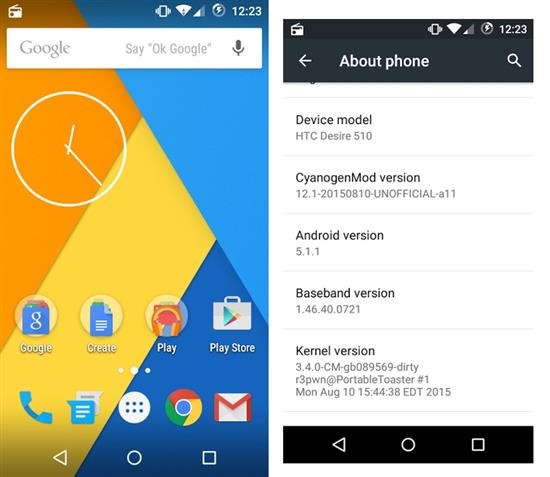
Resurrection Remix ROM for Samsung Galaxy Core Prime is based on CM, slim.omni and original Remix ROM builds. The newest one is based on android 5.1 lollipop which brings new features over the stock Core Prime ROM that is still stuck on Android 4.4.4.

* Navigation Bar
* Enable/Disable Navbar
* Navbar Ring Switch
* Navbar Ring Targets
* Navbar Button Customization
* Navbar Dimensions(Potrait and Landscape)
* Statusbar
* Brightness Slider
* Enable/Disable Show Notification Count
* SuperUser Indicator Switch
* Carrier Label
* Carrier Label Switch
* Carrier label Colour
* Quick PullDown Switch
* Smart Pulldown Switch
* Clock Customizations
* Time and date
* Clock Colour
* Day and date Toogle
* Center Clock/Right Clock Choice
* Battery
* Battery Bar customization
* Battery Icon Customization(circle/landscape/Potrait and more)
* Battery % Text
* Network Traffic Indicator
* Theme Chooser
* RR exclusive PITCH BLACK THEME
* Animations
* Toast Animations
* ListView Animations
* System Animations
* Gestures
* Gestures Anywhere Feature
* App Circle Bar
* Choose apps in App circle
* Trigger Width
* Trigger Hieght
* Trigger Position
* Recents Panel
* Clear All button Switch
* Clear All Tasks Switch
* Clear All Button Location(Top right,Top Left,Top Center,Bottom Left,Bottom Right,Bottom Center)
* Clock Widget
* Clock And Alarm Customizations
* Weather Panel Customizations
* Calender Events
* LockScreen
* Lockscreen Shortcuts
* Choose upto 5 Shortcuts
* 100+ Icons for Shortcuts
* Quick Slider Shortcuts
* Notification Drawer
* Weather Display Switch
* Quick Settings
* Choice to Add 20+ Tiles
* Enable 2/3/4 Tiles per Row
* Enable Disable Birghtness Slider in Notification Panel
* Advanced Location Settings Switch(Choose Battery saving/Device Only/High Accuracy Directly in Notification Panel)
* LongPress Toogles to Enter Settings
* Buttons
* Backlight Timer
* Backlight Strength
* Navigation Bar left/Right handed mode Switch
* Power Menu
* Power Menu End Calls Switch
* Home Button(For devices with HW keys Only)
* Home Button Wake Up
* Home Button answer call
* Long Press Actions
* Double Tap Actions
* Back Button(For devices with HW keys Only)
* Wake Up device Switch
* Menu Button(For devices with HW keys Only)
* Wake Up Device Switch
* Short Press Actions
* Long Press Actions
* Search Button(For devices with HW keys Only)
* Wake Up Device
* Short Press Action
* Long Press Action
* Volume Buttons
* Wake Up Device
* Playback Control
* Keyboard Cursor Control
* Swap Buttons on Landscape mode
* Perfomance Profiles
* LCD Density
* Expanded Desktop Mode
* All New CM Audio FX App
* Heads Up Customizations
* OverAll Smoothness Improvements
* Quick Unlock
* Optimizations to Improve Battery
* ALL cm12.1 Features
Installation instructions
* Download ROM and gapps from here and save on your external/internal SD
* Go to Core prime Recovery and make BACKUP of current
* ROM in Backup and Restore option
* Do WIPE DATA/FACTORY
* RESET + MOUNTS & STORAGE/FORMAT SYSTEM
* Choose install zip from and select ROM. Install gapps (google about it) in same fashion. Pico version recommended.
* follow on screen instructions
* Wait some minutes for first boot and after updating ROM
* Done