Epson Endeavor TD160E is an all in one

Epson Endeavor TD160E review. You have to see how times change. Do you remember from Epson and its famous printers? Personally I had long heard nothing of this manufacturer, which had fallen almost into oblivion. However , the company still active and so much so that in an attempt to rise from its ashes a phoenix which announced the launch of its first computer All in One focused on home users, the Epson Endeavor TD160E.

Epson Endeavor TD160E review

In fact it is not that wonderful team, but it’s something and something is better than nothing. The Epson Endeavor TD160E All in One is a capacitive touch screen with 10 points with a size of 15.6 inches and 1366 x 768 resolution, as a portable standard 15 inches. It houses an Intel Celeron N3150 1.60 GHz processor with 2GB of DDR3 memory and a 64GB SSD capacity. Read Celeron N3150 benchmark here.

Yes, the system is totally silent since it lacks active cooling (fanless), thereby being ideal for use in spaces where silence is very important as libraries or hospitals. It incorporates WiFi 802.11 ac, Bluetooth, one RJ-45 Gigabit and two USB 3.0 and HDMI video output connectivity.

The Epson Endeavor TD160E Pro comes with Windows 10 operating system factory and the manufacturer will offer different configuration options. In its most basic version (which I have described) will hit stores mid-March with a price of $ 889, quite high for what it offers.

We’ll see how she is going to Epson with this attempt to return to the domestic market, although it seems they have already left far behind the time when they were a world leader in the field of printers and related devices. Since then the team of which I speak today not blunts its hardware or its price exactly, but who knows if it’s just a test to see what market segment can be positioned.
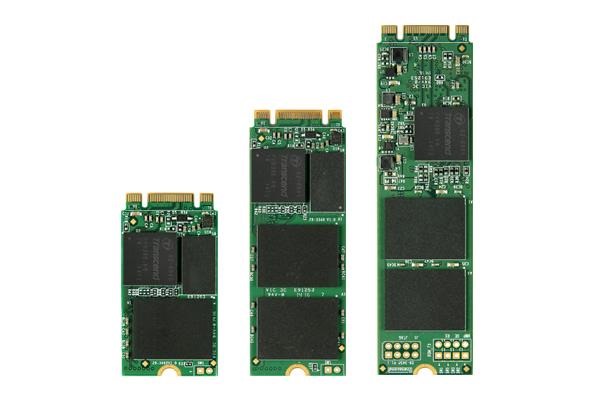
Transcend MTS800 M.2 SSD with 1TB storage launched

Transcend MTS800 M.2 SSD with 1TB storage has been launched offering large storage capacity for the ultra thin computing devices for ultrabooks, tablets and laptops. Transcend SSD370S review can be read here.

Transcend MTS800 M.2 SSD review

Transcend MTS800 features include very high quality flash storage made of MLC NAND flash mated with SATA III 6Gb/s interface to ensure superior performance and rock solid stability.

Transcend MTS800 ensures that the users will get a minimum sequential read speeds of 560 MB/s and write speeds of 460MB/s. Transcend MTS800 start at 32GB and go all the way to 1TB flash storage.

Continue reading “Transcend MTS800 M.2 SSD with 1TB storage launched”

Root Lenovo K3 Note easily: Install CWM on Lenovo K3 Note–Download custom recovery for Lenovo K3 Note

Here is how you can root Lenovo K3 Note easily. In this article, you will also find how to download and install CWM or TWRP custom recoveries on your Lenovo K3 Note android phone. You will need four tools for doing it. First and foremost you will need to download these four pieces of software.

Lenovo K3 Note root cwm

1.Lenovo USB Tools – Download it from here: https://userscloud.com/n7zmi1utn6wz

2. Flash Tools – Download it from here. https://userscloud.com/958tvsa17724

3. CWM Recovery Image and Scatter Text File (Developer – liuxinghost)- Download it from here. https://userscloud.com/yexc173ibpv8

4. Update.zip – Download it from here. https://userscloud.com/o8m7u398nmv5

CWM on Lenovo K3 Note

* Take a backup of your data. We don’t guarantee if something is erased. Always take precautions .
* Enable USB Debugging on your device.
* Goto > Settings > Developer Options > USB Debugging.
* If Developer Options is not located under settings then enable it by going toSettings > About Phone > Device Info and tap on Build Number for about 7-8 times. And then go back and follow previous step.
* Make sure the battery is 50% charged or more.
* Go to Settings > Security and enable Unknown Sources option.
Step 1 : Extract the LenovoUsbDriver_Techolaty.Net.rar and install the software in your PC.
Step 2 : Extract the Flash_Tools_Techolaty.Net.rar file and then open flash_tool.exe (run it as an administrator) Also Extract Recovery_Lemon_K3_Note_Techolaty.Net.rar in the same folder.
Step 3 : Now select MT6752_Android_scatter.txt .
Step 4 : Click on Options from the top then Download and make sure DA DL all with Checksum is checked.
Step 5 : Now just tick the checkbox recovery and browse to the extracted files and locate recovery.img
Step 6 : Now remove the battery of your phone & connect USB cable. Wait for 10 seconds & press the download button on PC. Then wait 05 seconds & insert battery in phone without removing USB cable. Wait for seconds and you will have CWM custom recovery installed on your Lenovo K3 Note.

Steps to enter Recovery mode in Lenovo K3 Note
1. Press and hold the Volume Down Button + Volume Up Button + Power Button.
2. When you see the Boot Screen, Release the Power Button but keep the Volume Buttons pressed until you see the Recovery Screen.

Root Lenovo K3 Note

Step 1 : Copy the UPDATE-SuperSU-v2.46.zip file in your SD card root folder
Step 2 : Enter/Reboot to recovery mode on your device
Step 3 : Select the UPDATE-SuperSU-v2.46.zip file and click update to root lenovo k3 note android phone.

Yoga 710 and 5101, Ideapad Miix 310 launched at MWC 2016

Yoga 710 and 5101 review

Lenovo presented at a conference in MWC 2016 its new laptops equipped with operating system Windows 10 : the Yoga 710 and 5101 and Lenovo Ideapad Miix 310 a 2 in 1 that can be used both as a laptop and tablet.

Yoga 710 and 5101, Ideapad Miix 310 review

In the words of Lenovo, “We have realized the need for users today is the ability to work on multiple devices. For example, they can send a message from your smartphone, work on your laptop and read on your tablet. Therefore the design of our new devices include the ability to use the laptop as a tablet, so that users can have the versatility of these devices with the convenience of being able to type on a keyboard with the full power of the latest generation Intel processors but still maintaining a huge battery life. ”

We started talking about the new Lenovo Yoga 11 or 710 14-inch laptop that weighs only 1.04 kg and therefore is ideal for carry it everywhere. Equipped with an Intel Core i7 processor sixth generation (in the 14-inch model) or Intel Core m5 (in 11-inch), which together with Windows 10 makes it an extremely powerful despite its size and weight device. also integrates a 256 GB SSD, WiFi 20% more powerful than previous models and as an option can be integrated Nvidia GeForce graphics. In all cases it has a Full HD display and up to 8 hours of battery life.

Meanwhile, the Lenovo Yoga 5101 offers a completely renovated with respect to the previous generation design, delivering 50% more battery life (reaches up to 8.5 hours) and is lighter than its predecessor. As with Yoga 710 and Yoga 3 Pro, the 5101 is a convertible that can be used in four different positions, although in this case weighs 1.75 kg (version 14-inch) or 2.08 Kg (15 inches) and is powered by hardware AMD (Intel Core i7 but AMD Radeon R7 M460 processor 2 GB).

Finally, we must mention the affordable Lenovo Ideapad Miix 310, a two in one that can separate the screen keyboard and weighing only 580 grams. It offers a wide range of connectivity (including LTE optional) and features a 10-inch Full HD resolution that will delight any user. Includes 64 GB of internal storage, 4 GB of RAM and Intel Core processors M. The best part is that its price of 269 euros.

The new Lenovo Yoga 710 will hit stores in May this year at a starting price of 799 euros for the 11-inch model and the 14-inch 899. For its part, the Yoga arrive in April 5101 at a price of 479 euros 14-inch model and 699 euros 15. Finally, the Lenovo Ideapad Miix 310 hit stores in June at a starting price of 269 euros in its most basic model. Obviously these prices will be increased if we choose more powerful hardware options.

Corsair launches new VOID Surround headphones

Corsair VOID Surround review

Corsair has just announced the update to its family of headphones Gaming VOID with the inclusion of two new models, the Corsair Corsair VOID VOID Surround and Wireless RGB white color, thus expanding the range of headphones for games compatible with PC, PS4 and Xbox One.

According to Corsair, VOID Surround headphones are “Stereo hybrids.” This is because through the use of an adapter is compatible with both PC and mobile devices since the original connector is a 3.5 mm mini jack that can be used for a stereo quality sound consoles or mobile devices, but also it includes a USB adapter with integrated sound card that turns the headset on a device with virtual 7.1 surround sound, this single case compatible with PC.

Corsair VOID Surround software

Like all the other members of the VOID family, Surround are designed to provide the best user comfort even on the longest gaming sessions. With its foam pads with memory effect microfiber coated aluminum frame, the Surround VOID are not only comfortable, but they are also very light. Of course speakers feature Neodymium magnets that deliver the best sound quality, and unidirectional microphone with active noise cancellation used by the rest of the family.

Moreover, Corsair also announced the launch of new handsets VOID Wireless RGB in white, Gaming headset with 7.1 surround sound which in this case are only compatible with PC as they are USB only. Integrated Dolby Headphone 7.1 surround sound with the convenience of not having cables through. The VOID Wireless RGB have a range of 12 meters and eye to the data, a range of up to 16 hours. Share exactly the same design as the previous model, so they are just as comfortable and lightweight.

However developments are also added with regard to the software, and is updated Corsair CUE to add what they called VOID Visualizer. This function is to combine a headset with a VOID RGB RGB Corsair keyboard (such as RGB K70 or STRAFE RGB ) LEDs to display on the keyboard graphic equalizer depending on the sound that comes out of the VOID headphones, creating spectacular effects.

The recommended retail price for Corsair VOID Surround is 79.99 euros, while the VOID Wireless RGB white rises to 129.99 euros. Both are available by manufacturer, but as always it will take a few days longer to reach the stores.

Incidentally, since I anticipate we’re waiting until we get a sample for analysis VOID Wireless RGB white, so that soon we will tell you what it looks like first hand, and in combination with an RGB STRAFE keyboard.