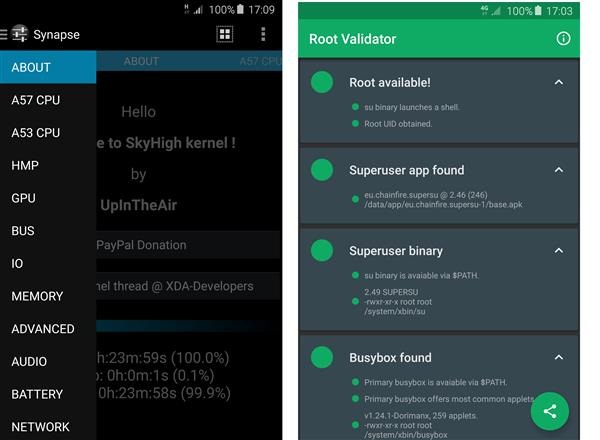
A new ROM on xda developers has surfaced that lets you attain root by flashing a pre rooted firmware. It is based on official Samsung Galaxy Note 5 source N920CXXU1AOGE and is compiled with Google ARM Toolchain GCC 4.9. It roots the system automatically and installs busybox as well. Of course this voids the warranty as it bumps knox counter to ‘1’. It also lets you overclock underclock Galaxy Note 5 as it install a custom kernel that lets you do it. It works only on the SM-N920 variant of Galaxy Note 5.
* SELinux PERMISSIVE (for Titanium Backup and other apps to work correctly)
* adb insecure
* init.d script support (drop in script & set permissions to 755 or 777 and reboot)
* Possible Screen Mirroring / AllShare Cast fix
* Secure storage = false (should prevent WIFI settings & passwords wiping on flash)
* Synapse app support for many kernel configurations
Samsung Galaxy Note 5 Rooted Firmware: The Features
Reduced logging
exFAT FS support
NTFS R/W support with app
CIFS support (not tested)
Frandom
mount partitions NOATIME and NODIRATIME by default
Entropy tweaks
CLEANCACHE & ZCACHE
Microsoft X-BOX gamepad controller in-built module
Much more – check source commits & Synapse
Galaxy Note 5 Kernel features lets you underclock overclock it
A57 CPU
CPU temperature
A57 big Cores Frequency Scaling
live frequency
MAX: 2400 MHz (stock 2100 MHz is default)
MIN: 500 MHz (stock 800 MHz is default)
HPM voltage control
A57 big Cores voltage control
CPU governors
interactive (default)
on-demand
conservative
userspace
performance
CPU governor tunables
A53 CPU
A53 LITTLE Cores Frequency Scaling
live frequency
MAX: 1500 MHz (stock/default)
MIN: 200 MHz (stock 400 MHz is default)
HPM voltage control
A53 LITTLE Cores voltage control
CPU governors
interactive (default)
on-demand
conservative
userspace
performance
CPU governor tunables
HMP
Up thresholds
Down thresholds
GPU
GPU stats
Current clock freq
Live Frequency Utilization (load)
Time in state
GPU power policy control
coarse_demand (default)
demand
always_on
GPU frequency scaling
Max freq control (stock 772 MHz is default)
Min freq control (stock 266 MHz is default)
GPU Governor
Default
Interactive (default)
Static
Booster (more graphic and benchmark performance)
GPU Interactive Governor tunables
highspeed clock
highspeed load
highspeed delay
HPM voltage control margin
GPU voltage control
BUS
Memory Bus HPM voltage control
Memory Bus voltage control
Internal Bus voltage control
ISP (Image Signal Processor) voltage control
IO
I/O Schedulers
DEADLINE
CFQ (default)
NOOP
Storage read-ahead (256 KB)
General IO tuneable
Add random
IO stats
Rotational
No merges
RQ Affinity
I/O scheduler tunables
MEMORY
Memory state
Total
Free
Low Memory Killer Profiles
Low
Medium
Custom (recommend)
Default (default)
Aggressive
Exterminate
Low Memory Killer minfree tuning (OOM LMK)
Kernel SamePage Merging (KSM)
KSM stats
Pages to scan
Deferred timer
Virtual Memory
Dirty Background Ratio
Dirty Ratio
Drop caches (Clear VFS cache after boot)
Laptop Mode
Swapiness
ADVANCED
Entropy (max 4096)
Gentle Fair Sleepers control (disabled)
Arch Power control (enabled)
randomize_va_space control
AUDIO
(Sound Control by AndreiLux)
Jack media volume control
L/R channel volume
mono mixer
Speaker volume control
Earpiece volume
Main Equalizer
Advanced Stereo Equalizer
NETWORK
TCP congestion control
All available enabled.
Default = westwood+
Screen mirror/allshare cast fix control (enabled)
Clean WIFI Lease
TCP/IP network security
3G DNS speed & security tweak
Google
OpenDNS
Comodo, Level3
Norton_DNS
Smart_Viper
SECURITY
KNOX control
NO_ACTION (default)
Disabled
Enabled
SELinux
Live status
BATTERY
Battery info
Battery SCALING calibration (fuel gauge reset)
FS (File System)
Display FS Type
FS Controls
remount System r/w r/o
remount RootFS r/w r/o
Scrolling cache control
Optimise Databases (SQLite3)
Wipe options
cache reboot
dalvik-cache reboot
cache & dalvik-cache reboot
Clean up
clipboard cache
/data/tombstones
/data/anr logs
/data/dropbox logs
lost+found
BACKUP & RESTORE
Name – Restore – Delete – Backup
profiles
kernel image
LOGS
LogCat
dmesg
last_kmsg
REBOOT
Reboot device
Recovery Mode
Download Mode
Power Off
Clear Synapse Data & Reboot
Restart Synapse
Rooted firmware: Installation instructions
Uninstall any CPU control apps, tweaks and init.d scripts etc.
Recommend: Disable or remove KNOX (you can disable with Synapse once kernel is flashed)
Install Synapse app from Google Play.
Device Settings:
Enable Developer Options > OEM UNLOCK
If flashing from previous SkyHigh kernel > Device settings > Applications > Synapse > Force Stop > clear data
If not installed > Install SuperSU from Google Play: Boot into Download Mode & connect to PC and Flash SkyHigh kernel with Odin 3.10.6 in [AP].
After boot:
a) wait at least 120 secs to stabilize
b) Open Synapse
c) Tap "Understood"
d) Tap the "" to apply new defaults
IMPORTANT: Synapse > FS > [Wipe Cache & Dalvik-Cache Reboot] !! (maybe help with reboot issue during call)
Download links: