Galaxy Core: Download Multi Window

Thanks to kind folks at XDA, the Samsung galaxy core users can have multi window functionality on their phones. All you have to do is get the multiwindow.apk file from here; put it on the root folder of your phone; reboot to cwm recovery; install my zip from SD card and install it on your phone.

Galaxy Core Download Multi Window

To use multi window on the phone, there is need to have root access, as well as CWM recovery, and can be used on any deodexed Galaxy Core ROM.

Cooler master Silencio 452 Specs Price

Some time back, folks at Cooler Master churned out Silencio 352 and 652, and today the company has released Silencio 452. The model has received a new shell which feels more sturdy and now has soundproof foam pads to minimize the noise levels. To further tone them down, it comes with rubber feet to dampen vibrations and two silent fans as well. Specs and price of Silencio 452 are given below.

Cooler master Silencio 452 review

Continue reading “Cooler master Silencio 452 Specs Price”

Download Galaxy Core Stock Deodexed ROM

For many reasons, you might require a deodexed, zipaligned and debloated ROM for your Samsung galaxy core. The ROM is plain stock, and does not have any bloatware, and is deodexed, and zipaligned. To install, follow these steps. Just make sure to backup your data before proceeding.

Download Galaxy Core Stock Deodexed ROM

1. Download the ROM from here and power off your phone.
2. Boot into CWM recovery by pressing home+power+volume up
3. Select wipe data / factory reset
4. Select wipe cache
5. Flash the zip
6. Do steps 3-4 again.

Download Install CWM Recovery on Galaxy Core

To do any sort of modding on your Samsung galaxy core, you will need to download and install CWM clockworkmod recovery. While with the stock recovery, you can wipe your phone, clear cache, with the CWM recovery, you can install custom ROMs, make Nandroid backup and even partition your SD card.

First, you will to install Galaxy Core Drivers on your computer. Download them from here. To get CWM recovery, you will need ODIN (download link) and CWM file (download link).

Download Install CWM Recovery Galaxy Core

Before you proceed, ensure that, you have 30 percent or more battery. Copy Recovery.tar File In ODIN Folder. Open settings on your phone and go tot developer options > tick USB Debugging. Now, turn off your phone.

Now, go into download mode. You can do that by pressing and holding the Volume Down + Home Key + Power Key. Do that for few seconds until download screen comes up. Press Volume Up key to proceed.

Connect your phone via USB cable and open ODIN. Click on PDA button and select recovery.tar file. Press the start button to start the process. It should display pass.

Samsung Galaxy Core Store Apps on SD Card

Samsung Galaxy Core users get only 8GB of flash storage, out of which only 4GB is available to the user. While you can use micro SD card to expand storage, only internal storage is used for storing apps. Here is a guide on how make everything store on external micro SD card.

Samsung Galaxy Core Store Apps on SD Card

1. First root your Samsung Galaxy Core by following step by step instructions from here.
2. Now, download external2internal app from Play store.
3. Start external2internal app and grant it root access. Tick send rescan and use per default options.
4. Then press Original Mounting Point And Change To ‘storage/sdcard0’.
5. Now, select original External Mounting Point And Change To ‘storage/ExtSdCard’.
6. Tap Ext.Sdcard Device Access and Change The Value From 179:49 to 179:33.
7. Now press back button and tick, At Boot Option and select External>Internal.
8. Wait for some time and reboot your Samsung Galaxy Core.

If still no success, go to external2internal app again Press External>Internal.

Walmart Selling Nokia Lumia 521 for $80

Walmart is now selling T-mobile version of Nokia Lumia 521 for mere $79.95. This is a pretty amazing price tag for such a capable that supports all Nokia Lumia services and runs the fastest growing smart phone platform.

The low price makes it not such a heartbreak in case your phone gets stolen, and the fact that there is no contract device makes it one of the best phone in the market. While lack of flash and front camera may turn off few, keep in mind that it is just $80.

Walmart Selling Nokia Lumia 521 for $80

Here are its specs – 1GHz dual-core Qualcomm 82270 processor; Windows Phone 8 operating system; 5 megapixel camera with auto focus; HD video recording at 720p, 30fps; 8GB internal memory, expandable up to 64GB; 1430mAh battery; Quad-band 4G UMTS/HSPA+ 42; WiFi for data (802.11b/g/n/e)

Mouse Computer Launches Laptop with WD Black 2 HDD

Mouse Computer Co., Ltd. has launched a G-Tune gaming laptop sporting the new Western Digital “WD Black2” hard disk which combines 1TB HDD and 120GB SSD in one casing.
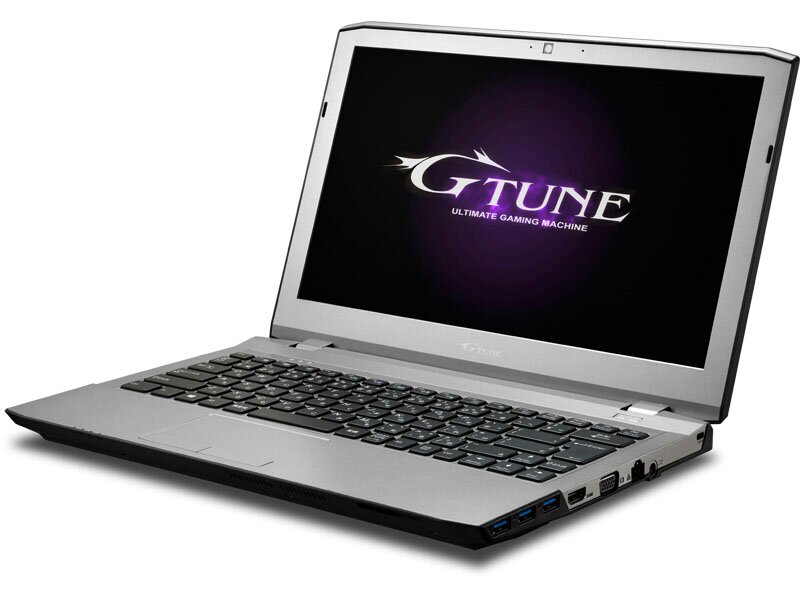
Mouse Computer Launches Laptop with WD Black 2 HDD

We believe that this HDD will be effectively utilized in this 13.3-inch notebook, which also features GeForce GTX 765M (2GB) GPU,  1,920 × 1,080 dot (full HD) display support 13.3-inch non-glare LCD, a very powerful and capable Core i7-4700MQ (2.4GHz) processor, 8GB RAM, Intel HM87 Express chipset, and Windows 8.1 64 bit operating system.

Ports selection includes card reader, USB 3.0 × 3, USB 2.0, mini D-Sub15 pin, HDMI output, IEEE 802.11b/g/n compatible wireless LAN, Gigabit Ethernet, Bluetooth 4.0 + LE, 2 megapixel Web came, and the usual audio jacks.

Battery life is statee to be around 3.5 hours. Body size is about 330 × 227 × 31.9mm (height width × depth), the weight is 2.1 kilograms. Price tag is set at 139,860 yen.