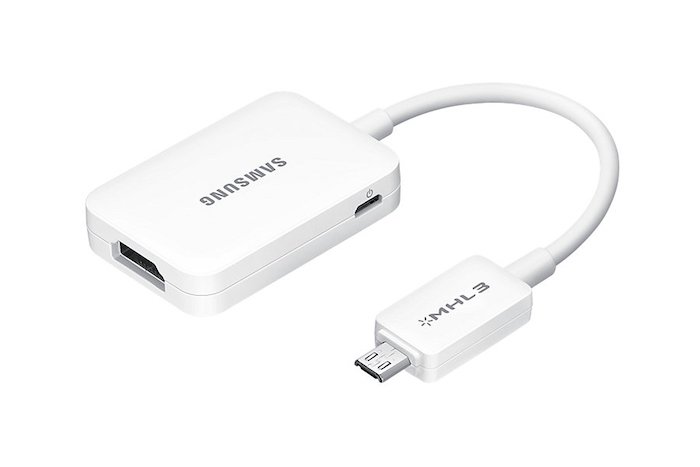
Galaxy Note 4, 3, S5, S4 MHL 2.0 HDTV adapter review, connect using HDMI cable

Samsung MHL 2.0 adapter is meant to be used in latest Galaxy Note and S series and it allows users to run full HD 1080p videos at up to 60 FPS. The best part is that you do not require your phone to connect to power source to use it. Also this HDTV adapter is fully backwards compatible with Galaxy S3 and Note 2 that have only MHL 1.0 support.

samsung note 4 mhl adapter
Continue reading “Galaxy Note 4, 3, S5, S4 MHL 2.0 HDTV adapter review, connect using HDMI cable”

Micro SATA 1.8 inch SSD HDD to 2.5 SATA converter review

The Micro SATA 1.8 inch SSD-HDD to 2.5 inch converter is for using 1.8 inch SSD drives in laptops with 2.5 inch HDD bay. In simple words, it lets you use a small SSD or hard disk into your conventional laptop.

I bought one for just $5 from Amazon to try it out and it works like a charm. I had a 128GB 1.8 inch SSD from Toshiba lying around and I thought of using it on my Lenovo ThinkPad X120E laptop that is slow snail when it comes to performance. I came to the conclusion that only an SSD can rescue it but I did not want to buy one since I already had one at home.

Micro SATA 1.8 inch SSD HDD to 2.5 SATA converter review

This Micro SATA 1.8 inch SSD HDD to 2.5 SATA converter worked like a charm. It adds around 1 inch to the length of the SSD. Here is how it looks like with the 1.8” SSD attached.

micro sata converter

After attaching simply slide it into the 2.5 inch connectors of your laptop. You may need to add some padding on the bottom so that it does not rattle. I added thermocol for padding. It works perfect and has solid construction.

laptop 1.8 inch converter to 2.5

It shall be noted that this converter does not works with mSATA drives.

Conclusion: It is cheap and it is functional. It lets you use your 1.8 inch SATA SSD drives in your big laptops. Buy it from amazon for just $5.

Rooted ROM for T-Mobile Note Edge with Knox disabled

Few days back we mentioned steps on how to disable knox on international Samsung Galaxy Note Edge. Today we are going to teach you how to do it on T-Mobile variant.

Step 1:
1.1 Download the factory NK3 ROM (link below) and Odin the package. This is the full factory NK3, which means it contains the factory recovery, modem, system, etc. It will essentially reset your device to factory (without wiping the /data partition, so all your installed app and data will still be there). You will lose root. When you complete this step, your modem will also be on NK3.
This is a zipped file. You need to unzip to get the tar file for Odin. The extension will be .tar.md5.
Download Link
1.2 Follow these instructions here to regain root. Pre requirements for getting root: Chainfire’s CF-AutoRoot & RECOVERY TWRP.Also, UPDATE SuperSU-v2.16. and just in case, Samsung USB Drivers. Finally Download Ext SD Card Write Fix.

Root T-Mobile Note Edge

Store these files inside your phone’s internal storage.

1. Make sure file UPDATE-SuperSU-v2.16.zip is in your Internal SD Card (Phone’s Internal Memory. Do not unzip this file – simply copy and paste it).
2. Make sure file tmo_n915t_extsd_fix_tekhd.zip is in your Internal SD Card (Phone’s Internal Memory).

STEP 0 -> Make sure you have already the Samsung USB Drivers installed; if not… Download them from the link above and install them.

STEP 1 -> Unzip the CF-ROOT File (CF-Auto-Root-tbltetmo-tbltetmo-smn915t.zip)

STEP 2 -> You will now have a program called Odin3 v3.07.exe… Run the program as Administrator (Right click, run as administrator) Once you open Odin3 v3.07.exe you will have a screen with only 1 checkmarks on it:

T-Mobile Note Edge

Follow these steps on the phone. Then Turn OFF Your Phone and Turn it back ON by pressing POWER + VOLUME DOWN + HOME button together at the same time. A Warning Screen will come up; press Volume Up button to enter DOWNLOAD MODE. Now connect the phone to PC via USB.

STEP 3 -> Make sure your program looks like the picture above… Now click on PDA and browse for the file CF-Auto-Root-tbltetmo-tbltetmo-smn915t.tar.md5.

>>> Now, If you are a 100% sure that your program looks like the picture above… Click START

-> The program will flash the Chainfire’s CF-AutoRoot for a few seconds then IT WILL FAIL. No need to worry.

Download and install TWRP custom recovery on T-Mobile Samsung Galaxy Note Edge

STEP 4 Now, to DOWNLOAD MODE AGAIN (by pressing POWER + VOLUME DOWN + HOME button together at the same time. A Warning Screen will come up; press Volume Up button to enter DOWNLOAD MODE).
STEP 5 -> Now open ODIN v.3.07, then click on PDA and browse for the file openrecovery-twrp-2.8.1.1-trltetmo.img.tar.
>>> Now, If you are a 100% sure that your program looks like the picture above. Click START > > PHONE WILL REBOOT AFTER FLASHING RECOVERY.
-> Now you have TWRP Custom Recovery.

twrp samsung galaxy note edge

STEP 6 -> Now turn OFF Phone Again. This time you are going to the recovery. (Not Download Mode) So basically after the phone is off, you just turn it on by pressing POWER + VOLUME UP + HOME button together at the same time. You will see this on the display.

STEP 7 Now hit SETTINGS ->SCREEN -> and UNCHECK "Enable Screen Timeout" & Set Brightness to 10% (See Pic Below) -> This will prevent display issues when using TWRP on your Note Edge.

STEP 8 -> No hit INSTALL (upper left) > then browse for the file UPDATE-SuperSU-v2.16.zip and swipe to install. Root Flashing completed, but don’t exit recovery yet. Now browse for the file tmo_n915t_extsd_fix_tekhd.zip and swipe to install. External SD Card Write Fix Flashing is complete. Exit Recovery and reboot (System Option in TWRP).

Now the final steps. 2.1 Download and flash the deodexed NK3/Knox disabled zip, be sure to verify the MD5
Download Link
MD5 Link
2.2 Clear dalvik and cache.

Adidas Fit Smart Wrist Based Heart-Rate Coach now supports Windows Phone

Adidas has announced an update to its miCoach Train and Run app for windows phone 8.1 which will allow WP8.1 users to use the company’s Fit Smart wrist based heart rate coach with their devices.

Following the update, you will be able to pair, configure and transfer your completed and planned workouts. You would also be able to use Fit Smart for sending heart rate, speed, distance and stride information in real time to the Train and Run app.

Both miCoach Train and Run apps are very popular among windows phone users, thanks to their comprehensive cardio, strength and flexibility training programs developed in partnership with the elite coaches at Exos.

The Adidas Fit Smart Wrist can store up to 10 hours of training data at one time and it makes use of optical sensor to measure your heart rate and accelerometer to track speed, distance and stride rate from your wrist.

Adidas Fit Smart Wrist Based Heart-Rate Coach now supports Windows Phone

Breaking: Lumia 435 specifications leaked, might replace Nokia X

The Lumia sales of 730 and 830 models is great and to improve them even more, Microsoft is working on Lumia 435 windows phone which will retail at an even cheaper price tag than 530.

This could be the device Microsoft needed from start in order to grab a decent chunk of marketshare, but better late than never, right? The Lumia 435 emerged earlier in various leaks by these model numbers – RM-1068, RM-1070, RM-1071, RM-1032, RM-1034  and RM-1069 which represent single and dual SIM models.

Lumia 435 specifications

Both have already been spotted on Indonesian certification and FCC websites. The Lumia spotted has 4 inch display packing WVGA 800 x 480 pixel resolution and hardware navigation buttons.

Lumia 435

Other specifications include 118.1 x 64.7 mm, Qualcomm Snapdragon 200 processor, 5 megapixel camera and removable battery.

Allwinner A83T vs RK3288, Atom Z3745, Snapdragon S4 Pro by Qualcomm

Allwinner A83T is an eight core processor that is designed for cheap tablets. We had a chance to use the InFocus C2107 7 inch Android tablet for some time and the first thing we did were few benchmark programs to see how it fares with likes of RK3288, Atom Z3745 and Snapdragon S4 Pro by Qualcomm.

The Allwinner A83T specifications includes 2 GHz octa core that is based on ARM Cortex A7 architecture with PowerVT SGX 544MP graphics.

AnTuTu benchmark test comparison

Allwinner A83T – 27942 Detailed Allwinner A83T benchmark.
Rockchip RK3288 – 37153
Intel Atom Z3745 – 33703
Qualcomm Snapdragon S4 Pro – 20383

To give you an idea of its performance, it is faster than the Snapdragon S4 Pro that is being used in the Nexus 7 2013 tablet.

CF Bench test

Allwinner A83T – 26138
Rockchip RK3288 – 21070
Intel Atom Z3745 – 29018
Qualcomm Snapdragon S4 Pro – 15230

Allwinner A83T – 27942
Rockchip RK3288 – 37153
Intel Atom Z3745 – 33703
Qualcomm Snapdragon S4 Pro – 20383

I will be honest with you – while these benchmark tests the raw power, all chips are speedy enough for your daily work.

Allwinner A83T vs RK3288, Atom Z3745, Snapdragon S4 Pro

After spending some time with our InFocus C2107, we have come to conclusion that the processor is powerful enough to handle most games, videos and web browsing which is surprising since I tis meant to be used in such cheap tablets.

The Allwinner A83T will be used in tablets that cost between 150 to 200 dollars.