This is how Android 5.0 looks on LG G3

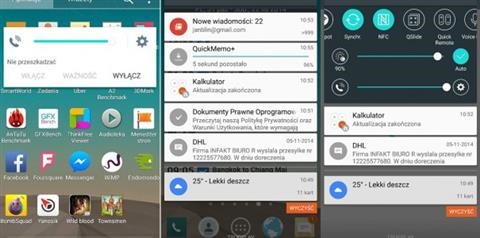
It is obvious that LG would release Android 5.0 lollipop for the LG G3 phone. Now first screenshots of it have been released that show how the new operating system will look in conjunction with the proprietary LG user interface on the G3.

Android 5.0 looks on LG G3

These images were released by a Polish site. The notification center show LG’s own adjustments along with certain tweaks to the homescreen as well. Overall the LG’s UI looks quite attractive but the new Android 5.0 does adds some more confusion as well.

The release of Android 5.0 for LG G3 will commence in few weeks from now but we do not have a concrete release date. We have been told that the LG G2 will be getting the update sometime later.

Pipo W5 tablet specifications, comes with stylus

Pipo W5 is a windows 8 tablet that costs 199 euro and features a small 8 inch display with 1280 x 800 resolution. The highlight of Pipo W5 is its support for stylus input.

Pipo W5 tablet specifications include Intel Atom Z3735G quad core 1.83 GHz processor, 2GB RAM, 32GB eMMC flash memory, two cameras (5 / 2 megapixel cameras) and a battery with capacity of 4500 mAh.

The Pipo W5 costs about 899 Yuan in China which is about 120 euros in Europe. However we are pretty sure it will retail at much higher cost in European shops if it ever makes a debut here.

Pipo W5 tablet specifications

The new Windows 8.1 with Bing has definitely allowed the Microsoft to gain some market share in the tablet arena and with devices like Pipo W5, there is little its rivals will be able to do. Windows allows users to do so much more on the move. There are no compatibility issues and you can even connect your scanners and printers with them easily since you can use the existing x86 / x64 drivers with them.  

Shuttle XH97V and DS437T Review, pictures and live video

Shuttle XH97V and DS437T are the two bare bone mini computers that retail for less than 250 euros. Both have good configurability and high expandability which make them perfect for small and home office. This is how it looks like.

Shuttle XH97V and DS437T Review

Here is a pictures from the back.

DS437T Review, pictures and live video

Shuttle DS437T Review

The more compact but also the less powerful of the two is the Shuttle DS437T which measures 200 x 165 x 39.5 mm and weighs mere 1.43 kilograms. It is very compact and has volume of mere 1.3 liters. Featuring a completely passive cooling system, it offers a dual-core Intel Celeron 1037U generation processor that is based on Ivy Bridge architecture. The CPU has TDP of 17W and a clock rate of 1.8 GHz.

The Shuttle DS437T can be configured with up to 16 gigabytes of memory and both DDR3-1333 and DDR3-1600 are supported. For storage there is space for single SATA III 2.5 inch disk. Despite its small size it offers a large number of ports. There are a total of 8x USB 3.0 ports, HDMI, DVI video outputs, SD card reader, audio jacks for headphones and earphones and a RJ-45 Ethernet jack for LAN. For connectivity you get the trusty old Gigabit Ethernet and 802.11n Wi-Fi. The Shuttle DS437T is already available on the market at a recommended retail price of 234 euro.

Shuttle XH97V Review

For those who have a little more available space should go for the Shuttle XH97V which offers more performance and flexibility. You can configure it with any Haswell processor that includes Celeron, Pentium, Core i3, i5 and i7 fourth generation CPUs with maximum TDP of 65 watts. The Shuttle XH97V measures 240 x 200 x 72 mm with a volume of 3.5 liters and weight of 2.2 kilograms. There are two RAM slots which can be used to equip the system with up to 16 gigabytes of DDR3-1600 memory. For storage there are a total of three units thus giving the user a lot more flexibility when it comes  to storage. The drives can be configured in RAID configuration as well.

Shuttle XH97V Review

Connectivity and ports selection in Shuttle XH97V is same as DS437T. It is already on sale for 235 euros including VAT in Europe.

Lenovo Tab 2 A7-30TF hits certification site in China

Lenovo Tab 2 A7-30TF has hit the Chinese certification site TENAA which is the approval authority for mobile devices in China. It shall be noted that the new model is not announced by the company and Lenovo Tab 2 A7-30TF specifications include 1024 x 600 pixel resolution display with IPS screen technology, 1.3 GHz quad core processor, 1 gigabyte of RAM and Android 4.4 KitKat operating system. We are also very sure it does come with phone functions built-in as well.

This is how the Lenovo Tab 2 A7-30TF tablet looks like. It looks like this tablet comes equipped with 7 inch WSVGA resolution. It measures 191 x 104.5 x 8.8 mm and weighs 300 grams.

Lenovo Tab 2 A7-30TF

For storage the Lenovo Tab 2 A7-30TF comes with 8 gigabytes of NAND storage. Here is its complete specifications sheet.

* 7 inch display
* 1024 x 600 pixel resolution
* 8 gigabytes of flash storage
* 1 gigabyte fo memory
* Quad core 1.3 GHz processor
* 2 megapixel camera with 0.3 MP webcam
* 3450 mAh battery
* Android 4.4.2 kit kat operating system

Dell Optiplex 9020 hands on review and video overview

The Dell Optiplex 9020 is a very compact nettop computer with a volume of 1.2 litres that has Intel Core i7 processor, 8 gigabytes of memory and choice of hard disk or SSD.

With the Dell Optiplex 9020 you will be able to save space without sacrificing performance. It is interesting not only for consumers with limited space at home but also for business houses where space is premium.

Dell Optiplex 9020 review

The body indeed is very compact and has an internal volume of just 1.2 liters. It can also be mounted on the wall or on the back of a monitor using VESA mount.

Being a very compact and powerful computer does not mean, it has small number of ports. In fact you get a total of six USB ports, two audio jacks for headphone and microphone along with VGA and display ports.

Dell Optiplex 9020 specifications include  Intel Core i5-4590T 2 GHz and a 2.2 GHz Core i7-4785T processor backed by either 4 or 8 gigabytes of RAM and 500GB 7200 rpm hard disk or 128GB SSD storage. GPU with either processor is Intel HD Graphics 4600.

Dell Optiplex 9020 hands on review

For operating system, you can choose Microsoft Windows 7 or 8.1 64 bit. Prices start at 699 dollars and go up to 989.

Moto E: Install apps on micro SD card and changing default directory for Bluetooth, download and screenshot

By default the Motorola Moto E install apps in the main internal storage. Same goes for the files that are received using Bluetooth or files that you download using the web browser. To change the defaults paths you will have to use the Xposed module.

Of course to do that you must have a rooted Moto E. Then install the Xposed framework from here. After that you will have to download and install Downloads2SD. This application will redirect your Chrome and Firefox downloads to /sdcard/Downloads.

Install apps on micro SD card and changing default directory for Bluetooth, download and screenshot

Your pictures will go to /sdcard/DCIM and your screenshots will go to /sdcard/Pictures while using the Screenshot. Get the Download2SD from here.