HP Slate Book 14 Specifications, comes with Nvidia Tegra 4

HP Slate Book 14 is now official and so are its specifications. Since it is called the Slate Book, it will runs Android operating system. The notebook also has a full HD touch screen as with Android it is highly recommended you have a touch panel.

So here are HP Slate Book 14 specifications as suggested by our close sources.

14.1 inch display
FHD touchscreen display packing 1920×1080 resolution
Nvidia Tegra 4 quad core SoC with four ARM cortex A15 cores all set to run at 1.8 GHz clock speed.
2 gigabytes of RAM
16GB of flash storage
802.11n Wi-Fi, Bluetooth 4.0
An HD webcam, dual microphones, Beats Audio support
32 watt hour battery with 10 hour battery life

HP Slate Book 14 Specifications

Our sources say that the HP Slate book will cost between 420 to 540 dollars. The notebook will be available in two colors – yellow which is shown above and pink.

This HP laptop runs V4.3 Android which has TRIM support and runs like a charm on it.
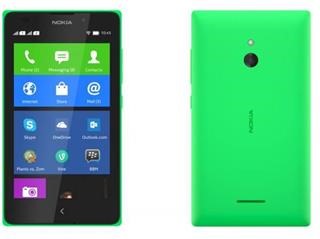
Nokia X and XL Double Tap To Wake UP now working as expected

Most Nokia Lumia devices come with double tap to wake up functionality but it does not work as expected in the Nokia’s Android phones, X and XL. The reason is X and XL use Vibrator and Accelerometer to implement Double Tap on these devices.

This is same for the Nokia 5XX series so it does not work as expected. You must tap really hard and at other times even hitting the phone at its back would wake it up.

Nokia X and XL Double Tap To Wake UP now working as expected

Nokia did this to reduce wastage of battery, the screen was not used to implement this feature.

Root Motorola Moto E using ODIN or ADB

We finally have the instructions on how to root the Motorola Moto E using either ODIN or ADB. Before you proceed you must have:

TWRP on your Moto E or ADB installed on your computer.

Method 1: Rooting using recovery

If you want to follow this method, first follow our instructions on how to install TWRP on Moto E. This requires you to unlock your bootloader too. Do not fret – just open the TWRP link and you will be guided for each and every step.

After you have TWRP on your phone, just download Super SU utility from playstore and install it. Here is a direct link to it.

Root Motorola Moto E

Method 2: Rooting using ADB

After you have ADB or fast installed on your computer, you can root it using ADB. Connect your phone and use these commands to flash it.

adb reboot bootloader
fastboot boot recovery.img

Download Stock Factory ROM for Moto E XT1021 XT1022 XT1025

So you have made myriad modifications on your phone and you want to just go back to stock. Or you want to sell it to someone and completely wipe everything stored on your Moto E. Folks at droid-developers have uploaded the original stock firmwares / ROMs of it.

ROMs for all variants of Moto E have been made available which includes XT1021, XT1022 and XT1025. Each firmware has a size of 400MB.

Blur_Version.20.11.13.condor_retbr.retbr.en.BR
Blur_Version.20.11.14.condor_o2gb.o2gb.en.GB
Blur_Version.20.11.14.condor_retaildsds.retaildsdsall.en.03

To install them you have ADB and fast boot installed on your computer. After you have installed it, use these commands to flash it.

adb reboot bootloader
fastboot flash recovery recovery.img
fastboot reboot

Download Stock Factory ROM for Moto E XT1021 XT1022 XT1025

Make sure you change the image file name to recovery.img before using above mentioned commands.

Moto E TWRP CWM Recovery Download

TWRP for the Motorola Moto E has been released and that means you will now be install ADB and flash new ROM. You will also be able to sideloading. There are few bugs though such as touchscreen would not work if you suspend the phone. So do not make go into suspended mode after you are in TWRP recovery mode.

To install it on your Moto E you must first unlock the bootloader as other wise you will not be able to do any sort of modifications to your device. Then download the recovery image file from here and make sure you have set up ADB on your computer. Then run these commands.

adb reboot bootloader
fastboot flash recovery recovery.img
fastboot reboot

Reboot to recovery and type

adb reboot recovery

moto e twrp cwm download

That is it. You’ve successfully installed TWRP. If you want CWM (clock work mod) recovery you will have to wait bit longer as developers are still working on it.

Xiaomi MI Pad Specifications leaked in AnTuTu

Xiaomi Mi Pad is a tablet from China that we recently spotted on AnTuTu. Its CPU is supplied by Nvidia and packs a 7.9 inch display featuring 2048×1536 pixels. This translates to 326 pixels per inch.

Xiaomi MI Pad Specifications

7.9 inch 2048×1536 pixel resolution display
Quad core Nvidia Tegra K1 processor
16GB flash storage
2 gigabytes of RAM
Micro SD card slot
Android operating system

The Nvidia Tegra K1 runs at 2.2 GHz processor that is backed by 2 GB of main memory. Xiaomi is selling it for USD 272 (1699 Yuan) which is pretty low for what you get. The retina display on a 7.9 inch screen will give you a pixels per inch of 326.

Xiaomi MI Pad Specifications

The AnTuTu site shows that the tablet scored 39263 points.