

Lenovo K6 series specifications. Lenovo K6 series. Learn more about the Lenovo K6, K6 Power, K6 Note and their specs along with their differences in this article.
Lenovo K6 series specifications. Lenovo K6 series. Learn more about the Lenovo K6, K6 Power, K6 Note and their specs along with their differences in this article.
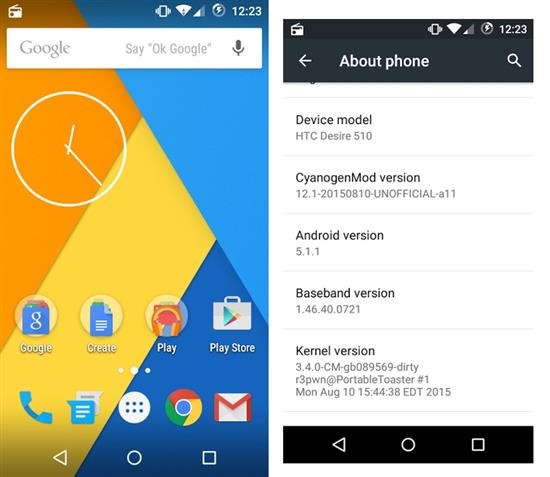
HTC Desire 510 get Android 5 Lollipop thanks to the cyanogen mod team that has brought CM 12.1 to the users. Before you click on the download button and install Android 5 Lollipop on your device, keep in mind that it is not a bug free ROM and these things are not working or cause a reboot.
Resurrection Remix ROM for Samsung Galaxy Core Prime is based on CM, slim.omni and original Remix ROM builds. The newest one is based on android 5.1 lollipop which brings new features over the stock Core Prime ROM that is still stuck on Android 4.4.4.

* Navigation Bar
* Enable/Disable Navbar
* Navbar Ring Switch
* Navbar Ring Targets
* Navbar Button Customization
* Navbar Dimensions(Potrait and Landscape)
* Statusbar
* Brightness Slider
* Enable/Disable Show Notification Count
* SuperUser Indicator Switch
* Carrier Label
* Carrier Label Switch
* Carrier label Colour
* Quick PullDown Switch
* Smart Pulldown Switch
* Clock Customizations
* Time and date
* Clock Colour
* Day and date Toogle
* Center Clock/Right Clock Choice
* Battery
* Battery Bar customization
* Battery Icon Customization(circle/landscape/Potrait and more)
* Battery % Text
* Network Traffic Indicator
* Theme Chooser
* RR exclusive PITCH BLACK THEME
* Animations
* Toast Animations
* ListView Animations
* System Animations
* Gestures
* Gestures Anywhere Feature
* App Circle Bar
* Choose apps in App circle
* Trigger Width
* Trigger Hieght
* Trigger Position
* Recents Panel
* Clear All button Switch
* Clear All Tasks Switch
* Clear All Button Location(Top right,Top Left,Top Center,Bottom Left,Bottom Right,Bottom Center)
* Clock Widget
* Clock And Alarm Customizations
* Weather Panel Customizations
* Calender Events
* LockScreen
* Lockscreen Shortcuts
* Choose upto 5 Shortcuts
* 100+ Icons for Shortcuts
* Quick Slider Shortcuts
* Notification Drawer
* Weather Display Switch
* Quick Settings
* Choice to Add 20+ Tiles
* Enable 2/3/4 Tiles per Row
* Enable Disable Birghtness Slider in Notification Panel
* Advanced Location Settings Switch(Choose Battery saving/Device Only/High Accuracy Directly in Notification Panel)
* LongPress Toogles to Enter Settings
* Buttons
* Backlight Timer
* Backlight Strength
* Navigation Bar left/Right handed mode Switch
* Power Menu
* Power Menu End Calls Switch
* Home Button(For devices with HW keys Only)
* Home Button Wake Up
* Home Button answer call
* Long Press Actions
* Double Tap Actions
* Back Button(For devices with HW keys Only)
* Wake Up device Switch
* Menu Button(For devices with HW keys Only)
* Wake Up Device Switch
* Short Press Actions
* Long Press Actions
* Search Button(For devices with HW keys Only)
* Wake Up Device
* Short Press Action
* Long Press Action
* Volume Buttons
* Wake Up Device
* Playback Control
* Keyboard Cursor Control
* Swap Buttons on Landscape mode
* Perfomance Profiles
* LCD Density
* Expanded Desktop Mode
* All New CM Audio FX App
* Heads Up Customizations
* OverAll Smoothness Improvements
* Quick Unlock
* Optimizations to Improve Battery
* ALL cm12.1 Features
Installation instructions
* Download ROM and gapps from here and save on your external/internal SD
* Go to Core prime Recovery and make BACKUP of current
* ROM in Backup and Restore option
* Do WIPE DATA/FACTORY
* RESET + MOUNTS & STORAGE/FORMAT SYSTEM
* Choose install zip from and select ROM. Install gapps (google about it) in same fashion. Pico version recommended.
* follow on screen instructions
* Wait some minutes for first boot and after updating ROM
* Done
If you are looking for simpest way of improving the performance of your Samsung Galaxy Core Prime G360T1, you will have to install Vegito kernel by Dreamstar at xda-developers. The kernel called the Vegito Kernel is based off latest sources from Samsung and is compatible for Samsung galaxy core prime G360T1 (qualcomm). Over stock kernel this kernel possesses following improvements.

* Insecured
* adb runnable as root
* init.d support
* Automatic busybox installation
* Reduce logger device RAM allocation to 128K
* Governors enabled: Performance, interactive
* ARM: Removed various debug traces
* Added Intelli Thermal v3.0
* Added bunch of TCP Congestion Controls.
* Enable CPU Boost
* Add GPU speed config support
To install, just flash below given file through Core prime TWRP in boot partition.
Here is a stock ROM for the Samsung Galaxy Core Prime G360H. It is based on latest official update for Core Prime which is Android 4.4.4 kitkat. The Dreamstar, the xda-developer behind this ROM is creator of this ROM and it is great for those who are looking for something that is based off stock ROM from Samsung minus the bloatware and is pre rooted.

* Fully deodexed
* Pre-rooted
* Added busybox
* New Google Bootanimation 6.0
* Removed bloatwares
* Added build.prop tweaks
* Added 4.4.4 songs
Installation guide – Make sure you’re using TWRP (Kitkat) or CWM (Kitkat)
1. Download Kitkat Deodexed G360H ROM from here.
2. Place it on the sd card.
3. Reboot on Galaxy Core Prime TWRP/CWM
4. Go to Wipes > advanced wipe > then wipe: Dalvik cache/ System/ Cache/ Data.
5. Go to Mount > disable everything (the update-script mount it for itself)
7. Go to Install > Select the correctly Storage and choose Kitkat_Deodexed_G360H.zip > Swipe to install
8. Wait the installation
9. Reboot
Samsung Galaxy Core Prime is now an old smartphone running android but did you know that you could install even something like marshmallow on it to get latest features. You can get all that by installing Samsung Galaxy Core Prime TWRP custom recovery.

Out of all custom recoveries out there, the TWRP is most popular. It supports touchscreen input and lets you install all sorts of hacks.
It shall be noted that by installing TWRP on Samsung Galaxy Core Prime, you will loose warranty but that is already lost, is not it?
Installation instruction – Odin flashable, go to download mode, connect to PC, run Odin, select ‘PDA’, select the twrp tar.md5, flash it.

Did you know that it was possible to use the HTC One camera application on the HTC One A9? We have been able to extract the files the package includes HTC 10 Camera, Gallery, Zoe. Just keep in mind that the stock camera is by far better, but this can be a interesting thing to try out if you are running an AOSP or CM based Custom ROM. This hack is working on almost all android phones as well.
Continue reading “Use HTC 10 Camera, Gallery, Zoe on One A9”
Unless you are a computer expert, chances are that you are not comfortable with photo editors. This is now a myth as Movavi photo editor is one of the easiest picture editors out there. We were on the quest to find the top photo editors that were dead-easy to use and Movavi application came out on top. It is compatible with both mac and windows and its installation process is seamless and does not require any expert knowledge.

In fact, it is easiest application out there on either platform to edit photos. Once the installation process has completed, double tap on its app icon to start it. Add the image by clicking “Browse for images” button. You can drag and drop pictures into the application window as well. Movavi photo editor supports batch image processing and lets you work on multiple pictures at once.
It comes with several photo editing tools that you adjust various aspect of the picture. You can play around with brightness, contrast, tint, shadows, highlights, gamma and what not. Increase intensity of an effect by moving slider to right and decrease by moving slider to left. It is really that easy.
Any change you make to the picture is shown in real time so what you see is what you get later. In case you are not satisfied with the effects, you can roll back to original image easily. Also included are basic image editing tools like crop, flip, straight and resize. Resizing allows the user to reduce the overall file size, making them more suitable for email and sharing on social networks.

Another very interesting feature is background swap where you can swap the background with a totally different background. It is also incredibly helpful if you want to remove an unwanted background object or person. To do this, mark the unwanted object with a red marker and things that you want to keep with green marker. The objects will be outlined with yellow color. Now, you will be able to swap the background easily. That is it, you do not need to be an expert to do complex things.
Save the changes by clicking on the Export button. File can be saved in multitude of image formats.
So there you go – Movavi Photo Editor does not require you to be a professional expert and all that you need to use this app are true computer basics.
It can be incredibly frustrating if you were at a concert recording our favourite band and later on, when you transferred them to computer, you found that most of the pictures you took were blurred? There are many reasons behind this and these include poor lightning conditions, shaky hands and you this damage looks irreversible. Fortunately, there is a way to fix these blurry pictures. While there are myriad software that let you do this but our favourite is Movavi Photo Editor.

Continue reading “How to fix blurry images with Movavi Photo Editor”
Onyx Boox C67 is a new ereader that is currently on sale only in China. This ereader device is intended to compete with the Kobo Touch 2.0 and the entry-level Kindle. Onyx Boox C67 specifications include 6 inch e-ink paper display with resolution of 1024 x 768 pixels.

Continue reading “Onyx Boox C67 specs: Onyx Boox C67 is a low cost ereader”