HTC U11+ Deodexed stock ROM based on Android 8 Oreo

HTC U11  Deodexed stock ROM based on Android 8 Oreo

HTC U11+ fully stock deodexed ROM based on Android 8 Oreo OS is made available by a user on xda-developers. It has same extracted system and boot images from latest RUU files. As said earlier, the firmware is deodexed and rooted with Magisk. All APK files have been zipaligned for best performance.

Here are the installation instructions for installing the HTC U11+ deodexed ROM:

* Download Skyline rom zip file and copy it to internal or external storage of your device.
* Enter recovery, select wipe and advanced wipe
Choose Dalvik/ART Cache,Cache,Data and swipe to wipe
* Select “Install” in recovery, choose your zip file from storage and swipe to confirm flash
Wait until finishing and boot process
* Process boot>Finish>reboot>htc animation>black screen(wait around 3-5 min)>show process update>htc power>setting device.

How to fix boot
1.reboot devices to recovery mode
2.flash patch_boot.img via twrp (choose install imge)
3.reboot >htc bootani>black>
4.press power+volume down for boot in HTC downlod mode and select reboot
>htc power android>htc boot animation>updtae number show>htc power android>set up devices

Features of the ROM:

*Android 8.0
*Google security Patch 1/12/2017
*Rom base 1.24.401.7>New Base Rom
*Updated Stock Apps
*Update carries
*Root
-SuperSU 2.82
-Last Magisk root V16.3>>Update magisk
*GoogleCamera Last update new version >>MGC_5.1.018_v2e_tolyan009_v1.4
-Add ARStickers
-Add ARCore
-Enable Portrait
-Enable Google Lens
*SonyMusic App
*Kernel Option
-CleanSlate v1.7.7
-Wind Kernel – r1
*Pixel launcher
*Add Android Messenger
*Add Feature Pixel 2017
*Modify Boot
*Carriers
-DWTL >Update >>1.24.1405.7
-DUGL>>1.24.400.3
-WWE >Update>>1.24.401.7

HTC U11 Life kernel lets you change squeeze and backlight settings

Here is a kernel for the HTC U11 Life android smartphone. To install it, all you need is an unlocked phone with TWRP custom recovery installed. Nothing else. Not even root is required. This kernel lets you change the settings for the squeeze control and have more control over the backlight.

Here is a video of the kernel in action on the HTC U11 Life.

Installation instructions:

0. TWRP – backup boot partition
1. TWRP flash zip
2. reboot, install both CleanSlate Companion and Configuration apps
3. Start companion App, grant permissions, leave it running (should start on each reboot by itself, but it’s worth starting manually, it’s quicker)
4. Start Configuration app, grant permission, configure to your liking and don’t forget to press Save button (disk icon)

HTC U11 Life kernel

Feature list:

* Squeeze Control (Wake,Peek,Sleep,Swipe)
* Kernel Ambient Display
* Backlight Dimmer
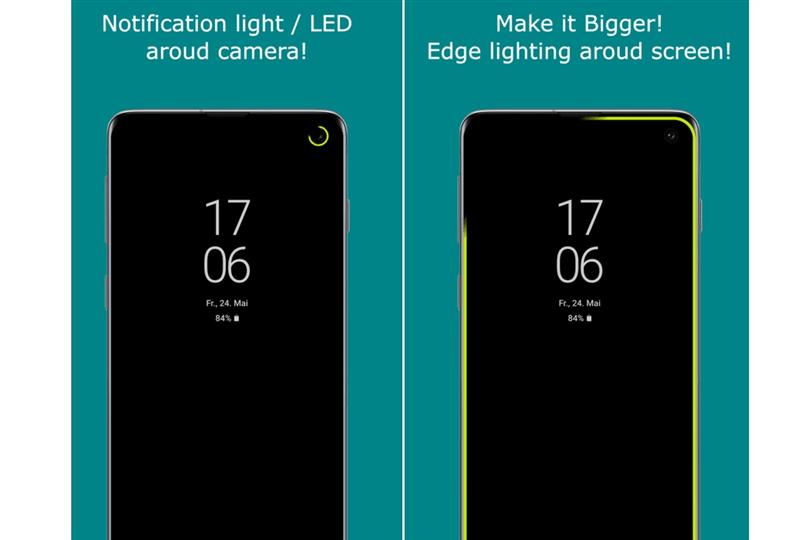
* Button Light Notification * when Secondary display turns off, BLN will start
* Notification double vibration pattern detection based Button Light Notifications
* “Endless BLN while charging” + “Notification vibration length based two types of blinking pattern for BLN” features
* KCAL Color Control
* Fingerprint doubletap sleep
* K.AdAway * kernel adblocking feature for browsing and in app (not for youtube stream etc)
* Smart Notification Control
* CleanSlate Companion app
* Unprivileged Configuration Interface Config App
* ROM side Ambient Display support for all notification functions
* Flashlight Notification
* Vibrating Notification Reminder
* Notification Booster on vibrating notifications when screen is off
* Gradient battery charging led turning from amber to green based on battery level percentage, then at full charge it starts to smoothly change from full bright green to golden and the back to full green cycling, signalling 100% battery for easy spotting
* Fading notification led fading/pulsating type notification LED blinking
* Upper grill RGB LED light brightness level you can lower the brightness level of the upper grill RGB led now
* Adrenoboost version 2.2 * smooth gaming, battery friendly, fixing GPU handling of stock HTC kernel -* battery friendly conservative governor. Three levels (1 is the most battery friendly), and off state.
* NTFS/ReadWrite
* Wakelock reduction patch

Intel Core i7-8650U vs Core i7-8550U benchmark: which processor is best for your laptop

Intel Core i7-8650U vs Core i7-8550U benchmark

Today we benchmark the Intel Core i7-8650U and the Intel Core i7-8550U, what should be in our future laptop? If we look at the specifications of these processors we find very similar data. Both processors are part of the eighth generation Kaby Lake R and are manufactured using the 14 nm process. Both have a maximum of four cores and eight threads, with a TDP of 15 W and integrated graphics Intel UHD Graphics 620. If we continue reading your file, we find that they support dual-channel DDR4 RAM up to 2400 MHz and the sets Manual, AVX2, Quick Sync, Virtualization and AES-NI.

Continue reading “Intel Core i7-8650U vs Core i7-8550U benchmark: which processor is best for your laptop”

Review: Western Digital Green 240 GB, a cheap SSD to improve the performance of your PC

Western Digital Green 240 GB review

Today we can have a top-of-the-range computer, with a next generation Nvidia GTX 1080 Ti graphics, 64 GB of RAM and two 4 TB hard drives each, which, both when starting and when trying to play relatively new games, we will have problems, and those responsible will also be the latter. For a long time, the bottleneck of computers has been on hard drives, and they are very slow compared to the speed of other components. Therefore, if we really want to take advantage of the performance of a PC it is necessary to resort to the new SSD and, if we also want an economic option, a great alternative is the Western Digital 240 GB. Western Digital is one of the leading manufacturers of hard drives in the market. Taking advantage of the boom SSDs were having, in 2015 this company took over Sandisk, a manufacturer that had already entered the SSD market so that WD could easily enter this new market and continue with its same range of products.

Continue reading “Review: Western Digital Green 240 GB, a cheap SSD to improve the performance of your PC”

Alldocube Knote Review: a 2 in 1 convertible fit for all budgets

Alldocube Knote Review

Although the ARM tablet market with Android or iOS operating systems is currently a bit stagnant, the market for convertible tablets with Windows operating system and processors with x86-64 architecture is slowly opening up gap among users, especially among those who They look for a tablet or a small laptop , that works acceptably and, above all, that it is economical. And one of the models that meets all these features is the convertible tablet 2 in 1 Allotocube Knote.

Continue reading “Alldocube Knote Review: a 2 in 1 convertible fit for all budgets”

MSI H310-F PRO mining motherboard supports Intel Coffeelake processors

MSI H310-F PRO specifications

With the rise of mining difficulty, the mining craze in cryptocurrency space has toned down in a big way but the companies have not given up. MSI has churned out a new motherboard that supports the LGA1151 socket that support Intel Coffeelake processors. So, if you planning to make a new mining rig with upcoming Pentium and Celeron processors, the MSI H310-F PRO will have you covered.

With 12x PCIe x1 and 1x PCIe x16 slot, the MSI H310-F PRO can handle upto 13 GPUs at a time. There are Molex power connectors in the box that will provide support for the additional GPU power requirements. There are four fan connectors and 2x DDR4 RAM slots. This makes it one of the best motherboard for miners.

This motherboard will be excellent for those who run massive GPU farms. Each machine will be able to run 13 graphics card simultaneously. While people will soon be moving away from Ethereum mining, they will still be able to do Ethereum Classic mining, which was the original Ethereum chain. There are plenty of other cryptocurrencies like Groestlcoin, Vertcoin, Zcash that would require miners to keep their network up and process transactions. However, mining is profitable only for a few. via videocardz

Gigabyte BRIX BLCE-4000C specifications: Mini PC with Gemini Lake processor

Gigabyte BRIX BLCE-4000C specifications

Gigabyte has launched a new mini PC desktop computer, BRIX BLCE-4000C that measures 4.6”x4.1”x2.1” which means you can put it just about everywhere. Powered by six watt Intel Celeron N4000 geminilake processor, it features a single slot that can take upto 8GB RAM, 2.5” bay that can take up any compatible HDD or SSD. It has many ports including 1x USB 3.0 Type-C, 3x USB 3.0 Type-A, Gigabit Ethernet, HDMI 1.4b, VGA, Mic and Headphone.

Continue reading “Gigabyte BRIX BLCE-4000C specifications: Mini PC with Gemini Lake processor”

Chuwi Surfbook CWI538 review: Is Chuwi Surfbook CWI538 a good buy?

chuwi surfbook review

The Chuwi Surfbook CWI538 is a 2in1 tablet with Microsoft Windows 10 Home operating system and powerful features. It has size of mini laptop but comes with tons of premium features to differentiate itself from rest of the popular mini laptops. You can choose from the tablet PC with 64 and 128 GB of RAM, with a total of 6 GB of RAM. It is available for 330 dollars/euros online.

Continue reading “Chuwi Surfbook CWI538 review: Is Chuwi Surfbook CWI538 a good buy?”