TrekStor SurfTab 8.0 review and first impressions

TrekStor SurfTab 8.0 is an 8 inch tablet that runs Windows 8.1 operating system. First hands on Trekstor SurfTab 8.0 review video is also available courtesy of tabletblog. TrekStor SurfTab 8.0 is a windows 8.1 Intel tablet that features Intel Atom Z3735G quad core processor clocked at 1.83 GHz clock speed. It is current on sale at amazon for around 120 euros. The first impression is quite good, but there are cheaper alternatives.

TrekStor SurfTab 8.0 is not particular exciting but has some good hardware inside. Specifications include 1GB of RAM, 16GB of internal flash memory and a micro SD card slot. There is a camera on its back packing 2 megapixel low resolution camera but I do not think it matters on a tablet. In addition to Windows 8.1, you also get a free annual license for Microsoft Office 365 software.

TrekStor SurfTab 8.0 review

The SurfTab Wintron 8.0 comes with a plastic housing with highly glossy surface. Since the one reviewed was in white, fingerprints were not visible. On the sides, two stereo speakers are present.

TrekStor SurfTab 8.0 reviews

While the Wintron has good price – performance ratio, we still find it difficult to recommend it. The reason is that there are better tablet competitors out there whose prices are lower too.

Download Samsung Galaxy S6 Themes for Note 3 S5 S6

Samsung Galaxy S6 makes use of tweaked touch wiz interface and folks at XDA have ported Galaxy S6 theme for the Galaxy Note 3, Galaxy S5 and Galaxy S6. The only requirement is that you need to be on Android 5.0 lollipop in order to install these. You can check it by going to settings > about.

Download Samsung S6 theme note 3 s5 s4

Download Samsung S6 theme for Galaxy Note 3, S5 and S6

1. First of all enable theme support, if you don’t have it, by doing this —> http://forum.xda-developers.com/show…&postcount=146
2. Flash this V2 of theme (I adjust Calendar icon) via recovery or unpack manually if you don’t have recovery (uninstall previous version before)
3. Apply Theme from Theme Chooser of Touchwiz
4. Now choose if download Note 4 Launcher S6 Style (smaller icons and menu 5×5) or S5 Launcher S6 Style (bigger icons and menu 4×5)
5. Unpack the one you choose and put in system/priv-app/TouchwizHome (or TouchwizHome_K depends on which device you’re) with correct permissions (rw-r-r)
6. Reboot and Enjoy.

Galaxy Note 4 camera ported to S4

The Samsung Galaxy Note 4 camera has been ported to the Galaxy S4 and it brings a lot of new features to the two year old phone. However some functions like selective focus and selfie mode with front camera do not work due to hardware restrictions. Fortunately, camera, Video Recording, front cam all main features are working. HDR also works.

Samsung Galaxy Note 4 camera S4

Install Galaxy Note 4 camera on Galaxy S4

1. Download Note 4 camera from here https://mega.co.nz/#!ulp0STrZ!pAbIhx…nGJPQzYd_KrbUo
2. Flash via recovery
3. Wait until it optimize around 10 apps
4. Open the camera and you’ll see that it’s crash. Reopen it.
5. Tap on Mode, slide down and open "Manage mode"
6. Unselect "Shot and More" and "Selective Focus"
7. Enjoy your new camera.

So now you can enjoy Note 4 camera along with Note 4 launcher and settings on your S4.

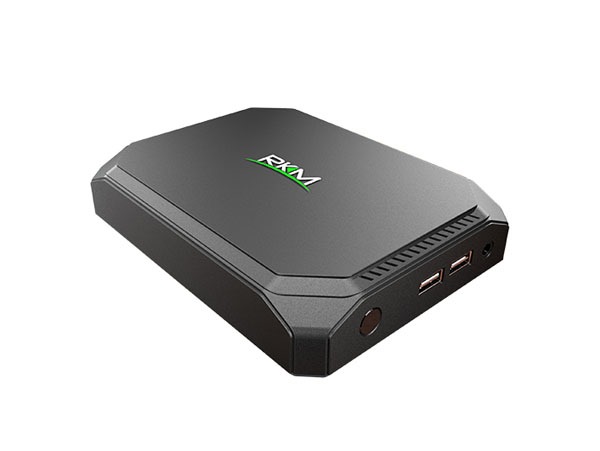
MSI Cubi is the smallest PC with Broadwell processor

At the CEBIT 2015 tech event, MSI has launched Cubi, a mini PC with broadwell processor and windows 8 operating system. It is the smallest PC ever created by a Taiwanese manufacture. MSI did not include the Cubi in its wind box range that was powered by either Intel or AMD processors. The company will be making the MSI Cubi available by the end of March with an unknown price tag.

MSI Cubi review

Continue reading “MSI Cubi is the smallest PC with Broadwell processor”

Galaxy S6 and S6 Edge: Protect any app with fingerprint reader

An XDA developer member has released an application called Finger Security that allows you to protect apps of your choice with your fingerprint. This will allow you to further increase the security by a long margin as a fingerprint reader can be used for so many purposes. The best part is that you do not have to root Galaxy S6 in order to use Finger Security app which is great as no one would want to void warranty of their new phone.

galaxy s6
Continue reading “Galaxy S6 and S6 Edge: Protect any app with fingerprint reader”

Download Official Samsung Galaxy S6 Wallpapers

We all love downloading wallpapers of top end and unreleased smartphones. Samsung has bundled a couple of new wallpapers with their Galaxy S6 and Galaxy S6 Edge phones. To us they are a bit ho-hum because we seen them doing better in the past.

official galaxy s6 wallpapers download

The one shown on the left is a Galaxy S6 and on the right is the S6 Edge. The one on the S6 Edge looks better. You can download both of them from the link given at the bottom at the post and decide which one looks better on your smartphone.

Make sure to clear the clutter off your homescreen so they look just like the wallpapers shown above. We personally like clear homescreens as they show off the wallpapers better.

Download official AOSP 5.1 for Grand Duos

Android Open Source Project community has released AOSP 5.1 firmware for the Samsung Galaxy Grand Duos dual SIM smartphone. Almost everything except FM radio works out of the box including dual SIM functionality. AOSP firmwares are great for those who despise the heavy touchwiz interface that Samsung slapped onto a mid range device.

Download official AOSP 5.1 for Grand Duos

AOSP 5.1 ROM for Galaxy Grand Duos (I9082/I9082L). What is working?

Wi-Fi
RIL (Calls, SMS, Mobile Data)
Dual SIM
Sensors (Accelerometer, Compass, Light, Proximity, etc.)
Camera
Video (playback & recording)
Audio (playback & recording)
GPS

And here are the installation instructions:
If you were on CM 10.1 or a stock ROM prior to 4.2, upgrade to stock 4.2 first.
Install ClockworkMod recovery with SELinux support (.tar) (.zip). Older CWM will result in a "status 7" error.
Reboot into recovery
Wipe data if coming from stock or other ROMs (You may get a "status 7" error if you fail to wipe.)
Install the ROM.

HTC Desire C Android Kitkat ROM now available for download

HTC Desire C development and updates were long abandoned by the company but folks at XDA has been churning out quality ROMs for it. Now Android 4.4 kitkat has been made available for it. However we cannot recommend it to the users as important components like Bluetooth, wireless LAN and video recording are not working in it.

HTC Desire C kitkat rom

However other components like Audio , Camera(Stills and Panorama) , Airplane Mode , Immersive Mode , Screen-Off Animation , USB Tethering , NFC(Only for the NFC Desire C’s) , Automatic Brightness , Omni Switch , ADB , GPS and SD Card are working fine on it. So but since most of us cannot live without built in Wi-Fi, we would still recommend getting the Android 4.1.2 ROM for Desire C.

If you still want to give it a drive, follow these instructions:

1) You need to install a TWRP. Get it by installing windroid’s universal android toolkit from here.
Flash it using this command:
fastboot flash recovery recovery.img
2) Download the ROM and the GApps.
3) Now, reboot to recovery.
4) Run the Wipe> Factory reset, and then click on Advanced> Select System and then swipe to wipe.
5) Install the ROM and the GApps.
6) Reboot to bootloader.
7) Flash the kernel(boot.img) using fastboot by typing:
fastboot flash boot boot.img
8) DO NOT ERASE THE CACHE USING THE FASTBOOT.
9) Reboot system now by typing:
fastboot reboot

Huawei MediaPad X2 price and release date along with specifications

Huawei MediaPad X2 is a 7 inch android tablet packing a very powerful eight core 64 bit Huawei Kirin 930 processor based on ARM Cortex A53 architecture clocked at 2 GHz.

Huawei MediaPad X2 price tag and release date: Huawei MediaPad X2 will be released on March 17 with a price tag of 1999 Yuan which is about $ 319.

Huawei MediaPad X2

Huawei MediaPad X2 specifications include 7 inch display packing 1920 x 1200 pixel resolution, 16 gigabytes of storage, Mali T628 GPU, 3 gigabytes of memory, micro SD card reader, LTE and massive 5000 mAh battery which according to the manufacture will provide full day of use. 32GB storage will cost 2499 Yuan which is about $ 398.