Samsung Galaxy J5 2016 TWRP: Download J510H J510F J510FN J510GN J510MN TWRP Custom Recovery

TWRP 3.1.0 for the Samsung Galaxy J5 2016 TWRP is available for download. It works for all variants of the J5 2016 android phone including J510H, J510F, J510FN, J510GN and J510MN. This version supports Aroma installer and ADB Backup. You can also Wipe Persist, Wipe Preload, Mount Efs / Preload / Firmware-modem / firmware / Persist and more features.

Download Galaxy J5 2016 TWRP

How to install .tar Samsung Galaxy J5 2016 TWRP Custom Recovery

1. Install device usb drivers and Odin
In Phone Developer options – On OEM unlock
2. Power off the device.
3. Boot to download mode (VOLUME DOWN/HOME/POWER).
4. Volume UP once.
5. Open Odin  as an administrator, connect the device to a usb port,
and make sure a blue button appears and says “Added” in description on the left.
6. Select AP or PDA for older Odin and search for the downloaded tar file.
7. Uncheck auto reboot from the second tab.
8. Start flash and you should see the succeeded command.
9. Unplug the device and remove the battery.
10. Reboot to TWRP and enjoy! (VOLUME UP/HOME/POWER).

How to install .img Samsung Galaxy J5 2016 TWRP Custom Recovery

1.Download the latest TWRP image file (.img)
2.Boot into the TWRP recovery.(VOLUME UP/HOME/POWER)
3.Go to install and find and select the Images button.(At right-bottom)
4.Browse to the image that you downloaded and select it.
5.Choose recovery and swipe to flash. You are done
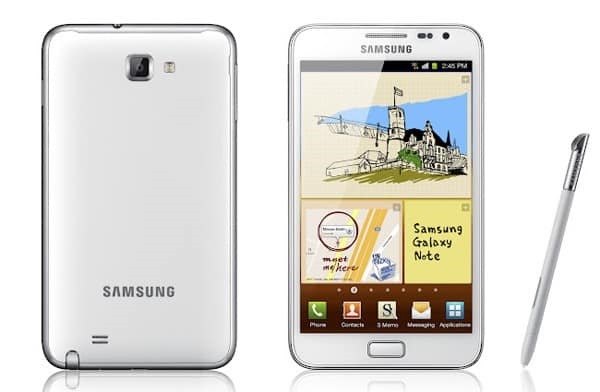
Galaxy Note 1 N7000 gets Android 7 Nougat: Download Android 7 for Galaxy Note 1

Samsung released the Galaxy note 1 back in 2011 and it is interesting to note that there is still a plenty of development going for it. Infact, you can download the latest android 7 nougat for it thanks to folks behind Lineage OS that was launched a firmware for it. If you running stock Samsung ROM, follow these steps.

Download Android 7 for Galaxy Note 1

1.flash N7000ZSLR1_N7000OZSLR1_BRI (or any other other 4.1.2) stock rom using odin
2.Copy Rom + Google Apps to your sdcard.
3.flash PhilZ-cwm6-XXLT6-XSA-5.06.1.tar.md5 to get cwm recovery by using odin or mobile odin
4. boot into recovery
5. flash this kernel to get an updated recovery
(this step will make your old rom unbootable stuck in the n7000 screen but you can boot into recovery with press and hold "home" and "volume+" buttons and power on your phone)
6. you need to reboot! your device now to recovery
7. you are now in the updated recovery and you need to do a factory reset + format the /system partition
8. you can now install the rom and gapps and reboot your device.

If you are having problem installing application, we suggest doing a repartition your phone and make more space. Just replace the files used in step 16 with the one we used for cm14/android7.

To enable root on N7000 in this ROM, follow these steps.

1. Go to Settings-About phone and tip 7 times on Build number to enable the Developer options
2. Go to Settings-Developer options-Root access and set it to Apps and ADB

LG V10 Rooted Stock ROM: LG H901 V10 Busybox rooted firmware

If you do not like messing with system and want root access, check out this LG V10 firmware that is stock, rooted and has busybox installed. The only requirement is you need to have LG V10 TWRP pre-installed. This ROM is only for the H901 variant.

LG V10 Rooted Stock ROM

It is completely stock, so even the junkware is there but since you have root, you will be able to uninstall it using any root tool. You can download the ROM from here.

Use the TWRP to flash it. Wipe is not needed but we advise to do it to avoid dealing with unexpected bugs later. It is understood and obvious that after installing this pre rooted ROM, you will not receive any OTA update but you can simply flash stock ROM again to get to that. For the geeks, this ROM only reflash the system and boot partitions. It does not overwrites recovery.

Download LG V10 TWRP 3.0 Custom Recovery: LG-H960A V10 custom recovery

LG V10 H960A TWRP 3.0 Custom Recovery

TWRP custom recovery for LG-H960A, more popularly known as LG V10 is now available for download. With LG V10 TWRP 3.0 custom recovery, you will be able to install custom ROMs and all sorts of LG V10 related hacks. To install it, you must have Android Marshmallow onboard. If you do not have it or still have not received it, you can use LG Bridge to fetch it. Also, bootloader needs to be unlocked.

LG V10 H960A TWRP 3.0 Custom Recovery

Another things to keep in before flashing LG V10 TWRP 3.0 custom recovery is that you will loose all the data. So make sure you have all the important stuff backed up.

Now is time to flash TWRP (twrp-3.0.2.0-0-h960a.img.zip (unpack .zip to get flashable .img)). I am assuming you have ADB and flashboot drivers installed on your computer. Connect your LG V10 to computer, fire up ADB and type in these commands.

adb reboot bootloader
fastboot flash recovery recovery.img

After typing in first command, your phone will reboot to fastboot screen. Second command flashes TWRP on it. Now, turn off your phone completely. For that, hold power button or take battery out. Do not reboot it. Now, put battery in and press power and volume down button. You will see the nice LG logo and that very moment, release power button while keeping the volume button down and then, press power button again.

You will get option to do factory reset and if you have done everything correctly. Make use of volume and power button and choose yes – twise. You will now be greeted with TWRP. Now, it is SuperSU to get root. Go into TWRP and type in this to root it.

adb push BETA-SuperSU-v2.74-2-20160519174328.zip /sdcard/supersu.zip

LG G2 Android 7 Nougat ROM for d80x, ls980, vs980

Download LG G2 Android 7 Nougat ROM for d80x, ls980, vs980

Folks handling android ice cold project have churned out android 7 nougat ROM for the LG G2 for all of its variants including d80x, ls980 and vs980. This is based on AOKP so you get stock android which means no bloatware. To flash this LG G2 Android 7 Nougat ROM, you will need the following.

* Custom recovery (TWRP)
* For the best experience upgrade to stock lollipop, Then root, then install TWRP
* Do not ever install any Bootstack
* Clean flash if coming from another ROM or CM 14.x (no dirty flash)
* Don’t do it if you don’t know it
* ROM has gapps persistance in between dirty flashes

We urge you to do a full wipe before installing the ROM. The developer of this ROM has not specified any bugs so we are expecting it to run smooth on your LG G2 phone.

Galaxy Mega Android 7 Nougat ROM: Download Android 7 for i9152, i9150 for Samsung Galaxy Mega–LineageOS Android 7 firmware for Galaxy Mega

Galaxy Mega Android 7 Nougat ROM

LineageOS is available for the Samsung Galaxy Mega 6.3 and 5.8 and this gives you latest Android 7 Nougat for the three old phone. LineageOS is based on AOSP project. Everything is working except for the second SIM card slot. Also, screenshot feature is not working and recent app thumbnails are coming out to be blank.

Everything is working including Wi-Fi, Bluetooth, RIL (Calls, SMS, Mobile Data), Sensors (Accelerometer, Compass, Light, Proximity, etc.), Camera, Video (playback & recording), Audio (playback & recording) and GPS.

Installation instructions:

* Install a custom recovery with SELinux support or latest CWM Galaxy Mega recovery.
* Download the latest build.
* Wipe data/factory reset if coming from stock or another ROM (You may get a “staus 7” error if you fail to wipe.)
* Flash the ROM and then GApps and reboot your phone

It is an amazing firmware for those who are looking for bloatware free experince on their android phone. It also has support for f2fs and to enable that, you just have to download the modified TWRP recovery from here and flash it. Make sure not to flash a kernel that does not support F2FS. In case, you want to go back to ext4 format, you will have to format the data and cache with Galaxy Mega’s TWRP recovery to ext4 format.