How to speed up your Mac laptop and clean all unwanted items

All laptops have a tendency of running fast for few months and slowly start slowing down. Same applies for the Mac laptops and desktops that start lagging too much due to bucketful of trash and unneeded files that are not visible to a normal computer user. These trash, junk files gradually accumulate resulting in slugging overall performance. So if you are cannot stand the slowness of your Mac laptop, we suggest using Movavi Mac Cleaner to do away with the junk files creating unpleasant experience.

mac cleanup

Continue reading “How to speed up your Mac laptop and clean all unwanted items”

Remove Photo Stamp from a Photo Using Movavi

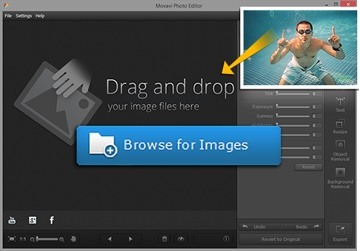
While Samsung Galaxy Note android phones do not add any sort of photo stamp to a photo, most modern cameras do and I find it extremely annoying. While some cameras do offer an option to turn it off, many of our friend’s cameras still have it on resulting in a lot of photos with time stamp on. In this tutorial, we will show you how to remove that from your pictures.

Remove Photo Stamp from a Photo (2)

Continue reading “Remove Photo Stamp from a Photo Using Movavi”

MSI H170I AC PRO, a Mini-ITX motherboard for Skylake

MSI H170I AC PRO is a mini ITX motherboard and comes with support for sixth-generation Intel processors including Celeron, Pentium and Core i-series. MSI H170I AC PRO offers comprehensive options in something that measures 17 cm sq.

MSI H170I AC PRO specs include Soket LGA 1151 Intel H170, two memory slots DDR4 providing support up to 32 GB, 6 Gbps SATA as standard, Turbo M.2 slot, PCI-E x16 3.0 port, WiFi 802.11 ac, Bluetooth 4.2 and USB 3.1. MSI AC H170I PRO will allow users to build high-end solutions in a standard Mini-ITX space.
MSI H170I AC PRO review

Continue reading “MSI H170I AC PRO, a Mini-ITX motherboard for Skylake”

Download CWM TWRP for S3 Neo: Samsung Galaxy S3 Neo CWM custom recovery – root S3 Neo

We now have instructions on how to root the Samsung Galaxy S3 Neo as well as on how to download TWRP for the S3 Neo android phone. TWRP is a custom recovery that has touch support while CWM has no touch screen support. Rooting S3 Neo is possible after installing CWM or TWRP custom recoveries on it.
Download root CWM TWRP for S3 Neo

Installation instructions without ODIN if your phone is on Android 4.3

1. Install TWRP or CWM for S3 Neo (download links given at the bottom of the article)
2. Download SuperSU-v2.45.zip and KNOX-Removal-Script.zip (all links are at bottom).
3. Transfer downloaded zips to SD Card
4. Boot into recovery mode (Volume UP + Home + Power button)
5. Flash SuperSU-v2.45.zip and Knox-Removal-Script.zip
6. Reboot

How to install CWM using odin

1. Download recovery.tar.md5
2. Download ODIN and Samsung USB drivers
3. Boot device in download mode ( Vol down + home + power )
4. Press volume up ( continue ) and connect phone with PC
5. Make sure Odin recognizes your phone ( There should be something like “0:[COM11]” in first box and it will be yellow )
6. Press PDA and navigate to recovery.tar.md5
7. Make sure Re-partition is unchecked
8. Press “Start” and wait few seconds
9. Device will reboot and you will have TWRP recovery on your device ( Boot with vol up + home + power )

If your on S3 Neo Android 4.4.4, then follow these instructions.
1 – Download and install the USB drivers for I9300I; link
2 – Download Odin v3.09;
3 – Download TWRP from this link;
4 – Download and Update SuperSU from here and Knox Removal Script (link) and copy them to your SDCard;
5 – Flash TWRP via Odin;
6 – Boot into TWRP, go to Settings and disable “Enable screen timeout”, then install Update SuperSU and Knox Removal Script;
7 – Reboot;

Android 4.3 download links

Download official Lenovo K3 Note ROM

You can download all and any official Lenovo K3 Note ROM using our method. Use this method to sniff data with proxy method and for that we will have to install fiddler on PC.

1. Install Fiddler Web Debugger on PC. Download link
2. Adjust Options by enable “Allow remote computers to connect”.
3. Restart Fiddler to activate the new settings.
4. Find the current IP Address of your running PC.
5. Setup WLAN Proxy in your K3 Note and try to click “System update”.
6. Now you should see the data that sent and received between cell phone and Lenovo server.

Download official Lenovo K3 Note ROM

Download official Lenovo K3 Note firmwareDownload Lenovo K3 Note firmwareofficial Lenovo K3 Note ROM

Lenovo K3 Note Android Lollipop ROM: Download android 5.1.1 ROM for the Lenovo K3 Note

You can download un official Lenovo K3 Note Android Lollipop ROM now. This ROM is based on cyanogenmod 12 which bring android 5.1.1 lollipop to this android phone. To flash this ROM, you must have Lenovo K3 Note CWM or TWRP as these are custom recoveries allowing you to install third party software and ROMs on it.

download Lenovo K3 Note Android Lollipop ROM

What is included in this ROM:
* Status Bar
* Clock & Date Options
* Battery Options
* Battery Bar Options
* SuperUser Indicator
* Bluetooth Indicator
* Brightness Control
* Mobile & Wifi Icon Options
* Notification & System Icon Options
* Network Traffic Monitor
* Breathing Notifications
* Bliss Logo Option
* Notification Count
* Wifi SSID in status bar (see Wi* Fi advanced options!)

Navigation & Button Options
* Set Navigation Ring Targets
* Backlight Brightness & Timeout
* Overflow Button Settings
* Navigation Bar Toggle
* Set Navigation Buttons, Layout & Dimension
* Double Tap to Sleep
* Power Button End Call Option
* App bar incl. open app in floating window via long* tap

Recents Options
* Memory Bar
* Clear All Button Tweaks
* Clear All tasks
* Clear All Recents Location
* Option to show Google search bar in recents Menu
* OmniSwitch (Option to replace recents menu with Omniswitch)
* Open app in floating window

Notification Drawer
* Status Bar Header (Weather)
* Tile Options
* Flashlight Option
* Custom Color Tile Options (Set Background, Icons & Text)
* Quick Setting Options
* Quick & Smart Pulldown
* Brightness Slider Toggle
* Vibrate, Detailed Wifi View & Advanced Location Options
* SlimActions Tile
* Auto Close Panel
* Force Expanded Notifications
* Open app in floating window via long* tap and then floating icon

Heads Up Notifications

Lockscreen Options
* Long Press Lock Icon to Sleep
* Shortcuts
* Bottom Corner Targets
* Weather Options
* Customize Text & Icon Colors (incl. carrier label)
* Clock Widget Settings
* Music Visualizer Options
* Power Button Lock Options
* Lock Method Options

Power Menu Options
* Power Off
* Reboot
* One Click Reboot
* Screenshot (with delay option)
* Screen Record
* Profile Switcher
* Airplane Mode
* User Switcher
* Settings Shortcut
* Device Lockdown
* Sound Panel
* Flashlight

Gesture Anywhere
* Location Options
* Trigger Regions

Animations
* IME Animations
* Toast Animations
* Listview Animations
* System Animations
* Scrolling Cache
* Scrolling Modifiers

App Circle Bar
* Included Apps
* Trigger width, position and height

Sound Options
* Link Ringtone & Notification Toggle
* Media, Alarm, Ring & Notification Sound Options
* Volume Steps
* Volume Panel Timeout
* Interruptions
* Launch Music Apps
* Dial Pad Tones
* Screen Locking Sound
* Touch Sounds
* Charging Sounds
* Camera Shutter & Screenshot Sounds
* Safe Headset Volume
* Less Frequent Notifications
* Media Control
* Vibration Options

Display & Light Options
* Smart Cover
* Adaptive Brightness
* LiveDisplay
* Rotation
* Double Tap to Sleep
* Sleep Time
* Wake on Plug
* Cast Screen
* Expanded Desktop
* Daydream
* Font Size
* DPI
* Battery Light

Notification Manager
* Device Lock Options
* Block App Notifications
* Disable Persistent Info
* Priority App Notifications

More Stuff Included

AudioFX Equalizer

* SuperSU – Huge thanks to @Chainfire
* BlissPop Wallpapers (via launcher’s Wallpapers)
* Home Launcher Option
* CM Camera
* User Profiles
* System Profiles
* Location Options
* Security Options
* Privacy Options
* Accounts & Sync
* Language & Input
* Backup & Reset
* Date & Time
* Accessibility
* Printing
* Developer Options
* Rom & Hardware Information