Asus MG279Q is a monitor with FreeSync support

Earlier it was not know if the Asus MG279Q supports AMD FreeSync or not but today it was confirmed by an AMD representative that the Asus MG279Q will indeed support FreeSync technology. However it will be limited to a minimum of 40 Hz and a maximum of 120 Hz.

Asus MG279Q review

Here are the exact words of AMD,

AMD does not have a black or white list for FreeSync monitors, and while the monitor supports the standard DisplayPort 1.2a, it can operate at variable refresh rate (VRR) provided by the manufacturer.

An Asus representative confirmed that the new Asus MG279Q features variable refresh rates between 40 and 120 H which means it will be compatible with AMD FreeSync. Asus MG279Q specifications include a 27 inch screen with IPS type panel. It has resolution of 2560 x 1440 pixels and has refresh rates of 120 Hz. Asus MG279Q has a contrast ratio of 1000: 1, 350 cd / m2 brightness and viewing angles of 178 degrees.

Port selection includes DisplayPort 1.2a +, a mini Display Port, two HDMi and MHL port with two USB 3.0 ports. The monitor will hit the market shelves by the end of March at a suggested price of $ 699.

AOC Q2778VQE is a WQHD computer monitor

AOC Q2778VQE was launched today that features a 27 inch display packing 2560 x 1440 pixel resolution. AOC Q2778VQE is ideal for fast-paced games and movies. The screen of AOC Q2778VQE has an aspect ratio of 16: 9 and viewing angles of 170 degrees horizontally and 160 degrees vertically. Since many users make use of different ports to connect their devices to their computer monitors, AOC has equipped it with several ports that include Display Port, HDMI, DVI and D-Sub connectors. This is how it looks like.

AOC Q2778VQE

AOC Q2778VQE not only offers high performance but also come with nifty power saving modes like Eco Mode and e-Saver. In fact this computer monitor also meets strict regulations such as Energy Star 6.0 and TCO 6.0. AOC offers a on site replacement service for up to 3 years.

AOC Q2778VQE specifications are given below:
Line monitor    Pro-line
Monitor size    27 Inch
Display Format    16: 9
Brightness    350 cd / m 2 (type)
Contrast ratio    1000: 1
Dynamic Contrast Ratio    80M: 1
Response Time    1 ms
Maximum resolution    2560 × 1440 @ 60Hz
Connectors: D-Sub, DVI, HDMI and Display Port   

AOC Q2778VQE is now available at a suggested retail price of 399 euros  and you can find more details in the AOC website.

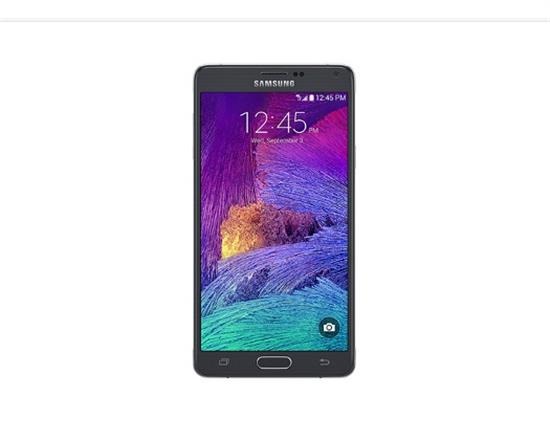
Download official Galaxy Note 4 SM-N910F 5.0.1 Lollipop ROM

Official Android 5.0.1 lollipop is now available for Snapdragon variant of Samsung Galaxy Note 4 that bears SM-N910F model number. If you have not received the update on your Galaxy Note 4, then you can download the update by following the instructions given below and get it updated. The best part is that you will not lose your warranty or do any harm to your device if you flash this. Please note that it’s only for N910C. Knox stays 0x0 which implies Knox counter will not increase and warranty will not get void.

Download Galaxy Note 4 SM-N910F 5.0.1 Lollipop ROM

Installation instructions.

Extract (unzip) the firmware file – download link.
Download Odin v3.09
Extract Odin zip-file
Open Odin v3.09
Reboot phone in Download Mode (press and hold Home + Power + Volume Down buttons)
Connect phone and wait until you get a blue sign in Odin
Add the firmware file to AP / PDA
Make sure re-partition is NOT ticked
Click the start button, sit back and wait a few minutes

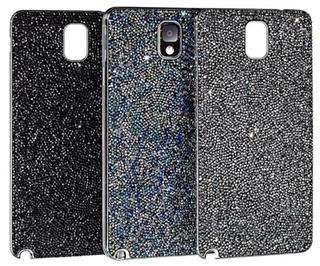
Review of Galaxy Note 4 Swarovski Battery Cover

Some people like a lot of bling on their phone and many of us resort to cheap Chinese bling cases but those who prefer quality choose Swarovski. The quality of Swarovski for the Samsung Galaxy Note 4 looks amazing and it really stylize your phone. Swarovski battery cover is adorned with crystals and is very easy to install.

Review of Galaxy Note 4 Swarovski Battery Cover

Simple remove your current battery cover and replace it the Swarovski case for Galaxy Note 4 and you are done. It fits just like the OEM case and adds minimum bulk, keeping your phone’s overall profile very thin. Here is its video review.

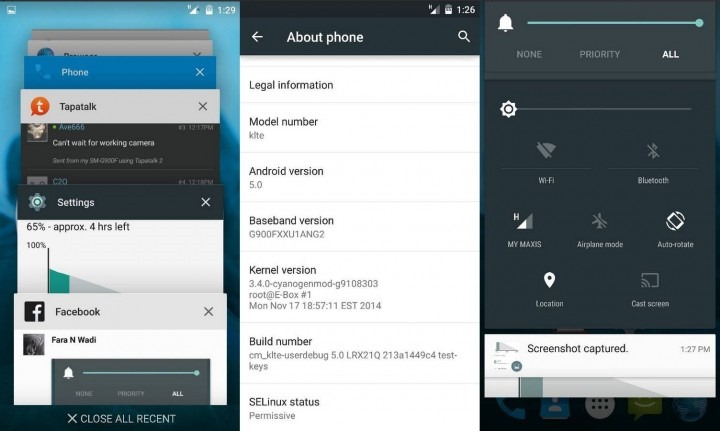
CM12 mod available for Galaxy Note 4

You can now download CM12 mod for the Samsung Galaxy Note 4. CM a k a Cyanogen Mod gives users vanilla android experience that free of Samsung bloatware and other unnecessary applications that come pre installed on the Note 4. While a lot of work has been done in porting CM12 to Galaxy Note 4, it is still pretty much a work in progress.

CM12 note 4

You can download the build from here and try it for yourself. Keep in mind that currently a lot of things are broken and it is clearly not good enough for daily usage. For instance camera, telephony, data, audio and many other things are not working.

So if your Samsung Galaxy Note 4 is your main phone, stick to the stock firmware. 

Get the TWRP for Note 4 to flash custom firmwares easily

TWRP stands for team win recovery project and it allows the Samsung Galaxy Note 4 users to easily flash custom firmwares easily. After installing TWRP on your Note 4, all you will have to do download the ZIP file containing the firmware or hack to the phone and flash it in recovery mode by holding down the volume up + power button.

TWRP for Note 4

It shall be noted that the warranty will be void after you have installed TWRP custom recovery on your Samsung Galaxy Note 4. You can download it from following links:

Acer Aspire VN7-791G Black Edition specifications, features GTX 950M GPU

Acer Aspire VN7-791G Black Edition has been launched that features the Nvidia GeForce GTX 950M GPU or GTX 960M. Prices start at 900 euro for the base model and these new laptops will be hitting the market shelves in mid-March. The Acer Aspire VN7-791G Black Edition could be the first notebook series to make use of these two new GPU units.

Acer Aspire VN7-791G Black Edition

The top specced model NX.MUWEU.004 Acer Aspire VN7-791G Black Edition specification include Intel Core i7 4720HQ processor with Intel Real Sense 3D camera and GTX 960M GPU. It will retail for 1550 euro. Lenovo also launched Y50 with same Nvidia GeForce GTX 960M GPU just few days back. However the Lenovo Y50 has better UHD screen and cheaper price tag too (1000 euro).

The cheaper one  Acer Aspire VN7-791G-555U (internal name NX.MUSEU.004) as mentioned earlier will cost 900 euro. Its specifications include Intel Core i5-4210H , 8 GB of memory (RAM) and a 1TB hard drive along with GTX 950M graphics unit.

Gigabyte P34W 14-inch gaming laptop with Nvidia Geforce GTX 970M

Taiwanese manufacturer Gigabyte has launched the P34W which is a gaming laptop with just 21 millimeter thickness and 1.71 weight. Despite have such thin hardware, Gigabyte has not compromised on its innards. Gigabyte P34W specifications include 14 inch display, Intel Core i7 quad-core processor, NVIDIA GeForce GTX 970M graphics card, up to 16 GB of memory backed by a combination of mSATA SSD and 2 TB hard drive.

Gigabyte P34W review

The 14-inch display has a resolution of 1920×1080 pixels. The battery has 61.25 Wh capacity. Ports and connectivity selection includes four USB 3.0 ports, HDMI, D-sub, Gigabit LAN, WLAN ac, Bluetooth 4.0 and an SD card reader. Also included is an HD webcam and a backlit chiclet keyboard for typing in dimly lit environments.

The Gigabyte P34W 14-inch gaming laptop is on sale at a suggested retail price of € 1,649.

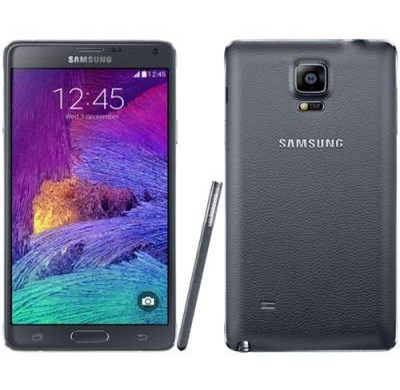
Overclock and underclock Galaxy Note 4 easily

Folks at XDA have churned out a custom kernel that allows the Samsung Galaxy Note 4 users to overclock or underclock their devices easily. The kernel is currently available only for the SM-N910F and SM-N910G variants.
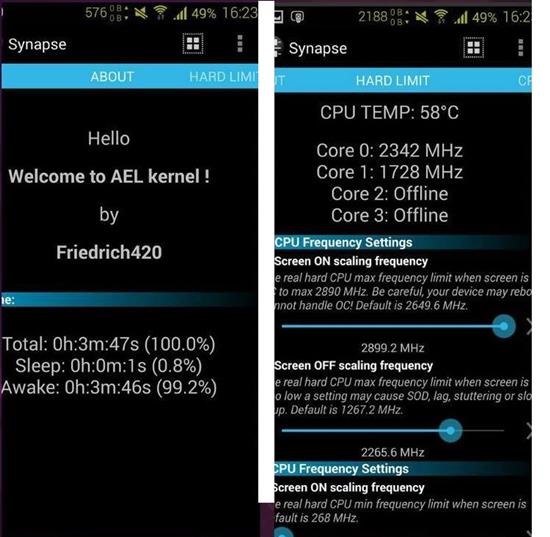
Overclock and underclock Galaxy Note 4

Here are its full list of features:

* Full Synapse control
* Built with the incredible Saber Mod 4.10 Toolchain
* Updated to Linux Kernel Base 3.10.5
* CPU Overclock up to 2.89 ghz (4 OC Steps: 2.68, 2.76, 2.84, 2.89)
* CPU Underlock down to 268 mhz
* HACK to allow non original SView Covers to access all the SView Features!
* Faux Sound Control
* Hardlimit Control
* Voltage Control
* Intelliplug v3.8 (faux123)
* Intellithermal (faux123)
* Additional Governors: Lionheart, Umbrella_Core, Bluactive, Intellimm, Interactive_Pro, Bioshock, OnDemandPlus, DanceDance, SmartMax, Yankactive, Wheatley,
SmartAssv2, Intelliactive, Darkness, Nightmare, ConservativeX, Alucard, Adaptive
* Additional I/O Schedulers: zen, sio, vr, fifo, fiops, bfq
* Powersuspend v1.5 ( Yank555.lu & faux123)
* LED Brightness Control
* Sweep2Sleep Hack
* USB Keyboard/Mouse Hack
(Use your phone as a keyboard and/or mouse)
* Patched for compatibility with DriveDroid app
(Flash .iso images to your pc from your phone!! No more need for usb sticks or dvd’s or cd roms)
* Fast Charge v1.2 [Yank555.lu]
* MDNIE (Color) Control [Yank555.lu and twsitedumbrella]
* Trinity Colors
* STEREO CALL RECORDING SUPPORT
* Overclocked Slimbus for a better overall sound experience
* Simple GPU Algorithm
* Dynamic FSync Control
* Fixed Simple_OnDemand GPU Governor crash
* Added Frandom
* Enabled CIFS Support
* Enabled and Optimized ksm (Kernel Samepage Merging)
* Enabled Gentle Fair Sleepers
* ENABLED ADVANCED TCP CONGESTION AND A LOT OF MORE OTHER TCP’s
* Permissive, with init.d support

Set the Hardlimit Screen on Max the same as the max CPU Frequency you want. For example if you want to overclock to 2.84, first set the hardlimit max frequency on to 2.84. 

Recommended settings for full performance.

– Hardlimit Screen On Max= 2.89
– Cpu Freq Max= 2.89
– Cpu Freq MIn= 268
– Cpu Governor= Performance or Bluactive
– I/O Scheduler: Deadline
– I/O Scheduler Readahead= 1024
– GPU Governor= Performance or cpubw_hwmon
– Enable simple gpu_algorithm
– Laziness=10
– Ramp Up Threshold= 1
– Dynamic FSync= On
– KSM = On

Balanced performance:

– Hardlimit Screen On Max= 2.68
– Cpu Freq Max= 2.68
– Cpu Freq MIn= 268
– Cpu Governor= Umbrella_Core or Interactive_Pro or Bluactive
– I/O Scheduler: sio or zen or bfq
– I/O Scheduler Readahead= 1024
– GPU Governor= msm_adreno or simple_ondemand
– Enable simple gpu_algorithm
– Laziness=5
– Ramp Up Threshold= 4000
– Dynamic FSync= On
– KSM = On

Allwinner A83T benchmark review

Allwinner A83T is an octa core processor made especially for the low end tablets that offer good performance and at the same time value for money. We reviewed Allwinner A83T on the Infocus CS1 A83 tablet.

Allwinner A83T benchmark

The AllWinner A83T is based on ARM Cortex A7 architecture and runs at 2016 MHz clock speed. Allwinner A83T benchmark results are given below. The processor is more than enough powerful to keep the entire system running smooth at all times.

1) AnTuTu benchmark – 27770

Allwinner A83T review

2) 3DMark Unlimited – 4956

Our review tablet, the Infocus CS1 A83 is able to run 1080p videos easily with hardware acceleration.

Normal bitrate 1080p Can run it? Mode
MPEG2 / MP2 2.0 – 6.6Mbps Yes HW
MPEG4 / MP3 2.0 – 7.6Mbps Yes HW
H264 / AAC 2.0 – 7.2Mbps Yes HW
VC1 / WMA3 2.0 – 8.6Mbps Yes HW
VP8 / VORBIS 2.0 – 7.8Mbs Jump frames HW
High bitrate 1080p    
Birds – H264 / No audio – 40Mbps Yes HW
Samsung Oceanic Life – H264 – AC3 2.0 – 40Mbps Yes HW
4K Format    
Skyfall – H264 / AAC 2.0 – 10Mbps Yes HW
Timelapse – H264 / AAC 2.0 – 43Mbps Jump frames HW
HD Club Chimei – H264 / AAC 2.0 – 60Mbps Jump frames HW
Newer 4K formats    
Elecard – H265-HVEC / AAC 2.0 – 6.4Mbps Jump frames SW
Tears of steel – H265-HVEC / AAC 2.0 – 15Mbps Jump frames SW
Google test – VP9 / No audio – 14Mbps Jump frames SW

As you can see the AllWinner A83T is a very capable processor and more than enough capable to perform most of the common jobs on a tablet.