Remove warning message from Moto X 2014 with unlocked bootloader

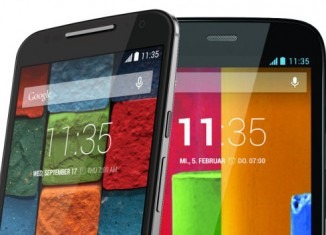
If you have recently unlocked bootloader on the Moto X 2014 you will be receiving a warning message on your phone. An XDA user has released a custom boot image that removes this warning message.

To flash it you will need ADB installed on your computer and download this logo file. Unzip it and put it in the folder of ADB. After you have installed it fire up command prompt, enter this command.

fastboot flash logo logo.bin

Within few seconds the logo.bin file will replace the warning message. That is it – you have successfully removed the warning message from your newly bought Moto X 2014. Some people can really annoyed by the warning message they see every time they boot their device.

Remove warning message from Moto X 2014 with unlocked bootloader

Flashing this file is safe and harmless. If the flash is unsuccessful your Moto X 2014 would not get bricked.

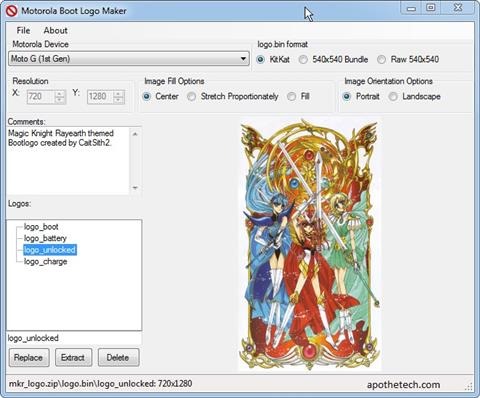
Download Motorola Boot Logo Maker for Moto X G 2014

The developer behind the Motorola boot logo maker has released an updated version for the Moto X and G 2014 2nd generation models. Here are its features.

* Open Existing Logo.bin files
* Open Existing Flashable zip files
* Create logo.bin files
* Create Flashable zip files
* Export images from Logo.bin / Flash able zips.

Flashing process for Motorola Boot Logo Maker

The application has user friendly user interface and one can easily create boot logos for it. To use it just double click on the tree view entries. Then select the picture and repeat that process for all of the files that would be in logo.bin

You then go to File / Save, and then save either as a .bin file, for flashing using fastboot, or as a Flashable zip file, for flashing using TWRP or CWM. In general, boot_logo is used on a factory locked device, and as a result, you probably should clear that one, as you would be wasting your space.

The logo_battery is your 0-3% indicator when the battery is run dry, and you plug it in to charge. logo_unlock is the actual boot screen logo you see on unlocked devices.

Download Motorola Boot Logo Maker for Moto X G 2014

It shall be known that any file more than 4MB logo.bin files will not be created. This is due to device limitation.

Asus G771 JM Review along with hands on pictures

The Asus G771JM is the top of the range gaming laptop from the electronic giant. Encased in aluminum alloy, the Asus G771 JM features backlight keyboard to help you type in dimly lit areas. It is outfitted with 17 inch IPS type full HD display packing 1920 x 1080 pixel resolution that provides excellent quality and therefore easy to read in bright sunlight.

We spent some great time with it and loved how powerful and fast its Intel Core i7 4710HQ 2.5 GHz processor felt. The CPU is backed by 16 gigabytes of RAM and dedicated Nvidia GeForce GTX 860M GPU with 4 gigabytes of onboard RAM. However considering the imminent launch of new GPU like Nvidia 900M, we can expect Asus to equip it with this latest GPU.

asus rog g771jm review

Asus has wisely used the massive casing by allowing the user to fit it with three storage drives. In two of the bays, you can fit in regular sized SSD / HDD but the third one can accommodate smaller M.2 SSD only.

asus g771 rog review

Measuring 418 x 284 x 37 mm and weighing 3:32 kilograms, the Asus G771JM comes with enough ports for connecting printers, flash drivers and whatnot. You get four USB 3.0 ports, HDMI digital video output port, mini display, SD card reader, RJ-45 LAN port and Kensington security lock. There is an optical drive that reads Blu-ray and for connectivity you get Gigabit Ethernet LAN, Bluetooth 4.0 and Wi-Fi 802.11ac radios.

Battery life is under five hours when you do not gaming but we expect no one to not use it for gaming.

asus g771 review

Overall this is a solid laptop and we whole heartedly recommend it for gaming.

Crooked slanted text on iPhone 6 bugging new users

Many new owners of Apple iPhone 6 are reporting slanted crooked text on the back of their new devices. While some are not very bothered by it, those who are fond of perfection are now thinking of getting a replacement.

Some people are OCD for that kind of stuff and we believe they have every right of being so after spending hundreds of dollars on a fragile phone and standing in long queues.

iphone 6 crooked slanted text
To those seeking replacement for their iPhones with crooked text, keep in mind that when you replace one iphone with an issue, to only end up with another one that has a dead pixel, faulty home button etc.

Swype on iPhone with iOS8 and battery life

So we finally have been using the new Apple iPhone 6 and we do like the ability to finally use third party keyboards. So we decided to try Swype on iPhone.

While we loved the added functionality and how everything works, we found something that should not be happening. Swype eats battery like a maniac who has been starving from many days.
Swype iPhone

Is it happening on your iPhones as well? I wonder how much power the the default keyboard uses though. It’s part of springboard, so it’s not measured, while Swype is an “app” so it is tracked by it.

How to root Motorola Moto G 2014 2nd generation instructions, download CWM

Thanks to kind folks at XDA we have instructions to root Motorola Moto G 2014 2nd generation phone and judging by the steps it is not exactly a very difficult task.

Since the Motorola Moto G 2014 2nd generation comes boot loader locked, it is mandatory to unlock it before we proceed. You will also need Motorola’s drivers installed on your computer.

Root Motorola Moto G 2014 2nd generation instructions. Also learn how to download clock work mod CWM recovery

1. I assume you have unlocked the bootloader of your phone. The first link in the post explains it.
2. Download the super SU file from here.
3. Copy the super SU file to internal SD card. Power off your phone and go to boot loader mode. You can do this by holding down power + Volume down buttons. Release when you have entered this mode.
4. Connect your phone to your computer and flash the CWM recovery in boot loader mode.
5. Then boot into recovery. Do this by holding down power + volume up button. Flash SuperSU.zip from recovery.
6. Reboot – you have successfully rooted your Moto G 2nd generation model.

Root Moto G 2014 2nd gen

In case you want to remove the root from Motorola Moto G 2014 you must restore the phone by download and flashing factory firmware.

Restore Moto G 2014 2nd gen, download factory firmware

So you have done all sorts of hacks on your Motorola Moto G 2014 2nd generation phone and for some reason you want to revert back to factory settings. For example you have unlocked bootloader of Moto G 2014 and for warranty reasons you must revert back to original firmware.

How to flash and restore the Moto G 2014 2nd gen?

First you download the ROM from here. In the link you will find original ROMs for Germany, USA, English, Canada and Brazil.

XT1063 – Global GSM Single-SIM
XT1064 – US / Canada AWS Single-SIM
XT1068 – Global GSM Dual-SIM
XT1069 – Dual-SIM with Digital TV

Restore Moto G 2014 2nd gen

1. Download the ROM and extract it to a folder
2. Download mfastboot-v2 and Extract it into the same folder [mfastboot Download: http://goo.gl/lTYq4F]
3. Reboot the phone into Boot loader
4. Run Following commands from the Command Prompt after cd-ing to the folder, one by one.

Unlock bootloader on Moto G 2014 2nd gen

When you unlock bootloader on Moto G 2014 2nd gen phone, you open a wide range of possibilities including the ability to root the phone.

You should know that unlocking bootloader voids the warranty. Also it factory resets your phone which means all personal data is deleted from the phone. Ready?

Follow these steps carefully to unlock bootloader on Moto G 2014.

* Make sure to take a backup of your entire device data.
* Download the Android SDK from here.
* Install the latest Motorola USB Drivers on your desktop. Download here.
* Put your device in fastboot mode (power off, then press the power and volume down buttons simultaneously).
* Open Command Prompt on androidsdk/platform-tools/ (Hold Shift and right click and press open command window here)
* Connect your Phone to PC
* Type this in the CMD prompt window – fastboot oem get_unlock_data
* You will get a return string. Copy it. [Right Click-Mark- Mark the text by pressing the shift key-Now press Ctrl+C]
* Paste all the lines together in a notepad. Remove the empty spaces.
* Now go to the Motorola Site.Sign in using your Google account or Motorola ID. Scroll down the page and paste the copied string in the field at step #6. Then click on ‘Can my device be unlocked?’, after which a “REQUEST UNLOCK KEY” button will appear at the bottom of page.
* To get your unlock key, select the ‘I Agree’ option. Note: You will receive an email with your Unlock Key at the email address you used to log in there.
* Important – Copy the 20-character key that Motorola sent you via email. Make sure your device is connected.
* Then in CMD type: fastboot devices (To check your device is connected)
* Then type: fastboot oem unlock UNIQUE_KEY

Here UNIQUE_KEY refers to the unlock code that you received via email.

To relock the bootloader on Moto G 2014 2nd generation phone, go to fastboot and give the command fastboot OEM lock.

moto g 2014 unlock bootloader

How to remove the unlocked bootloader message?

* Download the zip.
* Extract all the files
* Reboot to fastboot mode (power + vol down)
* Now open cmd and use cd command to go to the directory where you placed the file.
* Now Type the command: fastboot flash logo logo.bin
* Reboot from the recovery (use vol up to select and vol down to navigate)
* Now your boot logo should be restored back to the normal version.

Download Android 4.4.4 ROM for Samsung Galaxy S

An XDA user Mackay has released an Android 4.4.4 ROM for the Samsung Galaxy S smartphone. The ROM is based on Android 4.4.4 kitkat and Cyanogen mod. Also to flash it you require Mackay’s own kernel that can be downloaded from here.

The ROM is close to stock and no additional application are included which also means that it is bloatware free. The best thing is that you can flash it over a Cyanogen mod ROM. Here are the installation instructions.

* Do a factory reset
* Flash ROM
* Flash gapps
* Reboot your phone

The ROM is backed by CM11.0 codebase and bnew kernel: 0.692: updated recovery to TWRP 2.8.0.0. The TWRP has orange theme. Video editor and demo video files have been removed to free up more space. 

Mackay kernel settings options include:
* WiFi PM mode selection
* BLX settings
* BLN activation
* Navbar selection
* Low RAM mode selection

Download Android 4.4.4 ROM for Samsung Galaxy S

Review of Rokform Sport v3 for iPhone 6

The Rokform Sport v3 for iPhone 6 is current on sale for 39 dollars. Available in five colors, it made of hard plastic with rubber casing.

There are some unique features about it. For instance we love how solid it feels and how nicely it absorbs shocks. It has full button protection and has all required openings for buttons and ports.

Rokform Sport v3 for iPhone 6 Review

In the box you get two swappable back panels – one has removable magnet while the other has a hole that can be used for attaching Rokform’s traditional wall mounting system.

The only downside is the fact that the magnets disables NFC on the phone so you will not be use your iPhone for Apple Pay.

Rokform-Sport-v3-review

A wrist strap is also present in the box. Protective Rokform iPhone 6 Case features:

Dual Compound 6 sided protection (6ft. drop tested)
Shock absorbing soft inner liner
Tough outer polycarbonate shell
Easy-stick magnetic mount, mount most anywhere
Simple snap-in installation
Snap-in Rokform Mounting System (RMS) & Magnetic back
Snap-in Magnetic back
Works with all v3 mounting accessories