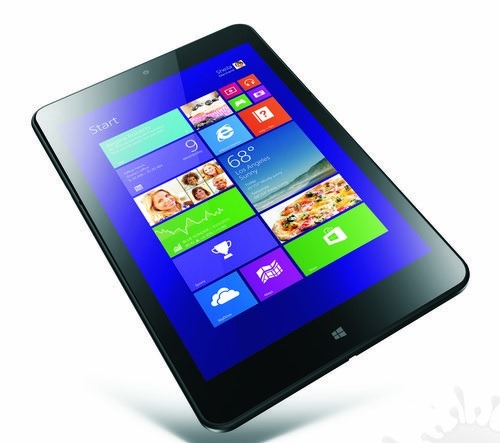
MODECOM FreeTAB 1010 Overview

MODECOM FreeTAB 1010 is quite frankly the cheapest tablet out there that runs the full fledge Windows OS. Based on x86 infrastructure, it runs Windows 8.1 not the shrunken down Windows RT. Folks at x-kom.pl  can get you one it for mere EUR 238 or 999 Polish Zloty if enter their promo code, FreeTAB.

MODECOM FreeTAB 1010 price overview

The promotion will end on January 31, 2014.

MODECOM FreeTAB 1010 Specs are quite amazing

The tablet runs windows 8 and is powered by dual core Intel Celeron N2805 processor that is manufactured using 22 nanometer processing technology and runs at 1.46 GHz clock speed. The CPU is backed by Intel HD graphics and 2 gigabytes of DDR3 type RAM.

The display measures 10.1 inches and features 10.1 IPS technology. Resolution is decent too – 1280×800 which will enable full metro user interface on it. For storage, you get meager 32 GB which is fortunately expandable via SD card slot.

Other specs include 7000 mAh battery, 802.11n Wi-Fi, digital compass, micro USB, USB 3.0 OTG compatible port, HDMI 1.4, 2 megapixel rear camera and 2 MP webcam. It measures 259 x 173 x 9.9 mm.

Zotac ZBOX IQ01 Core i7 4770T mini PC Specs Price

Zotac Japan has churned out an Intel Core i7 4770T powered mini PC (nettop) with a price tag of 90000 Yen. Specs of the Core i7 4700T include a 8 thread with quad core cores. Called the ZBOX IQ01, it measures 188 × 188 × 51mm (height x width × depth).

Zotac ZBOX IQ01 Core i7 4770T mini PC Specs Price

Optionally, if you do not have a lot of space on your desk, you can mount the ZBOX IQ01 using VESA mount.

ZBOX IQ01 specs are great for a small PC

ZBOX IQ01 specs include 2 mSATA slots, 2.5-inch bays supporting DDR3-1600 SO-DIMM RAM, USB 3.0 × 3, SD card reader, Gigabit Ethernet × 2, Display Port × 2, DVI-I, IEEE 802.11a/b/g/n/ac-enabled wireless LAN, Bluetooth 4.0, and voice input / output jacks.

Aforementioned specs are for the bare bones mode. Zotac does offer a model called IQ01 Plus that features above specs + 500GB hard disk + 4 gigabytes of RAM. Estimated retail price of this model is 110,000 Japanese Yen.

Sharp PW-SB1 Review

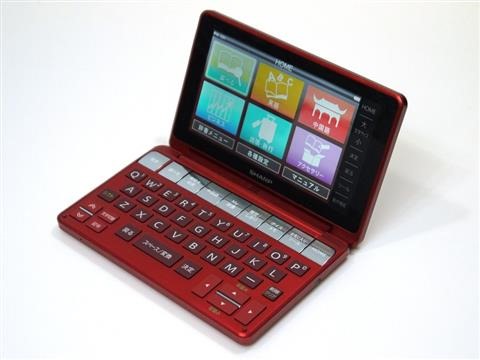
Think days of electronic diaries are gone? Well, Sharp still believes there is a decent market for the digital diaries, and today they have launched PW-SB1. It boasts a LCD display that can be rotated 360 degrees, and can be used as slate tablet by turning the keyboard on the back. Priced at 40,000 yen (~ USD 384), it features a higher resolution display compared to its predecessors and much more roomy keyboard.

Sharp PW-SB1 review specs

Here are its Sharp PW-SB1 specs at a glance

Display    5.2-inch color
Number of dots    800 × 480 dots
Power    Rechargeable lithium-ion battery
Operating time    About 50 hours
Extension    microSD, USB, Blaine library
Body size (including protrusions)    152.4 × 96.5 × 18.8mm (height x  width × depth)
Weight    About 295 grams (including batteries)

Sharp PW-SB1 specs

This is how it looks like when it is in tablet mode. In this mode, the keys of keyboard are disabled to avoid unwanted input.

It comes with a PDF viewer, Adobe Reader LE 2.5 to be exact. The Sharp PW-SB1 handled big PDF files just fine.

Sharp PW-SB1 Review

Calculator app is also included. Tax consumption mode is also there. Voice recoding app comes pre installed on it. It is not very feature rich but records sounds well.

Sharp PW-SB1 Review Verdict

While this Sharp digital diary tries to make electronic diaries relevant again, it stands no chance against modern tablets or even cheap Chinese tablets. Its proprietary operating system coupled with not-so-comfortable portrait mode prevents us in recommending it to an average Joe or a businessman. Its 5.2 inch display packs WVGA resolution, which is so 2008. Smatphones these days pack full HD resolution while remaining incredibly pocketable form factors.

[via pcwatch]

128GB ThinkPad 8 Gets a Price Tag

It is extremely rare to find productive tablets with 128GB of storage. Until now, Windows 8 tablets have only been offered in either 32 or 64 GB storage capacities. This is the first time, a PC manufacture is offering a tablet with 128GB storage. Meet the Lenovo ThinkPad 8, the might be the best tablet to stay productive.

128GB ThinkPad 8 Price specs

128GB ThinkPad 8 Price

Lenovo wants mere EUR / USD 599 for it. This is an extremely well thought price tag for something with such amazing specs and display, which packs higher resolution than the industry standard resolution, 1280×800. Not a lot of shops in Europe are selling it, but I think Cyberport.de is selling it. It is yet to go on a sale in US land.

128GB ThinkPad 8 Specs

Lenovo ThinkPad 8 runs Microsoft Windows 8.1 operating system and it runs butter smooth, thanks to the quad core Intel Atom Z3770 processor (2.4 GHz) and 2 gigabytes of main memory (RAM). For communication, you get a dual band Wi-Fi network card, and Bluetooth 4.0. Other specifications of this tablet include 8-megapixel main camera and front webcam.

Colorovo CityTab Lite 7 2.1 Cheap Tablet with Dual Core CPU

Colorovo CityTab Lite 7” 2.1 is the latest tablet with a diagonal display size of seven inches. Can you expect anything good from a tablet that has a suggested retail price of USD 80 (CNY 490)? The answer is yes.

Colorovo CityTab Lite 7 2.1 Specs

Colorovo CityTab Lite 7 2.1 Specs

Despite being so cheap, the Colorovo was able to fit a dual-core Rockchip 3026 processor (ARM Cortex-A9) with a clock frequency of 1.0 GHz, backed by dual-core graphics chip, the Mali-400. You get 512 MB ​​of RAM with CityTab Lite 7 2.1. For storage, you get meager 4GB built-in memory, which is fortunately expandable through the use of micro SD card slot. The 7-inch display packs WVGA resolution (800 x 480 pixels).

It runs Android 4.2 jelly bean operating system. For communication, you get 802.11n Wi-Fi, micro USB port, front webcam (0.3 mega pixel) and to keep the price low, there is no rear camera.

Battery capacity is 2500 mAh, and with that capacity, we do not expect it to yield more than 3 hours of active use.

TSUKUMO Aero Stream RM5A-B61 / E with AMD A10-7850K

Following the suite of Mouse Computer, TSUKUMO Japan has also churned out a desktop PC featuring the new AMD A10-7850K APU. Called the Aero Stream RM5A-B61 / E, it features the aforementioned quad core 3.7 GHz processor, R7 series Radeon 8-core GPU operating at 720 MHz, 8 GB of RAM, 500 GB of hard disk, DVD super multi drive, 450 W power supply and Windows 7 home premium 64 bit OS.

TSUKUMO Aero Stream RM5A-B61 E with AMD A10-7850K

Ports selection include HDMI output / 2 × Gigabit Ethernet, USB 3.0 × 2, USB 2.0 × 6, PS, DVI-D, mini D-Sub15 pin, voice input / output interface. Empty slots PCI Express x16 × 1, and PCI × 1.

Body size is about 190 × 400 × 370mm and the TSUKUMO Aero Stream RM5A-B61 / E weighs 10 kilograms. Price of standard configuration is 69,980 yen (USD 680), which makes it about 10,000 Yen more expensive than the Mouse Computer’s offerings.

Mouse Computer Launches A10-7850K Powered Desktops

Mouse Computer, Japan has released two desktop PC models, Lm-AR310S and Lm-ARS210S, both of which are powered by the new AMD A10-7850K APU. Both PCs are launched under G-Tune, a gaming brand of the Japanese manufacture.

mouse computer Lm-AR310S A10-7850K Powered Desktops

Both models feature similar specs, and but the Lm-ARS210S (100 × 393 × 364mm) is slimmer than Lm-AR310S (180 × 382 × 373mm).

Prices start at 59,850 yen (USD 580), and the starting model of Lm-AR310S gives you AMD A78 chipset, 8 GB RAM, 500 GB HDD, DVD super multi drive, 350W power supply (80PLUS BRONZE compliant) and Windows 8.1 64 bit Operating System.

mouse computer Lm-ARS210S

Ports selection includes Gigabit Ethernet, USB 3.0 × 4, USB 2.0 × 2, PS / 2 × 2, DVI, mini D-Sub15 pin, interface and audio input and output.

Related Links – 1, 2.

Root LG G Flex Easily using Vroot

Development for the LG G Flex is on fire. Few days back, we got hold of CWM and TWRP. Now, we have the root instructions for it. First get vroot from here and install it on your computer.

Root LG G Flex Easily using Vroot

Connect your G Flex phone to your computer. Make sure you have activated USB debug on your phone. Start vroot and click ROOT, wait phone to reboot itself. It will now disconnect from computer. Download clockworkmod superuser from playstore on your phone. Launch it, and update binary.

Now, download Titanium backup (full version) from playstore. Stat it. Kill all open apps. Now, launch Titanium backup and freeze Vroot. It is at the end of the list. Relaunch clockworkmod superuser and re-update binary and reboot the device. Now you can uninstall Vroot using Titanium Backup.

That is it. You have successfully rooted your LG G Flex.