RM-1099 Lumia spotted on Indonesian certification site

We have just spotted a new Lumia device on Indonesian website. Its product code is RM-1099 and it has been revealed for the first time. Earlier we have reported RM-1072 and RM-1077 phones both of which will come with 5 inch display packing 720p resolution. Both had earlier passed certification in Indonesia.

Unfortunately we do not have any word on specifications of RM-1099. In the upcoming Lumia devices, RM-1062 may be released as Lumia 1330 (successor of 1320) while RM-1072 will be churned out by the name of Lumia 1335. We will keep you updated if we dig out more information about the RM-1099.

RM-1099 Lumia

Could this be the Microsoft Lumia 940? We have to wait for some spec leaks. Maybe a windows 10 device? Who knows.


Overclock or underclock Galaxy Alpha using custom kernel, increase battery life or performance easily

An XDA user has released custom kernel for the exynos-powered Samsung Galaxy Alpha that allows you to easily overclock or under clock. You can change clock frequencies of A7 core to 200-1800 and A15’s core to 200-2000. To change clock speeds easily we recommend installing Synapse from play store.

galaxy alpha underclock overclock

Under clocking a processor increases the battery life while overclocking improves performance. We tested this Galaxy Alpha custom kernel at 2.0 GHz and did not notice any extra heat. Phone remained stable too. We recommend 500-1800 MHz for a15 cores and 200-1800 MHz for A7.

It shall be noted that it is not a firmware or a ROM. This is a kernel meant to be flashed over a stock ROM. Here is the screenshot of results achieved by overclocking. As you can see it surpassed the mighty Galaxy Note 4 in the AnTuTu Benchmark.

Asus 1000H / 1000HE Eee PC Bios Recovery guide

The Asus Eee PC 1000H was one of the most popular netbooks. Mine has been working fine until yesterday when it did not boot. I freaked out a little. A quick search online revealed that its BIOS was corrupted. I have made an Asus 1000H Eee PC Bios Recovery guide where I have explained how to flash and do the recovery of Bios.

1000h bios recovery

1. Go to Asus support site and search for 1000h in the product box.
2. Download the BIOS for Asus 1000H. You will get a zip file. Download it and unzip it.
3. You will find a ROM file. Rename it to 1000H.ROM or 1000HE.ROM if you are using that netbook.
4. Get a USB drive or an SD card with 1GB or less storage. If you are going to use an SD card, get a card reader.  
5. Format it with FAT file system. FAT32 or NTFS would not work.
6. Put the file into the root folder. Do not put it into any folder.
7. Take battery out and plug in the USB / SD card with card reader. Press the Alt + F2 key repeatedly and press power button. 
8. The system will beep once to tell you that it can found the BIOS. Follow the instructions on the screen.
9. It takes around 3-4 minutes for the flash to complete. 
10. Here is a video that shows the entire process.

ATT Galaxy Mega 5.8 official firmware download

If you are flashed all sorts of hacks on your ATT branded Samsung Galaxy Mega 5.8 smartphone and want to get back to stock firmware, you might want to flash its official firmware I527UCUBNE7. This method will remove root from Galaxy Mega 5.8 and also remove custom recovery and whatnot. This package must be flash using ODIN. It has multiple parts.

ATT Galaxy Mega 5.8 official firmware download

AP: Get the file from here and flash it under PDA in ODIN. It is a huge file and it contains system, stock recovery and kernel partition. Download it from here.

BL: This is the bootloader. If you already took the update ignore this but if you want to upgrade your phone you must flash this Download
CP: This is the modem and other network related partitions. You must flash this under Phone in odin Download
CSC: This contains carrier related settings for our firmare. Flash this under CSC in odin. Download

Samsung SM951 M.2 PCIE 3.0 SSD specifications, made for ultrabooks and workstations

Samsung has announced that it has commenced production of SM951 M.2 PCIE 3.0 SSD that is meant for ultrabooks and workstations. Compatible with both PCIe 3.0 and PCIe 2.0 interfaces, it is capable of reaching 2,150MB/s read and 1,550MB/s write speeds when using PCIe 3.0 or 1,600MB/s read and up to 1,350MB/s writes speeds when using PCIe 2.0.

This makes the Samsung SM951 atleast three times faster than the SSDs using SATA ports for data transfer. If you use PCIe 3.0 interface with this SSD, you will love how less power it consumes, around 450MB/s per watt for sequential reading and 250MB/s per watt for sequential writing.

What does this mean for you? Well it means that Samsung SM951 is 50 percent more efficient in terms of performance per watt over current slew of SSDs.

Samsung SM951

It is also the first solid state drive to feature L1.2 low power standby mode which allows high speed circuits to be turned off when your laptop is in sleep mode. Power consumption is vastly reduced to mere 2mW.

The Samsung PCIe SSDs will be manufactured using 10 nm technology and MLC-type NAND flash. The best part is that it comes in the 2280 M.2 form factor which is about 1/7 th size of 2.5 inch SSD. This will surely free up some space for other components on the motherboard.

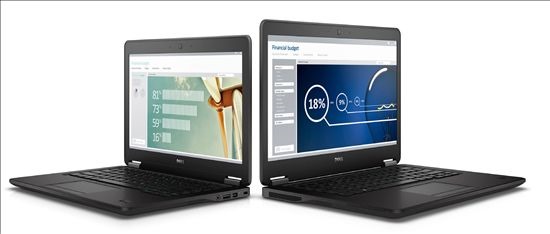
Dell Latitude 7000, 12 5000, 14 3000 Laptop gets Broadwell treatment

Dell has updated Latitude 7000, 12 5000, 14 3000 laptops with Broadwell processor. The new models feature the latest Intel Core vPro processors that are based on Broadwell architecture.

So what does this mean for you? You will find improved battery life and less heat generation. These computers come with a wide range of options including Core i7 processors, HD / full HD display, touchscreen, SSDs and HDDs.

Some also feature business class security including TPM modules, fingerprint readers and smart card readers.

Dell Latitude 7000, 12 5000, 14 3000 Laptop gets Broadwell treatment

The Dell Latitude 7000 feature either 12” or 14” displays. The 12 inchers are less than 0.8 inch thick and weigh mere 2.8 pounds. The Latitude 12 5000 series has 12” screen and weigh 3.4 pounds.