RAMdisk setup on EEEbuntu/Linux

A lot of us have switched to EEEbuntu on our EEE PCs. If you are like me, who likes to keep his netbook clutter free, you will want to set up RAMdisk. And if you thought that setting up RAMdisk in Windows XP was easy (see this article), then in EEEbuntu, it is even easier.

  • RAMdisk is located at “/dev/shm”
  • Open firefox and type in about:config in the address bar
  • Click on “I’ll be careful”
  • make a new string browser.cache.disk.parent_directory
  • give it a value /dev/shm
  • restart firefox

Usual warning about RAMdisk: you will loose all the data upon restart. That is why, it is only recommended for web browsers

Samsung's Nano-powered Q1EX UMPC showcased at CeBIT


Samsung NP-Q1EX, first spotted at CES in January is finally going to hit the US shores very soon. Unlike its older sibling, Q1U, it does not have a keyboard, which was quite useful for typing short URLs quickly and for basic office editing on-the-go. Although by shedding the keyboard, the Samsung was able to further shrink its size and thus making it more ‘portable’.

Specifications:

  • 7-inch WSVGA touch screen (1024×600 resolution)
  • Windows XP Home
  • 1.2GHz VIA Nano ULV U2500 processor
  • VIA’s Chrome9 HC graphics
  • 1.3MP digital camera
  • WI-Fi
  • Bluetooth 2.0
  • 60GB HDD
  • 2GB RAM
  • SD card slot
  • 4000mAh battery

Samsung claims that it will have 4.5-hours of battery life. Right now, it is too early to comment on that. Also, its not-so-recession-friendly price tag of $775 is surely going to turn-off a lot of customers from buying it.

[engadget]

ASUS not going to completely phase out 8.9 inch Netbooks

Looks like it was not completely true that the ASUS would completely rule out the 8.9-inch netbooks despite what the recent reports have been indicating so far. At CeBIT 2009, Shih said that the customers these days prefer the 10.2-inch models over the smaller models. This clearly indicates that most of the customers are looking for bigger screens and better keyboards.

ASUS are NOT going to completely phase out 8.9 inch Netbooks

Although, he made it completely care that the company is no longer going to concentrate on 7-inch EEE PC. Personally, I still believe that by using 7-inch screens in the netbooks, they can unveil even tinier EEEs (if they do not cover the sides with the speakers).

[via liliputing]

Lenovo Ideapad S10 review

Lenovo made its entry into the netbook business last year by launching two netbooks, namely Ideapad S10 and S9. Lenovo did not join the netbook arena in its initial stages. Instead, it watched the whole game and learnt from the mistakes of other manufactures. So, are we impressed by the Lenovo Ideapad? Read on to find out!

Let’s first take a quick glance its specifications:

  • 10.2″ WSVGA (1024 x 600) display
  • 1.6GHz N270 Intel Atom Processor
  • 1GB  DDR2 SDRAM @ 667MHz
  • Windows XP Home Edition
  • 1.3MP camera
  • 160GB HDD @ 5400rpm
  • Intel GMA 950 Integrated Graphics
  • Broadcom 11b/g Wi-Fi wireless and Bluetooth
  • 4-in-1 Media card reader and ExpressCard slot
  • 3-Cell Li-ion battery
  • Size 9.8″ x 7.2″ x 1.2″
  • Price: $420-$480 (differs from region to region)

Hardware and Design

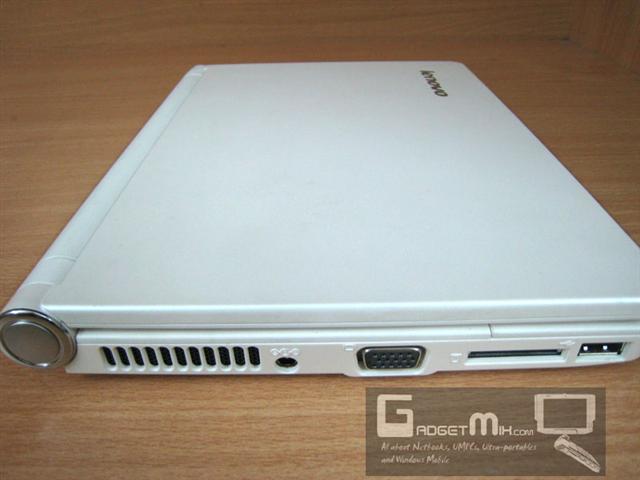
The Lenovo S10 is a very well designed netbook. The company Lenovo is often associated with high built quality when it comes to the laptops and the Ideapad S10 is no different. Immediately, when you touch, you feel quality.


On the right side, you will find the Kensington lock, USB 2.0 port, earphone jack, microphone jack and express card slot.

On the left side, you will find the power port, VGA port, USB 2.0 port and multi-card reader.

Display

The Lenovo Ideapad S10 has a 10.2-inch matt display. It has the usual netbook resolution of 1024 x 600. Having said that, we expected more from Lenovo as it entered late into the netbook market. Do not get us wrong, the resolution is perfect for the 10.2-inch and colors looks nice and vivid. Had it come with something like 1280 x 800, it would have it an obvious edge over the other netbooks for sure.

Keyboard

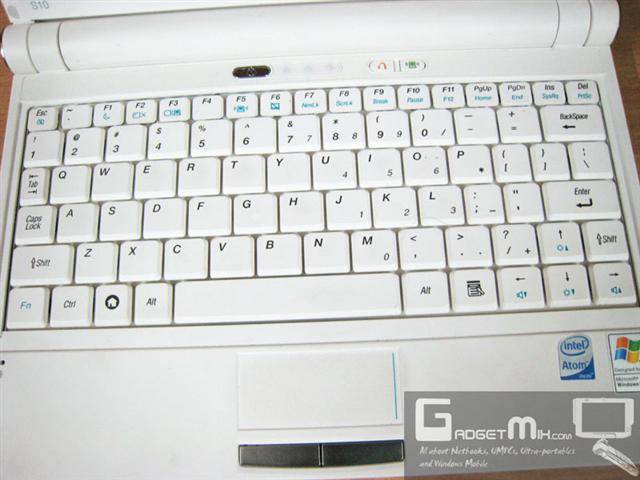
I always stress on keyboard a lot when doing netbook reviews. This is because people buy these 10.2-inch netbooks mainly because it provides the manufactures to fit in bigger keyboard. So, how is the quality of the Lenovo keyboard compared to the keyboards of Acer aspire one, ASUS EEE 1000H and S101? Just for the sake of comparison, I was able to type at 100+wpm on all the 10.2-inch netbooks. On S10, I achieved 80wpm. This does not mean that the quality of the keyboard is any less than found in other netbooks.

Trackpad

The trackpad is small when compared to other 10.2-inch netbooks. The EEE S101 and EEE 1000H or 904HA feature a much bigger trackpad. That said, we did not face any problems in using the trackpad. It is quite responsive. However, if you do something like graphic designing on your netbook, you will find using the small trackpad a little cumbersome.

Memory

The Ideadpad S10 comes with a respectable 160GB HDD and 1GB of RAM

Upgradability

The Lenovo has made upgrading the HDD as-well-as RAM quite easy for the end user. You do not have to seek for any experts help or visit service center just to change RAM or HDD.
I posted a “how-to” on how to change the HDD and RAM of the S10. I’ve just pasted the contents of that post here:

Here are the instructions:

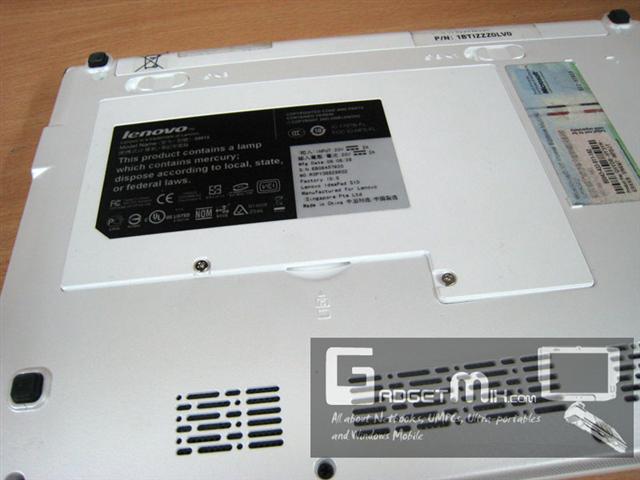
1. Flip the unit over such that it rests on its front cover. You will see two screws that provide the access to the HDD and RAM.

2. Unscrew the two screws. You will need Jeweler’s scewdriver to unscew them. Once done that, carefully remove the back panel starting from one side.

3. Here you will find access to the HDD (left side) and RAM (right side). Just a little pull towards the left will take the HDD out. You can swap it with a SSD or HDD of your choice. To take the RAM out, gently push the holders in opposite direction to which they are pointing to and then pull the RAM out carefully. Put in the RAM of your choice. Upto 2GB can be used.

Here is the HDD used in the Lenovo S10.

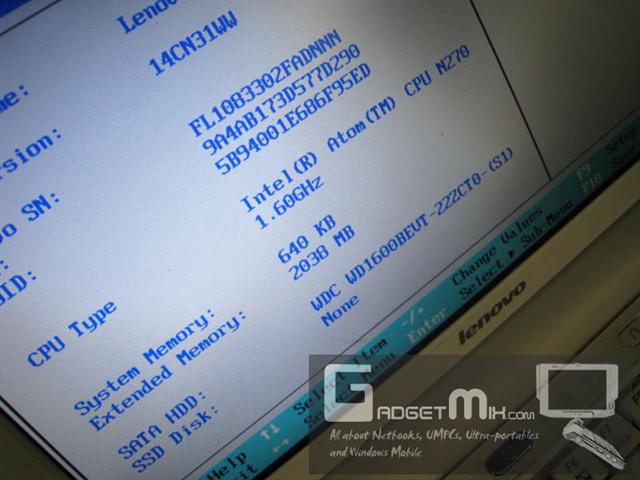
4. After upgrading, make sure to go to the BIOS and check if the S10 has recognized your RAM properly or not. You can enter BIOS by pressing the F2 key of your keyboard immediately upon bootup.

Battery Life

The Lenovo S10 comes with a 3-cell Li-ion battery. Axiomatically, we did not expect it to break any records in terms of battery life. We were able to squeeze 1 hour 45 minutes, which is fine for its capacity. However, if you turn off the wireless, you may be able to cross the 2 hour mark.

Speakers

The speakers are located on the front of the device. They produce adequate amount of sound. They are perfect for skype and for other audio conversations. Although, like other laptop/netbook speakers, they lack bass.

Lenovo One Key Recovery

Most of the netbook manufactures do not give a lot of heed to the software side of the netbook. Unlike other netbook manufactures, the Lenovo Ideadpad S10 comes with Lenovo One Key Recovery software. To explain its functionality, let me give you an example:
Say you are away from home and some random virus messes up the OS. Since, you are not at home, you do not have access to the external DVD drive and you cannot reinstall the OS. Note that this is the most common case with most of the netbook manufactures. They bundle a recovery DVD with the netbooks. With Lenovo S10, you do not need a DVD drive to restore the OS. When the device is off, just press the One Key Recovery button and the system will ask you, if you would like to make back up or to restore the OS. You can restore it to factory image or to some user defined image.

Crystal Disk Mark benchmark result

Some Size Comparisons

Thickness comparison of EEE S101 and Ideapad S10

EEE 701, S10 and S101

Final Thoughts

The Lenovo Ideapad S10 is a perfect mobile companion of those who want top-notch netbook from a reputed notebook manufacture. The processor is fine for the normal tasks that one does on-the-go. The battery life is little low, but if you can manage with that, you have a winner in your hands.

Pros:

  • Excellent build quality
  • Sophisticated design
  • Nice performance
  • Lenovo One Key Recovery
  • Easy to upgrade
  • Light weight
  • Responsive keyboard
  • Good value for money

Cons:

  • Awkward right shift key placement
  • 1.5 hours battery life

What Windows Mobile phones will you find at CeBIT 2009?

MSmobiles have given a summary of what various Windows Mobile companies have taken part in the CeBIT 2009 trade show.

  • HTC has stand in Hall 26, Stand A40 – where HTC Touch Diamond 2 and HTC Touch Pro 2 are being presented
  • Garmin (Hall 15, Stand D08) and Asus (Hall 26, Stand D39) are presenting phones that are result of their cooperation and some of these phones are Windows Mobile powered
  • Pearl (Hall 25, Stand D40) is presenting ultra-cheap Windows Mobile phones for German market (price: 100-200 Euro)
  • T-Mobile Germany operator is located in Hall 26, Stand A01 and is presenting HTC-manufactured Windows Mobile -powered T-Mobile MDA Compact V and T-Mobile MDA Vario V
  • new trend: several manufacturers, including Asus, Sony, MSI as well as mobile operators, are presenting at CeBIT 2009 many netbooks with built-in HSDPA; notably Asus is presenting across the line many models with built-in HSDPA (3G)

Windows Mobile phones costing just 100-200 euros sound interesting. It is definitely nice to see Windows Mobile going ultra-cheap

Onkyo updates C101 netbook

Onkyo have updated their netbook model 101 with the DC101WP and DC101BP. The DC101WP is white in color and DV101BP is black in color. The battery side has also seen a bump. It is now 11.1V and 4.4Ah (48.84Wh). Other specifications have not undergone any change like the Atom N270 processor, 1GB RAM and 160GB HDD.

[via akihabaranews]

Web Video Download finally comes out of BETA – Version 1 released [Windows Mobile]

This application makes me think something: why did no-one ever thought of this? Web Video Downloader is the first Windows Mobile application that lets you download streaming videos from plethora of websites.

Web Video Download

However, this application is no more a freeware. The application has undergone many phases and the developer has put in a lot of effort in this application. However, even then it costs a modest $14.95.

Read ApoTheTech’s review of Web Video Downloader

Taiwan mobile announces its own 10-inch netbook

With so many companies pouring themselves into the netbook space, even the cell phone providers are rolling out netbooks. Taiwan Mobile has announced W101, which is a typical 10-inch netbook with Intel Atom N270 processor.

Unlike other netbooks in the market, it comes with 8GB SSD instead of regular HDD. It is bundled Windows XP. Another interesting thing to note is that it weighs only 935gm. The netbooks will cost NT14,800 (USD 421). The company is offering several interesting deals with its 3.5G wireless services.

[via digitimes]

If Xandros is for netbooks, then Presto is for Laptops!

Xandros has unveiled the curtains-off the Presto, which is a platform that will allow users to do basic stuff like email, chat, web browsing, Skype or other applications. This is targeted to those people who are tired of waiting for the comparatively bulky Windows OS to boot. Xandros used their knowledge that they gained from the immensely popular EEE PCs. Xandros OS, that powers the linux-based EEEs booted up in mere 15 seconds on a fairly restrictive hardware. That included a desktop-class browser, full office suit and an array of useful utilities too.

Presto works over Wi-Fi, 3G, DSL, cable or standard Ethernet broadband networks. Even an application store has been made available for the Presto. Users can test the applications too at the website.

Presto has already been made available to the PC makers and will be made available for the public download starting from April 13 for very affordable $19.95.

[prestomypc] [via venturebeat]

Fidelity Electronics unveils VPC – Very Personal Computer (or Very Shabby Computer?)

Fidelity Electronics have unveiled Very Personal Computer, which has the specifications that were found in the old EEE 2G surf. Weighing at 1.5 pounds, it comes with a shabby WVGA screen and costs $199.

Specifications

  • 7-inch screen with 800 x 400 pixel
  • 3-hour battery life
  • 2 GB internal storage
  • Ethernet jack
  • SD card slot
  • 100 MHz Internet browser

Surprised by the last point? We are as surprised as you are. We are still trying to figure out what the folks at Fidelity meant by 100MHz Internet Browser. We fail to find a single advantage of buying the fidelity netbook over the now old ASUS EEE 2G surf. Wait, we do not even recommend the 2G surf to anyone too!

[jgadgets]