Download Android 7 for Galaxy Alpha: Lineage OS 14.1 for S801

Download Android 7 for Galaxy Alpha

Samsung stopped churning out updates for the Galaxy Alpha android phone a while ago but XDA developers are busy at work and they are still pumping out quality ROMs that bring latest android 7 Nougat to the users. This one is called Lineage OS and it brings Android nougat onboard. It shall be noted that it works only with SM-G850W variant of Galaxy Alpha. This ROM does not work with Exynos variant (SM-G850F) nor a locked bootloader (SM-G850A). Here is how to flash it.

Make sure that your SM-G850W has the Lollipop bootloader and modem (The last installed stock ROM must be 5.0.2).
Flash Galaxy Alpha TWRP recovery via Odin.
Use Odin without ‘Auto Reboot’ option.
After flashing TWRP via Odin, reboot to TWRP recovery (Vol UP + Home + Power). Don’t reboot to the stock image which restores the stock recovery.
Boot to TWRP recovery (Vol UP + Home + Power).
Wipe data / Factory Reset
Install the ROM (CM zip).
Install the Gapps.

That is it – you are now running android 7 on your Galaxy Alpha. Again, this ROM is only compatible with Snapdragon version of Samsung galaxy alpha and not Exynos variant that is sold in many parts of Asia.

OmiseGo vs TenX: Difference between OMG and PAY

There are two new crypto currencies in the market – TenX (PAY) and OmiseGo (OMG). Both have many similar features – they are both coded to deliver service payments in crypto currencies like debit or credit cards with a motive to make cross-crypto currency transactions as easy as possible for the seller and buyer. The seller would be able to accept TenX or OmiseGo easily. However, there are many differences between TenX and OmiseGo.

OmiseGo vs TenX: Difference between OMG and PAY

Continue reading “OmiseGo vs TenX: Difference between OMG and PAY”

Nexus 4 Android 7.1.2 ROM Nitrogen operating system

A custom ROM that is based on vanilla android 7.1.2 is available for download for the LG Nexus 4 phone. It is easily root-able but requires you to have Nexus 4 TWRP custom recovery onboard as that opens doors to flash unofficial things like custom firmware. This very ROM is called Nitrogen OS by its developer and he has also made the entire source code available on github.

Nexus 4 Android 7.1.2 ROM Nitrogen operating system

Here is how you flash Nexus 4 Android 7.1.2 ROM Nitrogen operating system

* Go to your recovery
* Wipe Data; Install ROM and Gapps zip (DO NOT FLASH SUPERSU, SuperUser is included in the ROM)
* Reboot – 1st boot takes around 3-4 minutes.
* Flash ROM, gapps, unsu zip, SuperSu and reboot

You will find the SuperSu in the application drawer and it will work like a charm – without any problems. If you restart / reboot your android phone, this very application icon will disappear from the list but your Nexus 4 will still be rooted.

So there you have it – the latest android 7.1.2 firmware for your LG Nexus 4. It is best ROM right now and nearly bug-free. We love the fact the Nexus 4 Android 7.1.2 ROM Nitrogen operating system has root out of box.

Beelink S1 Specifications: Mini PC with Apollolake and 8GB RAM

Beelink S1 Specifications (2)

Beelink S1 is an Intel Apollo lake mini PC with 8GB RAM. It is a near-barebone computer with M.2 SSD slot and 2.5 inch SATA drive that lets you add additional hard disk and SSD. This model goes for 300 dollars but there is a cheaper 4GB version as well that sells for 219 dollars. Beelink S1 specifications include Intel Celeron N4350 quad core processor, 64GB eMMC storage and 8/4GB RAM.

Continue reading “Beelink S1 Specifications: Mini PC with Apollolake and 8GB RAM”

Acer Switch 3 specifications: Acer Switch 3 is cheap windows 10 tablet with Pen support

acer switch 3 review (1)

If you are looking for a cheap windows 10 tablet with pen support, there are not many. While the Microsoft Surface Pro supports Pen input, it is not exactly cheap. Meet the Acer Switch 3, a windows tablet with Pen support under 500 dollars. It also happens to be the first Pentium-powered tablet with windows 10 onboard. Acer Switch 3 specifications are given below.

Continue reading “Acer Switch 3 specifications: Acer Switch 3 is cheap windows 10 tablet with Pen support”

Gfycat Minute-Long GIF Support Added

Gfycat has added a new GIF feature that promises to transform how we share short form content: longer GIFs that fully capture product demos, gamer reels, tutorials, and DIYs. Until now, the Gfycat supported only 15 seconds GIF which was not enough most of the time. The company listened to its customers and has added support for minute-long GIFs now.

Gfycat Minute-Long GIF

So, now the users do not have crop or speed up their highlights, or find other ways to “hack” Gfycat’s 15-second limit. Users begged and pleaded for longer GIFs to fully capture their moments of glory. In response, Gfycat decided to roll out one-minute GIF support so gamers could create better highlight reels, makeup artists could create better DIY videos, and chefs could better demonstrate their recipes.

Richard Rabbat, Gfycat CEO said

Gaming is a 91 billion dollar industry, and obviously we want to ensure that gamers bring out their inner creator through the tools we provide to make the best possible content. The short video has become a core part of how we interact today, whether that’s in the form of a GIF, a snap, or an Instagram video, what we’re witnessing is a seismic shift in communication.

Samsung S8 ROM for Galaxy Note 3: Download S8 firmware for Note 3

If you fathom all the amazing features of the Samsung Galaxy S8 on your Note 3, a developer has ported Samsung S8 UI and other amazing S8 applications for the Note 3. To flash S8 ROM for Note 3, you will need root permission and Note 3 TWRP custom recovery. ROM is said to be very stable and everything is working like a champ. So you can easily use it as your daily driver.

Samsung S8 ROM for Galaxy Note 3

Here are the Samsung Galaxy S8 features included in this ROM – SMusic , TouchWizHome , SBrowser , VoiceRecorder , Icons , SamsungNotes , GameHome , Weather , WeatherWidget , SamsungTheme , Audio , Fonts , sounds , GearManager , VideoList , Wallpaper , Build.prop , Themed SystemUI(StatusBar) , SamsungContact , SamsungIncallUI.

You can download the ROM from here and put in your phone’s storage. Then flash it in TWRP. The ROM also comes preloaded with Samsung galaxy S8 wallpapers for the best possible S8 feel.

This is an excellent ROM for those who are not yet ready to switch to new hardware like S8 and want to use their Samsung Galaxy Note 3 as much as possible. This year, Samsung will be releasing Note 8 which might be right time to upgrade. Until then, you can simply install S8 ROM on your Note 3.

Galaxy Note Fan Edition ROM for Note 3: Download Galaxy Note FE ROM for Note 3

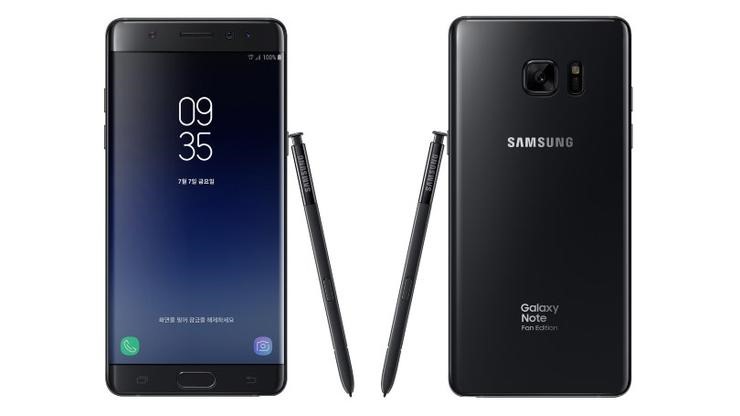
Samsung released Galaxy Note Fan Edition to reuse the parts of the Note 7 which was recalled due to battery issues. Now, a developer has churned out Samsung Galaxy Note FE ROM for Note 3 which brings the new Galaxy S8 UI and other enhancements that are introduced in the Fan Edition ROM. Before you flash this ROM, keep in mind that it is compatible with only qualcomm version of Note 3 which means N9005 / N900SK.
Galaxy Note Fan Edition ROM for Note 3

Also, you will need current kernel option supported so make sure to install kernel before ROM installation in order to avoid problem. Kernel is included in the package. Here are the features of the ROM.

* AOD Touch Enable / Disable
* Disable AOD Touch in the pocket
* AOD Auto/Manual Brightness control
* AOD position moving to prevent Burn-in
* Bluelight Filter
* Folder lock on the homescreen
* Fastest Perfomance
* Multi-languages supported
* 106 multi CSC
* Supports over 90 national system languages

* AOD/Bluelight is working on any kernel
* Lsskernel 3.8UX
* Magisk V12 & MagiskSU
* SuperSu 2.79 SR3
* Systemless Xposed 87.1 topjohnwu
* Updated lastest system app

Following things are not working right now.

* Sidesync, black screen but presentation mode is working
* VoLTE
* Video call
* S-View is not supported
* Bootloops with Jio Sim
* Spen cursor is misaligned

Here is how to install it.

Root permission and Custom recovery  – PhilZ Touch / CWM 6.0.5.0 / Note 3 TWRP 2.8.7.0
Make sure your phone is fully charged to 100%

Step01. Backup your data.
Step02. Perform a factory reset on recovery.
Step03. Recovery runs the ROM file.

Instructions for install the UX.

Aroma Installer
Step 4. Select the language you want to use for the installation.
Step 5. Select "MagMa-NX Custom Firmware Install".
Step 6. Select the device you are using.
Step 7. Select the kernel to use.
If you installed the kernel before installing the ROM
Select "[Kernel preinstalled] Do not install the kernel".
Step 8. Select the CSC of your carrier.
Step 9. Select the debloat App. (Keep default option if possible)
Step 10. SystemUI, UDS, and the color of the battery icon displayed in the status bar.
Step 11. Select the launcher you want to use. (Default: S8 Launcher)
Step 12. Select the Add user selection option.
Step 13. Select the type of camera app you want to use.
Step 14. Select the sound mode you want to use.
Step 15. Select the gps locale in your area.
Step 16. Select the type of rooting.
Step 17. Select the wipe method.
Step 18. Now click Next to install the ROM as you chose so far.
Step 19. When the installation is complete, click Next to reboot the system immediately.
Step 20. Wait approximately 15 ~ 20 minutes and the system will be booted and the first system setup screen will appear.

Step 21. After the initialization is complete and the home screen is displayed after booting is completed, run the "Live wallpapers" app on the second home screen.
Step 22. Select "HOME AND LOCK SCREEN" and select the desired background.
Step 23. Press "SET AS WALLPAPER" to finish setting up Infinity wallpapers.
Step 24. Now, when you press the power button to turn off the screen, the AOD screen is displayed and the Infinity wallpapers are applied.