Root Lenovo K3 Note easily: Install CWM on Lenovo K3 Note–Download custom recovery for Lenovo K3 Note

Here is how you can root Lenovo K3 Note easily. In this article, you will also find how to download and install CWM or TWRP custom recoveries on your Lenovo K3 Note android phone. You will need four tools for doing it. First and foremost you will need to download these four pieces of software.

Lenovo K3 Note root cwm

1.Lenovo USB Tools – Download it from here: https://userscloud.com/n7zmi1utn6wz

2. Flash Tools – Download it from here. https://userscloud.com/958tvsa17724

3. CWM Recovery Image and Scatter Text File (Developer – liuxinghost)- Download it from here. https://userscloud.com/yexc173ibpv8

4. Update.zip – Download it from here. https://userscloud.com/o8m7u398nmv5

CWM on Lenovo K3 Note

* Take a backup of your data. We don’t guarantee if something is erased. Always take precautions .
* Enable USB Debugging on your device.
* Goto > Settings > Developer Options > USB Debugging.
* If Developer Options is not located under settings then enable it by going toSettings > About Phone > Device Info and tap on Build Number for about 7-8 times. And then go back and follow previous step.
* Make sure the battery is 50% charged or more.
* Go to Settings > Security and enable Unknown Sources option.
Step 1 : Extract the LenovoUsbDriver_Techolaty.Net.rar and install the software in your PC.
Step 2 : Extract the Flash_Tools_Techolaty.Net.rar file and then open flash_tool.exe (run it as an administrator) Also Extract Recovery_Lemon_K3_Note_Techolaty.Net.rar in the same folder.
Step 3 : Now select MT6752_Android_scatter.txt .
Step 4 : Click on Options from the top then Download and make sure DA DL all with Checksum is checked.
Step 5 : Now just tick the checkbox recovery and browse to the extracted files and locate recovery.img
Step 6 : Now remove the battery of your phone & connect USB cable. Wait for 10 seconds & press the download button on PC. Then wait 05 seconds & insert battery in phone without removing USB cable. Wait for seconds and you will have CWM custom recovery installed on your Lenovo K3 Note.

Steps to enter Recovery mode in Lenovo K3 Note
1. Press and hold the Volume Down Button + Volume Up Button + Power Button.
2. When you see the Boot Screen, Release the Power Button but keep the Volume Buttons pressed until you see the Recovery Screen.

Root Lenovo K3 Note

Step 1 : Copy the UPDATE-SuperSU-v2.46.zip file in your SD card root folder
Step 2 : Enter/Reboot to recovery mode on your device
Step 3 : Select the UPDATE-SuperSU-v2.46.zip file and click update to root lenovo k3 note android phone.

Yoga 710 and 5101, Ideapad Miix 310 launched at MWC 2016

Yoga 710 and 5101 review

Lenovo presented at a conference in MWC 2016 its new laptops equipped with operating system Windows 10 : the Yoga 710 and 5101 and Lenovo Ideapad Miix 310 a 2 in 1 that can be used both as a laptop and tablet.

Yoga 710 and 5101, Ideapad Miix 310 review

In the words of Lenovo, “We have realized the need for users today is the ability to work on multiple devices. For example, they can send a message from your smartphone, work on your laptop and read on your tablet. Therefore the design of our new devices include the ability to use the laptop as a tablet, so that users can have the versatility of these devices with the convenience of being able to type on a keyboard with the full power of the latest generation Intel processors but still maintaining a huge battery life. ”

We started talking about the new Lenovo Yoga 11 or 710 14-inch laptop that weighs only 1.04 kg and therefore is ideal for carry it everywhere. Equipped with an Intel Core i7 processor sixth generation (in the 14-inch model) or Intel Core m5 (in 11-inch), which together with Windows 10 makes it an extremely powerful despite its size and weight device. also integrates a 256 GB SSD, WiFi 20% more powerful than previous models and as an option can be integrated Nvidia GeForce graphics. In all cases it has a Full HD display and up to 8 hours of battery life.

Meanwhile, the Lenovo Yoga 5101 offers a completely renovated with respect to the previous generation design, delivering 50% more battery life (reaches up to 8.5 hours) and is lighter than its predecessor. As with Yoga 710 and Yoga 3 Pro, the 5101 is a convertible that can be used in four different positions, although in this case weighs 1.75 kg (version 14-inch) or 2.08 Kg (15 inches) and is powered by hardware AMD (Intel Core i7 but AMD Radeon R7 M460 processor 2 GB).

Finally, we must mention the affordable Lenovo Ideapad Miix 310, a two in one that can separate the screen keyboard and weighing only 580 grams. It offers a wide range of connectivity (including LTE optional) and features a 10-inch Full HD resolution that will delight any user. Includes 64 GB of internal storage, 4 GB of RAM and Intel Core processors M. The best part is that its price of 269 euros.

The new Lenovo Yoga 710 will hit stores in May this year at a starting price of 799 euros for the 11-inch model and the 14-inch 899. For its part, the Yoga arrive in April 5101 at a price of 479 euros 14-inch model and 699 euros 15. Finally, the Lenovo Ideapad Miix 310 hit stores in June at a starting price of 269 euros in its most basic model. Obviously these prices will be increased if we choose more powerful hardware options.

Corsair launches new VOID Surround headphones

Corsair VOID Surround review

Corsair has just announced the update to its family of headphones Gaming VOID with the inclusion of two new models, the Corsair Corsair VOID VOID Surround and Wireless RGB white color, thus expanding the range of headphones for games compatible with PC, PS4 and Xbox One.

According to Corsair, VOID Surround headphones are “Stereo hybrids.” This is because through the use of an adapter is compatible with both PC and mobile devices since the original connector is a 3.5 mm mini jack that can be used for a stereo quality sound consoles or mobile devices, but also it includes a USB adapter with integrated sound card that turns the headset on a device with virtual 7.1 surround sound, this single case compatible with PC.

Corsair VOID Surround software

Like all the other members of the VOID family, Surround are designed to provide the best user comfort even on the longest gaming sessions. With its foam pads with memory effect microfiber coated aluminum frame, the Surround VOID are not only comfortable, but they are also very light. Of course speakers feature Neodymium magnets that deliver the best sound quality, and unidirectional microphone with active noise cancellation used by the rest of the family.

Moreover, Corsair also announced the launch of new handsets VOID Wireless RGB in white, Gaming headset with 7.1 surround sound which in this case are only compatible with PC as they are USB only. Integrated Dolby Headphone 7.1 surround sound with the convenience of not having cables through. The VOID Wireless RGB have a range of 12 meters and eye to the data, a range of up to 16 hours. Share exactly the same design as the previous model, so they are just as comfortable and lightweight.

However developments are also added with regard to the software, and is updated Corsair CUE to add what they called VOID Visualizer. This function is to combine a headset with a VOID RGB RGB Corsair keyboard (such as RGB K70 or STRAFE RGB ) LEDs to display on the keyboard graphic equalizer depending on the sound that comes out of the VOID headphones, creating spectacular effects.

The recommended retail price for Corsair VOID Surround is 79.99 euros, while the VOID Wireless RGB white rises to 129.99 euros. Both are available by manufacturer, but as always it will take a few days longer to reach the stores.

Incidentally, since I anticipate we’re waiting until we get a sample for analysis VOID Wireless RGB white, so that soon we will tell you what it looks like first hand, and in combination with an RGB STRAFE keyboard.

iWalk Duo 3000 Battery review

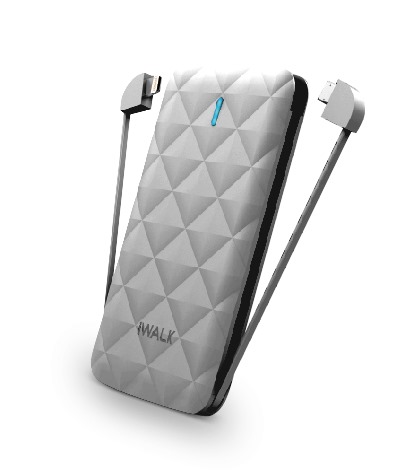
iWalk Duo 3000 costs mere 25 dollars and is cheaper and lower capacity version of the iWalk Extreme Trio 10000 battery. This battery can be used to charge your iPhone or any other iOS device as it comes with lightning cable built in. If you own a non-iOS device, you can charge that as well as it has micro USB cable on the other side. We reviewed iWalk 5400 universal battery charger nearly six years ago and it is still working so we can vouch for iWalk Duo 3000 as well.

iWalk Duo 3000 Battery review

Continue reading “iWalk Duo 3000 Battery review”

Arctic Freezer i11 CO can operate continuously

Arctic Freezer i11 CO review

Arctic has announced its new cooler for processors, the Arctic Freezer i11 CO. Designed for continuous 24/7 operation, the Arctic Freezer i11 CO provides up to 150 watts of cooling capacity with superior service life far superior to the competition sinks. The abbreviation that says everything is “CO”, which stands for “continuous operation” (Continuous Operation).

Arctic Freezer i11 CO reviews

Guarantee the continued smooth operation to ensure that the temperature of the processors installed on computers as servers continuous operation is decreased. Equipped with double ball bearings made in Japan, the fan reduces rotational friction and is significantly less sensitive to dust and high temperatures. Compared to the standard models, life expectancy is up to five times without the slightest compromise in performance.

Based on the Arctic Freezer 7 Pro, the Freezer i11 CO has greatly improved air flow, cooling capacity, the noise level and safety in transporting equipment. Regardless of whether the user is an expert in the installation of electronic equipment such as if a rookie, the Arctic Freezer i11 CO can be installed in just a few minutes, avoiding the long periods of waiting for servers and increases economic efficiency investments made in them.
Arctic Freezer i11 CO review test

By analyzing air flow and its movement inside the fan frame, it is also increased fan efficiency of 92 mm with free PWM including the new Arctic sink. In this way, the user benefits not only focus on a greater cooling capacity, but also a lower noise level. The copper heat pipes use technology direct contact with ensuring that heat can be dissipated particularly fast to the fins.

To ensure that the sink gets the necessary air flow you need, the Freezer i11 CO is extremely versatile and can be assembled according to individual preferences or the needs of the equipment through the use of a stable backplate, which remains firmly in instead, even when the equipment is to be transferred position.

SanDisk Extreme PRO microSDXC UHS-II PRO review

SanDisk Extreme PRO microSDXC UHS-II PRO review

SanDisk Corporation, the global leader in flash storage solutions, today introduced the world’s fastest microSD card. SanDisk Extreme PRO microSDXC UHS-II PRO card allows users to action cameras, unmanned drones and smartphones loading and unloading of large video and music files at unprecedented speeds to date.

SanDisk Extreme PRO micro sd review

SanDisk’s new card, available in capacities of 64 GB and 128 GB, offering transfer speeds up to 275 MB / s to download high-quality content at record speed. Thanks to its classification as Class 10 and UHS Speed ​​Class 3 (U3), the SanDisk Extreme Pro microSDHC UHS-II card is the perfect item to capture video at resolutions of Full HD and Ultra HD 4K in the last action cameras, drones drones and smartphones. With the card, SanDisk also includes a USB 3.0 reader to download files conveniently to a PC card.

In the words of Les Santiago, Direct IDC Research:

Mobile devices today are more sophisticated than ever, requiring more advanced technology to deliver the best possible user experience. With increasing demand for higher quality content, such as video at resolutions of Full HD and 4K, the need for storage solutions have higher capacity and faster growing exponentially. The microSDHC UHS-II Pro SanDisk Extreme card is at the forefront of delivering solutions that meet these changing needs.

The latest action cameras, drones and smart phones and tablets are versatile and powerful devices that have expanded the possibilities to collect and record high-quality video. The SanDisk Extreme Pro UHS-II microSDXC cards are compatible with devices that use host UHS-I, operating at speeds up to UHS-I as long as the device allows. They have also been designed for the most rugged devices today, since the cards can keep up in extreme environments. SanDisk Extreme Pro cards microSD microSDHC UHS-II 4 are made of shock resistant, high temperature, with an impermeable coating and protection against contamination x-ray

The SanDisk Extreme Pro microSDHC UHS-II cards are manufactured with capacities of 64 and 128 GB and have a limited lifetime warranty and will be available worldwide in the second quarter of this year at a price of $ 179.99 and $ 299.99 respectively

Movavi Mac Cleaner review: get rid of junk from your mac

Even if you have the most powerful mac laptop out there, chances are you will find it running slow after few months of use. This is due to the loads of trash and unrequired files that are normally not visible to the typical computer user. Over the period of time, these junk and trash files accumulate and result in slower computer performance. The best and most ideal way to deal with this problem is by installing a quality cleaning application called Movavi Mac Cleaner.
Movavi Mac Cleaner review

Continue reading “Movavi Mac Cleaner review: get rid of junk from your mac”

How to speed up your Mac laptop and clean all unwanted items

All laptops have a tendency of running fast for few months and slowly start slowing down. Same applies for the Mac laptops and desktops that start lagging too much due to bucketful of trash and unneeded files that are not visible to a normal computer user. These trash, junk files gradually accumulate resulting in slugging overall performance. So if you are cannot stand the slowness of your Mac laptop, we suggest using Movavi Mac Cleaner to do away with the junk files creating unpleasant experience.

mac cleanup (1)

Finding and deleting these files is a very time consuming and inefficient way as there are many, many folders on a Mac that have these unneeded files. But if you use Movavi Mac Cleaner, you can safely locate and remove any and every unrequired file, app or game. Removing these files will give your Mac a significant boost in terms of app loading and boot time. You will also free up few gigabytes of storage space.

Getting started with the Movavi Mac Cleaner is very simple – download the DMG installation file from the official website and drag it to the Applications icon on the dock of your Mac. This will automatically install the app on your computer. Start the app and immediately upon opening the app, it will start search and show you the junk files stored on your computer. There is a moving bar at the bottom that will show you the progress. If your Mac has lots of junk files, it can take a couple of minutes.

mac cleanup (2)

If you want the simplest way to clean your Mac without diving into complex tasks, you can straight away tap on the Start Cleaning button to start the deletion of junk files. If you have a hard time understanding English, you can click on the Gear wheel icon and choose a language of your choice.

You can also tell the app to only perform system cleanup or trash cleanup. This section enables you to remove different types of cache and log files. Here you can use on / off switches to specify the types of files you wish to erase. To only remove the trash files, click the Trash Cleanup section.

mac cleanup (3)

You can use the Uninstaller tool to get rid of the applications you don’t use and the leftover junk they leave after uninstallation process. For that, open the Uninstaller menu and let the Mac Cleaner scan the Mac to find all the user applications, OS X apps and junk left after app removal process.

After following these steps, you will now know how to make mac run faster and smoother. You will also free up valuable disk space that was earlier occupied by junk and unwanted files.