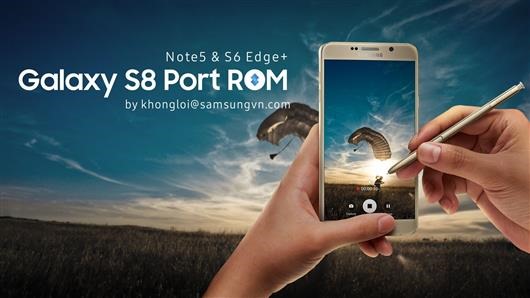
Galaxy S8+ ROM for Note 5: S8 Plus ROM ported to Samsung Note 5

download Galaxy S8  ROM for Note 5

An XDA developer user has ported entire ROM of Samsung Galaxy S8+ to Note 5. Supported Note 5 models include N920T/W8, N920CIG, N920CD, N920SKL and N9208. Despite being a third party firmware, everything is working as expected. This is the latest Android Nougat firmware with all security patches. The developer has added in his own mods too that include:

* AOD brightness control (2 state)
* Show/hide Power Menu on Lockscreen
* Enable/Disable Safe Volume Notification
* Show/hide Keyboard Switching Notification Icon
* Battery options
* Some features include enable/disable fingerprint wakeup, persistent notification, notification reply directy on lockscreen
* more features will come later
* virtual button option

CSC/OMC collection has been updated and modded for XXV, ATT, TMB, INS, TEL, RWC, XID, KTC, ITV, PHN, DBT, PAK, TUR, BRI, XME, XEF, THL and BTU.

How to install the ROM:

– Download ROM, Kernel, OMC-CSC
– Prepare yourself to not get lost of available aroma options.
– Know well your operator CSC/OMC code. Boot into Note 5 TWRP.
– Install ROM
– Install CSC/OMC and choose right one
– Then install Kernel (because aroma do not support file larger than 2GB).
– Full wipe required.
– If you see kernel is not seandroid enforcing, it is normal because I use new selinux stuffs. Nothing to worry.
Download Android 7 Nougat for Galaxy Note 10.1 N8000 N8013 2012

Download Android 7 Nougat for Galaxy Note 10.1 N8000 N8013 2012

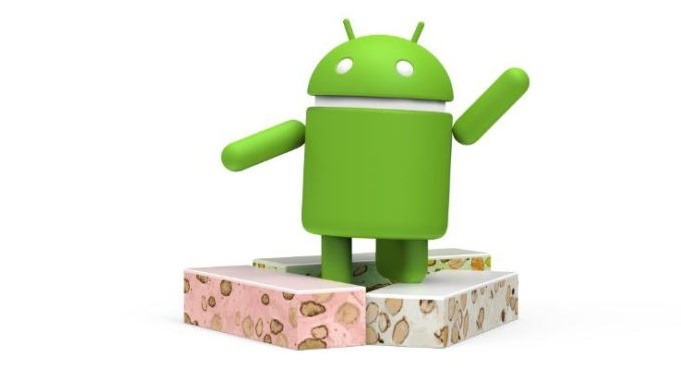
Android 7 Nougat is available for the Samsung Galaxy Note 10.1 N8000 / N8013 2012 model. This is the latest version of android and it is great to see such old tablet running it just fine. This is brought to you by the Lineage OS team that designed it to increase performance and reliability over stock android. However, since the android 7 nougat is still in alpha stage, do not install it if you want a stable ROM.

So how to install this ROM on your tablet?

First make sure you have CWM recovery or N8000 TWRP installed on your Samsung Galaxy Note 10.1. Then, download the ROM from here and gapps; wipe everything; put the ROM on micro SD card and install the ROM. Make sure to flash gapps immediately after installing the ROM. Do not reboot before installing gapps.

So what is not working. The stock camera application isn’t working but if you install Google Camera from playstore, you should not have any problems. Cursor is by default shown when S-pen is in use. You can easily disable it by going into Settings > Inputs. Also, keyboard does not work: enable hardware keyboard in settings. SElinux is set to permissive.

Download HTC U11 custom recovery: TWRP for HTC U11 available for download

We have great news for HTC U11 users. TWRP custom recovery is available for download which means now you will be able to flash custom ROMs on it. If you do not have custom recovery, there is no way to install a third party ROM or even install system level hacks. You will also need custom recovery on your HTC U11 if you want to overclock or underclock it as it lets you install custom kernels that lets you do it. The only thing that is not working on HTC U11 is encrypted backups so do use them.

HTC U11 twrp custom recovery

How to download and install TWRP on HTC U11?

First, you will need to download and install ADB drivers and platform tools from the Android SDK on your computer. Get the TWRP for U11 from here and rename IMG file to twrp.img. Then on your phone, go to Settings > About and tap on the build number seven times to enable developer settings. Then go into developer options and turn on USB debugging.

After that, on your computer, fire up command prompt and type in the following commands.

adb reboot download
fastboot flash recovery twrp.img
fastboot reboot

That is it. If you did everything correctly, TWRP custom recovery should now be installed on your HTC U11 android phone.

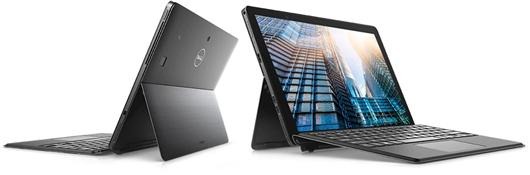
Dell Latitude 5290 specifications: 2-in-1 tablet with Kaby Lake-R launched at CES 2018

Dell Latitude 5290 specifications

Dell Latitude 5290, a 2-in-1 tablet was launched at the CES 2018 technology trade show. Dell Latitude 5290 specifications 12.3 inch full HD touchscreen display, 8th generation Intel Core i7 processor and optional keyboard cover. Dell Latitude 5290 price for the base model is going to be around 899 dollars and up. It boasts a self deploying kickstand which pops up by pressing bottom against flat surface. Dell Latitude 5290 specifications include Intel Core i3 dual core 7th generation processor / 8th Intel Core i5/i7 quad core processors, upto 16GB RAM and upto 1TB SSD. Other specs include 31.5WHr battery, optional Qualcomm Snapdragon X7 LTE modem, 8MP rear camera, 5MP front camera, Windows Hello support, stereo speakers, 802.11ac Wi-Fi, Bluetooth 4.1, 2x USB Type-C ports, USB 3.1 Type-A port, and an audio jack. It measures 11.5″ x 8.2″ x 0.4″ and weighs 2.6 pounds.

Continue reading “Dell Latitude 5290 specifications: 2-in-1 tablet with Kaby Lake-R launched at CES 2018”

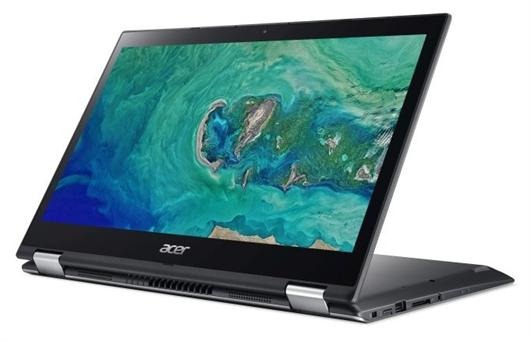
Acer Spin 3 2018 specifications price – SP314-51: Acer Spin 3 unveiled at CES 2018

Acer Spin 3 2018 price

Acer Spin 3 SP314-51 2018 was launched at the CES 2018. This is a convertible 2-in-1 laptop that can be used as tablet simply by flipping the screen. SP314-51 specifications include the latest Intel processor packed in a versatile and compact design at affordable price tag. This updated version of the Acer Spin 3 is designed for productivity and entertainment. Its durable 360-degree two-pair hinge allows it to work as a laptop, tablet and display, while also offering a comfortable presentation mode.

Continue reading “Acer Spin 3 2018 specifications price – SP314-51: Acer Spin 3 unveiled at CES 2018”