MIUI for HTC Desire 616 now available

HTC sells its Android phones preloaded with lots of junkware. To make matters worse, it is not possible for an end user to uninstall theme. So how do you get rid of HTC’s unwanted applications. The best way is to flash MIUI firmware.

MIUI for HTC Desire 616

The Deisre 616 is a great budget phone but HTC has burnded it with their heavy skin which its drop frames and cause stutter. Here are the installation instructions on how to install custom HTC Desire 616 firmware.

1. First root your HTC desire 616 device.
2. Install the CWM / TWRP Recovery for Desire 616.
3. Backup your current ROM using cwm and MTK droid tools before making any changes to your mobile. (Important)
4. Download the ROM zip file from here.
5. Put the zip file in the SD card.
6. In CWM Recovery: Wipe cache, data, dalvik cache, system; Select Install Zip From SD card and Flash MIUI Zip File and reboot.

Root HTC Desire 616 and gain super user access

Root functionality allows you to do access hidden folders, change permissions of certain folders that you cannot do without root and run applications that require Super User (Super SU) access. Fortunately rooting HTC Desire 616 is fairly easy. All you have to do is download Kingroot’s apk from here and put it in your device.

Root HTC Desire 616

Then Open the application ,with Internet on and press the Green Circle and wait for few minutes. That is it, your phone is rooted when you see this screen.  close the application and enjoy your rooted HTC Desire 616. Then download Supersu from the play store. Go Supersu settings > click on "Install SuperSu into /system" and then remove Kinguser.

It shall kept in mind that in case something goes wrong, you should be on stock ROM and rooting voids warranty.

Download HTC Desire 616 CWM clock work recovery

CWM a k a clock work recovery is a software that allows you to install custom firmwares and all sorts of hacks including ability to root HTC Desire 616. Fortunately CWM for HTC Desire 616 is now available. To install CWM on HTC Desire 616, you must use SP Flash Tool to install.

htc desire 616 cwm download

You can download it but before you use it on your computer, you must install driver for SP Flash Tool for windows. Then select MTK_AllInOne_DA.bin and then MT6592_Android_scatter.txt.

Download HTC Desire 616 CWM clock work recovery

After that press download button and turn off phone (wait for it turn off completely) and plug the  USB cable into phone. The SP Flash tool will auto detect your Desire 616 phone and write recovery.img into phone.

Download Grand Prime stock firmware and regain warranty

Every time you install a tweak or root Grand Prime, you void the warranty of your phone. Many times users brick their phone and the only solution is to flash the stock ROM. By downloading and installing this Samsung Galaxy Grand Prime firmware, you will be back to stock and everything installed and stored on your phone will be deleted as well.

Download Grand Prime stock firmware

Pre requirements

1. Samsung USB Driver
2.Odin from here http://devfilescloud.com/download/4
3. Stock Firmware (In the search box enter your model then select your region then download)
4. Please make sure that the battery juice is more than 40 percent

Instructions:

1. Download the USB Driver Install in our computer
2. Download the firmware from and extract you will see file tar.md5
3. Power off your grand prime
4. Boot into download mode by pushing volume down + home + power together
5. Press volume up
6. Connect the usb between mobile and computer
7. Extract Odin zip
8. Open Odin.exe
9. When You open you will see yellow color in BOX that means your phone is connected
10. Now Click on PDA and browse to the extract of the firmware and select where pda in file
11. Now Click on CSC and browse to the extract of the firmware and select where csc in file
12. Now click on PHONE and browse to the extract of the firmware and select where modem in file
13. After that click on start button
14. When the process complete unplug your phone
15. When your phone reboot remove your battery
16. Now push Volume up + power + home together to go in recovery
17. Now navigate to wipe data reset by pressing volume up /down
18. Click on wipe data reset by pressing power
19. Again Navigate to reboot system now and click on it
20. Be patient first boot may take time

Grand Prime: How to improve the camera quality

So you just bought the amazing Samsung Galaxy Grand Prime but you are not so amused with the camera application and have been wondering would it be great to get the Sony camera app on it? Well thanks to XDA it is finally possible. The app can be flashed on to the Galaxy Grand Prime easily.

galaxy grand improve camera quality

The only requirement is CWM recovery for Grand Prime. So download the file from here, reboot into recovery; Flash zip and Clear cache > Reboot.

The feature list of Sony camera include manual focus, Face tracking, Auto Focus, Auto intelligence mode, HDR MODE, Shot and clear, Panorama, Vr panorama, Burst shot, Beauty and Night mode. Some extra features included are scene mode, brightness control, cheese shutter and smile detection. All pictures are captured using in 13 MP (4160X3120).

Root Grand Prime, SM-G530H Samsung Galaxy rooted successfully

Chainfire is yet to release a root for the Samsung Galaxy Grand Prime GM-G530H but we have the instructions on how to get it done. To get Galaxy Grand Prime rooted, you will have to download the modified version of CF-auto root from here  and put it on your computer. The zip file contains three files, Odin v3.07, 2_cache_recovery_stock_mohan_sm-g530h.md5 and 1_cfroot_sm-g530h_mohan.tar.md5.

Root Grand Prime

To root Grand Prime, boot your phone into download mode (power button, home button and volume down key simultaneously) and connect it to the computer. Start up Odin on your computer and flash the first file by clicking on PDA and selection this file: 2_cache_recovery_stock_mohan_sm-g530h.md5. The device will boot up again.

Also check out instructions to root Galaxy Grand Quattro.

Again go into download mode and flash the second file (select PDA again): 1_cfroot_sm-g530h_mohan.tar.md5. The device will reboot and you will find SuperSU installed. Open it and it will ask to disable knox notification. Press Cancel and if SuperSU asks for su binary update, just press the Normal button.

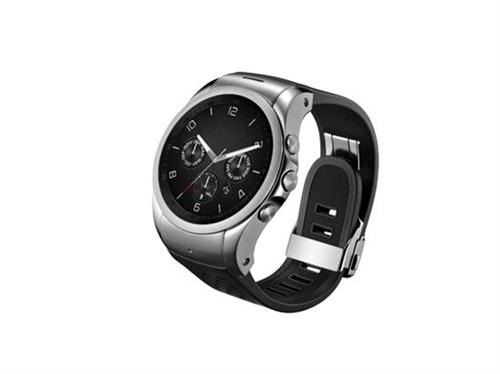
LG Watch Urbane LTE is a smartwatch with 4G

LG Watch Urbane LTE is now officially available in the market. It is the first smartwatch in the world with 4G LTE which is something that has never been equipped on a wearable device.

LG Watch Urbane LTE packs 1.3 inch OLED display, Qualcomm Snapdragon 400 1.2 GHz quad core processor with several days of standby time. Since it has 4G LTE, it will enable you to make and receive calls and send and receive text messages.

LG Watch Urbane LTE

Continue reading “LG Watch Urbane LTE is a smartwatch with 4G”

Free Fitbit Flex with Nokia Lumia 830 on AT&T

Great news for those who had eyes set on Nokia Lumia 830. AT&T is now giving away a free Fitbit Flex activity tracker when you buy a Nokia Lumia 830 on contract on Microsoft store. It is also possible to buy it off contract for $ 399 and you will still get the $ 90 Fitbit Flex for free. Amazon too is offering Fitbit Flex for free.

nokia lumia 830 fitness tracker

However we feel that it would have made more sense to offer the Nokia Lumia 830 for free under contract and a free Microsoft Band or may be for $ 99 instead of $ 199.