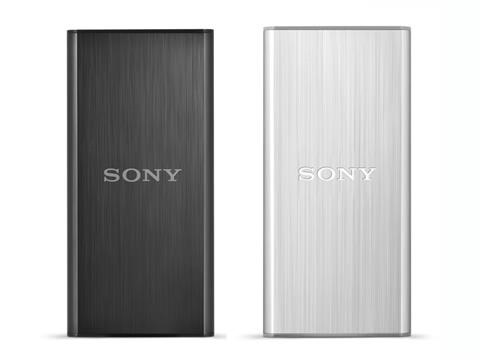
Sony SL-BG1, SL-BG2 SSD are credit card sized

Sony has launched two external SSD devices that are no more than credit cards. The SL-BG2 solid state drive come with 256 gigabytes of storage space while the SL-BG1 model is being offered in only 128GB variant.

This is ideal for ultrabook users that often have to deal with limited storage space.  Both have highly durable built thanks to the brushed aluminum casing that does a good deal of job against vibration, shock and heat.

And since both Sony SL-BG1 and SL-BG2 make use of solid state technology, the data is immediately accessible. In fact you can get up to 290 MB / s if you use it on a USB 3.0 port. This ensures maximum efficiency and reliability.

Sony SL-BG1, SL-BG2 SSD

Available in black and silver metallic colors, you can pre book it on official Sony’s website. 

Medion S10346 Lifetab release date, price and specifications

Medion S10346 Lifetab is all set to go on sale at Aldi Nord on November 27 2014 with a price tag of 199 euro. This Android tablet is powered by the Intel Atom Z3735F quad core SoC that does a fine job in driving its full HD display measuring 10.1 inches.

Medion S10346 Lifetab

Medion is a subsidiary of Lenovo and once again they have trusted Aldi for selling their tablets. At 199 euro, we think it is an excellent deal. It features IPS panel which is extra ordinary for this price.

Medion S10346 Lifetab specifications

* 10.1-inch IPS panel with a resolution of 1,920 x 1,200 pixels
* Intel Atom Z3735F quad-core processor up to 1.83GHz
* 2 GB RAM
* 32 GB internal memory, expandable by microSD card of up to 128 GB
* Android 4.4 KitKat
* 5 megapixel cam back, 2 MP front-Shooter
* Bluetooth 4.0, GPS, WiFi IEEE 802.11 n, infrared
up to 10 hours of battery life
* Stereo speakers on the front page
* microUSB 2.0 with USB host function and miniHDMI
approx 263 x 174 x 8.5 mm
* about 580 grams

The Lifetab S10346 will hit the Aldi Nord on November 27 for 199 euro and it is an absolute cracker deal given its amazing specifications. The tablet will be offered in both black and white colors.

The box includes useful accessories like micro USB cable, micro USB host cable, tablet stand and in-ear headphones.

We are not sure if an update to Android 5.0 will be provided but Medion is giving a whopping three year warranty.

Download Note 4 Launcher, Side softkey, settings and other Apps on Galaxy S4

XDA members have finally been able to port the Samsung Galaxy Note 4 to the S4. This includes Galaxy Note 4 side softkey, settings, launcher, wallpaper picker, ultra power save mode, lockscreen, S-finder, flip board brief, S-planner, European accuweather widget and S-reminder.

For these Galaxy Note 4 applications you will require TouchWiz 4.4.4

1. Note 4 Side Softkey

Download Note 4 Launcher, Side softkey,  settings and other Apps on Galaxy S4

1. Download and unpack my zip from here –> http://www.mediafire.com/?o6audcowsc29see
2. Put EasySideKey.apk im system/app and set correct permissions.
3. Put xml in my zip in system/etc/permissions and set correct permissions.
4. Reboot
5. Go to settings/display/one-handed operation/Side Key
(If you not found it install Note 4 settings)
6. Enjoy Side Key of Note 4

2. Note 4 Settings

Download –> http://www.mediafire.com/download/rr…ngs_Albe95.rar
Unpack and replace in system/priv-app (set correct permissions). Then reboot.

3. Wallpaper Picker

Download –> http://www.mediafire.com/download/74…icker_Note.apk
Put in system/priv-app (set correct permissions) and delete old SecWallpaperPicker. Then reboot.

4. Note 4 Touchwiz Launcher

download Note 4 Touchwiz Launcher

Download –> http://www.mediafire.com/download/37…uchWizHome.apk
Put in system/priv-app (set correct permissions) and delete old SecLancher3. Then reboot.

5. Note 4 UPSM (Ultra Power Save)

1. Download from here xperiacle module.
2. Install as a normal apk
3. Enable it in Xposed and reboot
4. Open it from the drawer and choose "newer kitkat ROM" ( I test both and with the older I face more Force Close)
5. Click on "Proceed" and give it Root access
6. Tap on Reboot now (if not work make a full reboot manually)
7. Open your Filemanager and go to system/app
8. Here delete EmergencyLauncher, EmergencyModeService and EmergencyProvider
9. Download my Emergency Note 4 rar
10. Put my 3 apk inside the rar in system/app and set correct permissions
11. Reboot and open Note 3 Upsm mod from the drawer
12. Choose UPSM ON/OFF
13. Accept the Samsung Terms and condition
14. IMPORTANT: If like me you’ve double tap to sleep module (or some other that change the action with a double tap on statusbar) disable it from xposed and make a soft reboot.
15. Then re-open from the drawer Note 3 UPSM and re-choose Upsm ON/OFF
16. On the popup choose Enable and enjoy Note 4 Upsm
17. To disable it double tab on status bar and a popup for deactivate will shown.

6. Download Note 4 Lockscreen: Put in System/priv-app and set correct permissions. Then reboot.

7. Note 4 S Finder – download link

8. Fliboard Brief (New Magazine) – download link

9. Note 4 S Planner

Download Note 4 S Planner – Unpack rar and put apk in system folder. Remember to delete old SPlanner or SecCalendar_Spen (S5 or S4 version).

10. Note 4 European Accuweather Widget

Download —> http://www.mediafire.com/download/37…te4_Albe95.zip
Install via recovery and be sure to clean cache and data from titanium backup before put widget on homescreen.

11. Note 4 S Reminder

note 4 s reminder app download

Download –> http://www.mediafire.com/?7sqho347h13ux5f

For following Note 4 applications you need to be on TouchWiz 4.4.2 or higher

1. Note 4 S Browser

Download link https://www.mediafire.com/?d05423b33qn5ms2

2. Note 4 Accuweather Widget

Download link https://www.mediafire.com/?nshu7vvtnxbqys9

3. Note 4 S Voice

Download –> http://www.mediafire.com/download/cz…d_phone(2).apk
This should fix "no voice bug" in S Voice.

4. Note 4 S Health

Instruction:
Download and install via recovery. If you don’t have a custom recovery:
1. First of all, uninstall previous version of S Health and Health Service and reboot
2. Unpack the zip
3. Put Health Service in system/app (and set correct permissions)
4. Install S Health as a normal apk
5. Put libPlatform in system/lib (and set correct permissions)
6. Reboot
7. If you have installed from recovery and you face crash when open S Health clear cache and data and delete apk with titanium backup. Then install apk from my zip manually.

5. Note 4 Smart Remote download link

6. Note 4 Geo News (full transparent) download link

7. Note 4 Galaxy Apps Widget (full transparent) download link

Note 4 Task Manager download link

Samsung Gear Manager download link

Snapbiz Card download link

All Together download link

S Memo download link

Story Album download link

Easy Chart for S Note download link

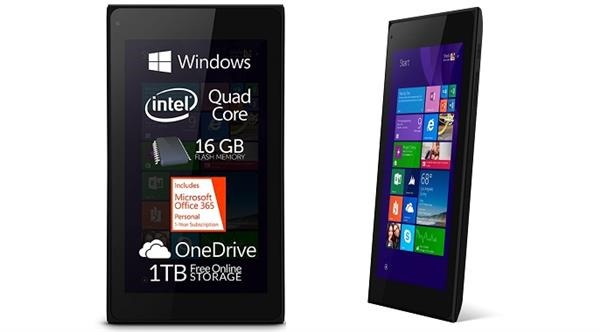
Allview Mobile WI7 is a 7 inch Windows 8 tablet

The Allview Mobile WI7 is made by Romanian company and is now officially the cheapest windows 8.1 tablet with 7 inch display. It can be pre ordered directly from the manufacture for 70 euro excluding shipping cost which is 5.99 euro. Delivery of the first lot is set to begin in the coming week.

Of course at 70 euros, you should be ready to make sacrifices with the Allview Mobile WI7. Before we delve into its specifications, we would like to add that you get free Office 365 license for 1 year.

Allview Mobile WI7 specifications

The Allview Mobile WI7 comes with a 7 inch display with 1024 x 600 pixel resolution. It is not known if it is an IPS or TFT panel. However judging by company’s history, we think it is an IPS display. Other specifications include Intel bay trail Z3735G quad core 1.83 GHz processor with 1 gigabytes of memory and 16GB of internal flash storage. Of course you can increase its storage by using a micro SD card slot.

Allview Mobile WI7

In the end this is a win for the consumer as he is getting a super affordable windows 8.1 tablet with 1 year of office 365 subscription.

Moto G 2014: Root guide on Android 5 Lolipop

Moto G 2014 has proved that you do not need to spend a lot to get flagship features. The phone has very good quality and runs vanilla like Android that yields excellent performance. Now you will be able to root your Moto G 2014 thanks to the modified version of the stock kernel with root enabled. An XDA developer member made modifications in the ramdisk that allow the flashing the of SuperSU.

Step 1: Download this: http://downloads.codefi.re/savoca/root/titan
Step 2: fastboot flash boot xt1064_lollipop_boot.img
Step 3: Flash SuperSU

Of course to flash it you need unlocked bootloader.

Moto G 2014 root android 5 lolipop

Root is considered as the main step for doing any sort of development as it grants the developer and user rights to do modification on the phone as per their needs. So if you are a user of Moto G 2014, you will definitely appreciate the progress made so far.

Moto E: Unlock bootloader guide

Before you proceed we shall make it clear that unlocking the bootloader of Moto E voids its warranty.

Also unlocking the bootloader of Moto E will wipe all data from it which means all personal data will be deleted including your applications, photos, messages and settings.

Make sure to take a backup of your entire device data.
Download the Android SDK OR Download the Minimal ADB and Fastboot
Install the latest Motorola USB Drivers on your desktop. Download here.
Put your device in fastboot mode (power off, then press the power and volume down buttons simultaneously).
Open Command Prompt on androidsdk/platform-tools/ (Hold Shift and right click and press open command window here)
Connect your Phone to PC
Type this in the CMD prompt window – fastboot oem get_unlock_data
You will get a return string. Copy it. [Right Click-Mark- Mark the text by pressing the shift key-Now press Ctrl+C]
Paste all the lines together in a notepad. Remove the empty spaces.
Now go to the Motorola Site. Sign in using your Google account or Motorola ID. Scroll down the page and paste the copied string in the field at step #6. Then click on ‘Can my device be unlocked?’, after which a "REQUEST UNLOCK KEY" button will appear at the bottom of page.
To get your unlock key, select the ‘I Agree’ option. Note: You will receive an email with your Unlock Key at the email address you used to log in there.
Important – Copy the 20-character key that Motorola sent you via email. Make sure your device is connected.
Then in CMD type: fastboot devices (To check your device is connected)
Then type: fastboot oem unlock UNIQUE_KEY

Make sure to replace the word UNIQUE_KEY with the unlock code that you get via email. Then hit enter and unlocking process will start. To relock the bootloader, type in this command – fastbook oem lock

Moto E Unlock bootloader guide

How to remove the unlocked bootloader message

Download the logo.zip.
Extract all the files
Reboot to fastboot mode (power + vol down)
Now open cmd and use cd command to go to the directory where you placed the file.
Now Type the command: fastboot flash logo logo.bin
Reboot from the recovery (use vol up to select and vol down to navigate)
Now your bootlogo should be restored back to the normal version

How to get OTA updates after rooting the device

So you have a rooted Moto E and want to get OTA updates even after rooting your device? Here is how.

1. Use the full unroot option from the Super Su.
2. Flash the stock recovery Use Code : mfastboot flash recovery recovery.img
3. Now you’ll be able to get OTA updates as before

GoClever Insignia 700 Pro and Quantum 700N video review

GoClever is an Italian computer maker and today it has launched Insignia 700 Pro and Quantum 700N laptops. These two feature 7 inch display and run Android 4.4 kitkat operating system.

goclever_quantum_700n

The most compact of the three is the GoClever Insignia 700 Pro that measures 190 x 108 x 9.1 mm and weighs 258 grams. 700 Pro specifications include 7 inch display with a resolution of 1024 x 600pixels that is powered by Intel Atom Z2520 clover trailer processor. Other features include 2 gigabytes of memory, 8GB of flash storage, audio jack, a 2 megapixel rear camera, a front-facing 0.3 megapixel, GPS modules, 3G, Bluetooth and Wi-Fi. All this is powered by a battery with a size of 3000 mAh.

goclever_insigna_700_pro

Next up is the GoClever’s Quantum 700N that measures 191 x 116 x 12 mm and weighs 320 grams. The display is identical to the 700 Pro but it is instead powered by MediaTek MTK8127 quad core processor with four ARM Cortex A7 cores and ARM Mali 450 GPU. It is supported by 512 MB ​​of RAM and 8 GB of RAM. Its battery has slightly less 2800 mAh capacity but it should still give up four-five hours of real world use. Price of it is 89.90 euro.

Insignia 1010 specifications

Another model GoClever Insignia 1010 has Intel Atom Bay Trail-T processor and a detachable keyboard. Unlike its other two new models, the Ingignia runs windows 8 and runs on Bay Trail-T.

goclover Insignia 1010

The Insignia 1010 specifications include 10.1 inch display with 1280 x 800 pixel resolution and Intel Atom Z3740D processor. The RAM is 2 gigabytes and for storage you get 32GB of flash storage. The 3G module is absent.

The Insignia 1010 which measures 258 x 172.6 x 10.5 mm and weighs 924 grams has a slightly higher battery capacity and yields around 6 hours of battery runtime. Its battery capacity is 8000 mAh.

The keyboard dock is included in the package which will be appreciated by the professional. The tablet is already available in several online shops at an average price of around 300 Euros.

Review of Zero Chroma Vario Edge bumper iPhone 6 case

We are normally huge fans of bumper cases and this one is different because it combines bumper with a stand. The Zero Chroma Vario Edge bumper is a case for the Apple iPhone 6. It costs 40 dollars and features a flux stand that allows you to do web surfing and watch videos with ease.

The Vario Edge fits the Apple iPhone 6 curved sides just fine and has appropriate openings for the ports and buttons. It fits perfectly with the company’s arm band and car mount which also makes the Zero Chroma Vario Edge bumper case the most versatile case out there.

Review Zero Chroma Vario Edge bumper iPhone 6 case

There is a lip on the front and stand on the back that keeps the fit of the Vario Edge slightly tighter than other bumper cases for the iPhone 6.

If an Apple iPhone 6 kick stand and bumper case is important to you, look no further than the Zero Chroma Vario Edge bumper.

Backup Your Android Phone with Vibosoft Android Mobile Manager

Nowadays the mobile phone plays a more and more important role in people’s lives. Almost all users prefer to use cell phones everyday. It is inevitable that they store batch of data in their phones. And among the data, some of them are very critical information, for example, office documents, some personal account, technical information. On one hand, with the increase of data we need to free up the phone space. On the other hand, we have to prepare for the data loss. In a word, we must backup our mobile phone data.

Phone data backup differs from the computer backup process. We need to finish an effective backup of contacts, text messages and even call log record. And sometimes we also need to keep a backup of applications. Then how can we backup the phone data safe and effectively? According to personal experience, it is better to back up to our computers compared to other backup methods. To backup all the data inside phones on our personal computer, it is better to rely on some third-party softwares, those programs can achieve transference between data like photos, text messages, contacts, applications, or even call records and computer. Thanks to them, we don’t need worry about the exhausted memory and don’t need encounter a permanent loss of data. From the great extent, they play the role of escort for our personal data in our phones.

Although there are so many choices for us, we should learn to distinguish the differences and choose the best one for you. Here I will share my preference named Vibosoft Android Mobile Manager. Vibosoft studio specializes in data recovery software, PDF tool and e-Books tool for both Mac and Windows users. It is well-known for his hi-tech and professional phone data recovery softwares. Vibosoft Android Mobile Manager is well-designed for Android mobile users. It provides safe and effective data backup and management service on your PC or Mac. This software is able to transfer phone data such as contacts, text messages, call history, pictures, apps and other content to the computer. What’s more, it can help you manage your phone data as an Android assistant. That is to say, you can edit your contact, send bulk SMS and organize your apps on computer. It has powerful functions and simple operation. All the functions mentioned above can be achieved with simple clicks.

Guide on How to Backup Contacts from Android Mobile Phone to Computer

Step One. Download the program, install it on your computer and then launch it. Users can download Windows version or Mac version based on personal need.

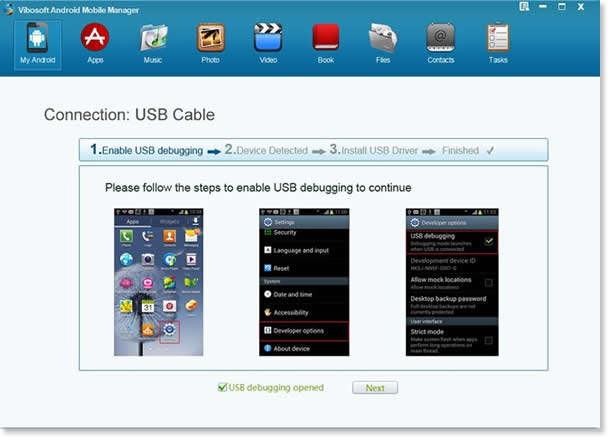
Step Two. Plug your Android device to PC via a USB cable and follow the instruction to open USB debugging. When it is over, your phone will be detected and it will install the USB driver automatically.

clip_image001

Step Three. Fully scan your Android device. You need wait a few seconds or more if your phone contains a large database. After that, all your phone information will be displayed with details. Tab the “Contact” folder to enter the management interface. You can export all the contacts or parts of them as you like.

clip_image001[7]

Vibosoft Android Mobile Manager is fully applicable to all Android braches. It doesn’t cause any damage to the original files. You can be relieved to manage your Android phones with it. You can reach the steps to transfer Android messages to computer here.

Best way to convert MP4 videos to MOV

The MOV format was coined and developed by folks at Apple. It is currently the universal codec used in all Mac computers and Apple devices such as iPhone, iPad and iPod Touch. However it is not the most popular format out there chiefly due to the fact that it can not be natively played on Windows platform and myriad of other devices. The most popular format out there is MP4 as it is playable out of box on most windows computers and non-Apple mobile devices like Android and Windows Phone.

Apple devices are also very popular and this leads to compatibility issues. Fortunately there exist a way to convert MP4 to MOV easily by using Movavi video converter. Movavi is an excellent company that makes video processing applications and it trusted by millions of satisfied people across the globe.

convert MP4 videos to MOV

The Movavi video converter lets you convert MP4 files to MOV format and much more. It supports plethora of mobile devices and is available for both Macintosh and Microsoft windows operating system. If you have a non-MP4 file such as WMV, MPEG-2 etc, you can still convert that video file to MOV using this application.

Using the Movavi video convertor application is fairly easy. First you must download it from their website. After opening the installer, you will be presented with an easy to use installation wizard. Simply follow the onscreen instructions and you will have it installed in no time. After installation, click on the shortcut on the desktop.

After that add you source files and set the destination. If you do not choose a destination folder, the converted files will be saved in the default folder. Now select the output format, which in this case is MOV. If you want to convert to some other format, choose it from here. The converter supports more than 180 formats. It supports two way encoding as well.

Now that you have specified and keyed-in all the settings, it is time to press the Convert button to start the conversion process. We have been told that Movavi video converter makes use of hardware encoding to speed up the process. It has full support for Intel Core i-series processors and Nvidia Cuda graphics which makes it must faster than the competition.

The developers and team behind it guarantee total user satisfaction as they themselves know they have a winner in their hands and no other video conversion software can touch in terms of simplicity, performance and ease of use.