Lenovo IdeaPad Z50-75 specifications, thin and light gaming laptop

The Lenovo IdeaPad Z50-75 is a thin and light gaming laptop that has thickness of about 25mm and weight of little over 2 kilograms. The design of the Lenovo IdeaPad Z50-75 is nice with simple lines and soft touch finishes here and there. All in all it does not look like cheap at all especially when you take a look the Lenovo IdeaPad Z50-75 specifications.

Lenovo IdeaPad Z50-75 specifications

* 15.6 inch display with full HD resolution with optional 2k and 4k panels
* AMD quad core FX series APU
* 16 gigabytes of DDR3L RAM
* Hybrid storage with HDD capacity ranging up to 1TB
* AMD Radeon R7- M260DX GPU with 2 GB of RAM onboard
* 3x USB ports out of which one is v3.0
* LAN port connecting to Ethernet networks
* Audio jack for headphone and microphone
* And since it is a big laptop, Lenovo equipped it with an optical DVD drive.

Lenovo IdeaPad Z50-75 review

Our friends at Simona Menghini have told that the Lenovo IdeaPad Z50-75 will go on sale between the month of October and November for around 599 euro.
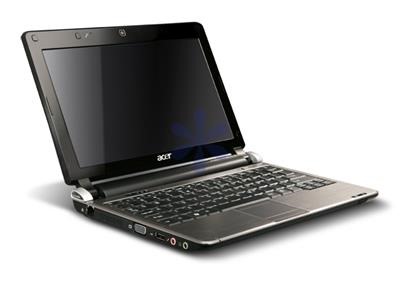
Acer Aspire D250 BIOS Recovery, recover it from brick

Something went wrong with your Aspire D250 BIOS? Download the latest BIOS from support.acer.com and follow these instructions to recover Acer Aspire D250 from brick state.

1. First format an USB stick with FAT, if this option is not available use a smaller USB stick (eg 1Gig)

2. Download the latest BIOS, and put both FLASHIT.EXE and the BIOS file in the root directory of the stick. Do NOT rename the BIOS file, it should be KAV60.fd

3. Now connect the USB stick to the AA1. Turn the AA1 off, DISCONNECT the battery but leaving the AC adapter connected. Press Fn+Esc, keep it pressed and press the power button to turn the AA1 on.

4. Release Fn+Esc after a few seconds. Press power button if it begins to blink, otherwise do nothing. The AA1 will now initiate the BIOS flash, do not interrupt it under any circumstances. The AA1 will reboot shortly after. Wait patiently.

Acer Aspire D250 BIOS

The BIOS has been flashed and all settings reset to default.

Moto G 4G: Download official Android 4.4.4 CM11

As all of you know CM11 team has been working day and night for bringing the latest Cyanogen Mod to the Moto G 4G android phone and thanks to folks at XDA it is finally here. Flashing instructions are given below.

1. First get the latest build from this link.

2. Now make sure you have the boot loader unlocked because without that we cannot proceed. Then ensure you have either CWM or TWRP recovery on board as it is not possible to flash a ROM with a custom recovery.

3. Now copy the ROM onto the SD card and reboot into recovery. Flash the ROM from recovery and wait for sometime for the system to settle down.

cm11 moto g 4g

Since this is an ongoing project some bugs do exist. The one we have come across is the low RAM bug where after 24hours an unknown process will take up a good amount of your ram and eat it until you factory reset/flash clean. Another minor bug is that sometimes the Moto G would not connect to certain router securities.

Moto G 2014 2nd generation and Gyroscope

We have an exciting news for all the new and potential Moto G users. According to users on XDA the Motorola Moto G 2014 2nd generation model does in fact comes with a built in gyroscope. This means all Google camera features like photo sphere, lens blur, panorama works for this device.

So there is no need for Motorola to push an update to enjoy the features. Just download Google’s camera from play store to enjoy enhanced camera experience. This also makes the phone compatible with Google cardboard.

So yes Moto G 2014 plays just fine with virtual reality applications just like high end Android phones in the market. When I was buying the the phone I did not pay too much attention to it. It’s also great because it works with several games that make use of gyroscope feature of Moto G 2014.

Moto G 2014 2nd generation Gyroscope

I have also noticed that it works great with most of the vr apps available for android and that too with good FPS.

Download CM10 Jelly Bean 4.1.2 for Sony Xperia U

If you despite the bloated user interface of Sony you can get enjoy total freedom on your Xperia U by installing CM10 on it. This brings jelly bean Android 4.1.2 on it. Here are its list of features:

* ROM compiled with Linaro Tool chain 4.7,
* Kernel compiled with Linaro 4.6.2 or Google 4.6.x,
* Added some governors
* Deleted some Cyano app, Zip aligned,
* Pre-rooted, Nova Launcher, New * Boot animation, Cwm v6.0.2.8,
* Possibility to change color notification * LED charging, added menu for disable flashing led when battery is low.

Here are its installation instructions:

* Make a backup of your current rom
* Wipe data/factory reset in recovery
* Flash CM10 Limited Edition (If you get error 7 while flashing extract the boot.img from the rom zip, and flash it via fast boot)
* Flash Ultra Slim Gapps
* Reboot and enjoy

We suggest you to remove audio like dial pad touch tones, touch sounds, screen lock sound and vibrate on touch. Also do not use swap with this ROM.

Download CM10 Jelly Bean 4.1.2 for Sony Xperia U

Remove warning message from Moto X 2014 with unlocked bootloader

If you have recently unlocked bootloader on the Moto X 2014 you will be receiving a warning message on your phone. An XDA user has released a custom boot image that removes this warning message.

To flash it you will need ADB installed on your computer and download this logo file. Unzip it and put it in the folder of ADB. After you have installed it fire up command prompt, enter this command.

fastboot flash logo logo.bin

Within few seconds the logo.bin file will replace the warning message. That is it – you have successfully removed the warning message from your newly bought Moto X 2014. Some people can really annoyed by the warning message they see every time they boot their device.

Remove warning message from Moto X 2014 with unlocked bootloader

Flashing this file is safe and harmless. If the flash is unsuccessful your Moto X 2014 would not get bricked.

Download Motorola Boot Logo Maker for Moto X G 2014

The developer behind the Motorola boot logo maker has released an updated version for the Moto X and G 2014 2nd generation models. Here are its features.

* Open Existing Logo.bin files
* Open Existing Flashable zip files
* Create logo.bin files
* Create Flashable zip files
* Export images from Logo.bin / Flash able zips.

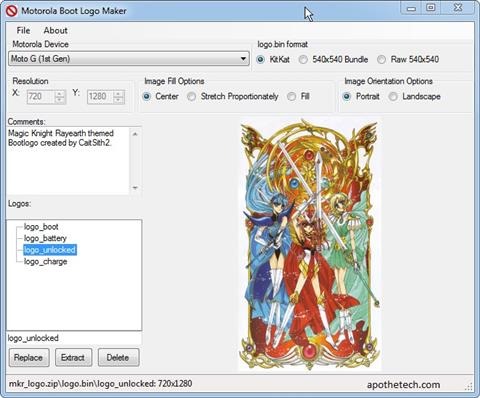
Flashing process for Motorola Boot Logo Maker

The application has user friendly user interface and one can easily create boot logos for it. To use it just double click on the tree view entries. Then select the picture and repeat that process for all of the files that would be in logo.bin

You then go to File / Save, and then save either as a .bin file, for flashing using fastboot, or as a Flashable zip file, for flashing using TWRP or CWM. In general, boot_logo is used on a factory locked device, and as a result, you probably should clear that one, as you would be wasting your space.

The logo_battery is your 0-3% indicator when the battery is run dry, and you plug it in to charge. logo_unlock is the actual boot screen logo you see on unlocked devices.

Download Motorola Boot Logo Maker for Moto X G 2014

It shall be known that any file more than 4MB logo.bin files will not be created. This is due to device limitation.

Asus G771 JM Review along with hands on pictures

The Asus G771JM is the top of the range gaming laptop from the electronic giant. Encased in aluminum alloy, the Asus G771 JM features backlight keyboard to help you type in dimly lit areas. It is outfitted with 17 inch IPS type full HD display packing 1920 x 1080 pixel resolution that provides excellent quality and therefore easy to read in bright sunlight.

We spent some great time with it and loved how powerful and fast its Intel Core i7 4710HQ 2.5 GHz processor felt. The CPU is backed by 16 gigabytes of RAM and dedicated Nvidia GeForce GTX 860M GPU with 4 gigabytes of onboard RAM. However considering the imminent launch of new GPU like Nvidia 900M, we can expect Asus to equip it with this latest GPU.

asus rog g771jm review

Asus has wisely used the massive casing by allowing the user to fit it with three storage drives. In two of the bays, you can fit in regular sized SSD / HDD but the third one can accommodate smaller M.2 SSD only.

asus g771 rog review

Measuring 418 x 284 x 37 mm and weighing 3:32 kilograms, the Asus G771JM comes with enough ports for connecting printers, flash drivers and whatnot. You get four USB 3.0 ports, HDMI digital video output port, mini display, SD card reader, RJ-45 LAN port and Kensington security lock. There is an optical drive that reads Blu-ray and for connectivity you get Gigabit Ethernet LAN, Bluetooth 4.0 and Wi-Fi 802.11ac radios.

Battery life is under five hours when you do not gaming but we expect no one to not use it for gaming.

asus g771 review

Overall this is a solid laptop and we whole heartedly recommend it for gaming.

Crooked slanted text on iPhone 6 bugging new users

Many new owners of Apple iPhone 6 are reporting slanted crooked text on the back of their new devices. While some are not very bothered by it, those who are fond of perfection are now thinking of getting a replacement.

Some people are OCD for that kind of stuff and we believe they have every right of being so after spending hundreds of dollars on a fragile phone and standing in long queues.

iphone 6 crooked slanted text
To those seeking replacement for their iPhones with crooked text, keep in mind that when you replace one iphone with an issue, to only end up with another one that has a dead pixel, faulty home button etc.

Swype on iPhone with iOS8 and battery life

So we finally have been using the new Apple iPhone 6 and we do like the ability to finally use third party keyboards. So we decided to try Swype on iPhone.

While we loved the added functionality and how everything works, we found something that should not be happening. Swype eats battery like a maniac who has been starving from many days.
Swype iPhone

Is it happening on your iPhones as well? I wonder how much power the the default keyboard uses though. It’s part of springboard, so it’s not measured, while Swype is an “app” so it is tracked by it.