Zotac Tegra Note 7 Review

Nvidia has announced 7 inch android tablet for the domestic Japanese market, and it is called Tegra Note 7. It is priced at 25,800 Japanese Yen, and will be released on December 4, 2013. This tablet is sold by Hong Kong’s ZOTAC. This is how its packaging looks like. Specs wise, it is very powerful. You get a Nvidia Tegra 4 five core processor based on ARM Cortex A15 architecture, 1.8 GHz clock speed, 1GB RAM, 16GB flash storage, Android 4.2.2 operating system, 7 inch IPS display, 1280×800 pixel resolution, 802.11n Wi-Fi, Bluetooth 4.0 LE, and up to 10 hours of battery life.

Nvidia Tegra Note 7 Review

Back of the Nvidia Tegra Note 7 tablet is very unique. Speaker is on the left and right side of the display. bass is pretty good for such small speakers. There is a 5 megapixel camera on the back for taking pictures.

Nvidia Tegra 4 Note 7 Review

Right now, it runs Android 4.2.2, but the company is promising an OTA update that will upgrade it to Android 4.3 that brings the much needed TRIM support that prevents the tablet from slowing down after some usage.  It comes with a stand which can be positioned in 3 ways.

Nvidia Tegra 4 Note 7 Review stand

It has a stylus on the top left. This is how it looks like.

Nvidia Tegra Note 7 stylus

Tegra Note 7    Nexus 7 (2013)    Nexus 7 (2012)
Ice Storm Unlimited    Ice Storm score    16,001    10,733    3,248
Graphics score    16,748    10,489    2,814
Physics score    13,841    11,682    7,055
Graphics test 1    92.1 FPS    52.9 FPS    12.4 FPS
Graphics test 2    57.4 FPS    39.5 FPS    12.1 FPS
Physics test    44.8 FPS    36.4 FPS    22.4 FPS

Kiano Elegance 9.7 3G Review

Design and Construction

On the right side, we find the RESET button, charging socket, Micro HDMI slot, Micro USB, mini-jack and a single speaker. There are also two physical buttons on the side. It comes with a high-resolution display, and compared to the Wi-Fi only model, it has the SIM card slot, which is located on the bottom, right next to the micro SD card slot. With 240 x 176 x 10 millimeters dimension, it measures same as Wi-Fi model, but weighs slightly more, about 15 grams heavier(605 grams).

Kiano Elegance 9.7 3G Review

Kiano Elegance 9.7 3G Screen

Kiano used a 9.7-inch IPS panel with a resolution of 1024 x 768 pixels. So we get a density of 132 PPI – this is not a particularly high value and difficult to consider it as an advantage. Since it uses IPS, the viewing angles are excellent, and so are the white balance and color reproduction levels. Brightness on the other hand, is mere 300 cd/m2.

Kiano Elegance 9.7 3G Specs

Dimensions    240 x 178 x 10 mm
Weight    605 grams
Colors    gray / black
Screen    9.7 "
Screen Type    IPS touch screen, capacitive, multi-touch support
Resolution    1024 x 768 px
Processor    Rockchip RK3188, 4-core, 1.6 GHz
GPU    4-core Mali-400
RAM    1 GB RAM
Usable Memory    8 GB
Media    microSD
System    Android 4.2 Jelly Bean
Battery    7800 mAh
Main camera    2 MP
Front camera    0.3 MP
3G Modem    so
WLAN    802.11 a / b / g / n
Bluetooth    so
USB    microUSB
GPS    not
HDMI    yes, Micro HDMI
What is in the box    Tablet, Charger, USB cable, Warranty Card, Manual

Kiano Elegance 9.7 3G Battery life

The tablet comes with a 7800 mAh battery. With brightness set to 120 cd/m2, you can watch a movie for nearly 9 hours in a row / surf the internet for more than 10 hours. 3G web browsing will yield 7 hours of runtime. Brightness levels play  a big part in overall battery runtimes.

Performance and Benchmarks

It is powered by rockchip RK3188 processor that is quad core and based on Cortex A9 architecture. It has clock frequency of 1.6 GHz and has 4 core Mali 400 GPU to handle graphics. Here are its benchmark results.

1. 3DMark – 3381
2. Peacekeeper (chrome / stock) – 684 / 765
3. Sunspider – 1207
4. Kraken – 13470

Kiano Elegance 9.7 3G Review Test

The tablet runs very smooth, and is very optimized. There are no hangups or slowdowns.

Kiano Elegance 9.7 3G Review Summary

Kiano Elegance 9.7 3G tablet is a well designed device. It does not have a high resolution display, but does that affects us? Not at 9.7 inches. Given its price and built in 3G connectivity, you just cannot complain about lack of retina display.

How to Root Oppo N1

Rooting allows you to perform super user specific tasks. For example, if you need access to the internal file system, or you need to run app that require super user (Super SU) access, you will need to root your Oppo N1 phone. Here are the steps on how to Root Oppo N1.

First, install TWRP / CWM on your Oppo N1. Then, install this APK on your phone. Then, fire up Play market, and install Super Su app from market. You will find Super Su on your phone after installing the apk. You can optionally install busybox too.

Download Oppo N1 TWRP CWM

TWRP for the Oppo N1 phone has been released. It provides same functionality as CWM, but lets user interact with the phone using touchscreen (no more volume rocker or power buttons to press).

Download Oppo N1 TWRP CWM

To download TWRP to your Oppo N1,

1) Install GooManager from the Play Store
2) Open GooManager and provide root permissions
3) Hit Menu (or the button with the 3 dots on your screen) and then Install OpenRecovery

Download Un Official XDA Reader

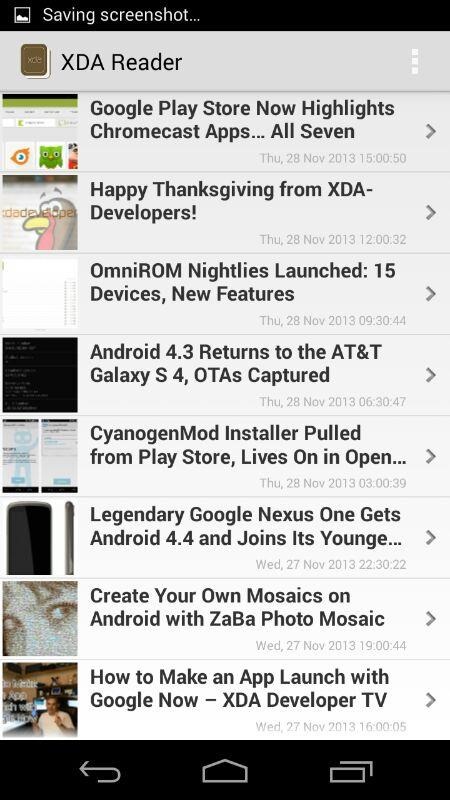
We are huge fans of XDA portal. After all, it is the most active developer community in the world. Now, a developer called Eatheat has churned out an app to read the news feed. The app is called XDA Reader, and it offers a lot of features. It has a slick Holo user interface, and has 4x built in themes.  Here are its list of features.

Download Un Official XDA Reader

Loads image and text in both the lists and the detailed view.
Loads feeds by asynctask. No heavy load on main UI.
10 latest posts from the Portal.
Ability to swipe through detail view to go on to the next feed.
Offline reading.
Complete Holo UI.
4 inbuilt themes to choose from.
Live preview of new theme directly on screen. No need to restart every time to select your choice. However, restart of app is need for applying the full theme.

There are two versions – free and pro. The pro adds these 3 features.

Get 12 inbuilt themes.
Ability to switch to full screen.
Ability to use expanded mode removing the StatusBar and the ActionBar.

[Free version link] [Pro version download link]

ASUS PadFone Infinity A80 and A86 Android 4.4 KitKat Release Date

ASUS PadFone Infinity A80 debuted at this year’s Mobile World Congress in Catalonia, and the ASUS PadFone Infinity A86 was revealed in October at a press conference in Taiwan. According to recent rumors, the owners of both models will have to wait quite a bit of time for Android 4.4 kitkat firmware update.

ASUS PadFone Infinity A80 and A86 Android 4.4 KitKat Release Date

ASUS PadFone Infinity A80 phone is powered by a 4-core Snapdragon 600 processor that runs at a clock frequency of  1.7 GHz processor backed by Adreno 320 graphics chip. It will be getting the update in the first quarter, next year, while the PadFone Infinity A86 with the Snapdragon 800 SoC will be updated to KitKat by the end of second quarter. Yes, that is a long time to wait for the two flagships phone hybrids.

Wind C22L Tablet Does Not comes with OS Installed

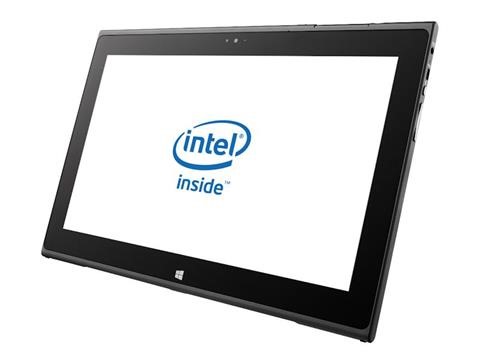
Meet Wind Tech Co. LTD, which has become the first company to offer a tablet without an operating system pre-installed. We have seen laptop vendors doing this from a decade to reduce the retail price, but this is the first time a tablet is being offered without one. Fortunately, since it is an x86 machine, you can easily install Windows 8.1 on it.

Wind C22L Tablet Does Not comes with OS Installed

Specs include 11.6 inch display packing 1366×768 pixel resolution, Intel Celeron 1007U 1.5 GHz processor, 64 GB SSD, Intel NM70 express chipset, 4 gigabytes of RAM, 802.11n Wi-Fi, Bluetooth, Micro SD card slot, micro HDMI, 2x USB 2.0, 1 MP / 2 MP front / back cameras, and head phone / microphone jack.

Battery capacity is 6,000 mAh, which should give you 6+ hours of productivity time. It measures 302 × 196 × 13.5mm (height x width × depth, and weighs 950 grams. The Wind C22L will retail at 50,000 Yen (~ $500) [press release link] [product page] (both Japanese)